

A lightweight, self‑hosted subscription management panel for VLESS over WebSocket + TLS. Built entirely in a single Python file, powered by FastAPI and SQLite.
📖 Table of Contents
- ✨ Key Features
- 🆕 What's New in v1.1.0
- 🚀 Quick Start & Deployment
- ☁️ Deployment Platforms
- 📁 Repository Architecture
- 💸 Bandwidth & Pricing Guide
- ⚖�� Strict Disclaimer
- 🙏 Acknowledgements
✨ Key Features
🔐 Security & Access
- Robust Authentication: JWT‑based sessions with HTTP‑only, secure cookies.
- Anti‑Brute Force: Rate limiting applied to logins and API interactions.
- Strict Passwords: Enforced policy (min 8 chars, uppercase, lowercase, numbers).
- Audit Logging: Logs all login attempts (Success/Fail, IP, User‑Agent).
📡 Inbound Management
- Full Lifecycle: Create, edit, toggle, and safely delete VLESS configs.
- Granular Control: Per‑user traffic limits (GB), expiration days, and max concurrent connections.
- Advanced Routing: Custom Path, SNI, Host, and TLS Fingerprints per inbound.
- Fragment Support: Add packet fragmentation ranges (e.g.,
1000-2000) to counter DPI. - Country Flags: Assign a flag (🇮🇷, 🇩🇪, …) to each config – shown in the panel and subscription links.
- Bulk Operations: Batch activate, deactivate, reset, or delete configs.
- Immutable Core: The default
SulgXinbound is systematically protected against accidental deletion.
📊 Real‑Time Analytics
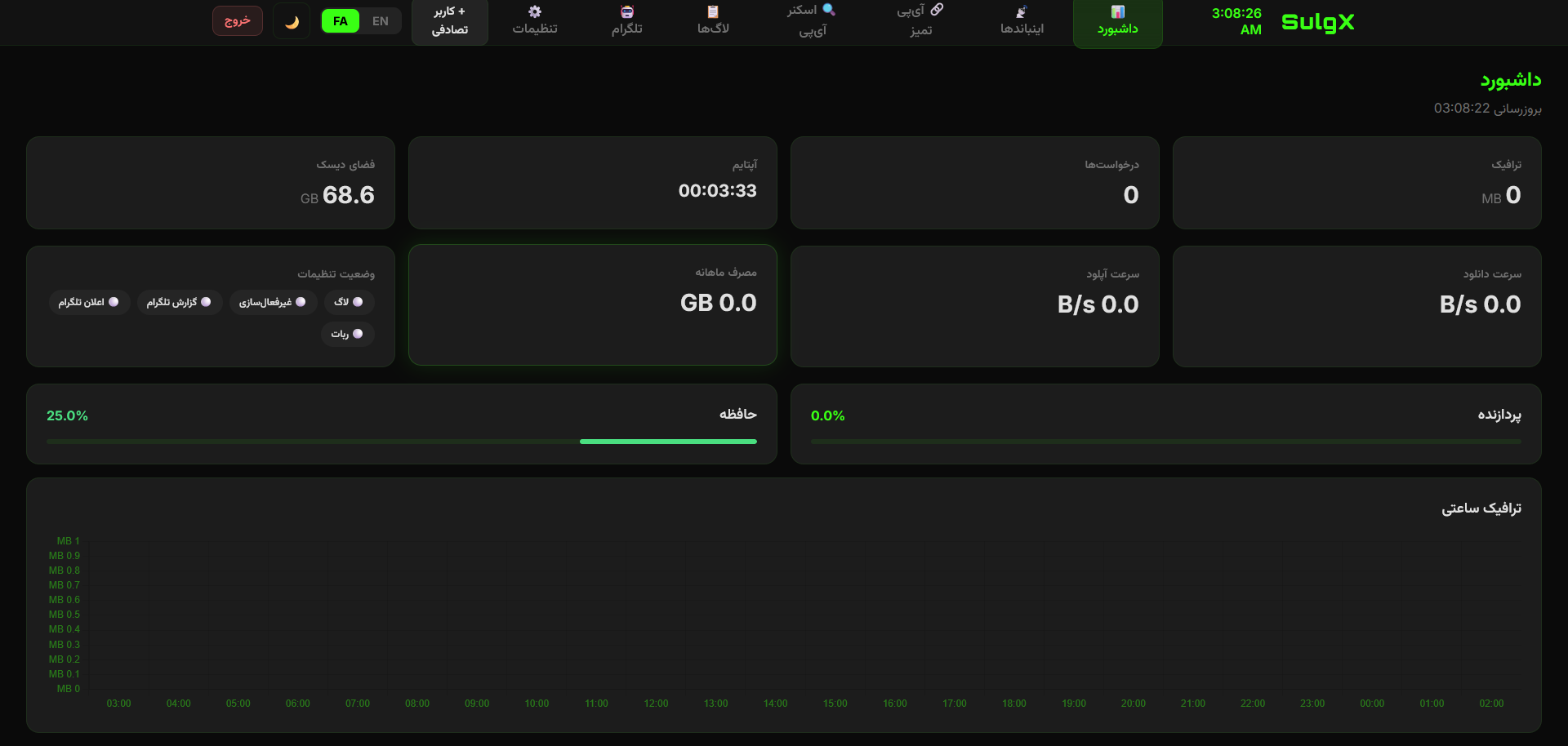
- Live Speed Engine: Highly accurate Download/Upload charts with adaptive spike‑filtering.
- Dynamic Metrics: 24‑hour real‑time traffic bars (timezone‑aware) and distribution doughnuts.
- System Health: Live CPU, Memory, and Disk monitoring with
loadavgfallbacks.
🗺️ Clean IP & Safe Scanner
- IP Management: Add, edit, and bulk‑import IPv4/IPv6 addresses dynamically attached to subscriptions.
- Safe Scanner: Scan port 443 across 24 predefined cloud providers (Cloudflare, AWS, Azure, etc.).
- Anti‑Crash: Safely handles massive CIDR ranges (e.g.,
/14) by capping at 4,096 IPs to prevent browser freezing. Automatically excludes public DNS (8.8.8.8).
🤖 Smart Telegram Bot
- Bilingual (EN/FA): Fully translatable templates.
- Event Alerts: Panel Logins, Expired Users, Errors, and 90% Quota warnings.
- Live Preview: Real‑time JSON template rendering in the dashboard.
⚡ Intelligent Keep‑Alive (Anti‑Sleep)
- Dual‑Mode: Simple (for Render/Railway) and Advanced (for Dockfly) keep‑alive pings.
- Configurable: Set interval, enable/disable, and choose mode directly from the panel settings.
- Self‑Healing: Automatically adjusts request headers and intervals to avoid provider blocks.
🆕 What's New in v1.1.0
| Category | Improvement |
|---|---|
| UI & UX | Major polish of the glass‑morphism interface. Fixed the Blue Theme selection bug and ensured theme settings persist across sessions. Mobile responsiveness greatly improved for all tables and control panels. |
| Performance | Link‑cache is now periodically cleaned to prevent memory leaks. Scanner tasks are correctly cancelled on WebSocket close. |
| Anti‑Sleep | Keep‑Alive engine completely re‑designed. Now features two distinct modes (Simple / Advanced) that can be switched in real time from the panel. |
| Inbounds | Added Fragment (FRAG) support to enhance DPI bypass. Country Flags can be assigned to each inbound and are displayed everywhere (panel, sub‑links, user dashboard). |
| User Dashboard | Added a live usage progress bar with color‑coded thresholds (green → yellow → red) so end‑users can instantly see their consumption. |
| Telegram | Fixed the language toggle (English / Persian). It now correctly saves and restores the selected language. |
| Database | Automatic schema migration – existing installations upgrading from older versions will automatically get the flag and fragment columns without manual intervention. |
| Bug Fixes | Settings status cards now correctly sync with actual configurations. Time‑zone and language selectors are fully harmonised. |
For a full list of commits, see the v1.1.0 release.
🚀 Quick Start & Deployment
[!NOTE] The project now runs natively through its Dockerfile. Simply fork the repo, set your environment variables, and let the platform build it for you. No manual start commands or Gunicorn configuration are required for the recommended platforms.
🍴 Step 1: Fork & Configure
- Fork this repository to your own GitHub account.
- (Optional) For maximum stability, you can pin your deployments to the release tag
v1.1.0instead of themainbranch.
☁️ Step 2: Choose a Platform
All five platforms listed below support WebSocket, can deploy directly from a Dockerfile, and do not require a credit card or phone number – only an email or GitHub account.
- Railway ← Top recommendation (free credit, persistent volumes)
- Render ← Free tier with persistent disks
- Dockfly ← Minimal & simple
- Back4app ← Parse‑based, generous free tier
- Scalingo ← French PaaS, 30‑day free trial
Other platforms such as Koyeb, Fly.io, Northflank, or Zeabur also work perfectly with SulgX, but they require a credit card or phone number for registration.
🚀 Step 3: Deploy with the Dockerfile
- Connect your forked repo in your chosen platform.
- The platform will automatically detect the included
Dockerfileand build the application. - Environment Variables – add the following variables in the platform’s dashboard:
| Variable | Example | Description |
|---|---|---|
ADMIN_PASSWORD |
StrongPass!123 |
Panel login password (min 8 chars, uppercase, lowercase, digits). |
SECRET_KEY |
random_long_string |
Secret key used to sign JWT cookies. |
DOMAIN |
sulgx.up.railway.app |
Your public domain. Highly recommended for correct link generation. |
DB_PATH |
/data/panel.db |
Path for the SQLite database. Important: If your platform supports persistent volumes (see table below), mount a volume at /data to keep your data safe. |
PORT |
8000 |
(optional) The port your app listens on. Most platforms ignore this and use their own. |
Persist your data Platforms that support persistent volumes let you keep your database across restarts. For platforms that don’t (or if you need extra safety), connect an external PostgreSQL database by setting the
DATABASE_URLenvironment variable.Access the panel Once deployed, open your app’s public URL and navigate to
/panel. Log in with the password you set inADMIN_PASSWORD.
📌 Platform‑Specific Notes
🔹 Railway
- Persistent volume: Yes. Attach a volume at mount path
/data. - Keep‑Alive mode:
Simpleworks best.
🔹 Render
- Persistent disk: Yes. Attach a disk at mount path
/data. - Keep‑Alive mode:
Simple. (Render sleeps after 15 min, but the keep‑alive will wake it up.)
🔹 Dockfly
- Persistent volume: Yes, but you must configure it in the service settings with mount path
/data. - Keep‑Alive mode:
Advancedis strongly recommended to prevent the container from sleeping.
🔹 Back4app
- Persistent volume: No. It is recommended to set
DB_PATHto/tmp/panel.dband use an external PostgreSQL (DATABASE_URL) for production data. - Keep‑Alive: The free tier stays awake.
Simplemode is sufficient.
🔹 Scalingo
- Persistent storage: No on the free trial. Use an external
DATABASE_URLif you need permanent storage. - The 30‑day free trial requires only an email. After the trial, the service becomes paid.
- Keep‑Alive mode:
Simple.
☁️ Deployment Platforms
| Platform | Free Tier | WebSocket | Sleep Mode | Persistent Volume | Card Required | Phone Required |
|---|---|---|---|---|---|---|
| Railway | $5 credit/month | ✅ | No (with keep‑alive) | ✅ (1 GB) | No | No |
| Render | 750 h/month | ✅ | Yes (15 min) | ✅ (1 GB) | No | No |
| Dockfly | 1 project (256 MB) | ✅ | No | ✅ | No | No |
| Back4app | 0.25 CPU, 256 MB | ✅ | No | No | No | No |
| Scalingo | 30‑day free trial | ✅ | No | No | No | No |
[!NOTE] Free‑tier limits and pricing are subject to change. Always check the provider’s official website for the most up‑to‑date information. For platforms that do not offer persistent storage, you can connect an external PostgreSQL database by setting the
DATABASE_URLenvironment variable. This will override the SQLite file and keep your data permanently safe.
📁 Repository Architecture
| File | Purpose |
|---|---|
main.py |
Core application – FastAPI backend, WebSocket tunnels, and embedded HTML/JS frontend. |
Dockerfile |
Container build – creates a slim Python 3.11 image and starts the panel. |
requirements.txt |
Python dependencies – pinned versions for consistent builds. |
render.yaml |
Render blueprint – automates deployment on Render. |
Procfile |
Heroku/Railway start command (optional) – if you prefer non‑Docker deployment. |
.gitignore |
Git ignore rules – keeps logs, caches, and the database out of version control. |
💸 Bandwidth & Pricing Guide
[!IMPORTANT] SulgX Panel is 100% Free. However, your cloud provider charges for the outbound bandwidth your users consume. The figures below are approximations and may vary. Always refer to the provider’s official pricing page.
| Platform | Included Free Bandwidth (approx.) | Cost Per Extra GB (approx.) |
|---|---|---|
| Railway | Pay as you go | $0.10 / GB |
| Render | 5 GB / month | $0.10 / GB |
| Dockfly | Not specified | Check provider |
| Back4app | 100 GB / month | Check provider |
| Scalingo | Not specified (trial period) | Check provider |
Monitor your provider's billing dashboard and use the panel's monthly traffic limits to control consumption.
⚖️ Strict Disclaimer
[!WARNING] READ CAREFULLY BEFORE DEPLOYING
- Free & Non‑Commercial: This software is provided 100% free of charge. It is NOT for sale.
- No Commercial VPNs: Do NOT use this panel to sell VPN subscriptions. It is designed strictly for personal, educational, and experimental purposes.
- No Platform Abuse: Do not abuse the free tiers of cloud providers by creating multiple accounts with temporary emails.
- Reporting: If you see someone selling access to this specific panel or abusing infrastructure, please report it to the respective hosting provider.
- Zero Liability: The developer assumes absolutely zero liability for any damages, billing overages, or Terms of Service violations incurred. You are solely responsible for your traffic.
🙏 Acknowledgements
A massive thank you to the platforms and communities that make free internet tools possible:
- Render, Railway, and Dockfly for their incredible developer‑friendly infrastructure.
- Open‑source Python & JS communities:
- The V2Fly project.
Dedicated to the people of my homeland Iran, from SulgX
Comments