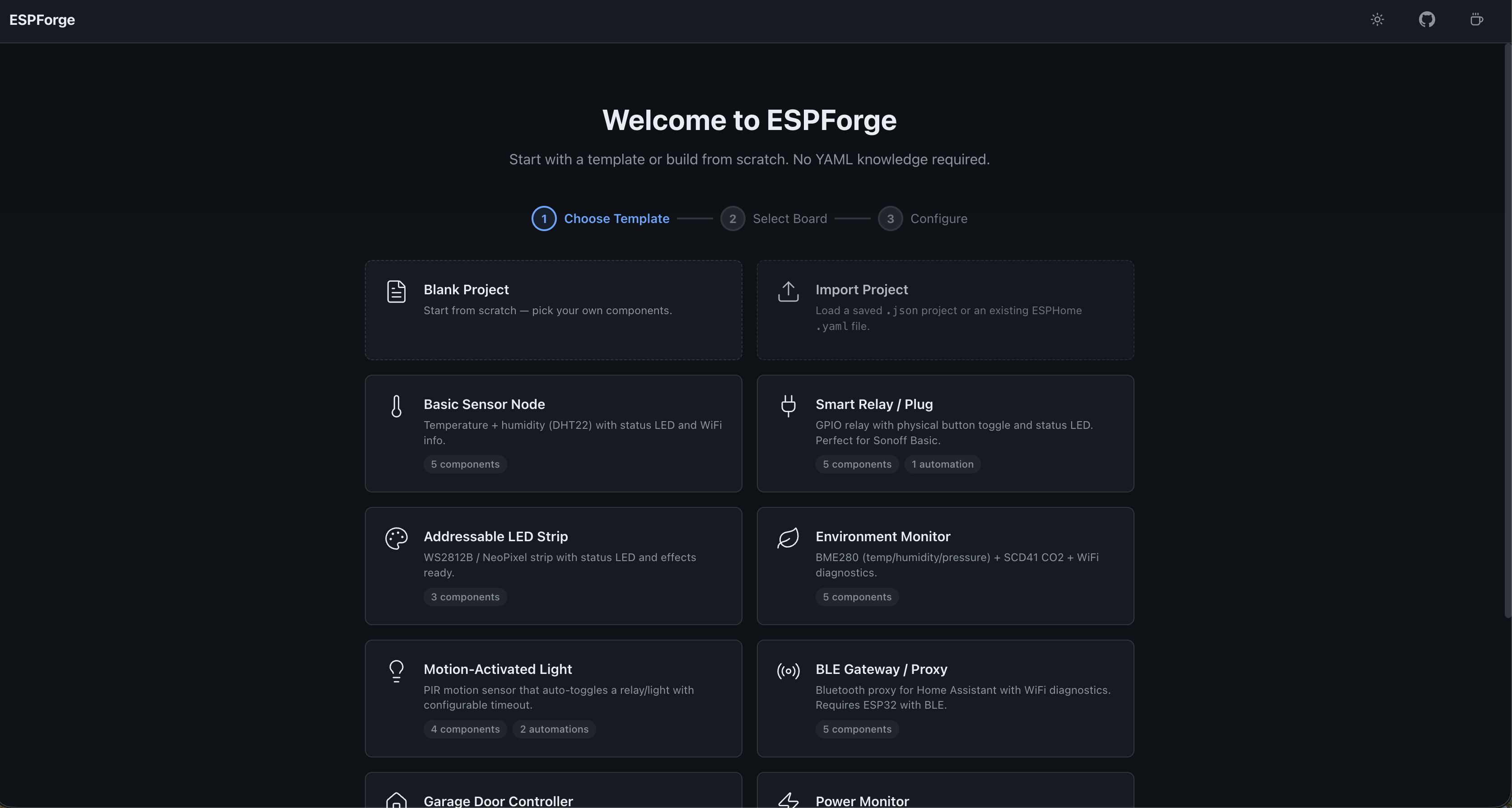
ESPForge provides a visual interface for creating ESPHome configurations directly in a web browser. ESPHome users typically edit YAML files by hand to define firmware for ESP32, ESP8266, and similar boards, specifying boards, sensors, switches, and network settings. This process demands familiarity with YAML syntax and ESPHome's component options. ESPForge eliminates that by letting users select from a list of 41 boards (including ESP32 variants, M5Stack, Seeed XIAO, LilyGO, Heltec, and others, plus a custom board option), pick from 99 components, and fill forms to generate a ready-to-flash YAML file.
The tool targets the 65-star TypeScript project at github.com/Mo3he/ESPForge. It runs locally with no server involvement, ensuring configurations stay private. Users follow a guided flow: choose a starter template from 14 options like Basic Sensor Node or BLE Gateway, assign a board, tweak settings, and export. Boards with built-in hardware, such as buttons or displays on M5Stack ATOM Lite, automatically include relevant components.
Core features
ESPForge organizes configuration into build, configure, import/export, and quality-of-life areas.
In the build section, it supports 41 boards like ESP32-S3, ESP8266, M5Stack Core2, Seeed XIAO S3 Sense, LilyGO T-Display S3 Pro, Heltec WiFi LoRa 32 v3, and Cheap Yellow Display (CYD). Users add from 99 components, including sensors, lights, fans, covers, BLE, IR transmitter/receiver (with RF proxy), mmWave radar like LD2410/LD2450, and OpenThread for Thread mesh on ESP32-C5/C6/H2. 14 starter templates cover scenarios such as Smart Relay, Addressable LED Strip, Environment Monitor, Garage Door Controller, and IR Blaster. Multi-template selection merges them, removing duplicates.
Configuration uses form-based editing with labels, defaults, and hints for every field. A visual pin mapper shows a color-coded board diagram and flags pin conflicts. Users build automations with triggers (boot, interval, button, sensor threshold), conditions, and actions for switches or lights. Full settings include WiFi, fallback AP, static IP, MQTT, API encryption, OTA, logger levels, SNTP, and status LED. Variant support hides incompatible components, like touch sensors on non-S2/S3 boards.
Import/export handles existing ESPHome YAML files for visual editing, with a live YAML preview that syntax-highlights changes. Validation checks for issues like missing WiFi or unassigned pins and auto-creates a secrets.yaml for sensitive values. Projects share via URL, save as JSON, and support undo/redo (Ctrl+Z/Ctrl+Shift+Z), light/dark themes, and keyboard shortcuts like Ctrl+S for save.
Getting it running
ESPForge requires no installation for basic use. Open mo3he.github.io/ESPForge in any browser. Configurations build locally and export as YAML for flashing via ESPHome Dashboard or the ESPHome CLI.
For Home Assistant integration:
- Go to Settings > Apps and click Install app.
- Click the overflow menu (top right) > Repositories.
- Add
https://github.com/mo3he/ESPForgeand click Add. - Find ESPForge in the store, click it, then Install.
- Once installed, click Start, followed by Open Web UI.
Docker deployment runs a containerized version:
docker run -p 8080:80 ghcr.io/mo3he/espforge
Or with Docker Compose in a docker-compose.yml file:
docker compose up -d
Access at http://localhost:8080. Updates use docker compose pull && docker compose up -d. The MIT-licensed project has a responsive layout for mobile and tablet.
Typical use cases
ESPForge suits users flashing ESPHome firmware onto custom sensors, relays, or displays without YAML editing. Templates speed up common setups: a Motion-Activated Light combines mmWave radar with a cover entity, while Power Monitor adds current sensors for energy tracking. Garage Door Controller templates handle locks and buttons, and IR/RF Proxy supports remotes.
Home automation enthusiasts pair it with Home Assistant, importing existing YAML from add-ons and tweaking visually. Developers prototyping BLE gateways or OpenThread nodes benefit from pin mapping and validation, avoiding flashes that fail due to conflicts. Onboard hardware auto-detection saves time for boards like LilyGO T-Beam Supreme with LoRa.
How it compares
Direct YAML editing in ESPHome remains the standard, offering full flexibility for advanced users but requiring manual syntax and component lookups from esphome.io. ESPHome Dashboard provides a basic web configurator for add-ons, but lacks ESPForge's 99 components, visual pins, or templates.
ESPForge fills the gap for beginners or visual workflows, similar to Node-RED's drag-and-drop for automations but focused on firmware YAML. It weighs more on browser resources due to the pin diagrams and previews compared to text editors like VS Code with ESPHome extensions. No server-side processing keeps it lighter than cloud tools.
The roadmap adds a display page builder for drag-and-drop widgets on screens like SSD1306 or ST7789V, generating font: declarations.
ESPForge works best for those avoiding YAML details on supported boards; expert users with rare components may stick to manual files. Source at github.com/Mo3he/ESPForge.
Comments