A professional, self-hosted web console for RustDesk servers — with a fully native in-browser remote desktop client.
CortenDesk gives the free, open-source RustDesk server (hbbs/hbbr) a clean and professional GUI Console: device fleet management, users and scoped access, address books, audit logs, and a web client that can view, control, and transfer files to your devices straight from the browser — no installer, no Electron, no paid tier.
Built on Laravel + Livewire with precompiled assets: there is no frontend build step. Clone, configure, migrate, serve.
Features
Console
- Devices — live fleet with presence, platform icons, aliases, device groups ("folders"), pre-registration, and a recycle bin. One-click connect via
rustdesk://deep links or the built-in web client. - Users & access scoping — admins see everything; regular users see only their own devices plus device groups granted to them or their user groups. The RustDesk client API is scoped with the same rules.
- Address books — full support for the modern multi-address-book API and the legacy API: shared books, share rules (everyone / user / group), tags with colors.
- Audit logs — connections, file transfers, console logins, and security alarms (brute-force/blocked-access events); filterable, exportable to CSV, with configurable retention and automatic nightly pruning.
- Single sign-on (OIDC) — sign in with Keycloak, Authentik, Entra ID, Okta, Google Workspace or any OpenID Connect provider. Authorization-code flow with PKCE, verified ID tokens, just-in-time account creation with optional approval, an email-domain allowlist, and optional provider sign-out. Password sign-in can be switched off — and returns by itself if SSO is disabled or left incompletely configured. For a provider that is unreachable while still configured,
CORTENDESK_OIDC_DISABLED=trueforces it off and brings the password form back. - Device policies (strategies) — push client settings to devices from the console: permissions, security and password rules, capture options. Assign to a device, a user or a device group, with the most specific assignment winning. Optionally enforced, so a local change is reverted on the next heartbeat.
- Two-factor authentication — TOTP with single-use recovery codes, optionally required for everyone or for administrators only, with an administrator reset and a break-glass command.
- Delegated administration ��� roles with a permission matrix over each console area, so you can grant someone the users screen without handing them the whole console.
- Automation API — scoped bearer tokens and a REST API for users, devices, groups, address books and audit logs, plus support for the RustDesk client's
--assignflag for unattended deployment. - Email — SMTP settings with a test send, user invitations by email, self-service password reset, and an optional emailed code when signing in from a new browser.
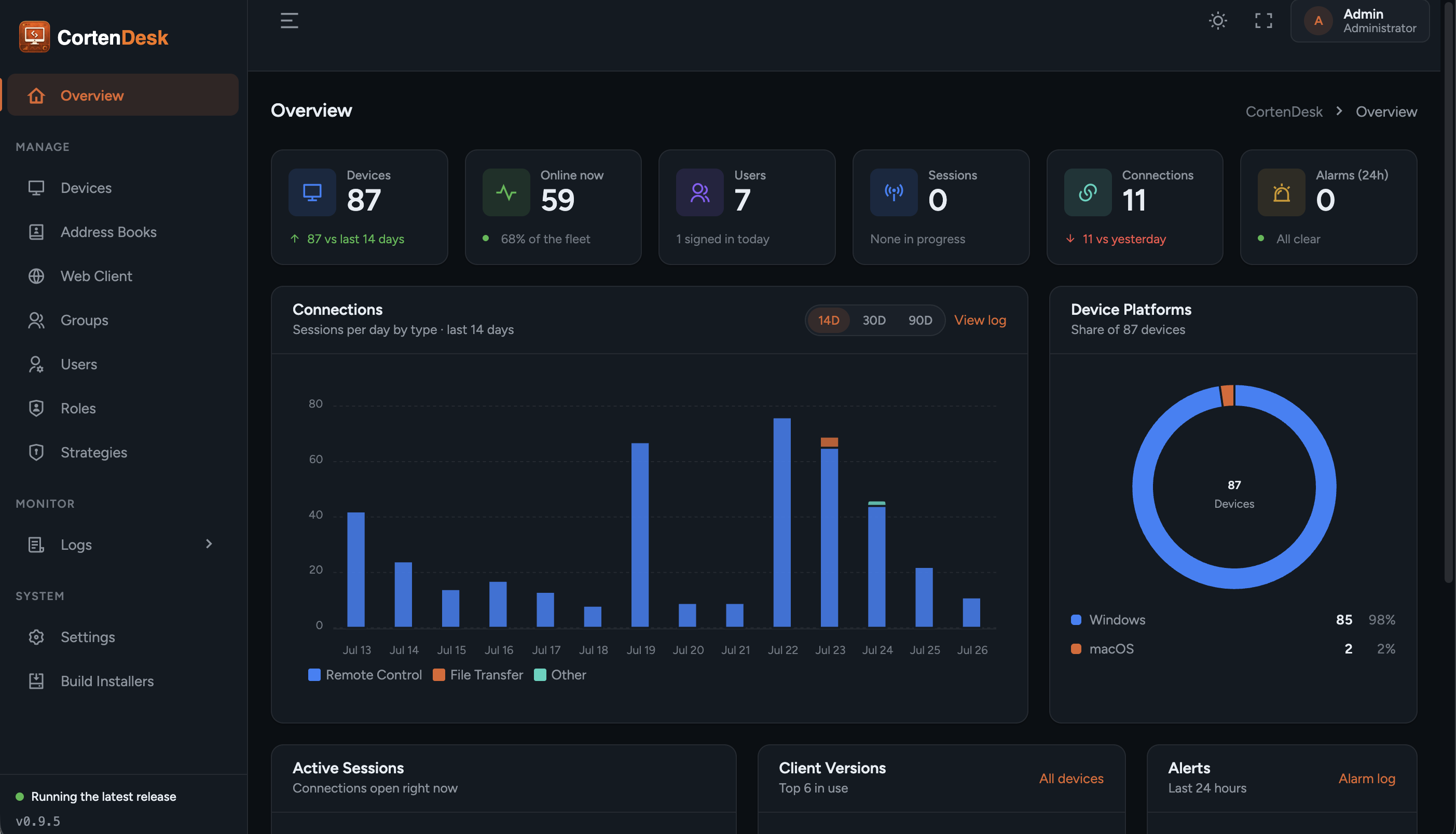
- Dashboard — live stat tiles, active sessions, 14-day connection charts, platform and version breakdowns.
- Importer — one artisan command migrates everything (users with passwords intact, devices, address books, audit history) from a
lejianwen/rustdesk-apidatabase. - Mobile-first — every screen works on a phone; wide tables degrade to card lists. Dark and light themes.
Client API
- Implements the RustDesk client HTTP API: login/tokens, heartbeat and sysinfo presence, address books, group tab, audit ingestion. Point stock RustDesk clients at CortenDesk as their API Server — no client patches needed.
Native web client
- A from-scratch TypeScript implementation of the RustDesk wire protocol (rendezvous → relay → NaCl handshake → login), running entirely in the browser over WebSocket relays. Not a WASM port — readable, auditable source.
- Hardware-accelerated video via WebCodecs (VP8/VP9/H.264/H.265/AV1 as supported), audio, clipboard both ways, multi-monitor switching, Ctrl+Alt+Del, session stats.
- File transfer — an in-session dual-pane manager: browse the remote filesystem, send/receive files and folders with progress, resume-aware digests, conflict prompts, and drag-and-drop. Uses the File System Access API on Chromium; falls back to picker/Downloads elsewhere.
- Saved passwords (hashed, never plaintext) with auto-login per device.
- Best experienced in Chrome/Edge; the desktop stream requires WebCodecs.
- HTTPS recommended, not required. Over HTTPS the client uses WebCodecs for hardware-accelerated VP8/VP9/H.264/H.265/AV1. WebCodecs is restricted to secure contexts, so over plain
http://the client falls back to H.264 through Media Source Extensions, which is not. The fallback is automatic and needs no configuration; it is limited to H.264 and reports no per-frame statistics.http://localhostcounts as secure.
Requirements
- PHP 8.4+ with Composer
- MySQL/MariaDB (SQLite works for evaluation)
- nginx + php-fpm (or any Laravel-capable web server)
- A running open-source RustDesk server (
hbbs/hbbr), reachable from your devices - For the web client: a proxy bridging WebSockets to hbbs/hbbr ports 21118/21119 —
wss://over HTTPS, orws://if you serve the console over plain HTTP — sample config below
Quick start with Docker
The repo ships a self-contained image (php-fpm + nginx, web client included, WebSocket bridge to your RustDesk server built in). Releases are published to GHCR — or build it yourself:
docker pull ghcr.io/marcpope/cortendesk:1.0.5   # or build locally:
docker build -t cortendesk .
docker run -d -p 8080:8080 -v cortendesk-data:/data \
  -e CORTENDESK_ID_SERVER=hbbs.example.com:21116 \
  -e CORTENDESK_RELAY_SERVER=hbbs.example.com:21117 \
  -e CORTENDESK_PUBLIC_KEY="<contents of id_ed25519.pub>" \
  cortendesk
First boot creates admin / changeme (override with CORTENDESK_ADMIN_USER
/ CORTENDESK_ADMIN_PASSWORD) and uses SQLite in the /data volume — see
docker-compose.yml for a MySQL setup. The container bridges /ws/id and
/ws/relay to your hbbs/hbbr (host taken from CORTENDESK_ID_SERVER, or set
RUSTDESK_WS_HOST). Put a TLS reverse proxy in front and set
CORTENDESK_WS_ID_URL / CORTENDESK_WS_RELAY_URL to the resulting
wss://your-host/ws/* URLs — browsers require wss for the web client.
Manual installation
There is no installer — setup is a standard Laravel deployment:
git clone https://github.com/marcpope/cortendesk.git
cd cortendesk
composer install --no-dev --optimize-autoloader

cp .env.example .env
php artisan key:generate
Edit .env — the CortenDesk-specific settings:
APP_NAME=CortenDesk
APP_URL=https://console.example.com

DB_CONNECTION=mysql
DB_DATABASE=cortendesk
DB_USERNAME=cortendesk
DB_PASSWORD=********

# Your RustDesk server
CORTENDESK_ID_SERVER=hbbs.example.com:21116
CORTENDESK_RELAY_SERVER=hbbs.example.com:21117
CORTENDESK_PUBLIC_KEY=<contents of your id_ed25519.pub>

# Native web client (wss endpoints your proxy exposes, see below)
CORTENDESK_NATIVE_WEBCLIENT=true
CORTENDESK_WS_ID_URL=wss://console.example.com/ws/id
CORTENDESK_WS_RELAY_URL=wss://console.example.com/ws/relay
Then migrate and cache:
php artisan migrate --seed
php artisan config:cache route:cache view:cache
Serve public/ with nginx + php-fpm as usual for Laravel. Log in as admin / changeme and change the password immediately.
Add the Laravel scheduler to cron (log retention and other maintenance run through it; the Docker image does this automatically):
* * * * * cd /path/to/cortendesk && php artisan schedule:run >> /dev/null 2>&1
Behind a reverse proxy (TLS termination)
CortenDesk honors X-Forwarded-* headers, so it works out of the box behind a
TLS-terminating proxy (Traefik, Caddy, nginx-proxy-manager, Cloudflare, …) that
forwards to the container/app over plain HTTP. Make sure your proxy passes
X-Forwarded-Proto (all of the above do by default), set APP_URL to your
public https URL, and set SESSION_SECURE_COOKIE=true so the session cookie
carries the Secure flag. No mixed-content issues — assets are generated with
the correct scheme from the forwarded headers.
Forwarded headers are trusted only from private/loopback addresses (Docker
networks, a same-host proxy) so that clients reaching the app directly cannot
forge their IP in the audit logs. If your proxy connects from a public
address, list it explicitly: TRUSTED_PROXIES=203.0.113.7 (comma-separated,
CIDRs allowed).
Getting this wrong is worth more than a wrong column in a log: every request
then appears to come from the proxy, so devices all record the same
last_online_ip and the per-address sign-in limiter treats every user as
one address, which can lock real users out.
WebSocket bridge for the web client
Browsers can't open raw TCP to hbbs/hbbr, so the web client speaks WebSocket.
Running the Docker image? You do not need the block below. The container
already bridges /ws/id and /ws/relay to hbbs/hbbr itself — point your proxy
at the container on 8080 for all paths and make sure it forwards WebSocket
upgrade headers. The snippet below is for a manual/VM install, where hbbs
and hbbr are reachable on the host. Full examples for Caddy, Traefik and nginx:
Reverse proxy and TLS.
For a manual install, add to your TLS server block (adjust the upstream host if hbbs runs elsewhere):
location = /ws/id {
    proxy_pass http://127.0.0.1:21118/;
    proxy_http_version 1.1;
    proxy_set_header Upgrade $http_upgrade;
    proxy_set_header Connection "upgrade";
    proxy_read_timeout 3600s;
}
location = /ws/relay {
    proxy_pass http://127.0.0.1:21119/;
    proxy_http_version 1.1;
    proxy_set_header Upgrade $http_upgrade;
    proxy_set_header Connection "upgrade";
    proxy_read_timeout 3600s;
}
Pointing RustDesk clients at CortenDesk
In each RustDesk client (or via a mass-deployed config): Settings → Network — set ID Server, Relay Server, Key, and API Server = your console URL. Devices then appear in the console within a heartbeat (~15 s). The Settings screen shows copy-paste values for all four fields.
Migrating from lejianwen/rustdesk-api
php artisan cortendesk:import-lejianwen /path/to/rustdeskapi.db --dry-run   # preview
php artisan cortendesk:import-lejianwen /path/to/rustdeskapi.db             # import
Users (original bcrypt passwords), devices (deduplicated), address books, share rules, and audit history come across. Go-encrypted address-book entry passwords cannot be decrypted and must be re-saved by users.
Rebuilding the web client (optional)
The browser client ships prebuilt in public/rdclient/. To hack on it:
cd webclient
npm install
npm run build        # or: npm run typecheck
Comments