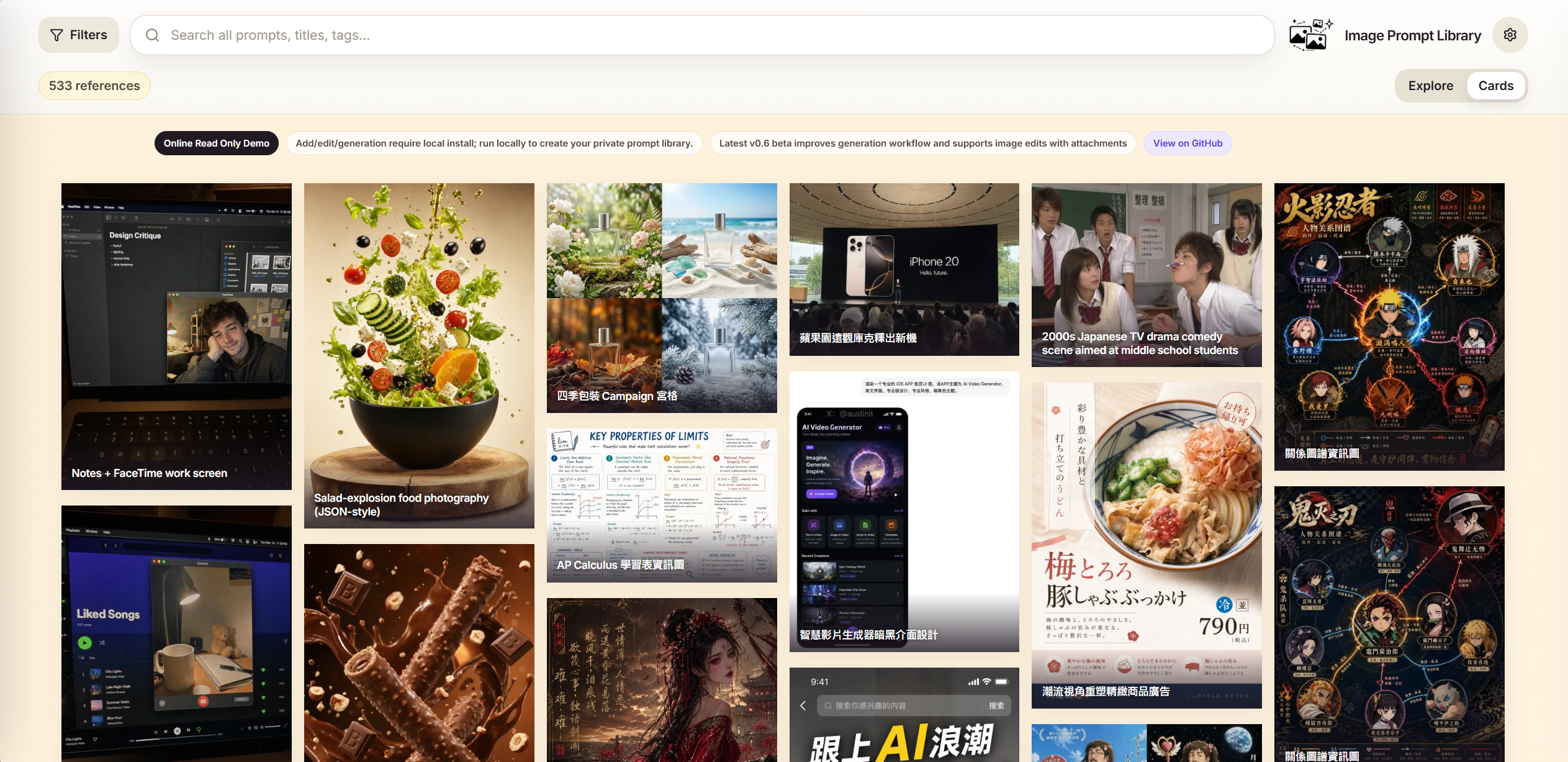
Image Prompt Library provides a local-first tool for managing image generation prompts and their outputs. Users save generated images alongside their prompts, metadata, tags, and collections, creating an image-first catalog for quick reference. Unlike one-off prompts in chat interfaces, this setup treats them as reusable assets stored entirely on the user's machine with SQLite for the database and local files for images—no accounts, cloud sync, or external hosting involved.
The project runs as a web app accessed via browser after a local server start. A public read-only demo at https://eddietyp.github.io/image-prompt-library/ showcases 533 prompt-image pairs drawn from two sources: wuyoscar/gpt_image_2_skill (CC BY 4.0) and freestylefly/awesome-gpt-image-2 (MIT). These cover areas like UI design, posters, product imagery, charts, diagrams, photography, portraits, architecture, scenes, and illustrations. Each entry appears as an image card with prompt variants in English, Traditional Chinese, and Simplified Chinese where available. The demo supports searching, copying prompts, and viewing structures but lacks editing or private additions.
Core features
The app centers on building and searching a personal catalog:
- Image-first interface: Displays entries as cards with thumbnails, prompts below, and metadata like source or generation details.
- Organization tools: Group items into collections and apply tags for filtering and retrieval.
- Prompt management: Store prompts with variables (added in v0.7), templates, and multi-language variants; edit or clone entries.
- Local generation integration: Connects via ChatGPT or Codex OAuth to generate new images, with queue management, cancellation, restart recovery, and result reuse marked as "Used as ref."
- Search and sorting: Image-based search with operators for relevance, plus cleanup for generation results.
All data remains private: SQLite handles the database, images store as local files. The current public beta, v0.7.4-beta, includes queue review improvements and consistent history loading for reused references.
Getting it running
Installation targets Python 3.10+ environments and uses a curl-based script—no Node.js needed. Run these commands in a terminal:
curl -fsSL https://raw.githubusercontent.com/EddieTYP/image-prompt-library/main/scripts/install.sh | bash
image-prompt-library start
The start command launches a local server. Keep the terminal open and open http://127.0.0.1:8000/ in a browser. Stop with Ctrl-C. Normal releases fetch dependencies automatically. For development or custom setups, clone the repo from https://github.com/EddieTYP/image-prompt-library (51 GitHub stars, Python-based) and follow repo instructions, which include CI workflows and GitHub Pages deployment badges.
Local installs unlock full functionality: add images via upload or generation, edit prompts, create collections, tag entries, and search across your library. Generated images save locally after OAuth approval, with queue states visible for review.
Who this is for
AI image generators who produce frequent outputs benefit most. If prompts evolve into templates—for instance, recurring styles in UI mockups, product shots, or illustrations—this app catalogs them visually. Designers iterating on posters or typography can tag variations and search by output style. Developers documenting diagrams or charts store prompts with images for reuse.
It fits workflows tied to local tools: pair it with Stable Diffusion setups or browser-based generators, using saved prompts as starting points. Multilingual support suits teams handling English, Traditional Chinese, or Simplified Chinese prompts. Those experimenting with prompt engineering track what works across models, inspecting metadata like "generated-result cleanup" flags from v0.7 updates.
Power users managing large prompt sets appreciate the no-cloud approach, avoiding vendor lock-in. A single user might build a library of hundreds of references over time, searchable faster than scrolling chat histories.
The online demo in practice
The GitHub Pages demo serves as a starting point without installation. Its 533 entries form a static gallery: filter by tags like "typography" or "architecture," click cards for full prompts, and copy text directly. Screenshots in the README show dense grids of image cards, each with variant prompts below.
This read-only mode tests the interface—search sorts by relevance, images load quickly. It draws from upstream repos, crediting licenses, and highlights prompt diversity: some entries compare model outputs or languages side-by-side. For private use, export ideas by copying prompts into local installs.
How it compares
Upstream sources like wuyoscar/gpt_image_2_skill and freestylefly/awesome-gpt-image-2 offer static GitHub galleries—lists or folders of prompts and images, lacking interactive search, tagging, or editing. Image Prompt Library imports their style into a dynamic, local app.
Broader alternatives include hosted tools like PromptHero (cloud-based search) or Lexica (Stable Diffusion-focused), but they require uploads and accounts. Local options like Automatic1111's web UI store generations with prompts, though without dedicated tagging/collections. For pure prompt storage, apps like Promptist use mobile-first designs but sync to cloud. This project stands out for zero-hosting, image-centric views, and OAuth generation in one package—51 stars reflect its niche appeal in Python's open-source ecosystem.
Desktop tools such as InvokeAI manage local generations with prompt history, but emphasize pipelines over visual catalogs. If queue management and restart recovery matter, this edges lighter prompt savers.
Users needing cloud sync or collaboration might skip it—the README stresses local-only storage. Heavyweight databases like Obsidian plugins for prompts exist but lack image-first browsing.
Image Prompt Library suits solo cataloging of AI image prompts on local hardware. Source at https://github.com/EddieTYP/image-prompt-library; demo at https://eddietyp.github.io/image-prompt-library/. Latest release: v0.7.4-beta under AGPL-3.0-or-later.
Comments