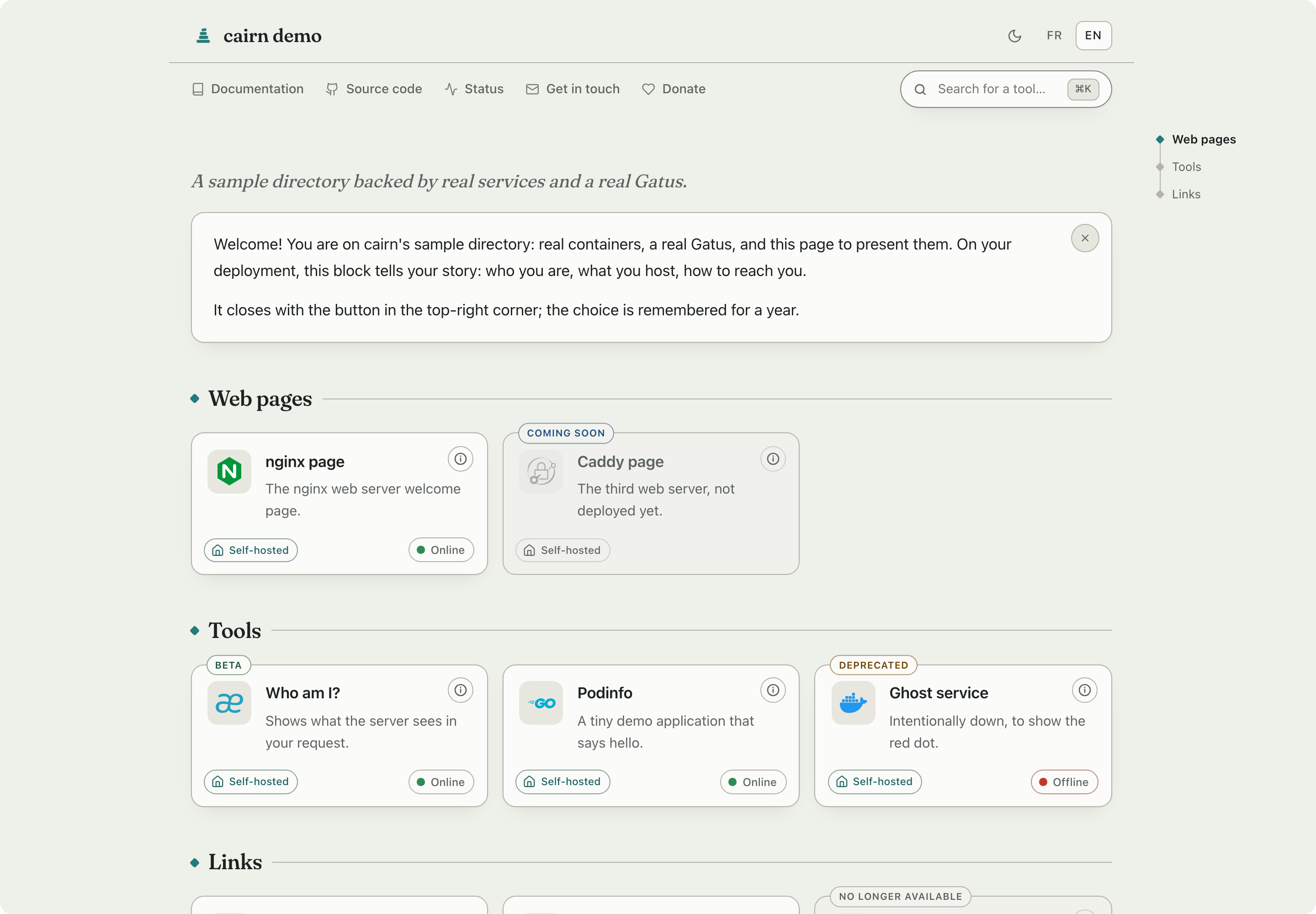
The directory page for the people you host services for.


A cairn is a small stack of stones left by hikers who walked the trail before you, so you find your way without digging.
Your family, your clients, your friends: they don't want a dashboard, they want to know what this place is, what each tool does, and whether it works right now. cairn is that page. Written in their language, readable without an account or a manual, and boring for you to operate.
Features
What your visitors get
- 👋 A welcome note in your words: who hosts this, for whom, how to reach you. Dismissable, remembered for a year (a plain cookie, no tracking).
- 🗂️ Tools grouped by need, one plain sentence each, with optional "Learn more" pages for the curious.
- 🚦 Live status pills fed by the monitor you already run, whichever it is, each linking to its status page. Your server does the polling, never the visitor's browser.
- 🏷️ Say where a service stands: coming soon, no longer available, beta, deprecated, new. A word on the card, in the visitor's language, and the two that mean "do not go there" stop being links at all.
- 🌍 Their language: the server picks it from the browser, a switcher pins it. One config file, translations inline.
- 🔍 Search from anywhere: just start typing, or ⌘K. A name finds that one service, not everything that mentions it; keyword search still reaches descriptions and hidden tags, accent-insensitive.
- 📱 At home on a phone: the layout reflows to one hand, the header steps aside as you scroll and returns the moment you head back up, and a burger keeps search within thumb's reach.
- ♿ Built to stay readable: text contrast measured against WCAG AA in both themes, a skip link, named landmarks, search results announced through a live region, a theme toggle that says which way it is set, and right-to-left languages laid out the right way round. The controls a visitor can operate, the search box and the phone's jump-to select, carry a boundary that clears 3:1, remeasured in a real browser on every pull request. Tested with a browser, never audited as a whole, and not yet with a real screen reader: if you use one, tell us what breaks.
- 🌗 Calm typography, light and dark, keyboard-friendly, and every feature degrades gracefully without JavaScript.
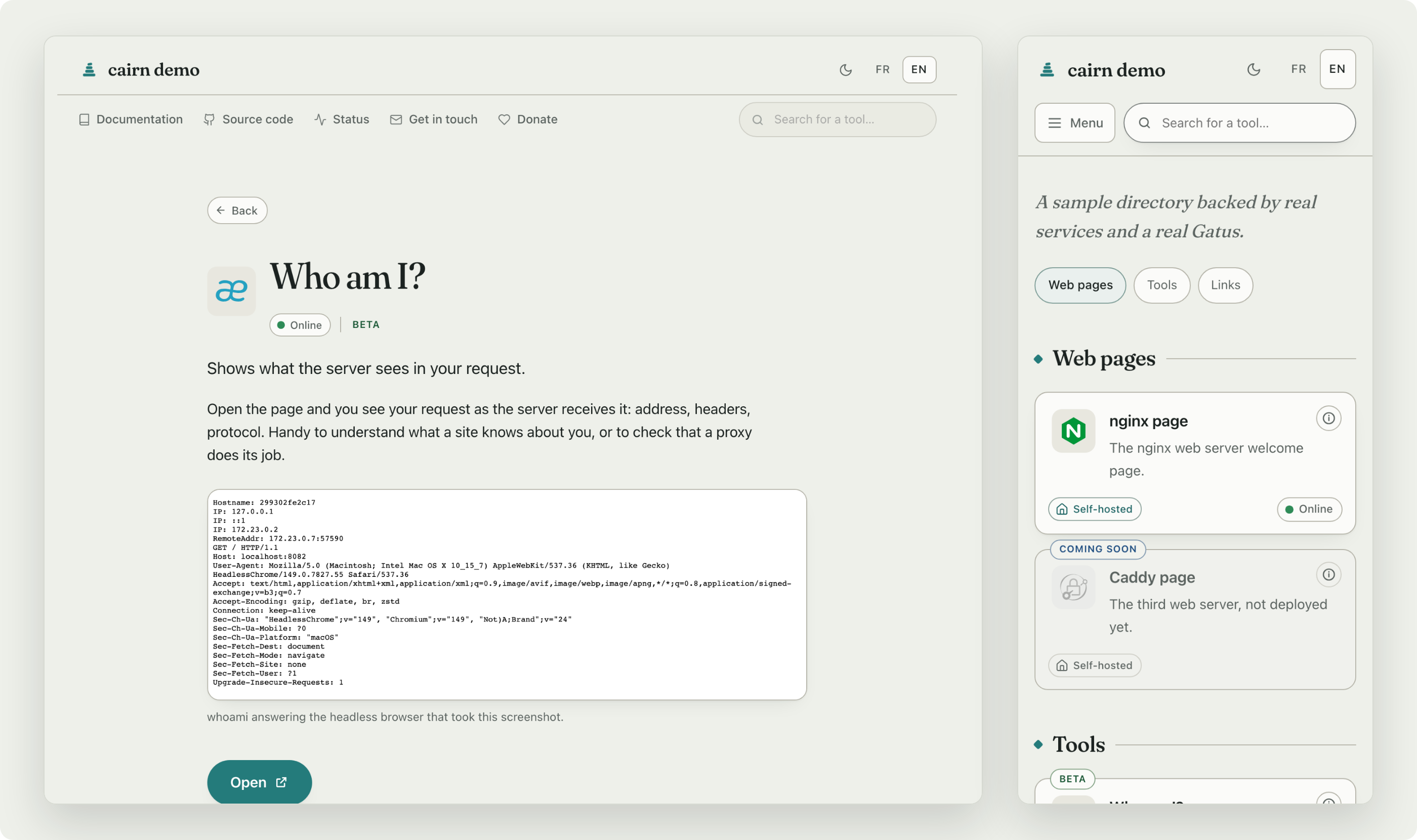
Behind a card when a visitor wants more than one sentence, and the same page in a hand.
What you get as the operator
- 📦 One static binary, about 10 MB, zero runtime dependencies, no database. The image around it is 4.4 MB to pull on amd64 and 4.0 on arm64, since that binary compresses well.
- 📝 YAML mounted read-only; edits apply live within seconds, and a config error names the file, the line and the expected shape instead of taking the site down.
- 📜 Legal pages served by cairn itself (legal notice, privacy…): the pages self-hosters never have anywhere to put. Written in ordinary markdown, headings and lists and tables, with raw HTML left as text so a config file can never reach the page as markup.
- 🌐 Wherever your domain has room: a domain, a subdomain, or a sub-path of
one you already use (
example.org/cairn/, one flag). cairn handles the prefix itself, so the proxy needs no rewriting rule.
Status monitoring
Whatever already tells you it is up. cairn does not ask you to change monitors. It reads the one you run, and the pills come from your server, never from the visitor's browser.
| Self-hosted | Gatus · Uptime Kuma · Cachet · Statping-ng · Upptime |
| Hosted | Atlassian Statuspage · Instatus · UptimeRobot · Better Stack · StatusCake |
Every one of those was read from a live instance rather than from a manual, and the mapping each needed is written down with the count that came back. Anything else publishing a list of names and states takes six lines of configuration: which monitors cairn reads also says what cannot be read, and why.

|
Gatus gets the warmest handshake, and has earned it.
It is the only one cairn integrates with both ways, since |
Security
Secure by subtraction: the safest surface is the one that isn't there. cairn stores nothing, signs no one in, and takes no input it has to trust. What little runs is kept deliberately tight, from the image down to the wire.
- 🪨
FROM scratch, non-root: no shell, no package manager, no libc in the image, so a compromised process has nothing to pivot into. - 🛡️ Runs locked down:
read_only,cap_drop: ALLand a self-probing healthcheck all work out of the box. See the hardened compose. - 🧱 A strict Content-Security-Policy (
default-src 'none', inline fragments pinned by hash) and the hardening headers, with no third-party script or font to trust. - 🔌 No outbound requests of its own: air-gap friendly, its only companions optional and yours, a self-hosted monitor for status and icons you can serve yourself. The demo runs on a network with no route out and serves its own icons, so the page it shows you makes no third-party request at all.
- 🔬 A watched supply chain: every pull request runs
govulncheck, a Trivy image scan and CodeQL, and they run again on the pushes that change code and weekly on a schedule. Dependabot follows the dependencies, and every CI action is pinned to a commit rather than a movable tag, as is the buildkit image that runs the build. - 🧪 More test than product: about 8 800 lines of tests against 6 000 of code, 505 of them run on every pull request, and 92.9% of the statements are covered with an 87% floor that fails the build. A browser suite drives what markup cannot show, and every one of those tests was made to fail before the fix it covers, by patching the fix out and reading the red.
- ✍️ Artifacts you can check: the image is signed with cosign and ships SLSA provenance and an SBOM; the release binaries carry their own attestation. The verification commands are two lines.
Quickstart
Nothing to write, nothing to mount, just look at it:
docker run --rm -p 8080:8080 morgankryze/cairn:stable
That is a running cairn on http://localhost:8080, telling you what to feed it. When you are ready to feed it, two files and one command:
# config/services.yaml
- id: pdf
  url: https://pdf.example.org
  icon: stirling-pdf
  name: PDF toolbox
  desc: Merge, split, compress your PDFs.
(Want two languages? name: { fr: Bo��te à outils PDF, en: PDF toolbox };
every text key works both ways. See Languages.)
# compose.yaml
services:
  cairn:
    image: morgankryze/cairn:latest
    ports:
      - 8080:8080
    volumes:
      - ./config:/config:ro
docker compose up -d
Open http://localhost:8080: that is a finished page. Everything else (title, languages, categories, status, theming) is one optional key at a time, at your pace: follow Getting started.
Prefer to see it live first? A public instance runs at https://cairn.libresoftware.cloud, and the demo stack spins up your own copy, with a real Gatus and a handful of sample services, one intentionally dead, in one command:
git clone https://github.com/MorganKryze/cairn.git && cd cairn/demo
docker compose up -d --build
Documentation
Everything lives in docs/, and it is written to be read, not just grepped: each page teaches the why before the how, in plain prose a developer can enjoy rather than a reference dump to endure. If you like understanding how a thing works, start anywhere below.
| Start | Getting started, the five-minute path · Upgrading, what a new version can refuse and how to fix it |
| Configure | Services · Site · Text · Theming · Languages |
| Deploy | Docker Compose · Podman · Bare binary · Kubernetes · Helm · Air-gapped · Reverse proxies |
| Recipes | Status page · Icons · Multiple files · Migration |
| Look up | Reference · FAQ · Comparison |
For your AI assistant
Those pages are indexed on
Context7, so an assistant with
the Context7 MCP server can pull cairn's real documentation instead of
inventing config keys that never existed. Ask it for morgankryze/cairn by
name.
Scope
Not a dashboard, on purpose. cairn is a directory, not a control panel: no auth, no widgets, no Docker socket, no admin UI. If the audience is you, the admin, Homepage or Homer will make you happier; the comparison is honest about it.
Colophon
A colophon tells how the book was made, so here is mine: Go, plain YAML, Fraunces for the headings, and Claude Code drafting at my side, never on autopilot. The taste, the reviews and the final word stay mine; the tests, the CI and the public history keep me honest.
Comments