kkRepo is an independent, self-hosted artifact repository for Maven, npm, PyPI, Go, Helm, Docker/OCI, NuGet, RubyGems, Yum, and Raw artifacts.
The project implements client-visible compatibility and migration support for Sonatype Nexus Repository deployments, including the /repository/<repo>/... URL layout and compatible permission/authentication behavior where required for migration. kkRepo uses MySQL for metadata and shared runtime state, supports OSS/S3 blob storage, and is designed for multi-replica deployment.
- Java and Spring Boot based service
- MySQL metadata and identity data
- MySQL-coordinated runtime state plus in-process TTL cache
- OSS/S3/File blob storage
/repository/<repo>/...protocol entrypoint and compatible permission model for migration scenarios- One-click migration tooling for existing Sonatype Nexus Repository instances, with zero-downtime migration to kkRepo
- Lightweight operations console under
/admin/ - User-facing repository browser under
/browse/
Trademark Notice
Sonatype, Nexus, and Nexus Repository are trademarks of Sonatype, Inc. kkRepo is an independent open source project and is not affiliated with, endorsed by, sponsored by, or connected to Sonatype, Inc. References to Sonatype Nexus Repository are used only to describe compatibility, migration, or interoperability.
Quick Start
Start a local trial environment with the public release image and MySQL:
curl -fsSL https://raw.githubusercontent.com/klboke/kkrepo/main/scripts/quickstart.sh | bash
Open:
- Admin console:
http://127.0.0.1:19090/admin/ - User browser:
http://127.0.0.1:19090/browse/ - Health check:
http://127.0.0.1:19091/actuator/health
On the first visit, create the initial Local/admin administrator password in the UI. The quickstart uses File blob storage for local trials; use OSS/S3 and your own encryption secrets for production.
If you prefer to inspect the script before running it, download scripts/quickstart.sh first and then run it with bash.
Build And Deployment
Local quick start, Spring Boot executable jar, Docker image, archive package, production deployment architecture, resource sizing, and upgrade flow are documented in the Build And Deployment Guide.
Local hot-reload development and testing are documented in the Development Guide.
Supported Capabilities
| Format | Repository types | Client publish/upload | Browse and search | Nexus migration |
|---|---|---|---|---|
| Maven | hosted / proxy / group | Maven deploy, PUT upload, and admin UI upload | Supported | Hosted repositories are migrated by default; proxy repositories can be migrated optionally |
| npm | hosted / proxy / group | npm publish, dist-tag, and admin UI upload |
Supported | Hosted repositories are migrated by default; proxy repositories can be migrated optionally |
| PyPI | hosted / proxy / group | twine upload and admin UI upload | simple index supported | Hosted repositories are migrated by default; proxy repositories can be migrated optionally |
| Go | proxy / group | Go module proxy is mainly read-only proxy; hosted upload is not supported | Supported | Proxy repositories can be migrated optionally |
| Helm | hosted / proxy | chart push, PUT upload, and admin UI upload | index.yaml supported | Hosted repositories are migrated by default; proxy repositories can be migrated optionally |
| Docker / OCI | hosted / proxy / group | Registry V2 login, hosted push/pull, proxy pull, group pull, OCI referrers, cleanup, and connector-port access | Manifest/tag/blob metadata supported | Hosted Docker repository data migration is supported through the Nexus Repository Data flow |
| NuGet | hosted / proxy / group | package push and admin UI upload | v3 service index / search supported | Hosted repositories are migrated by default; proxy repositories can be migrated optionally |
| RubyGems | hosted / proxy / group | gem push/yank and admin UI upload | Supported | Hosted repositories are migrated by default; proxy repositories can be migrated optionally |
| Yum | hosted / proxy / group | RPM upload and admin UI upload | repodata supported | Hosted repositories are migrated by default; proxy repositories can be migrated optionally |
| Raw | hosted / proxy / group | PUT upload and admin UI upload | Supported | Hosted repositories are migrated by default; proxy repositories can be migrated optionally |
Repository data migration scans hosted repositories by default. If you need to migrate proxy repositories from a source Sonatype Nexus Repository deployment as historical backup data or upstream cache data, explicitly specify repository names in Optional proxy repositories on the migration page.
Migrating From Sonatype Nexus Repository
Migration is available in the /admin/ console:
- Enable Script REST API script creation on the source Sonatype Nexus Repository deployment.
- On the
Nexus Metadatapage, runRun preflightfirst, then runRun migrationafter blocking issues are resolved. - On the
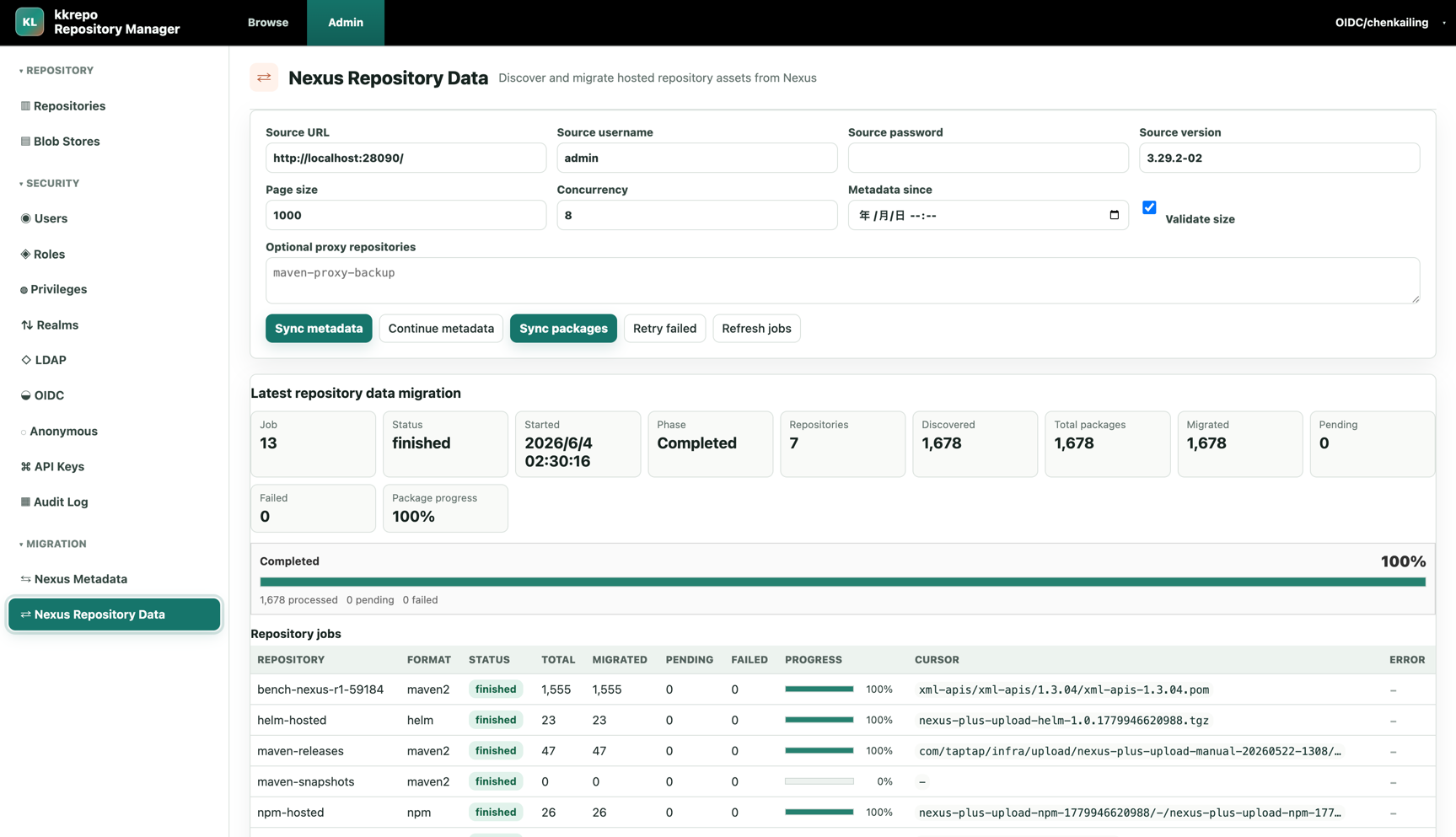
Nexus Repository Datapage, runSync metadatato migrate repository metadata, then runSync packagesto migrate the real blob data. - For the first repository data migration, leave
Metadata sinceempty to scan all data. Later runs can setMetadata sincefor incremental migration. - After migration is complete, point the original repository domain to kkRepo. Non-Docker clients can keep the same
/repository/<repo>/...URLs; Docker clients should keep the same/v2/...registry entrypoint, repository names, and connector/path-based routing shape.
Migration supports interruption and resume. Completed data is skipped on later runs. See the Nexus Migration Guide for the full process.
Compatibility And Migration Context
| Dimension | Sonatype Nexus Repository OSS / Community Edition | kkRepo |
|---|---|---|
| Product positioning | A general-purpose artifact repository management platform with broad format and management coverage | Provides migration-oriented client behavior, permission model, and /repository/<repo>/... URL compatibility while using a MySQL-first, OSS/S3-first, multi-replica-friendly architecture |
| Supported formats | Officially supports more formats; exact capabilities vary by version and distribution | Focuses on common artifact formats. Currently supports Maven, npm, PyPI, Go, Helm, Docker/OCI, NuGet, RubyGems, Yum, and Raw. Each format is implemented as an independent protocol module for prioritized extension and validation |
| Usage limits | Community Edition targets individuals and small teams. Official limits are up to 40,000 components and 100,000 requests/day. When exceeded, new component creation is paused until usage returns below the limits | Does not include Community Edition-style license usage limits. Capacity is bounded by MySQL, OSS/S3, replica count, and deployment sizing, so it can scale with actual business needs |
| High availability deployment | Open source editions are suitable for a single instance or basic Kubernetes deployment; official HA deployment is a Pro capability | Designed for multi-replica deployment by default: session, authentication tickets, catalog watermarks, locks, migration progress, and short-lived coordination state are stored in MySQL. In-process cache is only a rebuildable hot cache |
| Stability and upgrade | Version boundaries are complex: 3.70.x is the last version supporting OrientDB; 3.71.0 defaults new installs to H2, but H2 is still embedded; Community Edition did not support free external PostgreSQL until 3.77.0+; search was fully moved to SQL and away from Elasticsearch only in 3.88.0. Older OrientDB/Elasticsearch/local-data-directory deployments carry heavy upgrade windows and recovery depends heavily on backups, repair tasks, and manual intervention | MySQL-first runtime with no dependency on OrientDB or embedded Elasticsearch. Core state is in MySQL, blobs are in OSS/S3/File blob store, and cache/index data is rebuildable, making rolling upgrade, failover, and recovery easier |
| Metadata storage | Historical versions moved across OrientDB, H2, PostgreSQL, and related migration paths. Older instances must handle database migration constraints during upgrade | MySQL-first: repositories, components, assets, permissions, tokens, audit logs, migration state, and rebuildable indexes use explicit table structures for easier troubleshooting, governance, and horizontal scaling |
| Blob storage | Common deployments use local file blob store; object storage availability depends on version and configuration | OSS/S3-first, with File blob store retained for development and testing. MySQL stores only metadata, state, indexes, and references, not large blobs |
| Search and indexing | Before 3.88.0, Nexus search and indexing were based on embedded Elasticsearch, with index files and database state separated. Index corruption or inconsistency requires Nexus repair/rebuild tasks | Uses MySQL denormalized indexes and protocol-derived metadata. browse/search/index data is designed to be rebuildable, and node-local cache loss does not affect correctness |
| Architecture complexity | Nexus Repository is feature-rich and carries many general management capabilities and historical architecture mechanisms | kkRepo keeps the architecture simple and focuses on repository management and client protocol implementation |
Selection Guidance
- If your business scale is very small, package count and traffic are within Community Edition limits, and occasional maintenance downtime is acceptable, the open source Sonatype Nexus Repository edition may be sufficient.
- If stability, scalability, and multi-replica deployment matter, or if you manage a large number of packages, kkRepo is designed for that deployment shape.
- If an existing Sonatype Nexus Repository instance runs into component-count or daily-request limits after upgrading to a newer Community Edition version, kkRepo provides a one-click migration flow designed for zero-downtime migration.
UI Overview
User UI
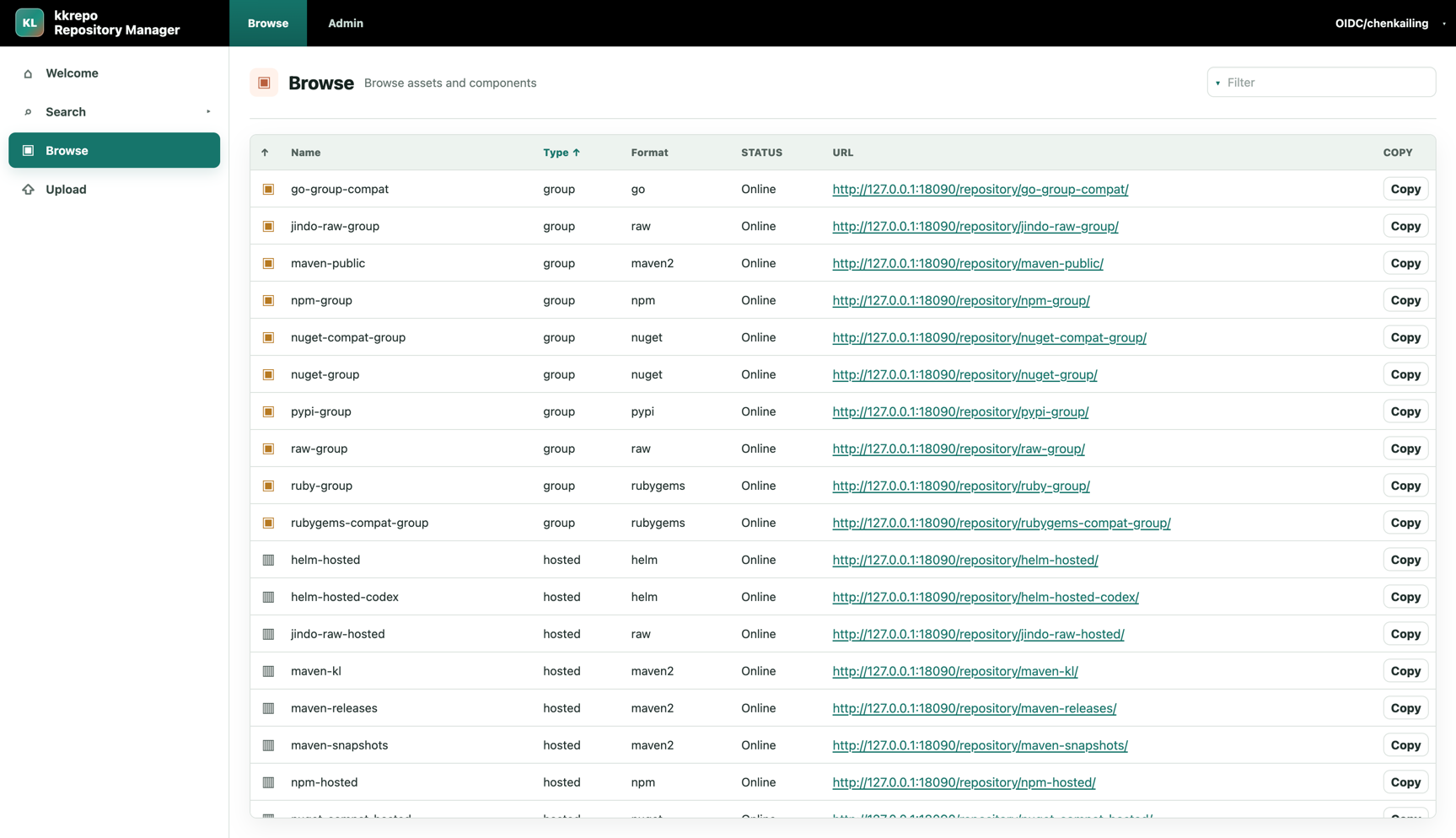
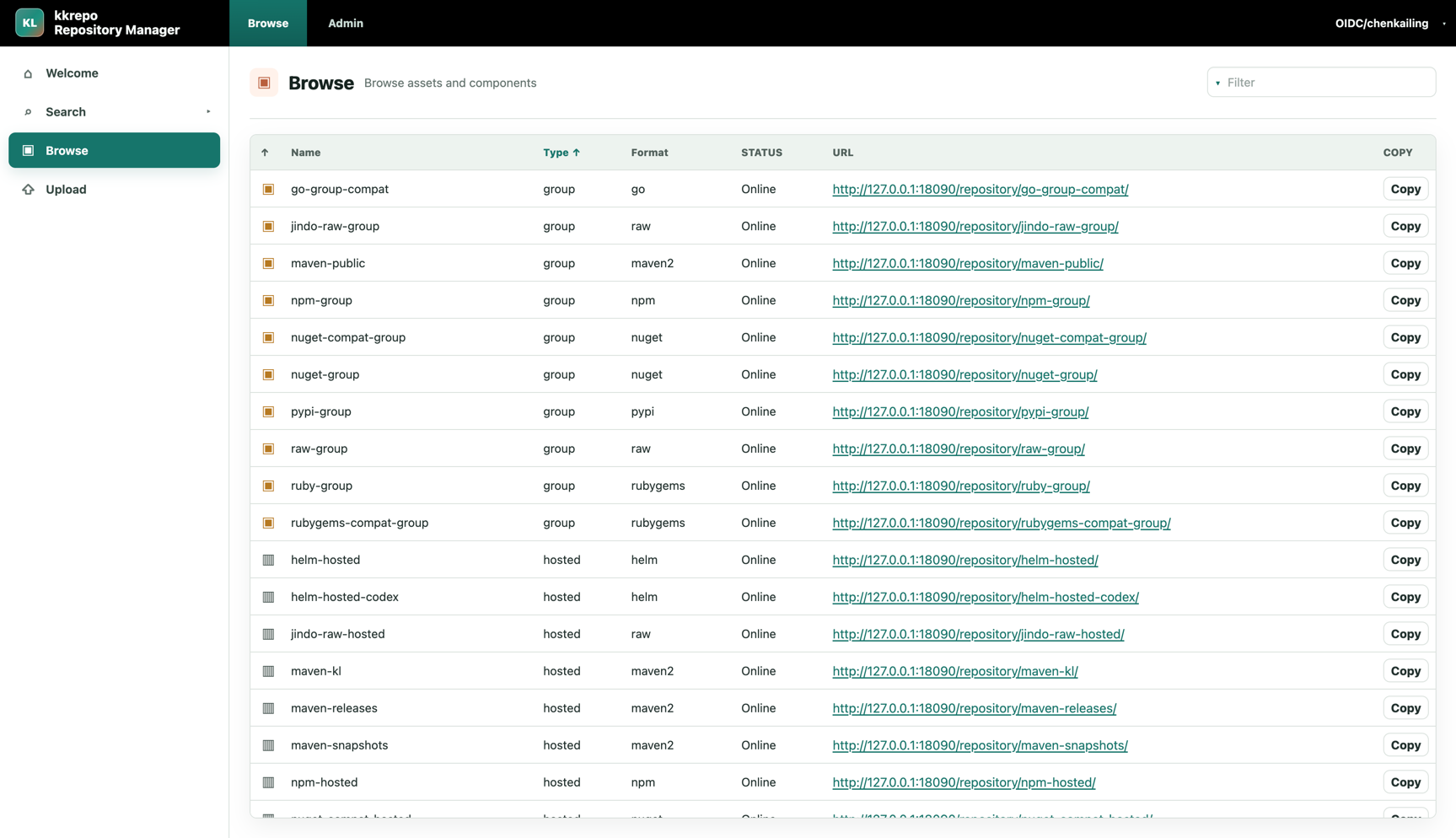
The user UI is for artifact consumers. It provides repository lists, package search, directory browsing, artifact details, and upload entrypoints.
The repository list shows hosted, proxy, and group repositories with format, status, and access URLs so users can copy client configuration URLs directly.
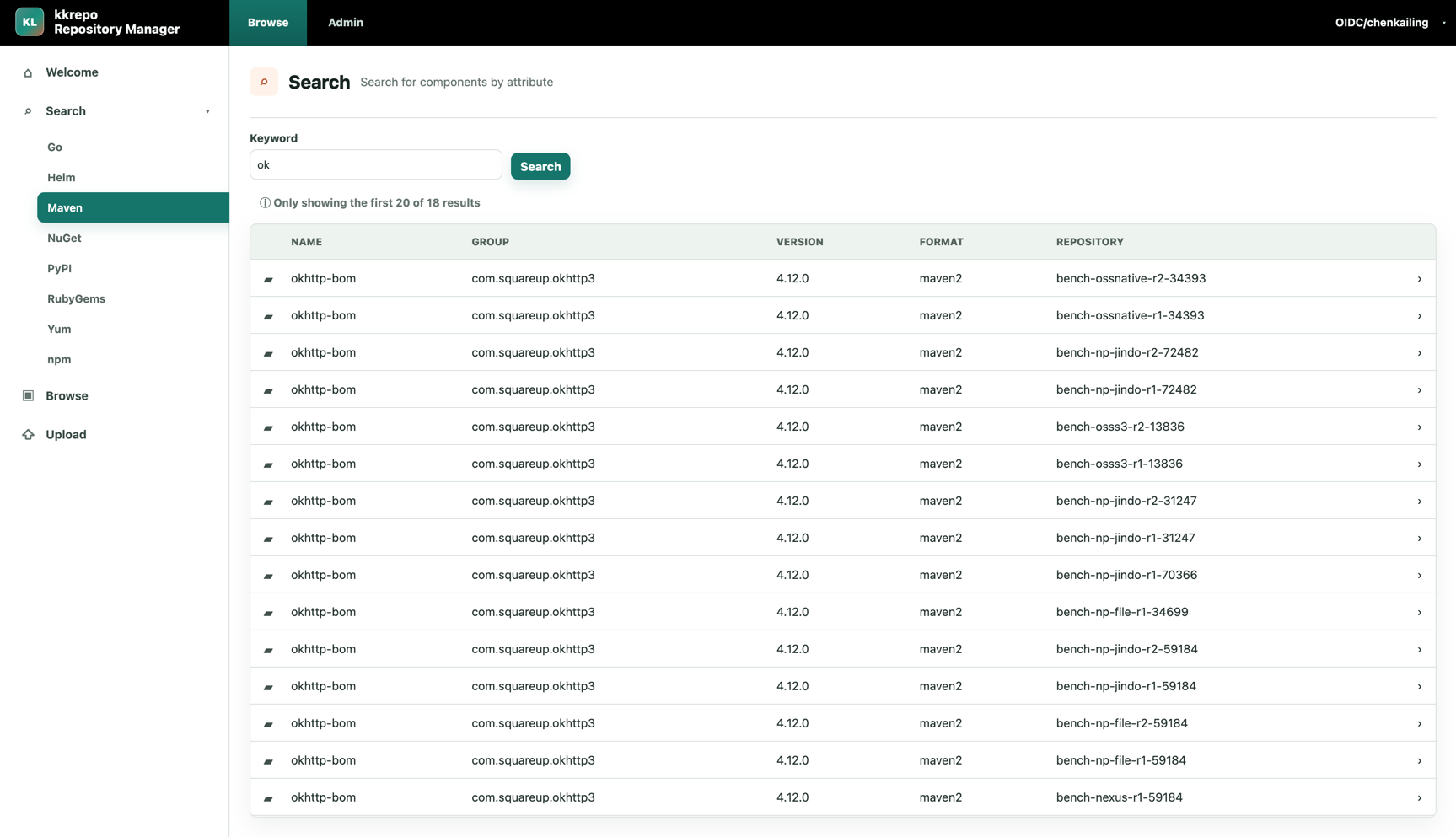
Search components by format across Maven, npm, PyPI, Go, Helm, Docker/OCI, NuGet, RubyGems, Yum, Raw, and other repository types.
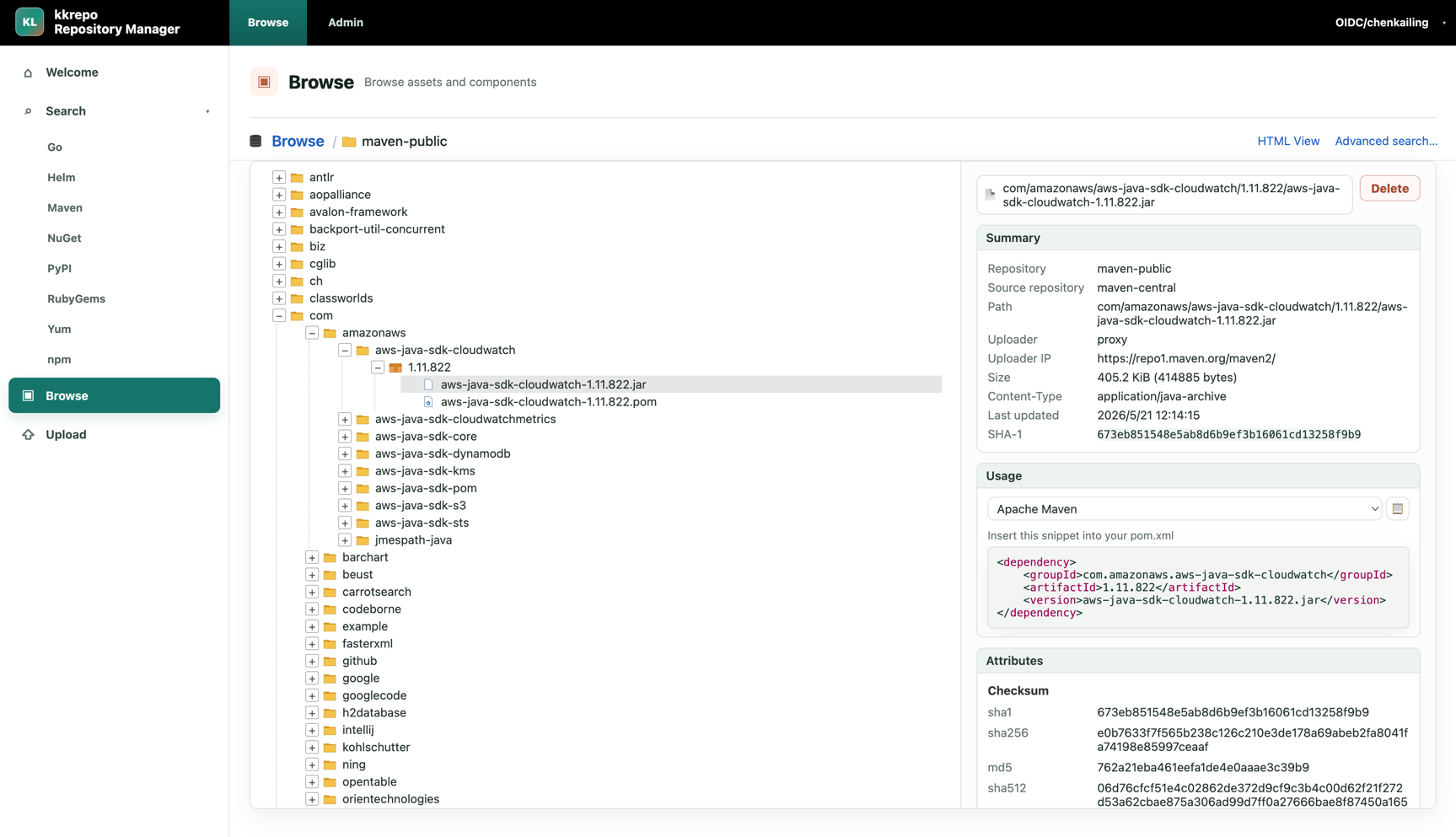
Directory browsing shows repository path trees, artifact summaries, checksums, content type, update time, and client usage snippets.
The upload page lets users select a repository, upload files, and set asset paths for manual publishing to hosted repositories.
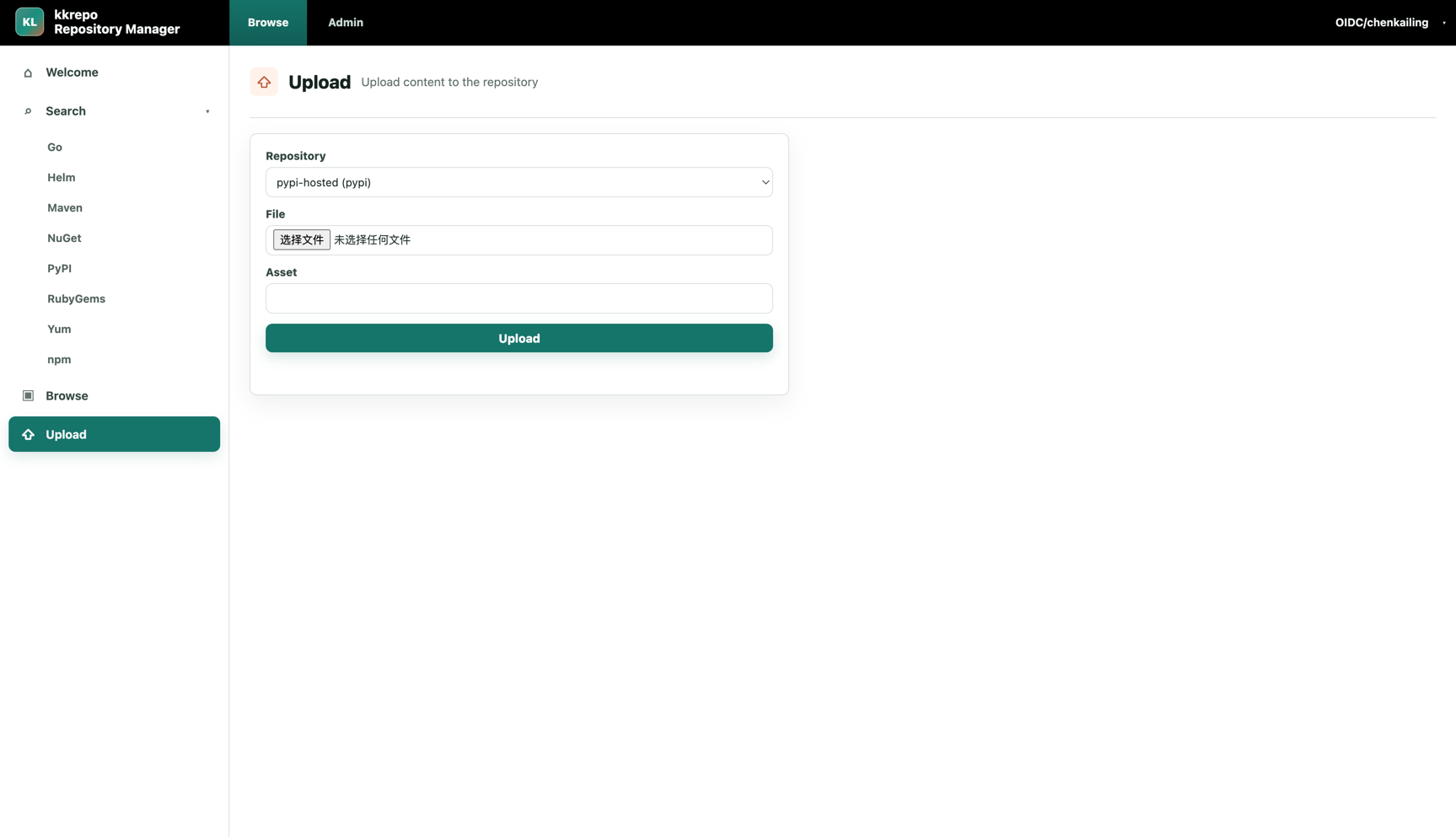
Admin UI
The admin UI is for repository administrators and focuses on repository configuration, storage health, security configuration, audit, and migration.
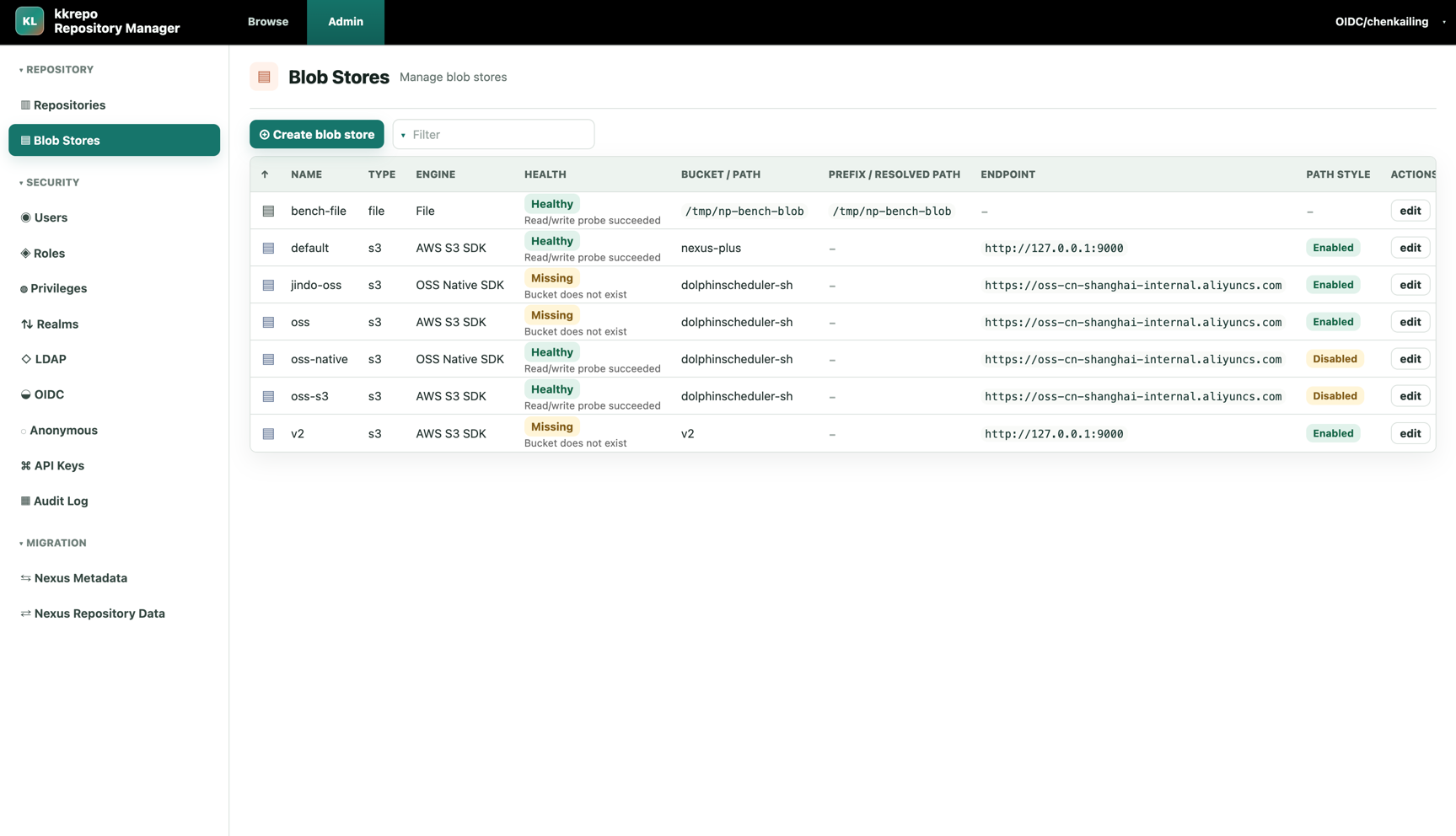
The Blob Store page supports OSS Native SDK, AWS S3 SDK, and File engines, and shows read/write probe health.
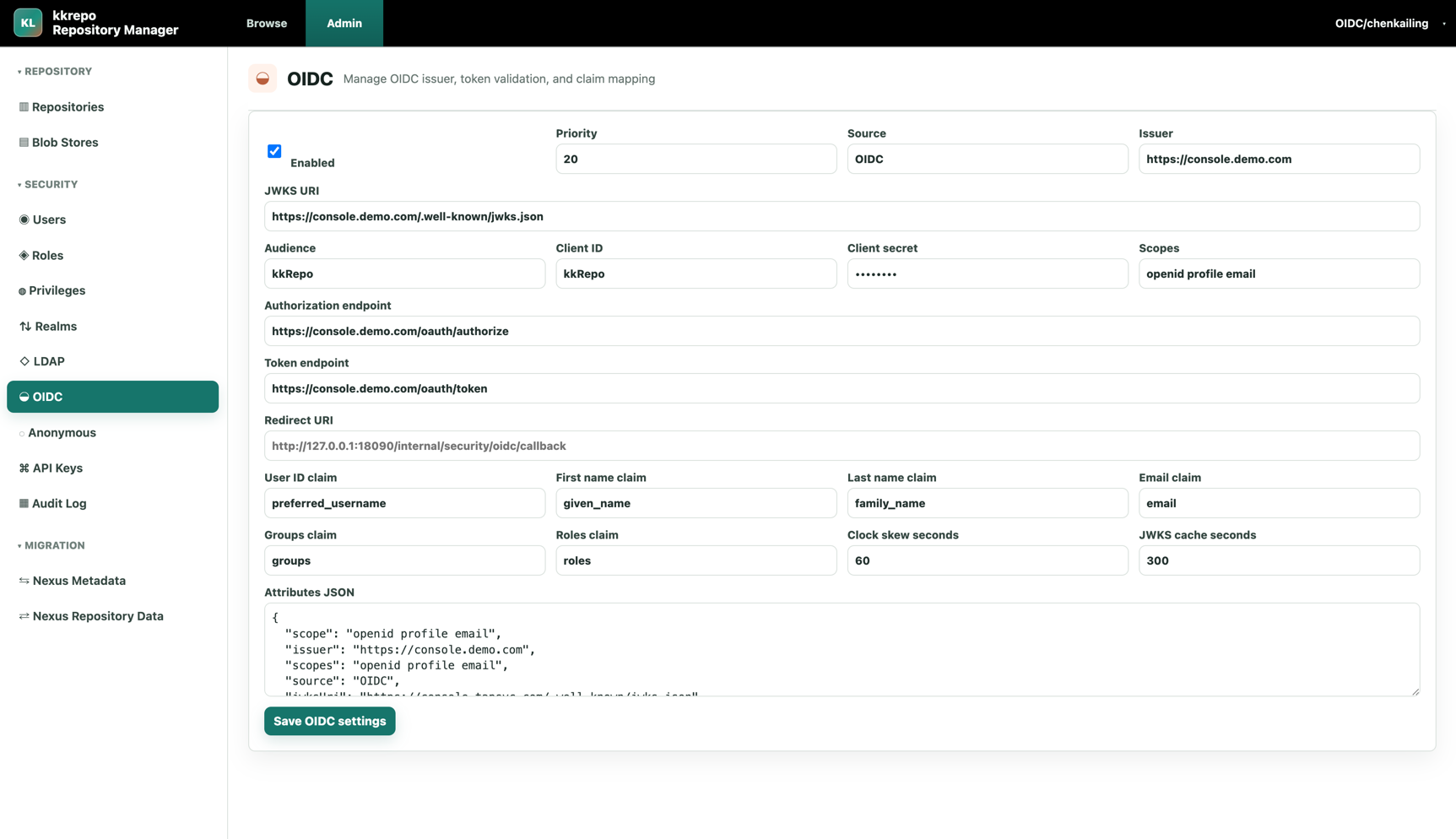
The OIDC page manages issuer, JWKS, client, scope, claim mapping, and token validation parameters for integrating with centralized identity systems.
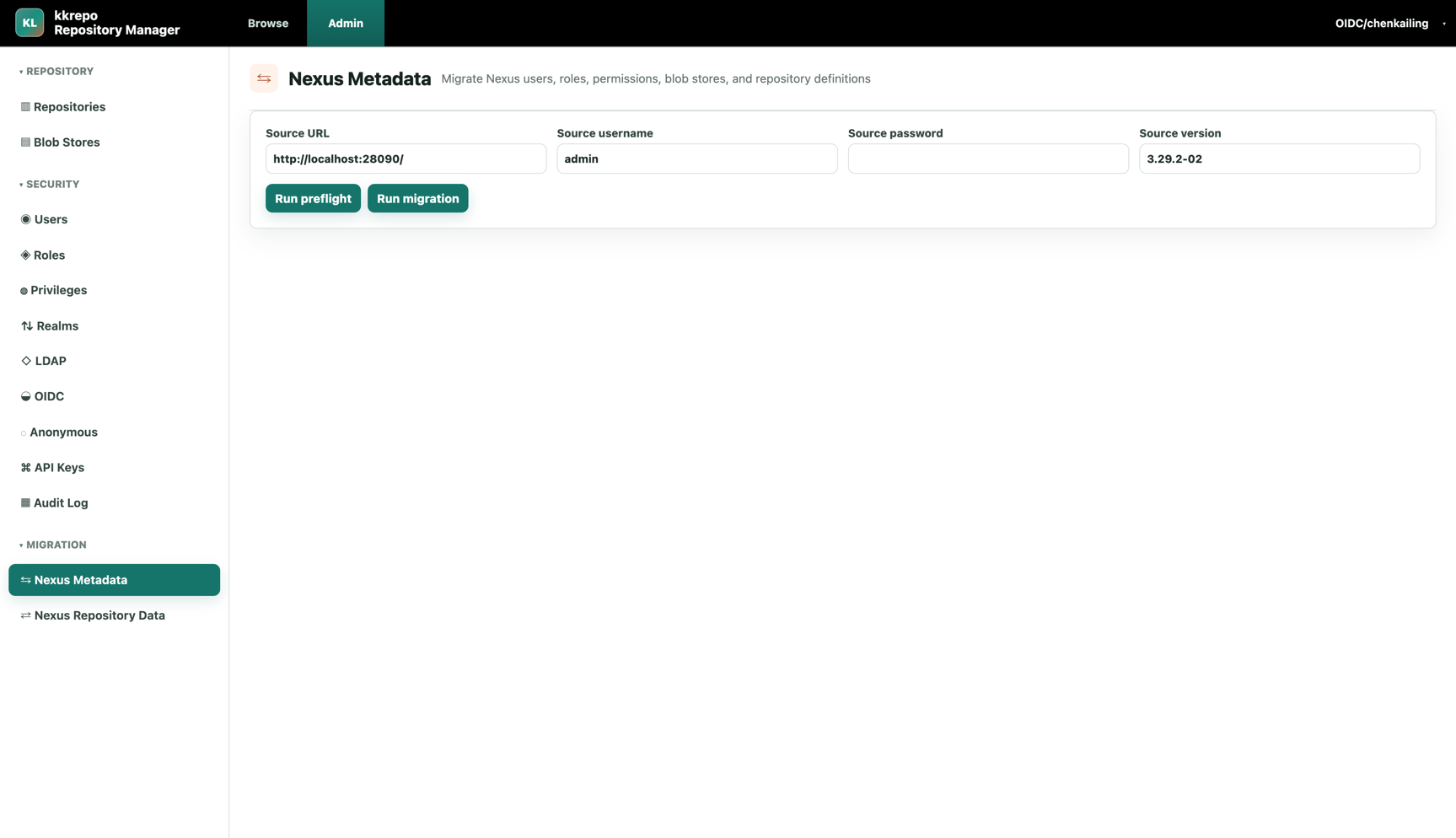
The Nexus Metadata migration page migrates users, roles, privileges, blob stores, and repository definitions, and supports preflight checks.
The Nexus Repository Data migration page shows hosted repository data migration tasks, concurrency settings, progress statistics, failure counts, and per-repository details.
AI agent and contributor development instructions are in AGENTS.md.
Roadmap
Repository format roadmap:
- Docker / OCI Registry - Completed (implementation notes)
- APT / Debian
- Cargo / Rust
- Terraform Provider / Module Registry
- Conan
- Conda
- Composer / PHP
Protocol and client compatibility backlog:
- RubyGems Bearer/API-key credential examples after client compatibility is verified.
Security
If you find a security issue, follow SECURITY.md and report it through GitHub Security Advisory first. Avoid disclosing exploitable details in public issues. Regular bugs, compatibility issues, and feature requests can be submitted as public issues.
Documentation
- Development Guide
- Build And Deployment Guide
- Client Recipes
- Architecture
- Compatibility Matrix
- Troubleshooting Guide
- Production Hardening Guide
- Backup And Restore Guide
- Security Model
- MySQL ER Design
- Nexus Migration Guide
- Nexus Migration Playbook
- Monitoring And Observability Guide
- Nexus Compatibility Testing
- FAQ
- Why We Built kkRepo
- Changelog
Comments