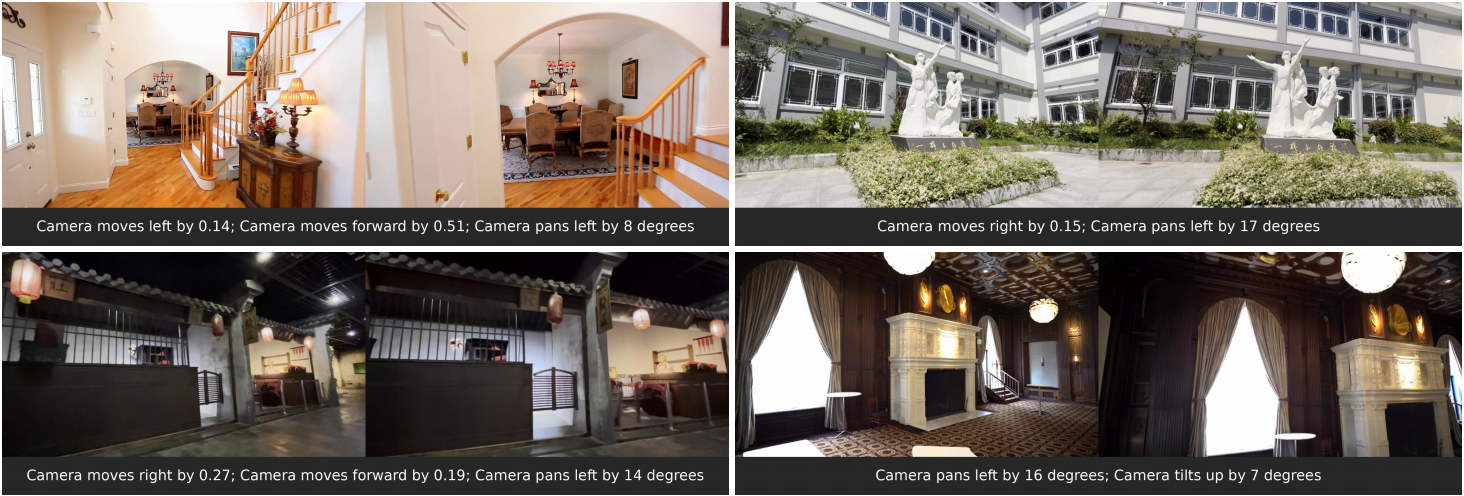
UniGeo is a Python-based framework for image editing that introduces camera-controllable manipulation using unified geometric guidance. Developed by researchers from Zhejiang University and Harvard University, it bridges image editing with 3D-aware video diffusion models—specifically built on Wan2.2-TI2V-5B and VGGT-1B. Unlike standard text-to-image or image-to-image models, UniGeo treats editing as a geometrically constrained process: users can adjust virtual camera parameters—such as pan, tilt, zoom, and roll—to reframe or reproject content within a source image, while preserving spatial consistency and scene geometry. This approach targets a niche but growing need: precise, geometry-aware editing without requiring 3D scene reconstruction or multi-view inputs.
What it does
UniGeo implements a unified geometric framework that maps 2D image edits to consistent 3D-like transformations using learned geometric anchors. Its core functionality includes:
- Camera-parameter editing: Users supply numeric values for camera pose (e.g., yaw, pitch, distance) to control how the output image is “viewed” relative to the input.
- Geometric anchor attention: A mechanism that aligns image features with geometric priors—though this is disabled by default in the main LoRA checkpoint to improve robustness on complex real-world images.
- VGGT-based normalization: Input images are preprocessed using VGGT to normalize geometric parameters across scale and resolution, enabling consistent inference.
- Dependency on video diffusion backbones: It builds on Wan2.2-TI2V-5B (a 5B-parameter text-to-video model) and VGGT-1B (a vision-geometry transformer), reusing their attention and temporal modules for static image editing.
- Landscape-first constraint: The framework requires input images with width ≥ height—portrait orientation is explicitly unsupported and may produce degraded outputs.
Getting it running
UniGeo runs on Linux with Python 3.9 and requires conda for environment management. The installation process is explicit about version compatibility, especially for PyTorch3D, which must be installed via conda using a package built for the exact combination of Python, CUDA, and PyTorch versions in use. As of the README, PyTorch 2.4.1, CUDA 12.1, and Python 3.9 are used in the example setup.
To begin:
git clone https://github.com/mo230761/UniGeo
cd UniGeo
conda create -n unigeo python==3.9
conda activate unigeo
pip install -r requirements.txt
Then, install PyTorch3D only via conda—no pip install is supported. For example, with CUDA 12.1 and PyTorch 2.4.1:
conda install /path/to/pytorch3d-0.7.8-py39_cu121_pyt241.tar.bz2
Pretrained weights must be downloaded separately. The primary UniGeo LoRA checkpoint is hosted on Hugging Face at 123123aa123/UniGeo. The Wan2.2-TI2V-5B and VGGT-1B models are also required and available at their respective Hugging Face links. A minimal inference dataset is included in example_dataset/, and users can run inference using the provided scripts—though the README does not list the exact command, the structure implies Python entrypoints tied to config files.
Who this is for
UniGeo targets researchers and developers working at the intersection of geometric computer vision and diffusion-based generative modeling. It is not a drag-and-drop editor for designers or photographers. Its inputs are numeric camera parameters—not brush strokes or masks—and its outputs assume familiarity with coordinate conventions, geometric normalization, and diffusion model limitations. Users need to understand why width ≥ height matters, how VGGT normalization affects scale, and why PyTorch3D version mismatches break the pipeline. The framework is also relevant for teams prototyping 3D-consistent editing interfaces, especially those already using Wan or VGGT models and seeking to extend them to static image control.
How it compares
UniGeo differs from mainstream image editing tools like InstructPix2D, DragGAN, or ControlNet-based editors. Those tools rely on segmentation masks, keypoint dragging, or conditional control (e.g., depth, Canny edges), but none expose explicit camera pose as an editable parameter. ControlNet supports camera conditioning in some forks, but not as a unified geometric framework—nor with VGGT normalization or Wan backbone integration. It’s also heavier than lightweight alternatives like T2I-Adapter or InstantX, both of which require less VRAM and avoid PyTorch3D entirely. The UniGeo Hugging Face Space demo runs on 23GB VRAM, signaling it’s built for high-end workstations—not laptops or consumer GPUs. It shares conceptual ground with projects like CAMS or ViewFormer, but those focus on view synthesis from single images rather than editing with user-controlled camera parameters.
UniGeo has 51 stars on GitHub and is distributed under no stated license in the repository. It is research code: the README documents known limitations, provides version-specific installation instructions, and directs users to its project page and arXiv paper for full methodological context. It does not offer Docker containers, Windows support, or CLI wrappers. If you want camera-parameter editing and already work with Wan or VGGT models, this framework provides a concrete, runnable starting point. If you need portrait support, low-VRAM inference, or GUI interaction, it is not the tool.
The project page is at https://mo230761.github.io/UniGeo.github.io/.
Comments