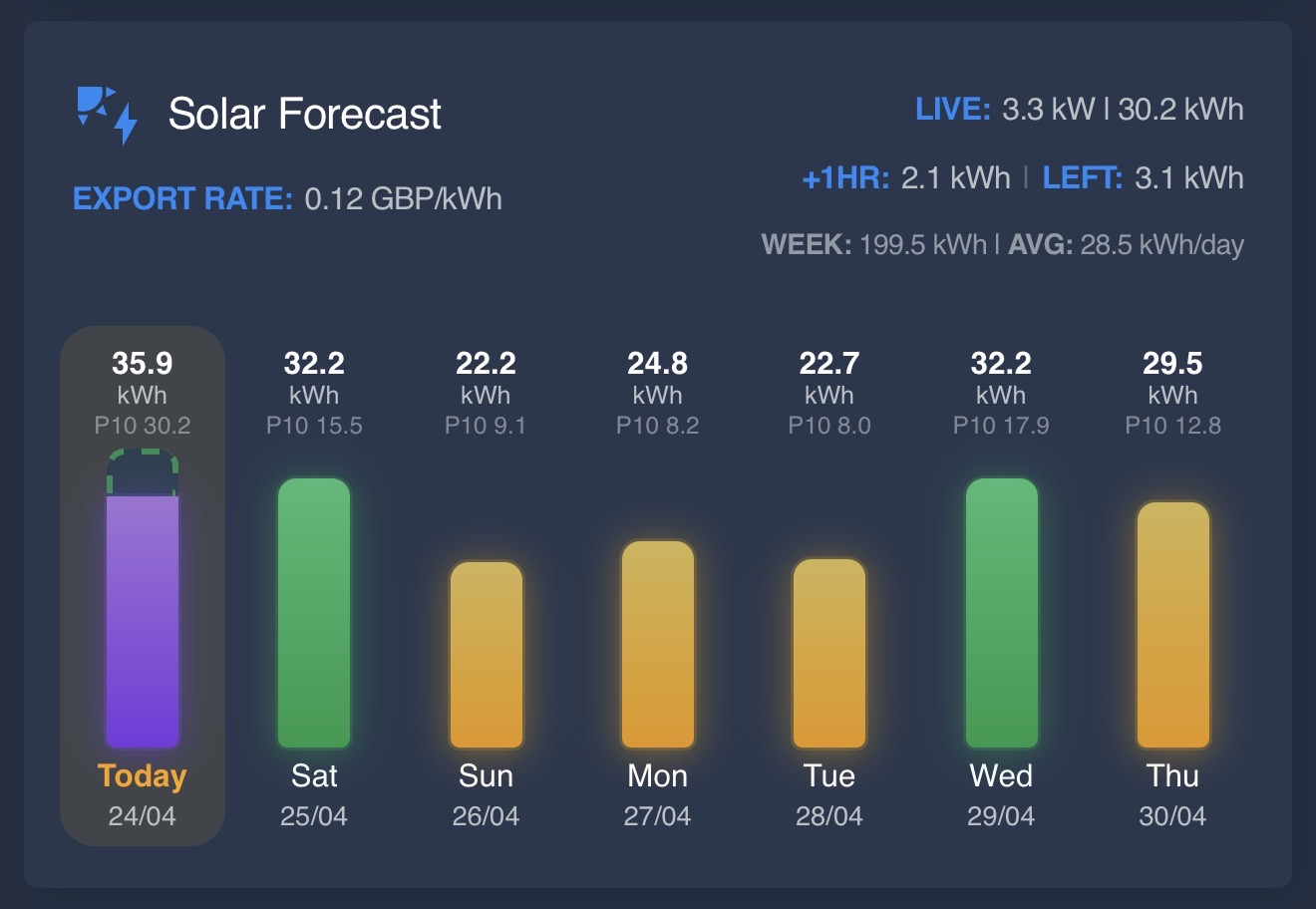
Solar Forecast Card provides a custom Lovelace card for Home Assistant users tracking solar energy production. It pulls forecast data from integrations such as Solcast, Volcast, Open-Meteo Solar Forecast, Forecast.Solar, and custom entities. The card displays this information in a compact dashboard view, with options for daily bars, hourly popups, and comparisons between predicted and actual generation. Hosted on GitHub at AshGSmith/solar-forecast-card, the TypeScript project has 85 stars.
Home Assistant setups with solar panels often rely on external services for production forecasts, but visualizing that data requires custom cards like this one. It simplifies integration by auto-mapping entities when users select a device from supported services in the card editor. The main card shows daily forecasts as horizontal bars, color-coded by expected output. A popup reveals hourly details for today, including time-formatted bars.
Core features
The card focuses on clear visualization of solar forecasts:
- Daily forecast bars: Horizontal bars represent today, tomorrow, weekdays, and totals or averages, pulled from integration entities.
- Hourly popup: Clicking a daily bar opens an hourly view for that day, with 12h or 24h time formatting based on Home Assistant settings.
- Actual vs. forecast comparison: In the hourly popup, measured generation appears as a slim bar below the forecast, colored red (below), amber (matching), or green (above).
- Current hour highlight: The ongoing hour gets a visual emphasis in the popup, with alignment tweaks for consistent row padding.
- Entity support: Includes options for
export_rate_entity,next_hour_entity,remaining_today_entity, andactual_arraysfor stacked per-array bars.
Screenshots in the repository show the main view with bars labeled "live," "today," "week average," and "export rate," alongside a popup with hourly bars up to 48 hours ahead.
Recent updates
Development emphasizes usability and localization. Version 1.4.0-beta.08 fixed current-hour highlight alignment to keep row padding and value positions consistent. Earlier betas in the 1.4.0 series added full Home Assistant locale support, covering all frontend languages with JSON files like de.json for German. A build-time validation script checks for JSON errors, missing keys, or extras.
Beta.03 introduced show_hourly_as_main, which swaps the daily bars for today's hourly chart directly on the main card, reusing popup logic for actual-vs-forecast display. Version 1.3.2 removed an unintended debug label from 1.3.1—a green ↑X.X kWh overlay on today's column. Other 1.3.x changes added desktop text scaling via desktop_text_scale, manual integration_type overrides, and improved Solcast attribute handling with fallbacks like detailedForecast or hours.
These updates address common pain points, such as inconsistent scaling or language mismatches in multilingual setups.
Getting it running
Installation targets Home Assistant Lovelace dashboards, with HACS as the recommended method.
Via HACS
- Open HACS in Home Assistant.
- Click the ⋮ button (top right) and select Custom repositories.
- In the Repository field, enter
https://github.com/AshGSmith/solar-forecast-card. - Set Category to Lovelace.
- Click Add.
HACS will list the repository under Frontend. Search for "solar forecast" and install it. Restart Home Assistant or reload resources if needed.
After installation, add the card via the UI editor:
- Edit your Lovelace dashboard.
- Click + Add Card > Custom: Solar Forecast Card.
- Select your integration device (e.g., from Solcast or Volcast) for auto-entity mapping.
- Tweak options like
show_hourly_as_main: trueor entity IDs for custom setups.
Manual installation skips HACS: Download dist/solar-forecast-card.js from releases and place it in /config/www/. Then add via resources: Settings > Dashboards > Resources > + Add Resource, URL /local/solar-forecast-card.js, type JavaScript Module.
Configuration uses YAML or the visual editor. Example for Solcast:
type: custom:solar-forecast-card
entity: sensor.solcast_site_power_today  # Auto-maps others
show_hourly_as_main: false
desktop_text_scale: 1.0
The editor includes a temporary language override for testing locales during setup.
Who this is for
Home Assistant users with rooftop solar and forecasting integrations benefit most. If you run Solcast for detailed hourly predictions, Volcast for free EU data, or Open-Meteo for open-source forecasts, this card consolidates the output without multiple sensors cluttering your dashboard. It's suited for those monitoring export rates, remaining daily production, or per-array stacks in multi-panel systems.
Real-world use includes daily planning—check tomorrow's bars to anticipate grid export—or troubleshooting, where hourly actual-vs-forecast reveals over/under-predictions. Self-hosters valuing TypeScript-based, lightweight cards (no heavy dependencies beyond HA frontend) find it straightforward. With 85 GitHub stars, it serves a niche but active community focused on energy dashboards.
How it compares
Few Lovelace cards specialize in solar forecasts. Home Assistant's built-in energy dashboard handles consumption but lacks dedicated forecast visualization. Custom cards like Mini Graph Card or Apex Charts offer generic graphing, but require manual entity configuration without auto-mapping for Solcast devices.
This card stands out for integration-specific smarts, like Solcast detailedForecast fallbacks, and features like actual coloring— absent in broader tools. It's lighter than full plotting libraries, prioritizing a single-purpose view. Drawbacks include beta-stage localization (full in 1.4.0) and no native support for non-listed integrations without manual entities.
For broader energy views, combine with Forecast.Solar's own cards or the HA solar integration, though those miss the popup depth.
Solar Forecast Card suits Home Assistant solar enthusiasts needing quick forecast glances. Source code and issues live at https://github.com/AshGSmith/solar-forecast-card. Those wanting built-in HA energy panels or non-Lovelace setups should look elsewhere.
Comments