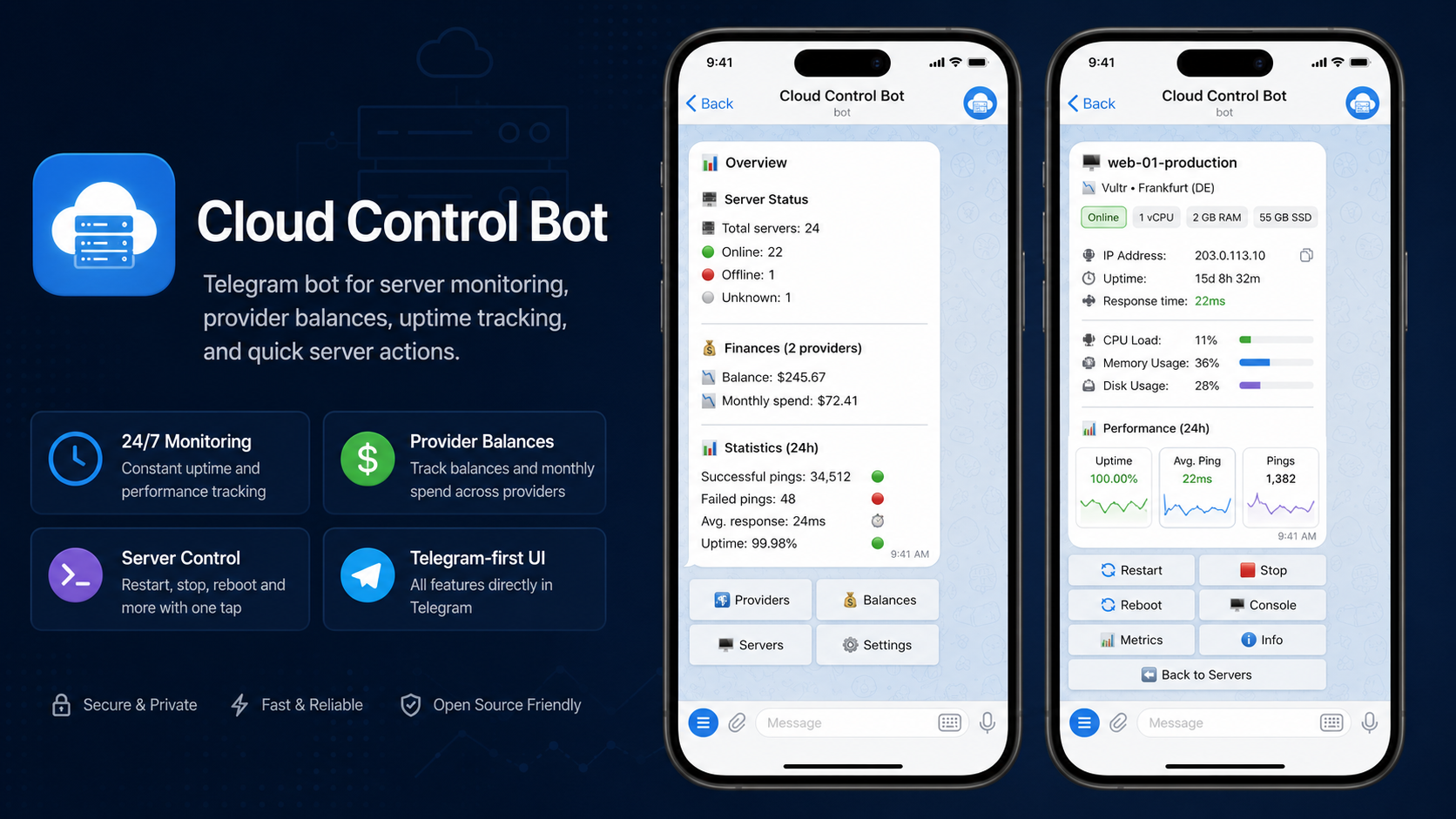
Cloud Control Bot
Monitor uptime, power-control, and track costs of your cloud servers — all from Telegram. Vultr · Hetzner · AWS
Features · Providers · Installation · Configuration · Running · Windows · Deployment · Adding a provider · Development · Troubleshooting
A Telegram bot to monitor, power-manage, and track the cost of your cloud servers across Vultr, Hetzner, and AWS. It watches your instances around the clock via ICMP ping, alerts you the moment one goes down (or comes back), lets you start / stop / reboot servers straight from chat, and keeps an eye on provider balances and costs.
Built on aiogram 3.x, with one isolated worker process per server, supervised background tasks, and heartbeat-based stall detection for unattended 24/7 operation.
The bot's user-facing text is available in English, Russian, Ukrainian, and Spanish — default English, with each user picking their language in Settings (or
/language). The code, docstrings, and this documentation are in English.
Features
- Multi-provider monitoring — Vultr, Hetzner Cloud, and AWS (EC2 + Lightsail) side by side.
- Multi-account support — several API keys per provider, auto-discovered from environment variables (no manual provider list to maintain).
- Per-server ping workers — each enabled server is monitored by its own isolated process; one crash never takes down the others.
- Instant up/down alerts — delivery-confirmed notifications with per-direction cooldowns and debouncing of transient provider failures (alerts only on sustained outages).
- Power management from chat — start, stop, reboot, and graceful (ACPI) shutdown where the provider supports it.
- Multilingual UI (EN / RU / UK / ES) — per-user language selection persisted across restarts; even background alerts are rendered in each recipient's own language.
- Balance & cost tracking — prepaid balance for Vultr, monthly costs via AWS Cost Explorer, with low-balance threshold alerts.
- Statistics — hourly availability stats and ping-error history persisted in SQLite.
- Self-healing — a supervisor restarts crashed background tasks and reconciles missing workers; subsystem health (queue fill, live worker count, manager liveness) is monitored.
Supported providers
| Provider | Instances | Balance / cost | Graceful shutdown |
|---|---|---|---|
| Vultr | Cloud Compute | Prepaid balance | No |
| Hetzner | Cloud | Postpaid (no balance API) | Yes |
| AWS | EC2 + Lightsail | Postpaid (AWS Cost Explorer) | EC2 only |
Architecture
main.py (main process)
|
+-- ApplicationContainer (DI: settings -> repos -> providers -> PingManager -> bot)
|
+-- PingManager
|   +-- one worker process per enabled server
|   +-- ping_results_queue   (IPC Queue: results -> main process)
|   +-- shared_state         (DictProxy: current status sync)
|
+-- up to 5 supervised background tasks
|   +-- ping_results_processor  reads the queue, writes SQLite, sends notifications
|   +-- balance_checker         polls balances, alerts below threshold (only if a provider exposes balance)
|   +-- servers_sync_task       syncs the server list with provider APIs
|   +-- workers_health_task     monitors + reconciles worker processes
|   +-- log_cleanup_task        removes rotated logs
|
+-- supervisor + heartbeat registry
|   crash -> CRITICAL log + alert + recreate; stale heartbeat -> alert
|
+-- Telegram bot (aiogram polling)
Servers are identified by a composite key f"{provider_alias}:{server_id}"
(e.g. hetzner_prod:12345, aws_main:us-east-1:i-0123456789abcdef), which keeps
instances from different accounts and regions cleanly separated.
Project layout
src/
+-- config/          settings (Pydantic), config.yaml, provider auto-discovery
+-- providers/       BaseProvider + Vultr / Hetzner / AWS, factory, manager, mixins
+-- monitoring/      PingManager and the per-server ping worker
+-- background_tasks/ ping processor, balance checker, sync, health, supervisor, heartbeat
+-- bot/             routers, formatters, keyboards, middlewares, notifications, utils
+-- storage/         JSON + SQLite repositories (servers, balance, statistics)
+-- models/          Server, Provider, PingResult, billing models
+-- utils/           logging, log cleanup
+-- container.py     application container / wiring
+-- exceptions.py    typed exception hierarchy
main.py              entry point
Requirements
- Python 3.12+ (CI runs the suite on 3.12 and 3.13).
- Raw-socket / ICMP privileges. ICMP ping requires the
CAP_NET_RAWcapability:- Linux: run as root, or grant the capability once with
sudo setcap cap_net_raw+ep $(readlink -f $(which python3)). Note asetcapgrant is invalidated whenever the interpreter is replaced (a pip/apt upgrade or venv rebuild) and applies to every script that interpreter runs — for a real deployment prefer the scoped capability of the Docker (cap_add: NET_RAW) or systemd (AmbientCapabilities=CAP_NET_RAW) setups below. - Windows: run the terminal / service as Administrator.
- Linux: run as root, or grant the capability once with
- API credentials for at least one provider (see below).
Installation
git clone https://github.com/kirillDevPro/cloud-control-bot.git
cd cloud-control-bot

python -m venv venv
source venv/bin/activate
# Windows (PowerShell):
.\venv\Scripts\Activate.ps1
# Windows (Git Bash):
source venv/Scripts/activate

pip install -r requirements.txt
Configuration
Configuration comes from two sources, with the following priority:
environment variables (.env) > src/config/config.yaml > built-in defaults
1. Secrets — .env
Copy the template and fill it in:
cp .env.example .env
TELEGRAM_BOT_TOKEN=123456:your-bot-token   # from @BotFather
ADMIN_IDS=123456789                         # Telegram user IDs, comma-separated

# Providers are auto-discovered from variable names:
HETZNER_PROD_API_KEY=...        # -> alias "hetzner_prod"
VULTR_MAIN_API_KEY=...           # -> alias "vultr_main"
AWS_MAIN_ACCESS_KEY_ID=...       # -> alias "aws_main" (both AWS keys required)
AWS_MAIN_SECRET_ACCESS_KEY=...
Provider auto-discovery
The bot detects providers from the shape of your environment variables — there is no provider list to maintain by hand:
| Pattern | Resulting alias |
|---|---|
HETZNER_{SUFFIX}_API_KEY |
hetzner_{suffix} |
VULTR_{SUFFIX}_API_KEY |
vultr_{suffix} |
AWS_{SUFFIX}_ACCESS_KEY_ID + AWS_{SUFFIX}_SECRET_ACCESS_KEY |
aws_{suffix} |
{SUFFIX} matches [A-Z0-9_]+ (the full pattern is e.g. ^HETZNER_([A-Z0-9_]+)_API_KEY$).
The display name is generated automatically: Hetzner (prod), Vultr, AWS (prod), etc.
The suffix main is hidden, so VULTR_MAIN_API_KEY simply shows as Vultr. Add a second
account by adding another suffix, e.g. HETZNER_STAGING_API_KEY.
2. Non-secrets — src/config/config.yaml
Ping intervals, balance threshold, sync interval, and log level:
monitoring:
  ping_interval: 60     # seconds between pings (10-3600)
  ping_timeout: 5       # ping timeout in seconds (1-30)
  ping_attempts: 3      # attempts before marking offline (1-10)
balance:
  threshold: 2000.0     # low-balance alert threshold (USD)
  check_interval: 10800 # balance poll interval (seconds)
sync:
  servers_interval: 600 # server-list sync interval (seconds)
logging:
  level: INFO           # DEBUG, INFO, WARNING, ERROR, CRITICAL
Running
python main.py

# with debug logging:
LOG_LEVEL=DEBUG python main.py
In Telegram, open the bot and use /start. The main menu exposes Monitoring,
Management, and Balance. Only the user IDs listed in ADMIN_IDS are allowed in.
Runtime data lives in data/ (server cache, balance history, SQLite statistics, callback
cache) and logs in logs/ — both are gitignored and safe to delete to reset state.
Running on Windows
The bot runs on Windows Server 2016 and newer (2019 / 2022 / 2025) and Windows 10 / 11 —
anything Python 3.12+ installs on. There is no separate Windows build; python main.py is identical
on every platform, and multiprocessing uses the native spawn start method.
One Windows-specific requirement: run it as Administrator. ICMP ping uses raw sockets, which on Windows are only available to elevated processes. Without admin rights every ping fails and all servers are reported offline. Start an elevated terminal ("Run as administrator"), then:
.\venv\Scripts\Activate.ps1
python main.py
For unattended 24/7 operation, register it as a Windows service that restarts on crash and runs elevated — Task Scheduler (built in: Run with highest privileges + Run whether user is logged on or not) or a service wrapper such as NSSM both work.
Deployment (24/7)
For unattended operation, run the bot under a process manager that restarts it on
crash — the in-app supervisor only restarts background tasks, not the main.py
process itself.
Docker (recommended)
cp .env.example .env   # fill in your tokens/keys
docker compose up -d --build
docker compose logs -f
The provided docker-compose.yml reads secrets from .env, runs the process
unprivileged with only CAP_NET_RAW (for ICMP), persists data/ and logs/ in named
volumes, and restarts automatically (restart: unless-stopped).
systemd (without Docker)
A sample unit lives at deploy/cloud-control-bot.service.
It restarts the process on failure and grants CAP_NET_RAW via AmbientCapabilities
(no setcap needed). Adjust the paths/user, then:
sudo cp deploy/cloud-control-bot.service /etc/systemd/system/
sudo systemctl daemon-reload
sudo systemctl enable --now cloud-control-bot
journalctl -u cloud-control-bot -f
Adding a new provider
- Create a subclass of
BaseProvider, RetryMixin, HttpClientMixininsrc/providers/. - Implement
get_servers(),start_server(),stop_server(),reboot_server(),shutdown_server(), and optionallyget_balance(). - Add the type to the
ProviderTypeenum (src/models/provider.py) and register it inProviderFactory(src/providers/factory.py). - Add the env-var pattern to
src/config/provider_discovery.py.
Development
Install the pinned dev tools (ruff, mypy):
pip install -r requirements-dev.txt
Then run the same checks CI runs (ruff/mypy configured in pyproject.toml):
ruff check src main.py scripts/check_i18n_locales.py
mypy src main.py scripts/check_i18n_locales.py
python scripts/check_i18n_locales.py   # EN/RU/UK/ES locale parity
All three run automatically in CI on every push and pull request, across Linux and Windows on Python 3.12 and 3.13.
Troubleshooting
PermissionError/ "Operation not permitted" on ping, or every server shows offline. The process lacks raw-socket privileges — see Requirements (Linuxsetcap/CAP_NET_RAW, Windows Administrator).- The bot ignores you / "access denied". Your Telegram user ID isn't in
ADMIN_IDS. Get your ID from @userinfobot and add it (comma-separated) in.env, then restart. - No providers detected. Check the env-var shape: Hetzner/Vultr need
*_API_KEY, AWS needs both*_ACCESS_KEY_IDand*_SECRET_ACCESS_KEYfor the same suffix (see Provider auto-discovery).
Security
The bot holds cloud-provider API keys and can power-manage live servers. See SECURITY.md for the disclosure process and operator hardening notes.
Comments