
DockTUI is a fast, zero-dependency terminal dashboard for monitoring, debugging, and managing local Docker containers and images. It is written in pure Python, talks to Docker through the Docker CLI, and keeps your existing Docker permissions and context intact.
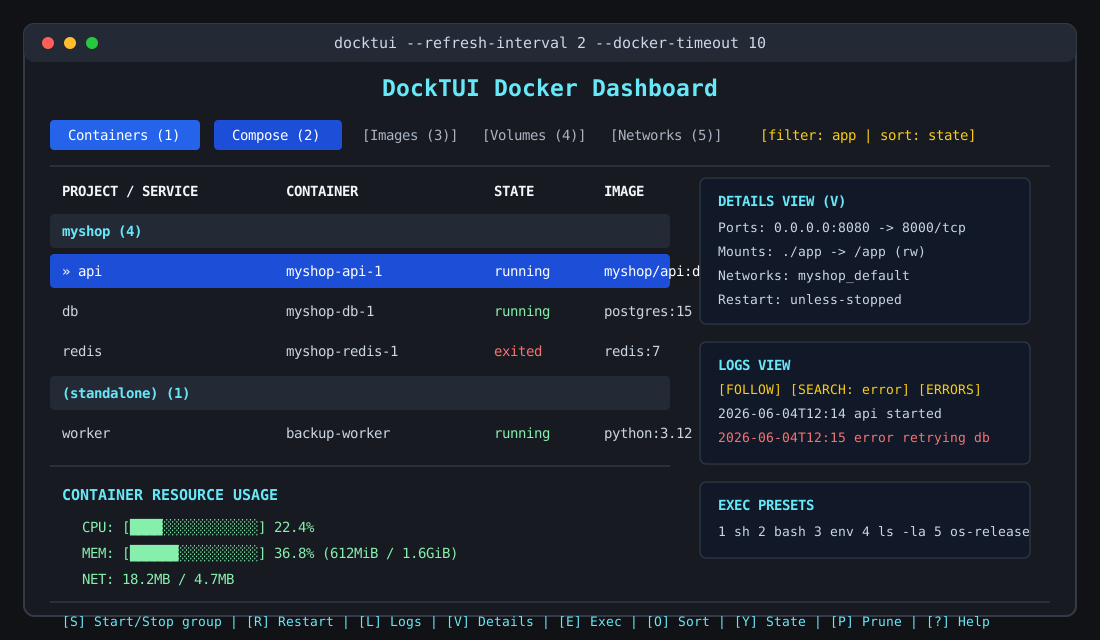
Use DockTUI when you want something richer than repeated docker ps, docker stats, and docker logs, but lighter than a web dashboard or a heavyweight TUI framework.
Why DockTUI?
- Zero runtime dependencies: install the package and run it. No Docker SDK, no TUI framework, no daemon sidecar.
- Docker-native behavior: DockTUI wraps the Docker CLI, so it respects your current Docker context, permissions, and platform setup.
- Practical workflows: start, stop, restart, rename, inspect, tail logs, execute commands, browse images, volumes, networks, and review disk usage from one terminal screen.
- Compose-aware dashboard: containers are grouped by Docker Compose project and service labels when available.
- Safe cleanup flow: destructive cleanup requires explicit confirmation and supports separate system, image, volume, and full prune actions.
- Friendly codebase: small pure-Python modules, unit tests with subprocess mocking, and CI on Linux, macOS, and Windows.
Key Features
| Area | What DockTUI gives you |
|---|---|
| Docker dashboard | Containers, Compose groups, images, volumes, and networks in one terminal UI. |
| Daily actions | Start, stop, restart, rename, inspect, delete images/volumes, and run safe prune flows. |
| Logs | Follow mode, search, next-match navigation, error/warning-only filtering, and adjustable tail size. |
| Exec | Preset, recent, and custom commands inside running containers. |
| Details | Readable container summary for ports, mounts, env, labels, networks, and restart policy. |
| Zero dependencies | Pure Python standard library implementation; no Docker SDK or TUI framework required. |
DockTUI vs alternatives
| Tooling style | Best for | Tradeoff |
|---|---|---|
docker ps, docker logs, docker stats |
Maximum control and scripting | Repetitive for day-to-day monitoring |
| Web dashboards | Rich graphical management | Heavier setup and more moving parts |
| Full-featured TUI managers | Broad Docker workflows | Often depend on larger external runtimes |
| DockTUI | Lightweight local monitoring and quick actions | Intentionally focused on common local Docker tasks |
Installation
Install the latest code from GitHub:
pip install git+https://github.com/strmax195-hue/docktui.git
Local development:
git clone https://github.com/strmax195-hue/docktui.git
cd docktui
pip install -e .
Usage
Simply run:
docktui
Useful options:
docktui --version
docktui --refresh-interval 5
docktui --docker-timeout 15
Hotkeys & Keyboard Navigation
Global Controls
Tabor1-6: Switch between Containers, Compose, Images, Volumes, Networks, and Contexts tabs.↑/↓(Arrow Keys) or Mouse Scroll Wheel: Navigate list items and scroll text logs.G: Force refresh data.?: Open the in-app keyboard help screen.Q: Exit DockTUI.
Containers & Compose Tabs
S: Start or Stop the selected container.Son a Compose project row: Start or stop all containers in that project group.R: Restart the selected container or selected Compose project group.L: Open fullscreen interactive Logs View (opens aggregated logs when a Compose project row is selected).V: Open readable Details View.I: Open fullscreen interactive Inspect View.T: Open processes running inside the container (Top View).E: Execute a shell command inside the running container (Exec View).N: Rename the selected container./: Filter the containers grid by name/image.C: Clear the active container filter.O: Cycle sort mode.Y: Cycle state filter.P: Open System Disk Usage & Cleanup Dashboard.
Images Tab
D: Delete the selected image (asks for confirmation).P: Open System Disk Usage & Cleanup Dashboard.
Volumes Tab
D: Delete the selected volume (asks for confirmation).P: Open System Disk Usage & Cleanup Dashboard.
Contexts Tab
U: Switch active Docker context to the selected context.
In-View Navigation (Logs, Inspect, Exec, Details, Top, System Views)
↑/↓(Arrow Keys) or Mouse Scroll Wheel: Scroll content.Escor View Key: Return back to the main dashboard.- Logs View Features:
F: Toggle follow mode to keep refreshing and pinning logs to the newest lines.Space: Pause follow mode./: Search/filter logs for specific terms.N: Jump to the next search match.E: Toggle error/warning-only log lines.O: Export the current logs buffer to a local file.C: Clear active log filters.+/-: Increase/decrease log line retrieval limits.
- Inspect, Details, Top Views:
O: Export the current view buffer to a local file.
- Exec View Features:
R: Re-run the current command.E: Execute a new preset, recent, or custom command.
- System View Features:
X: Triggerdocker system prune -fafter typingPRUNE.I: Triggerdocker image prune -fafter typingIMAGES.V: Triggerdocker volume prune -fafter typingVOLUMES.A: Triggerdocker system prune -f --volumesafter typingALL.
Technical Architecture
DockTUI interfaces directly with the local Docker daemon by wrapping the docker command-line utility via subprocess execution. This guarantees that your existing Docker configurations, permissions, and security context are preserved without requiring complex SDK setups or elevated privilege daemons.
It implements a non-blocking cross-platform input capturing loop using:
msvcrton Windows.select,termios, andttyon Unix systems (Linux/macOS).
Running Tests
DockTUI includes an isolated unit test suite covering client operations via subprocess mocking, meaning you can run tests without a running Docker daemon:
python -m unittest discover tests
On Windows, py -m unittest discover tests also works when the Python launcher is installed.
Roadmap
See ROADMAP.md for planned improvements, including richer Compose actions, detail views, export workflows, and theme polish.
Releases
Release notes live in CHANGELOG.md. Maintainers can use docs/release-checklist.md when cutting GitHub releases.
Comments