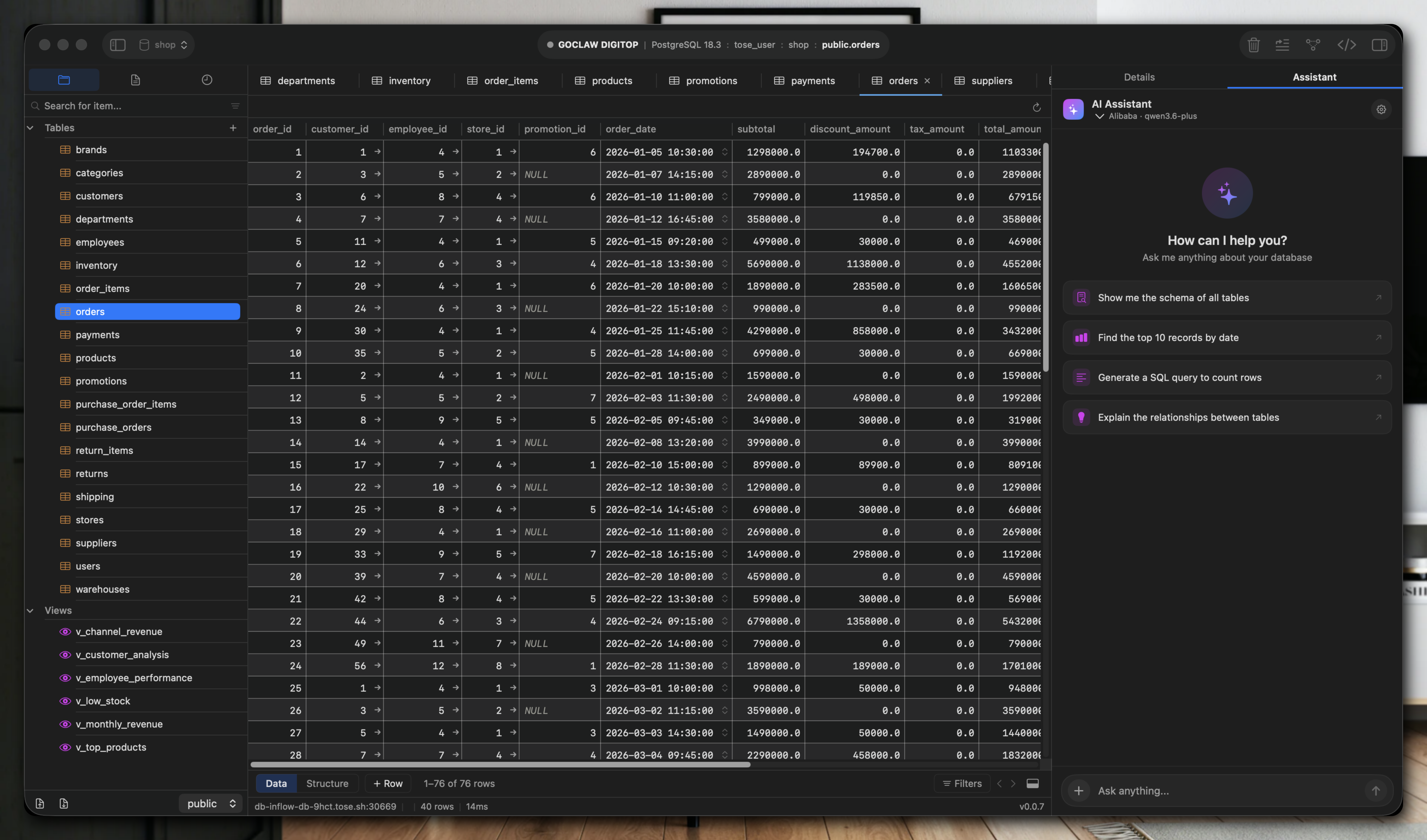
Gridex is a database IDE for macOS, Windows, and Linux that connects to PostgreSQL, MySQL, SQLite, Redis, MongoDB, SQL Server, and ClickHouse. It runs as a native application on each platform, using AppKit for macOS, WinUI 3 for Windows, and Qt 6 for Linux. This avoids Electron or web views in the data grid, providing direct performance for query editing and navigation.
The app bundles seven database drivers into a single binary. Each driver follows a shared DatabaseAdapter protocol with around 50 methods, so features like the grid view, query editor, ER diagrams, backups, and MCP integration work consistently across engines. An AI chat connects to models such as Claude, GPT, Gemini, or Ollama, allowing them to inspect schemas, execute read-only queries, and generate SQL tied to a specific connection. A built-in MCP server exposes 13 tools over stdio, compatible with clients like Claude Desktop or Cursor, under a three-tier permission model with audit logs.
Supported Databases
Gridex handles these engines:
- PostgreSQL (with sequences)
- MySQL
- SQLite
- Redis (SCAN operations)
- MongoDB (aggregations)
- SQL Server (stored procedures)
- ClickHouse (MergeTree mutations; macOS-only for now)
Linux and Windows support six of these, omitting ClickHouse temporarily. The unified protocol ensures identical behavior where possible, such as grid rendering or backups.
Core Features
Gridex emphasizes a keyboard-driven interface for speed. Key elements include:
- Native rendering: No web tech for the core grid, leading to responsive handling of large result sets.
- AI schema awareness: Select a connection, and the AI reads tables to suggest or validate SQL.
- MCP integration: Start the built-in server to pipe tools into external apps, with permissions controlling read/write/execute actions.
- Cross-engine tools: ER diagrams, query history, and backups adapt to each database's primitives.
- Self-updating binaries: macOS uses Sparkle, Windows Velopack, Linux a JSON feed.
These draw from the app's focus on developer workflows, like quick schema exploration or AI-assisted refactoring.
Getting It Running
No compilation is needed; Gridex distributes ready-to-run binaries. Download from the official page or GitHub releases.
For macOS 14+ (universal for Apple Silicon and Intel): Grab Gridex-0.0.11-universal.dmg from https://cdn.gridex.app/macos/Gridex-0.0.11-universal.dmg. It's signed, notarized, and updates automatically via Sparkle. Mount the DMG, drag Gridex to Applications, and launch.
Windows 10/11: Use the Velopack installer at https://cdn.gridex.app/windows/Gridex-stable-Setup.exe. Run the EXE, follow the prompts, and it handles updates.
Linux (x86_64, Qt 6): Fetch the AppImage from https://cdn.gridex.app/linux/Gridex-latest-x86_64.AppImage. Make it executable with chmod +x Gridex-latest-x86_64.AppImage, then run ./Gridex-latest-x86_64.AppImage. Updates pull from a JSON feed.
Check https://github.com/gridex/gridex/releases for deltas, checksums, or older versions. Swift 5.10 underpins parts of the stack, per the badges, with the project under Apache 2.0 license. Join the Discord at https://discord.gg/UuV2Ktc6 for support.
Once open, add connections via host, port, credentials, and database name. The interface shows a sidebar for schemas, a central query editor, and bottom grid for results. Keyboard shortcuts handle navigation, like Cmd/Ctrl+Enter for execution.
Who This Fits
Developers managing multiple database types benefit most. A team using PostgreSQL for the main app, Redis for caching, and ClickHouse for analytics gets one tool instead of juggling separate clients. The AI chat suits solo users prototyping queries or debugging schemas without leaving the app.
Database administrators appreciate the native speed for large dumps or ER diagrams. For example, SQL Server users access stored procedures directly, while MongoDB folks run aggregations in the grid. The MCP server appeals to those integrating with IDEs like Cursor, where Gridex acts as a backend for database tools.
If your workflow spans platforms—say, macOS daily but Linux servers—cross-compatibility keeps things consistent. It's less ideal for mobile or browser-only setups, as it's desktop-bound.
How It Compares
Gridex differs from Java-based tools like DBeaver, which run anywhere but carry JVM overhead. DBeaver covers similar databases with plugins, yet Gridex's native UIs respond faster on result grids, especially for Redis key scans or ClickHouse mutations.
Electron apps such as DataGrip alternatives or dbt clients feel heavier due to web rendering; Gridex skips that for direct toolkit drawing. TablePlus (macOS-focused) matches native feel but lacks Linux/Windows and AI/MCP. It's lighter than full IDEs like DataGrip, which add indexing at a resource cost.
On multi-DB support, it matches Postico or pgAdmin for Postgres depth but extends to NoSQL like Redis/MongoDB with tailored ops. The AI edge—models querying live schemas—sets it apart from static tools. At 429 GitHub stars, it's early but active.
Gridex suits cross-platform database work with native performance and AI tools. Source code sits at https://github.com/gridex/gridex; try the binaries if this matches your stack.
Comments