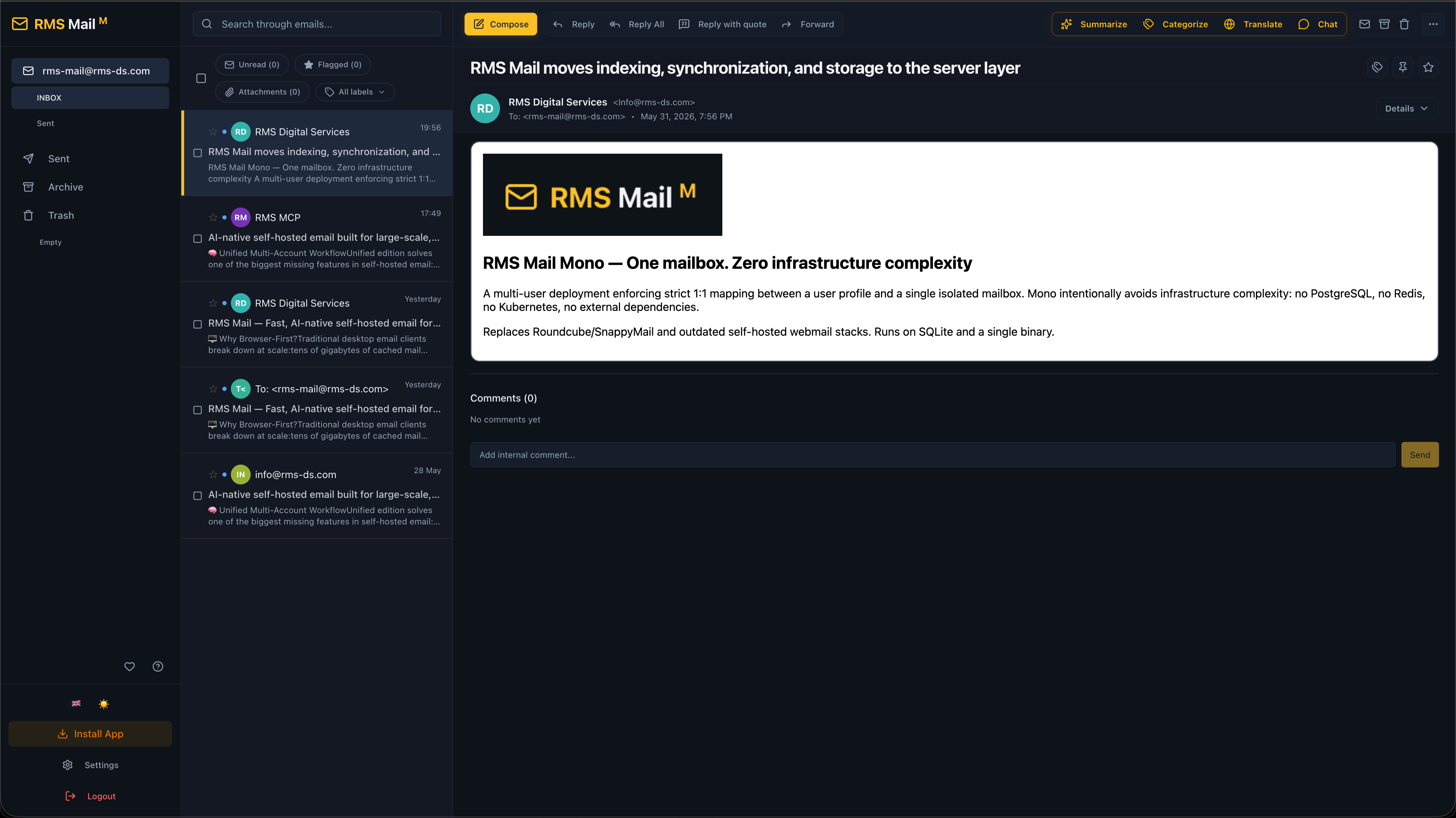
High-performance self-hosted email built for large-scale, multi-account workflows.
Built for developers, operators, and power users managing real-world workloads at scale.
Supercharged with an optional AI module, because modern email outgrew traditional webmail clones years ago.
🚧 Current State
RMS Mail is actively developed and already used in real-world workflows.
Current status:
- Mono edition: Release Candidate
- Unified edition: In active development
- Teams edition: Planned
The project currently prioritizes:
- core stability
- large-mailbox performance
- AI workflows
- infrastructure reliability
- workflow ergonomics
Documentation, walkthrough videos, and deployment guides are currently being expanded.
📑 Table of Contents
- 🖥️ Why Browser-First?
- 💡 Why RMS Mail Exists
- 🚀 What Makes RMS Mail Different?
- 🧠 The Programmable Inbox
- 🛠️ Inbox Mastery at Scale
- 👥 Who is this for?
- 🎯 Editions
- 🏗️ Architecture & Tech Stack
- ⚡ Vector Search & Performance Pipeline
- 📧 Gmail-Style Email Processing
- 🌍 Internationalization (45 Languages)
- 🚀 Quick Start
- 📊 Feature Matrix
- 💭 Philosophy
- 🗺️ Roadmap
- 🔑 Security: Database Encryption & Key Rotation
🖥️ Why Browser-First?
Traditional desktop email clients break down at scale:
- tens of gigabytes of cached mail
- duplicated local databases
- RAM-heavy indexing
- slow synchronization
- poor remote/VPS workflows
RMS Mail moves indexing, synchronization, and storage to the server layer.
Result:
- lightweight clients
- instant access from anywhere
- centralized indexing
- lower hardware usage
- easier backups
- better multi-device workflows
💡 Why RMS Mail Exists
Modern self-hosted email is still broken. Most webmail clients:
- feel outdated (stuck in 2005)
- become painfully slow on large mailboxes
- have terrible search
- collapse under multi-account workflows
- ignore automation
- bolt AI on top as an afterthought
- force users into desktop apps that cache gigabytes locally
RMS Mail was built from real operational pain:
- many accounts
- millions of emails
- constant context switching
- support-heavy workflows
- browser-first work environments
- AI-assisted operations
- IDE-native automation
The goal is simple: Make self-hosted email fast, programmable, scalable, and actually pleasant to use.
🚀 What Makes RMS Mail Different?
⚡ Built for Huge Mailboxes
RMS Mail is designed for:
- tens of accounts
- hundreds of folders
- millions of emails
- bulk operations at scale
Unlike traditional IMAP clients: search is locally indexed, metadata is normalized, UI rendering is virtualized, and operations run directly against DB/index pipelines.
Result: instant search, smooth scrolling, no IMAP SEARCH freezes, and bulk operations on thousands of emails simultaneously.
🤖 AI Is Native — Not Bolted On
AI is integrated directly into the Web UI, Telegram, MCP, and IDE workflows. The AI can:
- search your inbox
- summarize threads
- draft replies
- categorize emails
- execute mailbox actions
- operate through tool-calling
Supported providers: OpenAI, Anthropic, Gemini, Groq, DeepSeek, Ollama, OpenRouter, Qwen, XAI, OpenCode. (Your providers. Your keys. Your infrastructure.)
🧠 Unified Multi-Account Workflow
Unified edition solves one of the biggest missing features in self-hosted email: Real multi-account workflows. Features: unified inboxes, unified project groups, cross-account search, cross-account bulk actions, unified notifications, centralized AI workflows. Designed for: agencies, freelancers, operations teams, infrastructure engineers, support-heavy environments.
🧠 The Programmable Inbox
RMS Mail is an orchestration layer, not just a client. Control your mailbox from anywhere:
🔌 MCP Server & IDE Integration
RMS Mail ships with a native MCP server. Use your mailbox directly from Cursor, Zed, Claude Desktop, custom agents, orchestrators, and IDE-integrated workflows. Available capabilities:
search_emailsget_emailemail_agent(Natural language email operations)
This is not an "AI wrapper" integration. Your mailbox becomes part of your agent ecosystem.
💬 Deep Telegram Integration
RMS Mail includes a deeply integrated Telegram bot. Capabilities:
- inbox summaries
- instant notifications
- AI-assisted chat
- mailbox search
- quick actions (
/archive,/delete,/reply) - workflow automation
The same AI + mailbox system works consistently across browser UI, Telegram, MCP, and agents.
🛠️ Inbox Mastery at Scale
We fixed the most annoying UX limitations of self-hosted email:
- Smart Mail Auto-Discovery: Dynamic Mail Server Resolver automatically discovers IMAP/SMTP hosts, ports, and encryption methods based purely on your email domain. No Thunderbird-style setup hell.
- Unlimited Bulk Operations: Works on ANY mailbox size. Select 10K+, 100K+ emails and apply rules instantly. No "visible rows only" limitations. No pagination hell.
- Thread Chains (Conversations): Full Gmail-style conversation threading. Smart grouping with a per-user toggle to switch between classic list and threaded views on the fly.
- Configurable Send Delay (Undo Send): Not just an "oops button". A robust, persistent backend queue manages outbound mails. Graceful system shutdowns preserve pending items. Can be toggled or configured per user.
- Smart Notifications: Browser push notifications, Telegram push alerts, AI-priority notifications, Rule-based notifications, and real-time IMAP IDLE events.
- Command Palette & Custom Hotkeys: Fully rebindable keyboard shortcuts with a fuzzy-search command palette (
Cmd+Shift+P) for lightning-fast, mouse-free navigation. - PWA (Installable App): Install RMS Mail as a standalone, native desktop or mobile application with isolated windows and OS-level integration.
👥 Who is this for?
Ideal for:
- VPS owners
- developers
- homelabs
- self-hosters
- freelancers
- privacy-conscious users
Especially people who:
- hate outdated webmail
- manage email-heavy workflows
- want local AI integration
- use Telegram daily
- work inside IDEs
🎯 Editions
| Edition | Status | Purpose |
|---|---|---|
| Mono | Release Candidate | Multi-user deployment with strict 1:1 user-to-mailbox isolation (SQLite). |
| Unified | Coming Soon | Multi-account workspace with unified inboxes (PostgreSQL + Redis). |
| Teams | Planned | Shared mailbox collaboration & helpdesk workflows. |
Mono
One mailbox. Zero infrastructure complexity.
A multi-user deployment enforcing strict 1:1 mapping between a user profile and a single isolated mailbox. Mono intentionally avoids infrastructure complexity: no PostgreSQL, no Redis, no Kubernetes, no external dependencies. Replaces Roundcube/SnappyMail and outdated self-hosted webmail stacks. Runs on SQLite and a single binary.
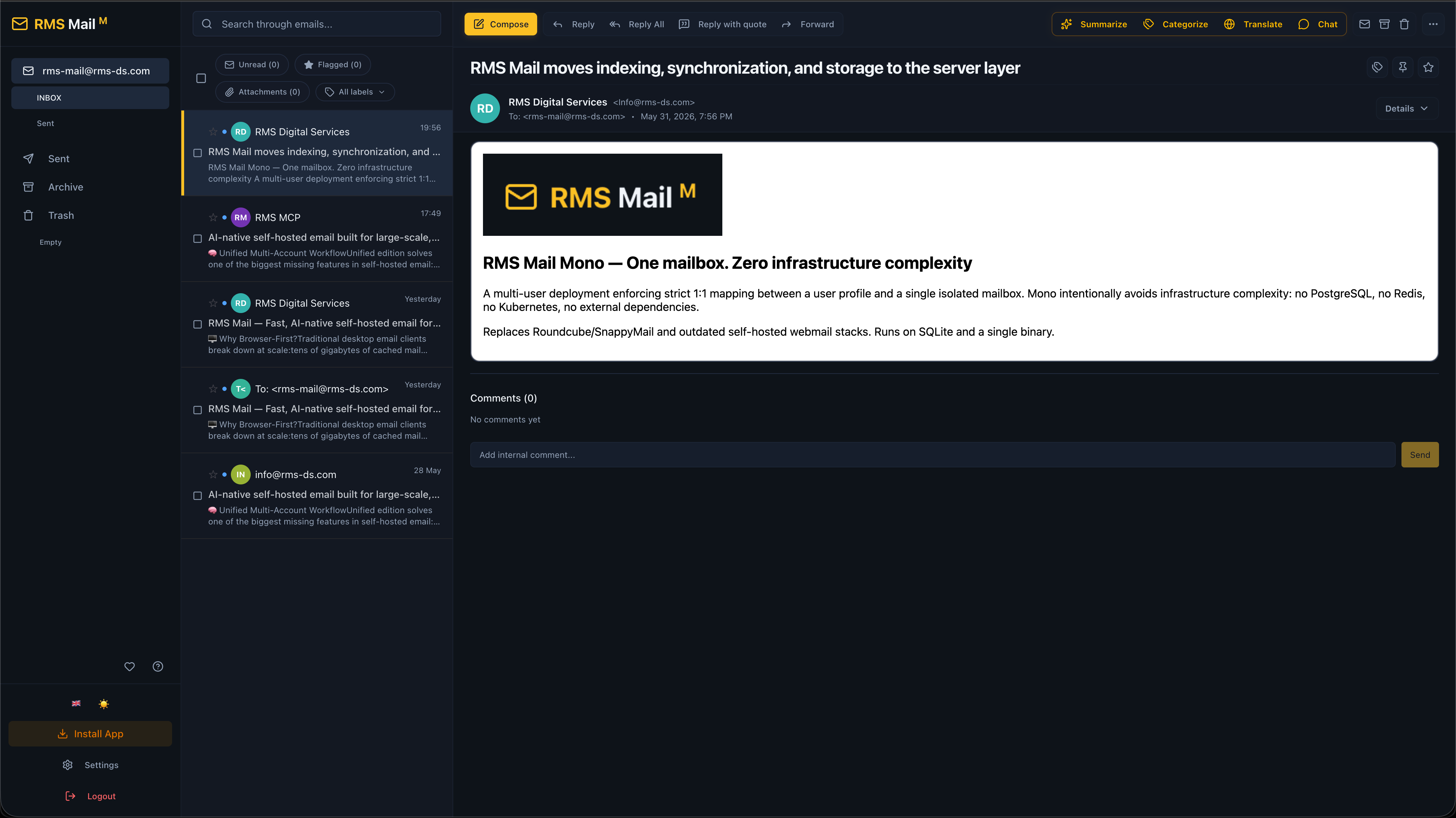
RMS Mail Mono Interface
Features:
- modern Apple Mail-inspired UI
- instant vector search with Bluge
- IMAP IDLE push sync
- AI-native workflows
- Telegram & MCP integrations
- browser & Telegram notifications
- configurable email threading & Undo Send delay
- bulk operations for huge folders
- webhook automation
- keyboard-first workflow
- rich HTML composer
- labels, rules
- real-time SSE updates
- pin / snooze / mute
- SPF/DKIM verification
- 45 languages
Unified
All your inboxes. One workspace.
Designed for users managing many inboxes, client accounts, infrastructure mail, support-heavy workflows, and personal + business communication.
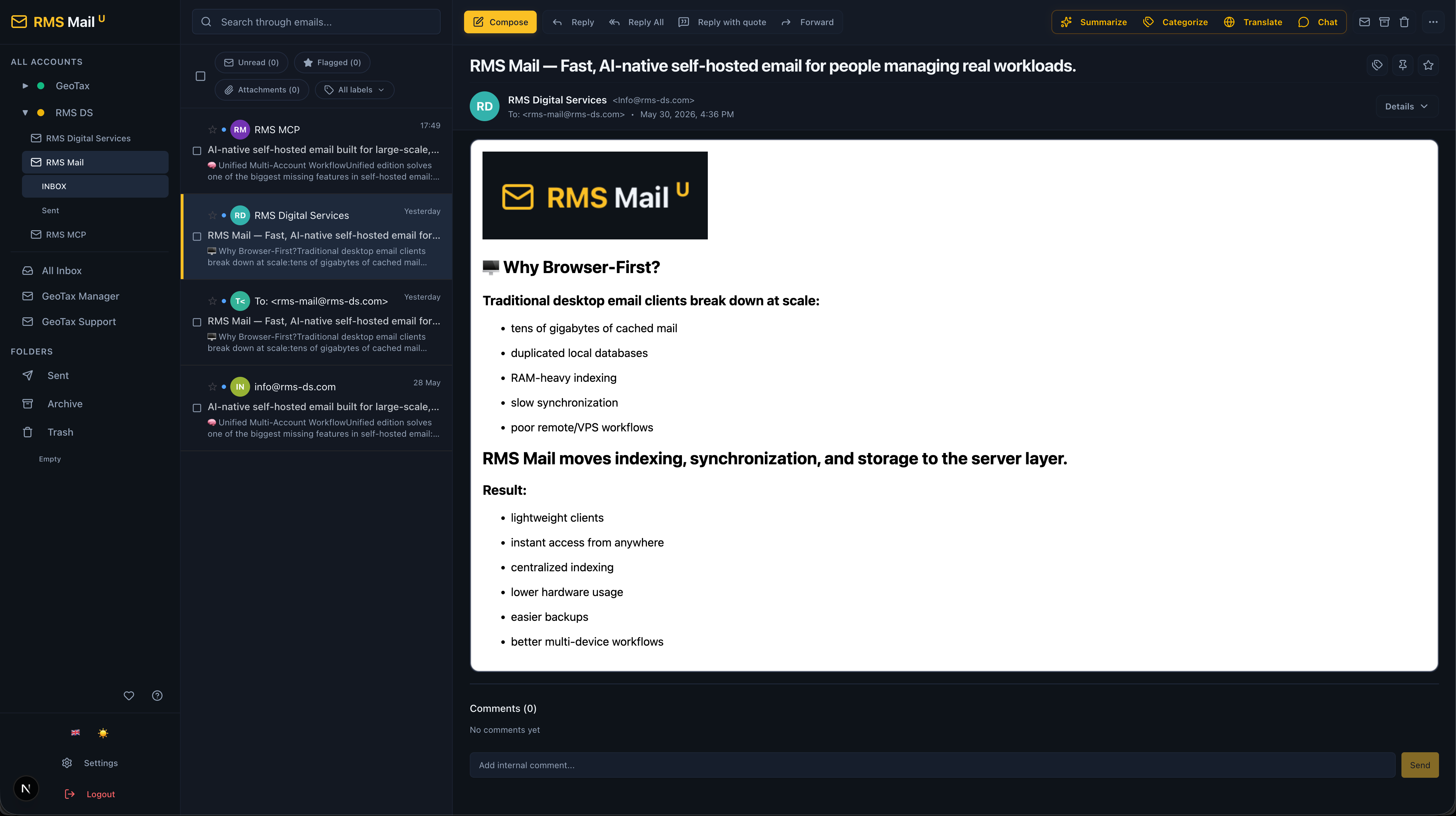
RMS Mail Unified Interface
Everything from Mono plus:
- unified inbox
- unified project groups
- PostgreSQL + Redis
- OAuth2
- cross-account workflows
- centralized notifications
Teams
Email-native collaboration.
Extends Unified for support teams, agencies, and operations teams living inside shared inboxes. Everything from Unified plus:
- shared mailboxes
- assignments
- SLA tracking
- internal comments
- role-based access
- team notifications
- shared automation
(If your company needs Teams edition, please contact us or open an issue).
🏗️ Architecture & Tech Stack
┌──────────────────────────────────────────────────────────┐
│                  Frontend (Next.js 16)                   │
│   React 19 · TipTap · Framer Motion · TanStack Virtual   │
│   45 languages (next-intl) · Tailwind CSS · shadcn/ui    │
└────────────────────────┬─────────────────────────────────┘
                         │ REST + SSE
┌────────────────────────▼─────────────────────────────────┐
│                   Backend (Go 1.26)                      │
│                                                          │
│  ┌───────────┐  ┌──────────┐  ┌────────────────────┐     │
│  │ IMAP/IDLE │  │ SMTP     │  │ MCP Server         │     │
│  │ Sync      │  │ Client   │  │ (JSON-RPC + SSE)   │     │
│  └───────────┘  └──────────┘  └────────────────────┘     │
│                                                          │
│  ┌───────────┐  ┌──────────┐  ┌────────────────────┐     │
│  │ AI Gateway│  │ Telegram │  │ JWT Auth           │     │
│  │ (10 LLMs) │  │ Bot      │  │ + MCP API Keys     │     │
│  └───────────┘  └──────────┘  └────────────────────┘     │
│                                                          │
│  ┌───────────┐  ┌──────────┐                             │
│  │ Bluge     │  │ AES-GCM  │                             │
│  │ FTS Index │  │ Crypto   │                             │
│  └───────────┘  └──────────┘                             │
└────────────────────────┬─────────────────────────────────┘
                         │
          ┌──────────────┼──────────────┐
          ▼              ▼              ▼
     ┌─────────┐   ┌──────────┐   ┌─────────┐
     │ SQLite  │   │PostgreSQL│   │  Redis  │
     │ (Mono)  │   │(Unified) │   │(Unified)│
     └─────────┘   └──────────┘   └─────────┘
Tech Stack
Frontend:
Next.js 16
React 19
Tailwind CSS
TipTap
TanStack Virtual
next-intl
Framer Motion
Backend:
Go 1.26
SQLite
PostgreSQL
Redis
Bluge
SSE
MCP
⚡ Vector Search & Performance Pipeline
RMS Mail does not rely on slow IMAP search. Every email passes through a pipeline ensuring smooth virtualization even with huge folders.
Plaintext
┌─────────┐     ┌──────────────┐     ┌───────────────┐     ┌─────────┐
│  IMAP   │ ──▶ │  SQLite/PG   │ ──▶ │  Bluge Index  │ ──▶ │   UI    │
│ Server  │     │  (metadata)  │     │  (full-text)  │     │ (React) │
└─────────┘     └──────────────┘     └───────────────┘     └─────────┘
Pipeline:
IMAP synchronization
Metadata normalization
Local indexing with Bluge
Real-time UI rendering
Result: sub-100ms search, instant filtering, scalable inboxes, fast bulk operations.
📧 Gmail-Style Email Processing
Incoming emails are normalized before rendering to ensure privacy and safety.
Plaintext
Raw MIME ──▶ enmime parser ──▶ HTML sanitization ──▶ CSS normalization ──▶ Safe rendering
Features:
MIME normalization
HTML sanitization
quote folding
inline attachment support
tracking protection
XSS protection
privacy-first rendering
🌍 Internationalization (45 Languages)
RMS Mail supports 45 languages out of the box. Includes LTR/RTL support, live language switching, localized dates, and full UI localization.
Supported regions: Europe, Middle East, East Asia, South Asia, Central Asia, Caucasus, Southeast Asia.
| Code | Language | Code | Language | Code | Language |
|---|---|---|---|---|---|
en |
🇬🇧 English | ru |
🇷🇺 Русский | zh |
🇨🇳 中文 |
ja |
🇯🇵 日本語 | ko |
🇰🇷 한국어 | ar |
🇸🇦 العربية |
he |
🇮🇱 עברית | hi |
🇮🇳 हिन्दी | bn |
🇧🇩 Bengali |
ur |
🇵🇰 اردو | fa |
🇮🇷 فارسی | tr |
🇹🇷 Türkçe |
de |
🇩🇪 Deutsch | fr |
🇫🇷 Français | es |
🇪🇸 Español |
it |
🇮🇹 Italiano | nl |
🇳🇱 Nederlands | pl |
🇵🇱 Polski |
cs |
🇨🇿 Čeština | sk |
🇸🇰 Slovenčina | hu |
🇭🇺 Magyar |
ro |
🇷🇴 Română | bg |
🇧🇬 Български | el |
🇬🇷 ��λληνικά |
sr |
🇷🇸 Српски | hr |
🇭🇷 Hrvatski | sl |
🇸🇮 Slovenščina |
sv |
🇸🇪 Svenska | da |
🇩🇰 Dansk | nb |
🇳🇴 Norsk |
fi |
🇫🇮 Suomi | et |
🇪🇪 Eesti | lv |
🇱🇻 Latviešu |
lt |
🇱🇹 Lietuvių | uk |
🇺🇦 Українська | kk |
🇰🇿 Қазақша |
ka |
🇬🇪 ქართული | hy |
🇦🇲 Հայերեն | az |
🇦🇿 Azərbaycanca |
uz |
🇺🇿 Oʻzbekcha | vi |
🇻🇳 Tiếng Việt | th |
🇹🇭 ไทย |
id |
🇮🇩 Indonesia | ms |
🇲🇾 Melayu | ca |
🇪🇸 Català |
🚀 Quick Start
Mono
git clone https://github.com/your-org/rms-mail.git
cd rms-mail

# 2. Set up your environment variables
cp .env-m.example .env

# 3. Configure your ENCRYPTION_KEY inside the .env file
# (You only need to enter the ENCRYPTION_KEY; that is all the app needs to function)
# To generate a secure random 32-byte hex key, run: openssl rand -hex 32

# 4. Copy the Mono-specific compose configuration
cp docker-compose-m.yml docker-compose.yml

# 5. Fire it up!
docker compose up -d
Once started, open your browser and navigate to:
👉 http://localhost:3000
Unified
# 1. Clone the repository and navigate to the project directory
git clone https://github.com/your-org/rms-mail.git
cd rms-mail

# 2. Set up your environment variables
cp .env-u.example .env

# 3. Configure required variables inside the .env file:
# - DATABASE_URL
# - REDIS_URL
# - ENCRYPTION_KEY (To generate a secure random 32-byte hex key, run: openssl rand -hex 32)

# 4. Copy the Unified-specific compose configuration
cp docker-compose-u.yml docker-compose.yml

# 5. Fire it up!
docker compose up -d
Once started, open your browser and navigate to:
👉 http://localhost:3000
📊 Feature Matrix
| Feature | Mono | Unified | Teams |
|---|---|---|---|
| IMAP Sync + IDLE | ✅ | ✅ | ✅ |
| SMTP Send | ✅ | ✅ | ✅ |
| AI Gateway (10 providers) | ✅ | ✅ | ✅ |
| AI Chat + Tool-calling | ✅ | ✅ | ✅ |
| Telegram Bot | ✅ | ✅ | ✅ |
| MCP Server | ✅ | ✅ | ✅ |
| Vector Search (Bluge) | ✅ | ✅ | ✅ |
| PWA (Installable Web App) | ✅ | ✅ | ✅ |
| Command Palette & Hotkeys | ✅ | ✅ | ✅ |
| Dynamic IMAP/SMTP Resolver | ✅ | ✅ | ✅ |
| Auto-Draft (UIDPLUS + SSE) | ✅ | ✅ | ✅ |
| Zstd Compression & GC | ✅ | ✅ | ✅ |
| Seamless Key Rotation | ✅ | ✅ | ✅ |
| Unlimited Bulk Operations | ✅ | ✅ | ✅ |
| Full Mobile Responsiveness | ✅ | ✅ | ✅ |
| Drafts with Autosave | ✅ | ✅ | ✅ |
| Private Email Notes | ✅ | ✅ | ✅ |
| Labels, Rules | ✅ | ✅ | ✅ |
| Rich HTML Composer | ✅ | ✅ | ✅ |
| 45 Languages (i18n) | ✅ | ✅ | ✅ |
| Thread Chains (Toggleable) | ✅ | ✅ | ✅ |
| Configurable Send Delay | ✅ | ✅ | ✅ |
| Browser & TG Notifications | ✅ | ✅ | ✅ |
| IDE / Agent Integration | ✅ | ✅ | ✅ |
| Pin / Snooze / Mute | ✅ | ✅ | ✅ |
| Hash Partitioning (64x) | — | ✅ | ✅ |
| Multi-Account Unified Inbox | — | ✅ | ✅ |
| Project Groups | — | ✅ | ✅ |
| PostgreSQL + Redis | — | ✅ | ✅ |
| OAuth 2.0 (Google, MS) | — | ✅ | ✅ |
| Shared Mailboxes | — | — | 🚧 |
| Assignments | — | — | 🚧 |
| Internal Comments | — | — | 🚧 |
| SLA Tracking | — | — | 🚧 |
| Role-based Access | — | — | 🚧 |
💭 Philosophy
RMS Mail is built around several core ideas:
email should be fast
email should scale
email should be programmable
email should integrate with AI naturally
users should control their infrastructure
self-hosted software should not feel outdated
This project is heavily shaped by support workflows, operational reality, multi-account overload, browser-first workflows, AI-assisted productivity, and real infrastructure constraints.
🗺️ Roadmap
Current priorities:
Unified public release
Teams edition
onboarding simplification
deeper IDE integrations
more automation workflows
expanded AI orchestration
🔑 Security: Database Encryption & Key Rotation
RMS Mail securely encrypts sensitive data at rest using AES-256-GCM.
- Key Derivation: Raw keys provided via environment variables are hashed using SHA-256 to guarantee a 32-byte length.
- Storage: A secure, random 12-byte nonce is generated for every database entry. The result is stored as a base64-encoded string (
nonce + ciphertext) and is fully supported on both PostgreSQL and SQLite.
Zero-Downtime Key Rotation
The system supports seamless key rotation. The ENCRYPTION_KEYS environment variable accepts a comma-separated list of keys (encKeys array).
- Encryption: The
encryptPasswordfunction always uses the primary key (encKeys[0]). - Decryption: The
decryptPasswordfunction iterates through the entireencKeysarray, returning the result from the first key that successfully decrypts the payload.
To rotate your encryption keys without downtime, follow these steps:
1. Add the new key Update your environment variable. Place the new key at the beginning of the list, keeping the old key as a fallback.
export ENCRYPTION_KEYS="new-secret-key,old-secret-key"
2. Re-encrypt existing data
Run the application with the -rekey flag. This triggers the store.RekeyAll() method, which iterates through the accounts.password_encrypted and mcp_keys.key_encrypted fields. It decrypts each record using the available fallback keys and re-encrypts them using the new primary key (encKeys[0]).
./rms-mail -rekey
# Expected output: "Rekey complete" "re_encrypted"=5
3. Remove the old key Once the rekey process is complete, the old key is no longer needed. You can safely remove it from your environment.
export ENCRYPTION_KEYS="new-secret-key"
⚖️ License
AGPLv3
Comments