Home Assistant on Android Auto
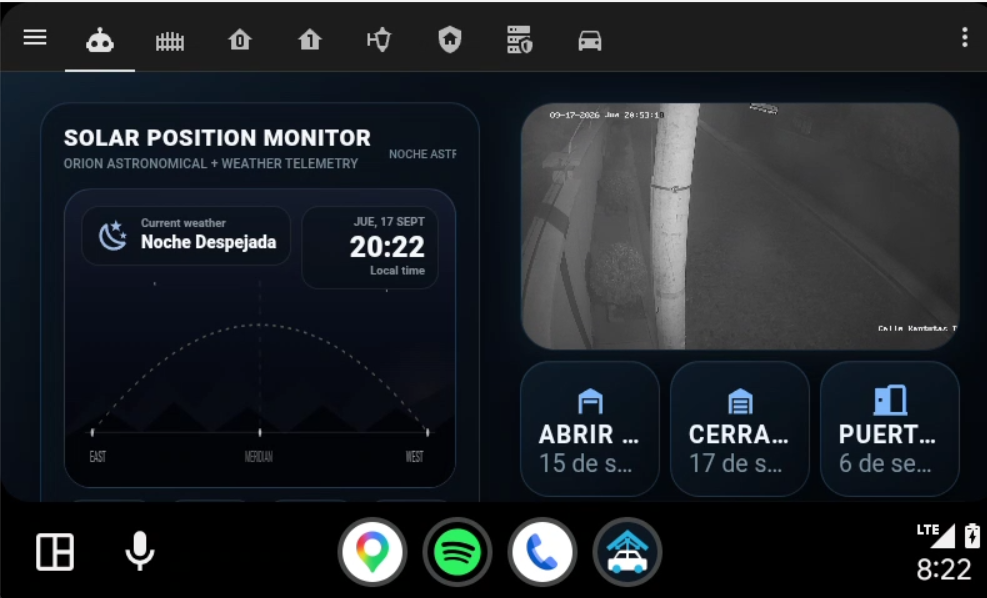
HomeCar is an open-source Android application that provides direct access to a Home Assistant dashboard from Android Auto through a dedicated full-screen WebView interface.
The goal is simple:
Car -> HomeCar -> Home Assistant
No media browser. No playlists. No unnecessary menus. Just your dashboard.
Features
- Home Assistant dashboard directly inside Android Auto
- Full-screen WebView interface
- Single HomeCar launcher entry in the tested Android Auto setup
- Configurable Home Assistant server
- Persistent URL configuration
- Same server configuration on phone and Android Auto
- HTTPS domain support
- Local HTTP/IP support
- Settings available on the phone and hidden in the projected Android Auto interface
- Session and WebView persistence
- Android Auto DHU support
- Physical Android Auto vehicle testing
- Universal APK build support
Use cases
HomeCar can be used as an in-car interface for:
- Garage doors
- Gates
- Lights
- Security cameras
- Alarm systems
- Climate control
- Home status
- Presence information
- Energy monitoring
- Custom Home Assistant dashboards
The interface displayed by HomeCar is controlled by your Home Assistant dashboard.
Configuration
Open HomeCar on the phone and tap the settings button.
Enter your Home Assistant address.
Examples:
https://home.example.com/
or:
http://192.168.1.100:8123/
If no protocol is entered, HomeCar automatically assumes HTTPS.
Example:
myhome.example.com
becomes:
https://myhome.example.com/
The configured server is stored locally and reused automatically.
The settings button is intentionally hidden while HomeCar is running inside Android Auto.
Android Auto
HomeCar provides a dedicated Android Auto interface that opens the configured Home Assistant dashboard.
The current Android Auto build disables the unused mirroring launcher entries and removes the media-browser service entry from the projected interface.
HomeCar v0.1.1-beta has been tested with:
- Android Auto Desktop Head Unit (DHU)
- A physical Android Auto vehicle setup
- KingInstaller installation of the universal APK
Compatibility can still vary depending on:
- Android version
- Android Auto version
- Vehicle/head unit
- Installation method
- Android Auto developer settings
If HomeCar does not appear in Android Auto or Android Auto reports that the app is not working, please open an issue and include the phone model, Android version, Android Auto version, vehicle/head unit and installation method.
Installation
Download the latest universal APK from the GitHub Releases page under Assets.
Current beta file:
HomeCar-v0.1.1-beta-universal.apk
Important:
- Install the
.apkfile. - Do not try to install the
.apksbundletool container directly. - KingInstaller can be used when required by the Android Auto environment.
Typical installation flow:
- Copy
HomeCar-v0.1.1-beta-universal.apkto the phone. - Install it using the required installation method for your Android Auto setup.
- Open HomeCar on the phone.
- Tap the settings button.
- Enter your Home Assistant URL.
- Save the configuration.
- Connect Android Auto.
- Open HomeCar from the Android Auto launcher.
Configure and test the interface while the vehicle is parked.
Building HomeCar
Requirements:
- Android Studio
- Android SDK 36
- Java / Android Studio JBR
- Gradle
- Android NDK
- CMake
- Google bundletool
Clone the repository:
git clone https://github.com/RenanEspinar/HomeCar.git
cd HomeCar
Build the Android Auto debug bundle:
./gradlew bundleAutoDebug
HomeCar uses a dynamic Web module, so the Android App Bundle must be converted into a universal APK with bundletool.
Example:
java -jar bundletool.jar build-apks \
  --bundle=path/to/homecar-auto-debug.aab \
  --output=HomeCar.apks \
  --mode=universal \
  --overwrite
HomeCar.apks is a ZIP-format bundletool container. Extract it and use:
universal.apk
The resulting universal APK contains the Web module required by HomeCar.
Architecture
HomeCar keeps the Android Auto projection infrastructure while replacing the user-facing experience with a dedicated Home Assistant browser.
Simplified architecture:
Android Auto
     |
     v
HomeCar CarService
     |
     v
HomeCar Activity
     |
     v
WebView
     |
     v
Home Assistant
The media-browser and mirroring launcher entries are disabled in the HomeCar Android Auto build.
Security changes in v0.1.1-beta
The v0.1.1-beta update includes several hardening changes:
- Direct exported access to the HomeCar/Fermata content provider is disabled in the Android Auto build.
- Direct
file://access through the content provider is blocked. - WebView file and content access are disabled.
- Top-level WebView navigation is limited to HTTP and HTTPS schemes.
- Geolocation and WebView permission requests are restricted to the configured Home Assistant origin.
- Xposed IPC messages are validated by sender UID.
Security review is still ongoing. In particular, inherited networking behavior and cleartext HTTP support remain under review because HomeCar intentionally supports local Home Assistant instances that may use HTTP.
Server configuration
HomeCar does not contain a personal Home Assistant address.
The default placeholder is:
https://homeassistant.example/
Each user configures their own server through the application.
The selected address is stored locally using application preferences.
Current status
v0.1.1 Beta
Working in the current tested build:
- Full-screen Home Assistant WebView
- Android Auto DHU
- Physical Android Auto vehicle test
- Configurable Home Assistant URL
- Persistent configuration
- HomeCar launcher entry
- Custom HomeCar branding
- Phone interface
- Universal APK generation
- KingInstaller installation of the universal APK
- Improved dark-theme settings visibility
- WebView and IPC hardening introduced in v0.1.1-beta
Still being validated across different devices and vehicles:
- Android Auto version compatibility
- Android device compatibility
- Vehicle/head-unit compatibility
- Installation methods across Android versions
Roadmap
Planned improvements include:
- First-run configuration screen
- Connection test
- Better error handling
- Reload button
- Connection status
- Optional kiosk mode
- Configurable WebView behavior
- Multiple Home Assistant profiles
- Improved Android Auto compatibility
- Automated GitHub release builds
- Continued security hardening
Project
HomeCar is developed as an independent open-source project.
Developer:
Renan Espinar
Repository:
https://github.com/RenanEspinar/HomeCar
Issues and contributions are welcome.
Technical foundation
HomeCar is derived from the open-source Fermata Media Player project created by Andrey Pavlenko and its contributors.
Fermata provides part of the Android and Android Auto infrastructure on which HomeCar was initially developed.
Original project:
https://github.com/AndreyPavlenko/Fermata
HomeCar changes the user-facing experience and focuses specifically on Home Assistant dashboard access while preserving the upstream licensing and attribution requirements.
Disclaimer
HomeCar is an independent community project.
It is not affiliated with or endorsed by Google, Android Auto, Home Assistant or Nabu Casa.
HomeCar is derived from Fermata Media Player under the GNU GPL v3.0. The upstream Fermata project and its contributors are not responsible for HomeCar-specific modifications. https://github.com/user-attachments/assets/2d40f518-d339-4e8d-a337-9cc1152467cf
Android Auto interfaces should only be configured or operated when it is safe and legal to do so.
HomeCar - Your Home Assistant dashboard, in your car.
Comments