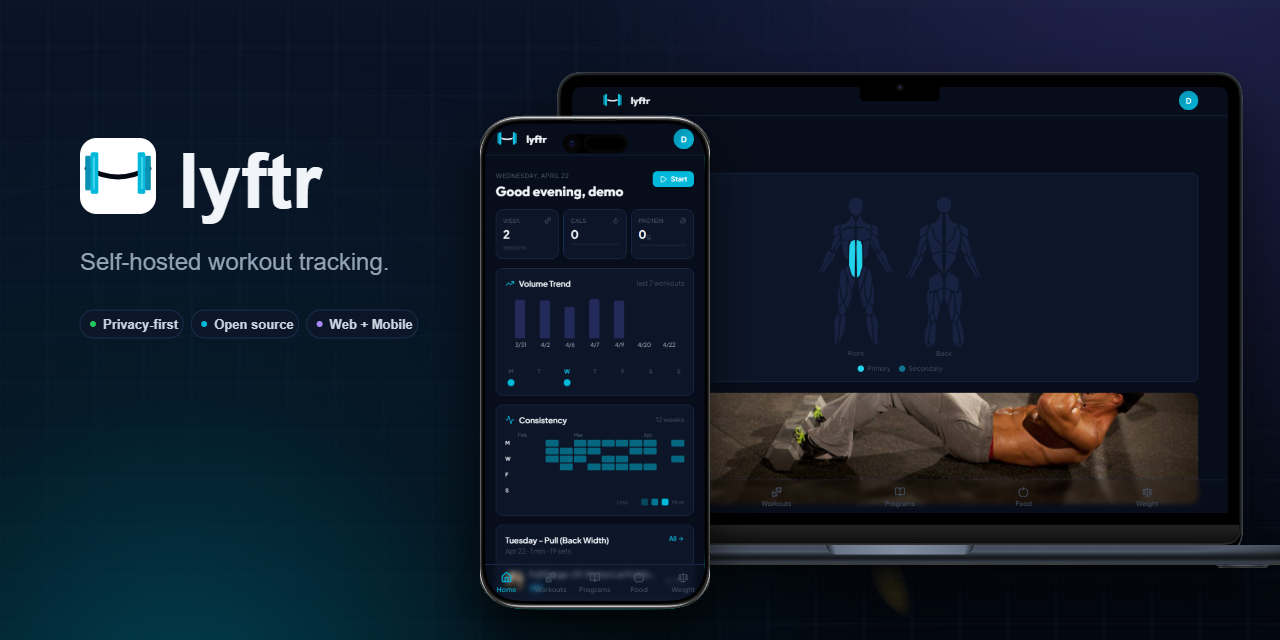
Lyftr is a self-hosted fitness tracker built for people who want full control over their workout and health data without relying on commercial cloud services. It lets users log workouts, track weight, build reusable programs, and monitor progress — all from a single SQLite file that runs on minimal hardware. The project positions itself between feature-rich but closed platforms like Hevy and Strong, and older self-hosted tools like Wger, aiming for a modern, mobile-first interface with simpler setup and lower infrastructure demands. It’s written in TypeScript, distributed via Docker, and designed to run on devices as modest as a Raspberry Pi 4 or as straightforward as a $5 VPS.
What it does
Lyftr focuses on core fitness tracking without over-engineering. Its current stable features include:
- Workout logging using a built-in library of 800+ exercises, with support for sets, reps, weight, and rest timers
- A program builder for creating and reusing workout templates (e.g., Push/Pull/Legs splits)
- Active workout mode, guiding users step-by-step through sets with on-screen prompts and timers
- Gym Mode, which switches to a full-screen, card-based layout optimized for use on phones or tablets mounted near equipment
- An overview dashboard showing training volume trends, weekly consistency heatmaps, and muscle group balance metrics
Nutrition tracking is listed as in progress, and features like PWA installation, iOS app support, and CSV import from Strong or Hevy are marked as planned. The project is in early beta, meaning UI inconsistencies, unimplemented flows, and breaking changes between versions are expected.
Getting it running
Lyftr is designed for minimal setup: no compilation, no Node.js or Go toolchain required — just Docker. The official quick start pulls two files directly from the GitHub repository:
curl -o docker-compose.yml https://raw.githubusercontent.com/Cawlumm/lyftr/main/docker-compose.yml
curl -o .env https://raw.githubusercontent.com/Cawlumm/lyftr/main/.env.example
The .env file must be edited to set JWT_SECRET to a cryptographically strong value (32+ characters). Then, start the stack with:
docker compose up -d
By default, the app listens on port 3000. On a local machine, visit http://localhost:3000. On a VPS, replace localhost with the server’s IP or domain. No reverse proxy or TLS configuration is required to begin — though production use should add HTTPS via Nginx or Caddy.
The app uses a single SQLite database file stored inside the container (/app/data/lyftr.db), and no external services (PostgreSQL, Redis, etc.) are needed. It has been verified to run on Raspberry Pi 4 (arm64), x86 VPSes (Hetzner, DigitalOcean, Oracle Free Tier), Synology NAS units via Docker Container Manager, Proxmox LXC containers with Docker installed, and desktop machines using WSL2.
Who this is for
Lyftr suits users who prioritize data ownership and simplicity over breadth of features. If you want to run a fitness tracker on spare hardware — a Raspberry Pi collecting dust, an old NAS, or a cheap cloud instance — and don’t need advanced nutrition analytics or third-party integrations yet, Lyftr fits. It’s also appropriate for people who find Wger’s interface dated or Hevy’s export restrictions limiting. The mobile-friendly design works well on phones and tablets, and Gym Mode’s large-tap interface makes it usable mid-set without squinting at small buttons.
It’s not intended for users needing polished, production-ready stability. The README explicitly warns that it’s “the software equivalent of going to the gym for the first time.” That means missing edge cases, incomplete documentation, and features that may shift or disappear between commits. If you need a reliable daily driver today, with zero tolerance for breakage, this isn’t it — yet.
How it compares
Lyftr sits in a narrow niche among self-hosted fitness tools. Wger is more mature and feature-complete (including nutrition, barcode scanning, and extensive admin controls), but its interface feels desktop-first and its setup requires more moving parts (Django, PostgreSQL, optional Redis). FitNotes is Android-only and stores data locally — no server, no sync, no web access. Lyftr trades some of Wger’s depth for a tighter scope and lighter infrastructure: SQLite only, no Python backend, no admin panel beyond basic user management.
Compared to commercial apps, Lyftr avoids subscriptions and vendor lock-in. Hevy and Strong offer polished mobile apps and slick web UIs, but they don’t let you self-host — and their free tiers have shrunk over time. Lyftr’s commitment to “no ‘your export is a Pro feature’” is baked into its licensing (MIT) and architecture: all data stays in your SQLite file, and backups are just file copies.
The project has 32 stars on GitHub as of its latest public snapshot, and it was featured in the selfh.st weekly roundup for April 2026 — a small but active signal in the self-hosted ecosystem. It’s built and maintained by a single developer (Cawlumm), and contributions are open.
Lyftr is available at https://github.com/Cawlumm/lyftr, with a live demo at https://lyftr-demo.fly.dev — where you can log in with demo@lyftr.local and password123.
Comments