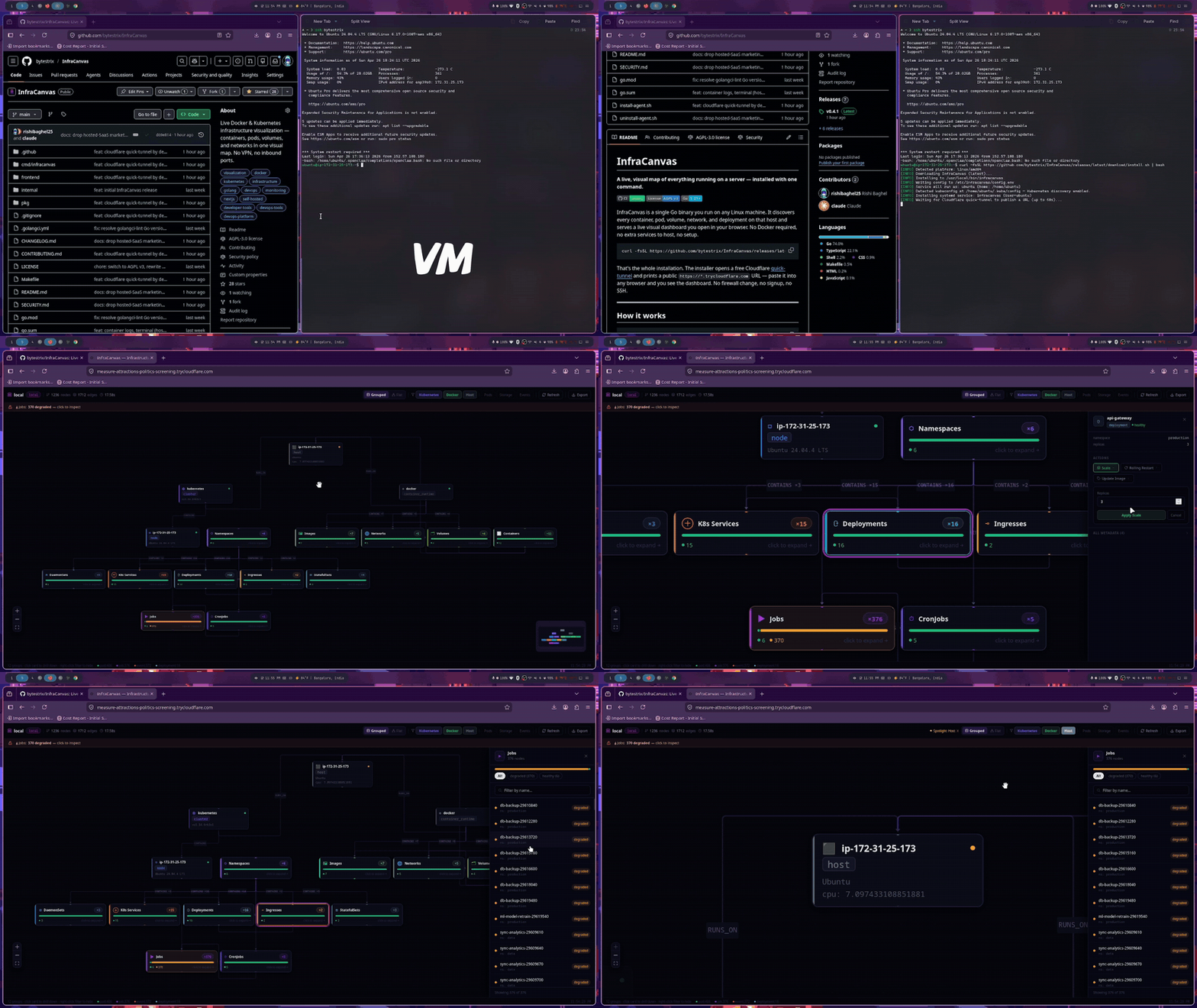
InfraCanvas is a lightweight, self-contained tool for visualizing Docker and Kubernetes infrastructure in real time. It maps containers, pods, volumes, and networks on a single Linux host and serves the view as an interactive dashboard accessible from any browser—without opening inbound ports, configuring firewalls, or setting up a separate web server. The tool targets a specific friction point: inspecting live infrastructure on remote servers when you lack direct GUI access or want to avoid exposing internal services. It does not require Docker to run, nor does it depend on Kubernetes control-plane components—it works by inspecting local runtime state via the Docker socket or Kubernetes kubelet APIs, then renders a live graph in the browser.
What it does
InfraCanvas operates as a single Go binary that combines three components in one process: a local discovery agent, a WebSocket relay for live updates, and an embedded web UI. It detects running containers (Docker, Podman), Kubernetes pods and deployments (via /pods and /runningpods endpoints on kubelet), volumes, and networks. The dashboard updates in real time, showing relationships—like which containers use which volumes or networks—and displays resource usage metrics where available. It does not store data, does not send telemetry, and does not require a backend database or authentication layer beyond an optional token for the dashboard URL.
- Runs on any Linux machine with Go 1.21+ (compiled binary only; no Go toolchain needed at runtime)
- Uses Cloudflare’s free
trycloudflare.comtunnel by default—no inbound ports, no firewall changes - Supports
--no-tunnelto bind directly to0.0.0.0:7777, or--privateto bind to127.0.0.1for SSH-tunneled access - Dashboard URL includes an auto-generated auth token (stored in
/etc/infracanvas/config.env) - Each instance runs independently—no coordination needed across multiple VMs
Getting it running
Installation is a one-liner. The script downloads the latest release binary, places it in /usr/local/bin, sets up a systemd service, and starts it. It then launches cloudflared in the background to create a public HTTPS URL:
curl -fsSL https://github.com/bytestrix/InfraCanvas/releases/latest/download/install.sh | bash
The output includes a URL like https://shy-pine-2f1a.trycloudflare.com/?token=a8f3e2b1c9d4f02e. That link works immediately from any device with internet access. The token is required to load the dashboard; if lost, it’s readable from /etc/infracanvas/config.env.
For custom behavior, pass flags to the installer:
# Use port 8888 instead of 7777 (only relevant with --no-tunnel)
curl -fsSL .../install.sh | bash -s -- --port 8888

# Skip Cloudflare tunnel; bind to 0.0.0.0:7777 (requires inbound TCP 7777 allowed)
curl -fsSL .../install.sh | bash -s -- --no-tunnel

# Bind only to localhost (requires SSH tunneling to access)
curl -fsSL .../install.sh | bash -s -- --private
The binary listens on 127.0.0.1:7777 by default. With --no-tunnel, it binds to 0.0.0.0; with --private, it binds to 127.0.0.1. The dashboard is served from the same port, with no reverse proxy needed.
Who this is for
InfraCanvas suits operators, SREs, and developers who need to quickly inspect infrastructure on a single Linux host—especially in cloud environments where inbound port exposure is restricted or discouraged. It’s useful during debugging sessions on staging or test clusters, when verifying volume mounts or network policies, or when onboarding new team members who need a visual orientation to an unfamiliar server. Because it runs without Docker or Kubernetes dependencies (it reads the Docker socket or kubelet HTTP endpoints directly), it works on minimal VMs, CI runners, or bare-metal nodes where full orchestration tooling isn’t present. It’s not designed for multi-cluster topology mapping, long-term monitoring, or alerting—those tasks fall outside its scope.
How it compares
InfraCanvas is lighter and more narrowly scoped than tools like Prometheus + Grafana, K9s, or Lens. Unlike K9s, it does not offer terminal-based interaction or command execution. Unlike Lens, it does not connect to Kubernetes API servers remotely—it only inspects the local node. Compared to docker ps or kubectl get pods, it adds topology context: users see how components connect, not just what is running. It differs from static diagram generators like diagrams or kdot by updating live and requiring no manual input. It also avoids the setup overhead of tools like NetData or cAdvisor, which need persistent services and often require port forwarding or reverse proxies. InfraCanvas’s reliance on Cloudflare’s quick-tunnel is both a strength (zero-config public access) and a limitation: the URL changes on every restart, and the tunnel depends on outbound HTTPS connectivity to cloudflare.com. For air-gapped environments, --no-tunnel or --private are required—but then infrastructure must be reachable via other means.
The project is licensed under the AGPL v3 and hosted on GitHub with 31 stars as of the latest data. It’s written in Go, with no external runtime dependencies beyond what’s embedded in the binary. The installer script pulls prebuilt releases, and the binary itself does not require Docker, Node.js, Python, or other interpreters. It’s updated infrequently—commits are sparse, and the CI pipeline verifies builds on every push. The README emphasizes simplicity over extensibility: no plugin system, no custom themes, no export options. It renders what it finds, and stops there.
If you want a fast, no-setup way to see what’s actually running on a Linux VM—and you’re okay with a one-node-at-a-time view—InfraCanvas delivers that. It does not replace observability stacks, cluster-wide dashboards, or CLI tools for deep inspection. It fills a narrow gap: visual context, on demand, with minimal ceremony. The source is at https://github.com/bytestrix/InfraCanvas.
Comments