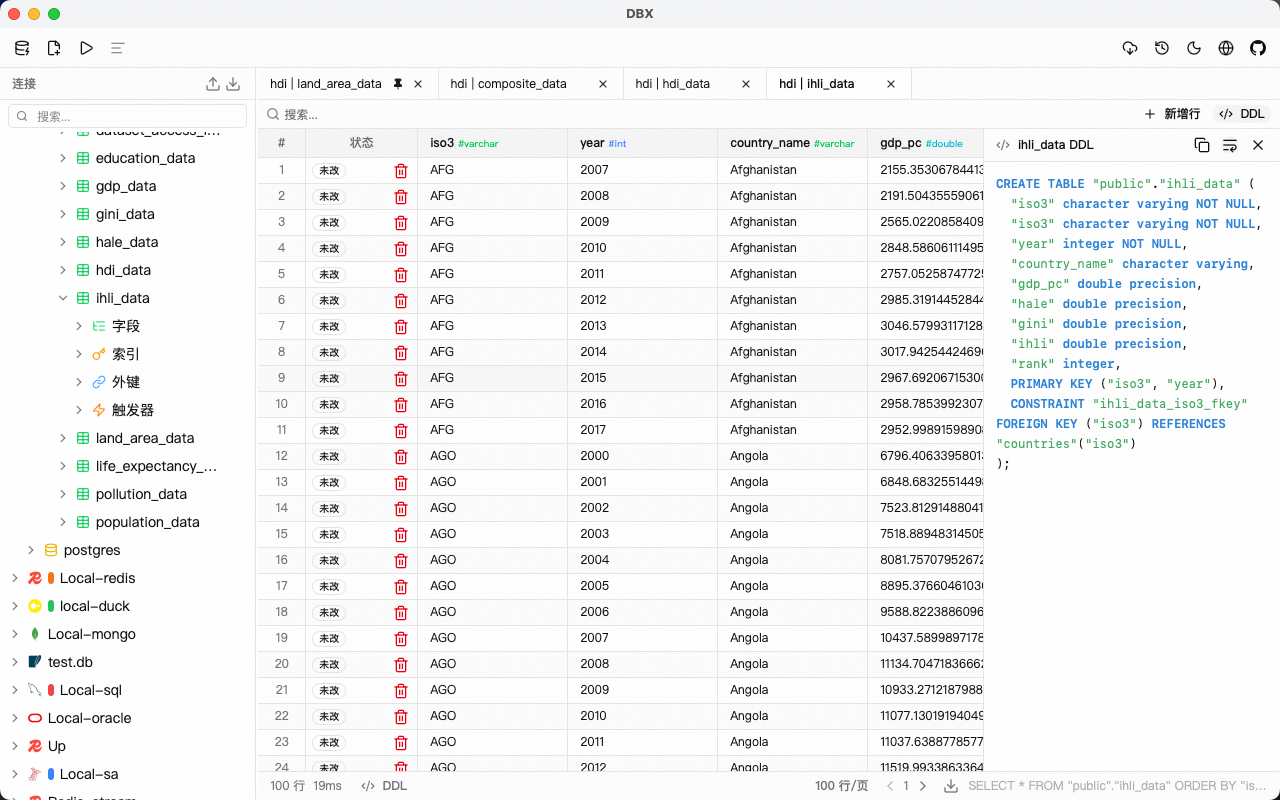
DBX is an open-source database management tool built as a lightweight, cross-platform client. At around 15 MB for the installer, it targets users who need quick access to multiple database types without the overhead of larger applications. The project, hosted at t8y2/dbx with 855 GitHub stars, uses Vue as its primary language. It supports MySQL, PostgreSQL, SQLite, Redis, MongoDB, DuckDB, ClickHouse, SQL Server, Oracle, MariaDB, TiDB, OceanBase, openGauss, GaussDB, KingBase, Vastbase, and GoldenDB.
This tool fills a gap for developers and admins handling diverse databases on desktops across Windows, macOS, and Linux. Unlike bloated clients that bundle full browsers or runtimes, DBX skips Chromium entirely, keeping the download small while offering schema browsing, query editing, and data export in a single package. It includes English and Simplified Chinese localization, with community support via LINUX.DO and WeChat/QQ groups.
Supported databases
DBX connects directly to a range of relational, NoSQL, and analytical databases. The full list from its badges and docs:
- Relational: MySQL, PostgreSQL, SQLite, SQL Server, Oracle, MariaDB, TiDB
- Key-value/NoSQL: Redis, MongoDB
- Analytical: DuckDB, ClickHouse
- Enterprise/compatible: OceanBase, openGauss, GaussDB, KingBase, Vastbase, GoldenDB
Connections use standard protocols, with extras like SSH tunnels (key or password auth) and auto-reconnect on drops.
Core features
DBX packs functionality into its small size:
- Schema browser: Sidebar view of databases, schemas, tables, columns, indexes, foreign keys, and triggers. Includes search and pin options for quick navigation.
- Query editor: Powered by CodeMirror 6, with syntax highlighting, SQL autocomplete for tables/columns, Cmd+Enter to run, selected query execution, and built-in formatting.
- Data grid: Virtual scrolling for large results, inline editing, sorting, search, pagination, resizable columns, row numbers, and zebra striping.
- AI SQL assistant: Converts natural language to SQL, explains queries, suggests optimizations, or fixes errors using Claude or OpenAI APIs.
- Specialized browsers: Redis key search by pattern (views Strings, Hashes, Lists, Sets, ZSets, Streams); MongoDB document CRUD with pagination and direct Atlas/replica set URLs.
Other tools include query history (searchable, restorable, copyable), safety prompts for DROP/DELETE/TRUNCATE/ALTER, export to CSV/JSON/Markdown, file previews for Parquet/CSV/JSON via DuckDB drag-and-drop, connection colors, dark mode with native title bar sync, and auto-update checks.
AI agent integration
DBX extends to AI workflows via an MCP server for coding agents. Run it with:
npx @dbx-app/mcp-server
Add this to your .mcp.json file:
{
  "mcpServers": {
    "dbx": { "command": "npx", "args": ["-y", "@dbx-app/mcp-server"] }
  }
}
This lets agents like Claude Code, Cursor, or Windsurf query databases using DBX's saved connections. It supports listing schemas, tables, and running queries securely.
Getting it running
Download the latest release from GitHub releases. Badges show the current version, total downloads, MIT license, and contributor count. Unzip and run the executable—no installers beyond that for most platforms. It checks for updates on launch and notifies for new versions.
For development or MCP, use npm via npx. No Docker image or package manager install mentioned; it's distributed as standalone binaries. Connections save locally with colors for easy switching. SSH setup prompts for host, port, user, auth type, and keys/passwords.
Test a connection: Open DBX, add a new one (e.g., PostgreSQL at localhost:5432), enter credentials, and browse schemas. Run a query like SELECT * FROM users LIMIT 10—autocomplete suggests tables, and Cmd+Enter executes.
Who this is for
DBX suits developers juggling multiple database flavors in daily work, such as full-stack engineers querying MySQL prod data, Redis caches, and DuckDB analytics files. Data analysts previewing CSVs or Parquet without spinning up servers find the file drag-and-drop useful. Teams on Linux desktops (via LINUX.DO community) or remote setups with SSH tunnels get reliable access.
It's practical for quick local SQLite inspection or MongoDB Atlas checks without cloud GUIs. The AI assistant helps non-experts generate SQL from phrases like "show top users by sales," while pros appreciate autocomplete and history. At 15 MB, it runs on low-spec machines where heavier tools lag.
How it compares
DBX stands out for its size—no bundled Chromium means faster launches than Electron-heavy clients like DBeaver (200+ MB) or TablePlus equivalents. DBeaver offers similar multi-DB support but with more plugins and a steeper curve; DBX prioritizes speed and simplicity.
For Redis/Mongo, it matches RedisInsight or MongoDB Compass in browsing but adds them to a unified app. AI features overlap with tools like SQLAI but integrate natively without extra tabs. Lacks advanced diagramming (e.g., DbVisualizer) or team sharing (Navicat), focusing on solo use. Query history and safety dialogs cover basics without enterprise bloat.
Advanced use cases
Beyond basics, load a Parquet file by dragging it in—DuckDB parses instantly for previews. Pin frequent tables in the sidebar for dashboards. Export grids to Markdown for reports. For Redis streams, pattern-search keys and inspect values in-place.
The MCP server shines in AI dev: Configure once, then agents query via natural language, pulling real data without exposing credentials.
DBX skips heavy customization or plugins, so users needing ER diagrams or version control integration look elsewhere. Source at github.com/t8y2/dbx; check releases for binaries.
Comments