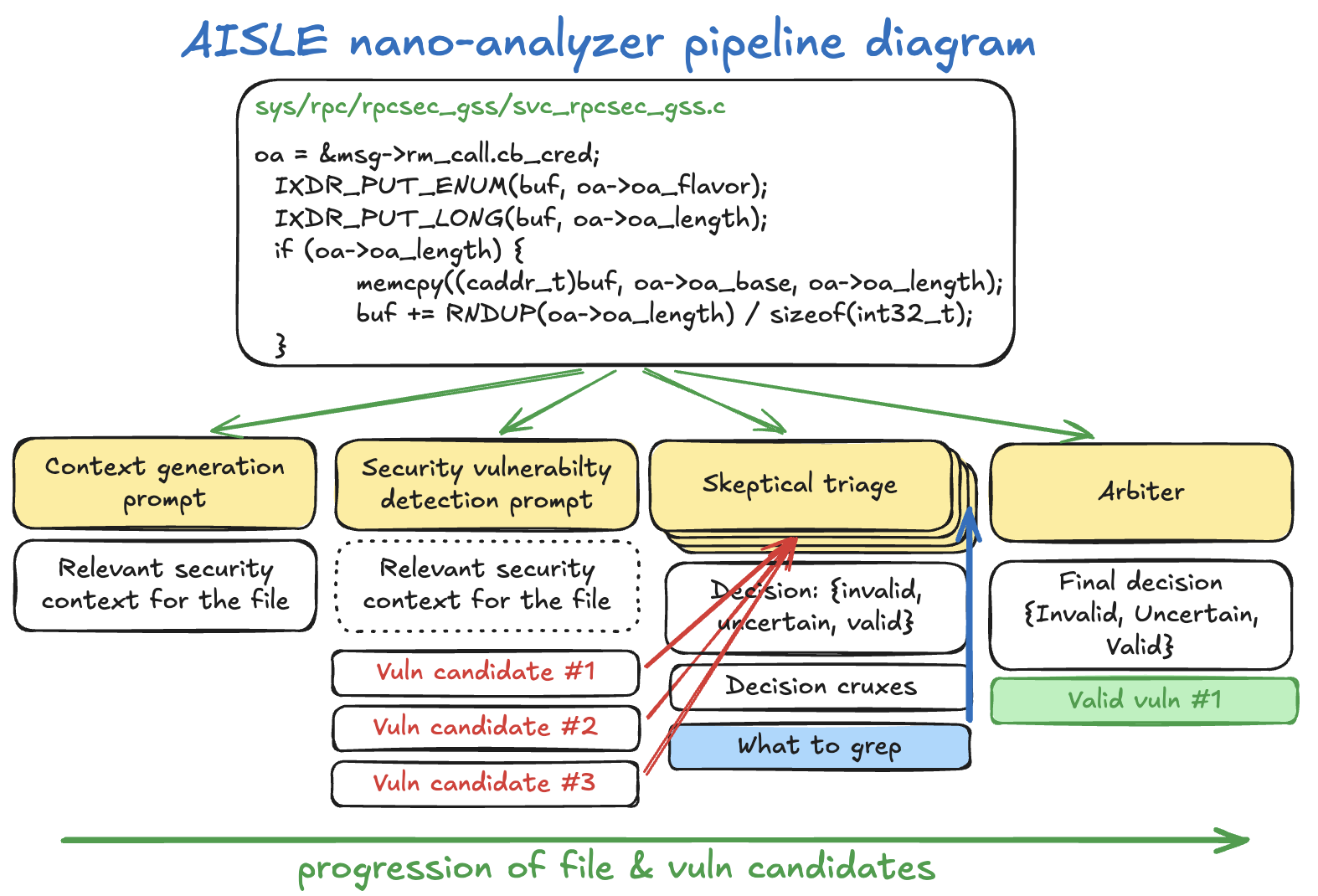
Nano-analyzer is a Python-based tool from AISLE that uses large language models (LLMs) to scan source code for zero-day vulnerabilities. Hosted on GitHub at weareaisle/nano-analyzer, it has garnered 230 stars since its release. As a research prototype, it focuses on detecting unknown bugs through a streamlined, single-file Python script called scan.py. The project targets memory safety issues in C and C++ code, such as buffer overflows, NULL dereferences, integer overflows, and type confusion, though it can process other languages with reduced effectiveness.
This scanner addresses a gap in traditional vulnerability detection: tools like static analyzers or fuzzers often miss zero-days because they rely on known patterns. Nano-analyzer sends code through an LLM pipeline to generate context, hunt for bugs, and triage findings skeptically. Results output to Markdown and JSON files for review. AISLE shares it as-is for open research, with a diagram in the README illustrating the flow from source code input to verified findings.
What it does
The core of nano-analyzer is a three-stage LLM process applied to each source file:
- Context generation: The model produces a security briefing on the file's purpose, untrusted data flows, buffer sizes, and locations.
- Vulnerability scan: Primed with that context, the model examines functions one by one, outputting structured findings on potential zero-day bugs.
- Skeptical triage: A reviewer model challenges each finding across multiple rounds (default: 5), using grep (via ripgrep or Google codesearch) to check the codebase for defenses. An arbiter decides the final confidence score.
High-confidence findings (tunable via --min-confidence, e.g., 0.7) appear in the output files. Parallelism defaults to 50 concurrent scans, adjustable with --parallel. Users specify a model like gpt-5.4-nano (OpenAI) or qwen/qwen3-32b (OpenRouter), and the script routes API calls accordingly.
Current limitations
The README emphasizes that nano-analyzer is a v0.1 prototype with known constraints. It biases toward C/C++ memory safety vulnerabilities, using prompts and few-shot examples tuned for those. Scans on other languages work but yield poorer results.
False positives occur even after triage—manual verification is required. False negatives miss classes like logic bugs, race conditions, cryptographic flaws, or authentication issues; a clean report does not confirm safety. Analysis stays single-file, overlooking cross-file interactions. Outcomes depend on the LLM: different models produce varying detections and hallucinations.
For large repos, optional tools like ripgrep (rg) or Google codesearch speed up triage grep. Without them, it falls back to Python's built-in search.
Getting it running
Setup requires minimal effort, matching the "nano" name. It runs on Python 3.8+ with no pip dependencies—everything lives in scan.py.
Clone the repo:
git clone https://github.com/weareaisle/nano-analyzer.git
cd nano-analyzer
python3 scan.py --help
Provide an API key via environment variable:
# OpenAI (models without slash, e.g., gpt-5.4-nano)
export OPENAI_API_KEY=sk-...

# OpenRouter (models with slash, e.g., qwen/qwen3-32b)
export OPENROUTER_API_KEY=sk-or-...
Basic usage scans a file or directory:
# Single file
python3 scan.py ./path/to/file.c

# Directory (recursive)
python3 scan.py ./path/to/src/
Key flags include:
| Flag | Default | Description |
|---|---|---|
--model |
gpt-5.4-nano |
LLM for all stages |
--parallel |
50 |
Concurrent scans |
--repo-dir |
./ |
Root for triage grep (when scanning subdirs) |
--min-confidence |
0.5 |
Threshold for findings |
--triage-rounds |
5 |
Triage iterations |
For example, scan a crypto library subdirectory with more scrutiny:
python3 scan.py ./lib/crypto/ --repo-dir ./ --triage-rounds 7 --min-confidence 0.7 --parallel 30
Outputs land in a nano-analyzer-results/ directory with per-file Markdown (human-readable) and JSON (structured).
Who this is for
Security researchers or developers auditing C/C++ codebases benefit most, especially for quick zero-day hunts in prototypes or open-source projects. If you probe memory-unsafe code and want LLM-assisted insights beyond grep or basic static tools, it fits. Use it on small-to-medium repos where single-file analysis suffices—pair with --repo-dir for context.
Teams experimenting with AI in security workflows can adapt the prompts in scan.py for custom needs. It's not a production scanner; treat outputs as starting points for manual review. Open-source contributors might run it on pull requests for early flags on memory bugs.
How it compares
Nano-analyzer stands apart as a lightweight LLM harness rather than a full static analyzer like Coverity or Clang Static Analyzer, which excel at known patterns but skip zero-days. Fuzzers like AFL++ find crashes empirically but require setup and time. LLM tools like those from GitHub Copilot or custom agents offer code review, yet lack nano-analyzer's structured triage with grep verification.
It's heavier on API costs than rule-based scanners but cheaper than human audits for initial passes. For non-C/C++, tools like Semgrep or CodeQL provide broader language support without LLM variability.
Comments