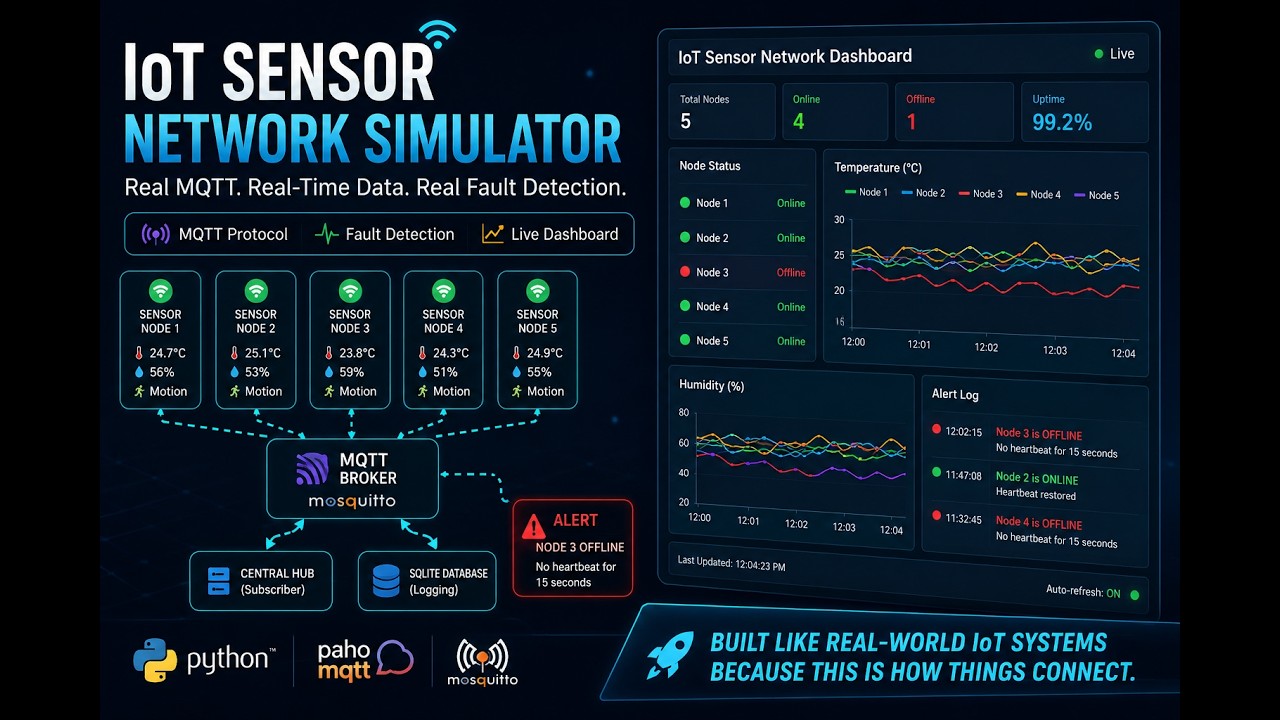
A real distributed systems project — not a toy script.
Built with the actual MQTT protocol used by AWS IoT, Tesla, and billions of embedded devices worldwide.
🎬 What's happening under the hood
  Every 3–5 seconds, each node wakes up, generates a reading, and shouts it
  into the network. The hub is always listening. The dashboard is always watching.

  ╔══════════════════════════════════════════════════════════════════════════╗
  ║                     LIVE SENSOR NETWORK (simulated)                     ║
  ╠══════════════════════════════════════════════════════════════════════════╣
  ║                                                                          ║
  ║   🌡  node_1  temp=22.4°C  ──┐                                          ║
  ║   🌡  node_2  temp=19.8°C  ──┤                                          ║
  ║   💧  node_3  humi=58.3%   ──┼──►  [ Mosquitto Broker :1883 ]           ║
  ║   💧  node_4  humi=61.1%   ──┤          │                               ║
  ║   👁  node_5  motion=0     ──┘          │ subscribe sensors/+/+         ║
  ║                                         ▼                               ║
  ║                                  [ hub.py ]                             ║
  ║                                  ├─ logs readings to SQLite             ║
  ║                                  ├─ tracks heartbeats per node          ║
  ║                                  └─ 15s silence = ❌ OFFLINE            ║
  ║                                         │                               ║
  ║                                         ▼                               ║
  ║                              [ Streamlit Dashboard ]                    ║
  ║                              ├─ 🟢 node_1  22.4°C   2s ago             ║
  ║                              ├─ 🟢 node_2  19.8°C   4s ago             ║
  ║                              ├─ 🔴 node_3  OFFLINE  23s ago  ← ALERT   ║
  ║                              ├─ 🟢 node_4  61.1%    1s ago             ║
  ║                              └─ 🟢 node_5  motion=0  3s ago            ║
  ╚══════════════════════════════════════════════════════════════════════════╝
Kill any node with one command. The hub detects the silence. The dashboard goes red. Revive it. It comes back online. The whole thing is live.
🎥 Demo
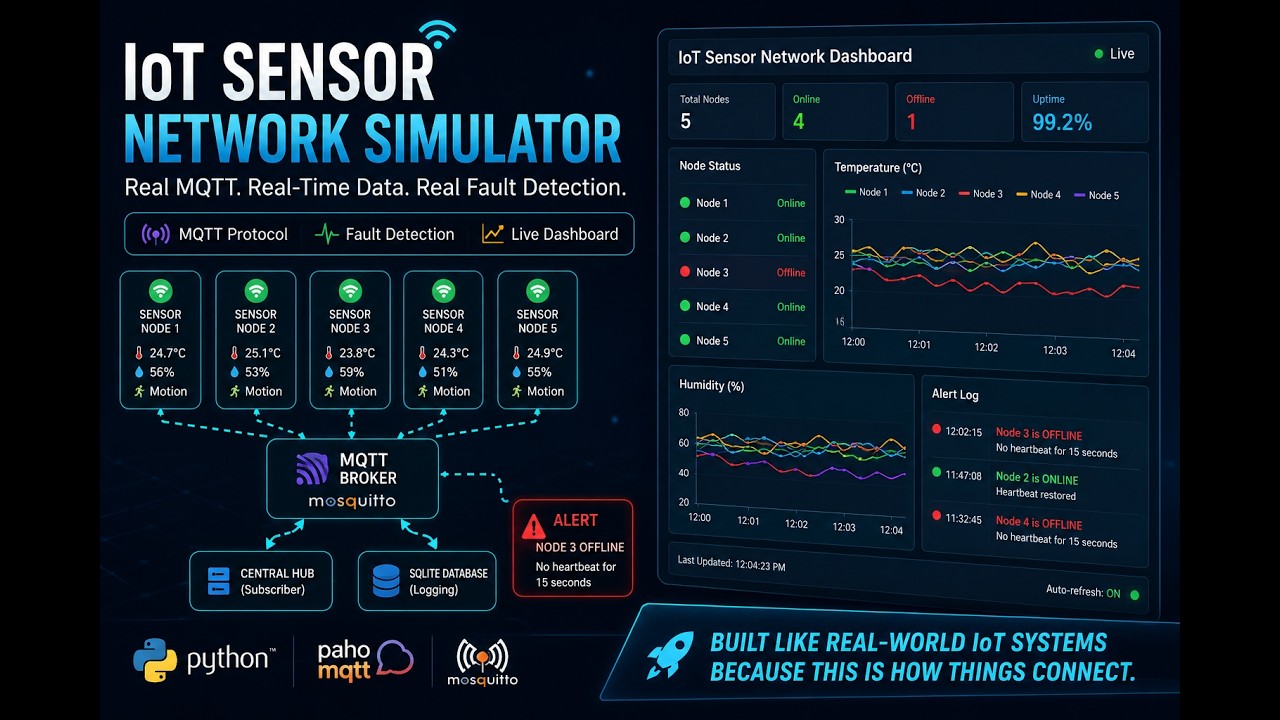
Click to watch — live fault detection, node recovery, and real-time dashboard
✨ Why this project exists
Most IoT tutorials fake it — one script, fake pub/sub, no real network, no real protocol.
This project uses real MQTT over a real broker with real distributed processes. The same architecture pattern behind:
| Real System | What it shares with this project |
|---|---|
| 🏠 Smart home hubs (Google Home, Amazon Echo) | MQTT pub/sub between devices and hub |
| 🏭 Industrial SCADA systems | Sensor nodes → central aggregator → dashboard |
| 🚗 Tesla vehicle telemetry | Heartbeat-based liveness detection |
| ☁️ AWS IoT Core | Topic-based routing, wildcard subscriptions |
| ⚓ Kubernetes | Heartbeat timeouts → node marked NotReady |
🧩 Core concepts demonstrated
📨 MQTT Publish / Subscribe — click to expand
MQTT is a messaging protocol designed in 1999 for oil pipeline monitoring over satellite — low bandwidth, unreliable connections, constrained devices. Those same properties make it the dominant IoT protocol today.
How it works here:
node_1 publishes ──► sensors/node_1/temperature  ──► broker ──► hub receives
node_1 publishes ──► sensors/node_1/heartbeat    ──► broker ──► hub receives
hub subscribes   ──► sensors/+/+                 (+ matches any single level)
Publishers and subscribers never connect to each other — the broker decouples them entirely. A node doesn't know or care that the hub exists.
🖥️ Distributed Process Architecture — click to expand
Each sensor node is a completely independent OS process with:
- Its own MQTT client connection
- Its own data generation loop
- No shared memory with any other node
- No knowledge that other nodes exist
PID 21564  sensor_node.py  node_1  temperature
PID 11088  sensor_node.py  node_2  temperature
PID  7896  sensor_node.py  node_3  humidity
PID  4208  sensor_node.py  node_4  humidity
PID  3892  sensor_node.py  node_5  motion
PID  9100  hub.py          ← subscribes to all of them
Kill PID 7896 — the others keep running. The hub notices the silence. This is how real embedded hardware behaves.
💓 Heartbeat-based Fault Detection — click to expand
A classic distributed systems pattern used in Kubernetes, ZooKeeper, Consul, and every serious distributed database.
The algorithm:
Every 5 seconds:
  node → publishes heartbeat to sensors/{node_id}/heartbeat

Every 5 seconds (hub fault-detection thread):
  for each known node:
    if (now - last_heartbeat) > 15 seconds:
      mark node OFFLINE
      log alert

When heartbeat resumes:
  if node was OFFLINE:
    mark node ONLINE
    log recovery alert
Sleep-mode awareness: Nodes can publish their expected sleep schedule before going dormant. The hub uses this to avoid false-alarming — it knows the difference between "dead" and "intentionally sleeping."
📊 Real-time Monitoring Dashboard — click to expand
The Streamlit dashboard polls SQLite every 3 seconds and shows:
- Node status grid — per-node cards with color-coded online/offline status, current reading, last-seen timestamp
- Time-series charts — rolling Plotly charts for temperature, humidity, and motion
- Alert log — timestamped log of every offline event, recovery, and anomalous reading
SQLite is used as a lightweight shared state store — the hub writes, the dashboard reads. No additional infrastructure needed.
🗂 Project structure
iot-sensor-network/
│
├── src/
│   ├── sensor_node.py      # 🌡  Independent sensor device — MQTT publisher
│   │                       #     Generates realistic temperature / humidity / motion
│   │                       #     Publishes readings + heartbeats
│   │
│   ├── hub.py              # 🖥  Central hub — MQTT subscriber
│   │                       #     Logs all readings to SQLite
│   │                       #     Fault-detection thread watches heartbeats
│   │
│   ├── launch_nodes.py     # 🚀  Spawns all 5 nodes as separate OS processes
│   │                       #     Writes PID records so fault_injector can find them
│   │
│   └── fault_injector.py   # 💀  Kill / revive individual nodes on demand
│                           #     Demonstrates fault detection live
│
├── app.py                  # 📊  Streamlit dashboard — live monitoring UI
├── mqtt_test.py            # ✅  Connectivity verification script
├── requirements.txt        # 📦  Pinned dependencies
├── .gitignore
└── README.md
⚙️ Tech stack
| Layer | Technology | Version | Role |
|---|---|---|---|
| Message broker | Mosquitto | 2.x | Routes all MQTT messages |
| MQTT client | paho-mqtt | 2.1.0 | Python MQTT pub/sub |
| Database | SQLite | stdlib | Time-series + state store |
| Dashboard | Streamlit | 1.36.0 | Live web UI |
| Charts | Plotly | 5.22.0 | Interactive time-series |
| Data wrangling | pandas | 2.2.2 | DB → DataFrame queries |
🚀 Getting started
Prerequisites
- Python 3.9 – 3.12
- Mosquitto MQTT broker — this is a system service, not a pip package
Step 1 — Install Mosquitto
⚠️ This step is required. The hub and nodes will fail with
ConnectionRefusedErrorif Mosquitto isn't running.
- Download the installer from https://mosquitto.org/download/ (64-bit
.exe) - Run it — installs as a Windows service automatically
- Start the service (PowerShell as Administrator):
net start mosquitto
- Verify it's listening:
netstat -an | findstr 1883
# Should show: 0.0.0.0:1883   LISTENING
macOS:
brew install mosquitto
brew services start mosquitto
Linux:
sudo apt install mosquitto mosquitto-clients
sudo systemctl start mosquitto
Step 2 — Python environment
# Windows
py -3.11 -m venv venv
venv\Scripts\python.exe -m pip install -r requirements.txt

# macOS / Linux
python3.11 -m venv venv
source venv/bin/activate
pip install -r requirements.txt
Step 3 — Verify connectivity
Run this before anything else. It connects to Mosquitto, publishes a test message, and confirms it arrives back.
# Windows
venv\Scripts\python.exe mqtt_test.py

# macOS / Linux
python mqtt_test.py
Expected output:
✅ All Python imports OK
✅ Connected to Mosquitto at localhost:1883
✅ Received message: {"test": true, ...}
══════════════════════════════════════════════════
��� MQTT CONNECTIVITY TEST PASSED
   You can now start the full simulation.
══════════════════════════════════════════════════
Step 4 — Run the simulation
Open three terminal windows in the project root.
Terminal 1 — Start the hub first:
venv\Scripts\python.exe src/hub.py
[hub] Connected to broker at localhost:1883
[hub] Subscribed to sensors/+/+
[hub] 📡 node_1/temperature: 22.4°C       ← data starts flowing
[hub] 📡 node_3/humidity: 58.1%
Terminal 2 — Launch all sensor nodes:
venv\Scripts\python.exe src/launch_nodes.py
✅ node_1   (temperature) — PID 21564
✅ node_2   (temperature) — PID 11088
✅ node_3   (humidity   ) — PID 7896
✅ node_4   (humidity   ) — PID 4208
✅ node_5   (motion     ) — PID 3892
Terminal 3 — Open the dashboard:
venv\Scripts\streamlit.exe run app.py
Opens at http://localhost:8501 — auto-refreshes every 3 seconds.
Step 5 — Demo fault detection 🔥
This is the interesting part. Open a fourth terminal:
# Kill node_3 — simulates a dead battery or lost connection
venv\Scripts\python.exe src/fault_injector.py --kill node_3
Watch what happens:
# After ~15 seconds silence, the hub fires:
[hub] ❌ Node node_3 OFFLINE (no heartbeat for 15s)
[hub] 🔔 ALERT [offline] node_3: Node node_3 went offline
The dashboard card for node_3 turns 🔴 RED.
# Bring it back
venv\Scripts\python.exe src/fault_injector.py --revive node_3
# Hub immediately detects the returning heartbeat:
[hub] ✅ Node node_3 came back ONLINE
[hub] 🔔 ALERT [online] node_3: Node node_3 reconnected
Card goes 🟢 GREEN. The full cycle is logged in the alerts panel.
🌡 Sensor simulation details
| Sensor | Behaviour | Range |
|---|---|---|
| Temperature | Slow random walk ± 0.3°C per step, 3% chance of a sudden spike (+3–8°C) | 15°C – 35°C |
| Humidity | Slow random walk ± 0.5% per step | 20% – 90% |
| Motion | Binary trigger, ~5% probability per reading | 0 or 1 |
The hub flags anomalies automatically:
- Temperature > 30°C or < 15°C → alert logged
- Humidity > 80% → alert logged
- Motion triggered → alert logged
🔧 Troubleshooting
| Problem | Fix |
|---|---|
ConnectionRefusedError on port 1883 |
Run net start mosquitto as Administrator |
| Dashboard shows "waiting for data" | Start hub.py before opening the dashboard |
| Nodes exit immediately | Run mqtt_test.py first to verify broker is reachable |
ModuleNotFoundError |
Run pip install -r requirements.txt inside your venv |
| Port 1883 already in use | Another Mosquitto instance is running — check Services |
🗺 Future work
This is a v1 local simulation. The path to production:
- 🔒 TLS + Auth — production MQTT uses port 8883 with client certificates or username/password. Noted in code comments throughout.
- ☁️ Cloud broker — swap
localhost:1883for AWS IoT Core, HiveMQ Cloud, or EMQX. The node/hub code is broker-agnostic. - 🍓 Real hardware —
sensor_node.pyruns unmodified on a Raspberry Pi. PointBROKER_HOSTat a real broker and connect actual sensors. - 📈 Time-series DB — replace SQLite with InfluxDB or TimescaleDB for production-scale workloads and Grafana dashboards.
- 😴 Sleep mode — already partially implemented. Nodes publish their sleep schedule; the hub suppresses false-alarm timeouts during intentional dormant periods.
📖 Why MQTT?
MQTT was designed in 1999 for monitoring oil pipelines over satellite links — high latency, low bandwidth, unreliable connections, constrained devices. Those exact constraints describe IoT hardware.
Compared to HTTP:
| MQTT | HTTP | |
|---|---|---|
| Header overhead | 2 bytes fixed | ~800 bytes minimum |
| Connection model | Persistent | Request/response |
| Broker decoupling | ✅ Yes | ❌ No |
| QoS guarantees | 3 levels | None built-in |
| Idle detection | Last Will & Testament | Polling |
Today MQTT is the default protocol for AWS IoT Core, Azure IoT Hub, Google Cloud IoT, and most commercial smart home platforms.
Built by Eddie · Python · MQTT · Distributed Systems
If this was useful, leave a ⭐
Comments