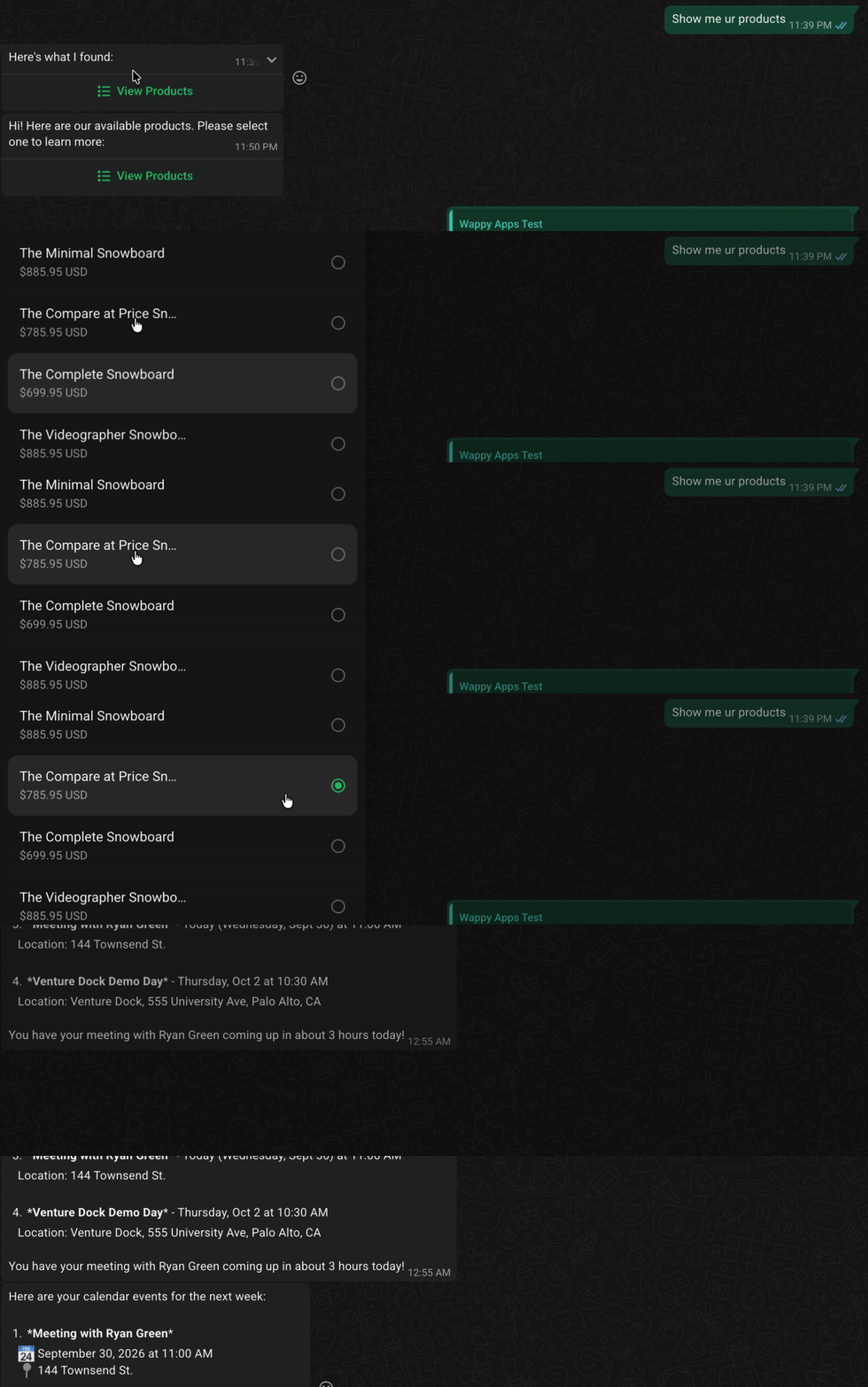
Build a real AI agent on WhatsApp, running on your own machine, in under a minute.
Free. Open source. No account with us, ever. Your conversations, your memory, your data stay in one file on your own machine — nothing routes through a server we run.
Why now
AI models finally got good enough to reliably use tools, remember context, and hold a real conversation, not just autocomplete a reply. At the same time, WhatsApp is already the app on over 2 billion phones, nobody has to install anything new to talk to your agent. Put those two things together and the obvious move is: skip building a new app, skip handing your data to someone else's cloud, and just run your own agent, locally, on the channel people already have open.
That's what this is. One command, your own model key, your own WhatsApp number, your own data.
Install — under a minute, free, 100% local
npm create @wappy_ai/agent
cp .env.sample .env    # fill in your model key + WhatsApp creds
npm install
npm run dev             # boots the server, opens a tunnel, prints the URL for Meta's webhook config
$ npm create @wappy_ai/agent

┌  Wappy agent setup — let's set up your WhatsApp agent
│
◆  Which model provider will you use?
│  ● Anthropic
│  ○ OpenAI
│  ○ Gemini
│  ○ Local Ollama
│
◆  Where should retrieved knowledge (anything you ingest) live?
│  ● Local (SQLite/LibSQL) — free, no account, works offline
│  ○ Cognee — self-hosted or cloud knowledge graph
│
◆  Add a productivity agent (reads your Gmail/Calendar, answers in plain language)?
│  ○ No
│  ● Yes
└
◇  Interview complete — generating your project...

Done — 7 file(s) written in ./my-agent.
A few questions, then a working agent. No credit card, no signup for Wappy itself, nothing phoning home.
Personal use cases
- 🧠 A personal assistant that actually remembers you. Not just the last message, a real session profile of what's going on, so three days later it still knows what you meant.
- 📅 "What's on my calendar / find that email" — connect your own Google account once, then just ask in plain English. No fixed command list.
- 📚 A private, grounded knowledge base. Ingest your own notes or documents and ask questions about them, answered from what you actually gave it, never a hallucinated guess, and it never leaves your machine.
Business use cases
- 🎫 A support agent that resolves things in your own ticketing system instead of collecting an email and vanishing.
- 🍽️ A booking agent for a restaurant, clinic, or studio, wired to your real reservations system.
- 🏢 An internal ops bot for IT or HR, reachable from the app your team already has open all day.
None of these ship pre-built, they're what you wire your own data and tools into. The agent (memory, context, tool-calling, reply formatting) is already built; your business logic is yours.
Memory backend: local or Cognee
Every generated project wires in a real Knowledge/RAG layer, so anything you ingest can
actually be retrieved and grounded in a reply. The interview picks what backs it:
- Local (default) — SQLite/LibSQL, BM25 matching, zero setup, fully offline.
- Cognee — self-hosted or cloud. Extracts entities and relationships
into a real knowledge graph instead of plain keyword matching, and keeps refining it over time.
Needs your own running Cognee instance — the generated project's
COGNEE_SETUP.mdcovers both the self-hosted and cloud paths.
Same rule as everywhere else here: bring your own instance, nothing routed through us.
A real sample tool: Gmail/Calendar assistant
Say "yes" to the productivity question and you get a working example of the tool-calling harness used for everything else here, not a toy demo. Connect your own Google account (one click, on a local page the project serves) and text the bot anything about your Gmail or Calendar:
- "What's on my calendar today?"
- "Find emails about the invoice from last week"
- "Summarize my unread mail by topic from the last 2 days"
Two generic, parameterized, read-only tools (search_gmail, search_calendar) using each API's
own real query syntax — the model builds the actual query itself, no hand-built filters, no MCP
server. It only reads, never sends or deletes anything. Not connected yet? It says so honestly
instead of making something up.
Packages
| Package | What it is |
|---|---|
@wappy_ai/core |
The shared contracts everything else is built on. |
@wappy_ai/harness |
The agent itself: how it thinks, remembers, and decides what to do. |
@wappy_ai/whatsapp |
Talking to WhatsApp correctly: message formatting, retries, a real webhook server. |
@wappy_ai/create-agent |
The installer (npm create @wappy_ai/agent). |
@wappy_ai/connector-cognee (optional) |
Bring-your-own Cognee REST client + Knowledge implementation, used when you pick Cognee over the local memory backend. |
@wappy_ai/productivity (optional) |
The Gmail/Calendar assistant above. |
@wappy_ai/connector-google (optional) |
Bring-your-own Google OAuth + the real Gmail/Calendar API calls behind it. |
Every install pulls in core/harness/whatsapp/create-agent. connector-cognee is only
added if you pick Cognee; productivity/connector-google only if you say yes to the
productivity question. Nothing extra otherwise.
Requirements
- Node.js 22+ (the Vercel AI SDK, which every generated project depends on directly, requires it)
- A WhatsApp Cloud API app. Free, via Meta's developer portal. You'll need a phone number, an access token, and an app secret — the generated project's own README walks through every field.
- A model API key. OpenAI, Anthropic, or Gemini. Or skip it entirely and run fully offline against local Ollama.
- Python 3.10–3.14 — only if you pick Cognee as your memory backend AND self-host it without Docker. The default (local) memory backend needs nothing extra, and Cognee itself can also be run via Docker or Cognee Cloud instead — your generated project's own
COGNEE_SETUP.mdcovers all three. Not a requirement ofnpm create @wappy_ai/agentitself.
For contributors (and your coding agent)
Early days, genuinely pre-1.0. Open to any kind of feedback. See ARCHITECTURE.md
and CONTRIBUTING.md.
Comments