A small Solana and Robinhood scanner built around GMGN market data. It ranks active pools by hourly volume relative to liquidity, checks short-term flow, and posts the result to Telegram.
The script is meant for quick pool and momentum rotation. It does not place trades or touch a wallet.
How it works
The candidate lists come from GMGN Trending on Solana and Robinhood. Each chain gets its own board, ranked by:
V/L = rolling 1h volume / liquidity
FLOW compares the latest five minutes with the rolling one-hour volume:
FLOW = (latest 5m volume * 12) / rolling 1h volume
The arrow adds direction from the same five-minute window:
📈price up and buy volume leads📉price down and sell volume leads🔄mixed or conflicting flow
Speed labels:
🔥above 1.20🟢0.80 to 1.20🟡0.50 to 0.79🧊below 0.50
A hot reading measures activity, not safety. 🔥📉 usually means an active sell-off.
The main boards show up to five rows per chain. Rows are kept tight so both chains remain readable in one Telegram message.
Filters
The default Solana scan uses:
| Filter | Value |
|---|---|
| Interval | 1h |
| Minimum liquidity | $2,500 |
| Minimum holders | 200 |
| Minimum age | 30m |
| Minimum gas fee | 20 |
| Minimum smart degen count | 2 |
| Minimum swaps | 500 |
| Minimum market cap | $100,000 |
| Social profile | Required |
| Wash trading | Excluded |
| Creator close | Not required |
Robinhood uses the same interval, liquidity, holder, age, smart-degen, swap, and market-cap gates. It does not reuse Solana's minimum gas-fee gate. GMGN reports gas on a different scale for Robinhood, and applying 20 there removed active names from the candidate set.
Requirements
- Python 3.9 or newer
- GMGN CLI, configured with access to market commands
- Hermes Agent for the included scheduled-job setup
- A Telegram bot token and target chat ID
Run locally without a VPS
You do not need a VPS. Install Hermes Agent on Windows through WSL, or on a Linux or macOS computer, and run the radar locally with Telegram.
The setup is simple:
- Install Hermes Agent.
- Install and configure GMGN CLI.
- Clone this repository and run
./install.sh. - Add your Telegram bot token and chat ID.
- Test the radar once, then add the Hermes cron.
Your computer must stay turned on and connected to the internet for scheduled reports to keep running.
The radar sends reports straight to Telegram every ten minutes. Hermes only handles the schedule. The cron uses no_agent: true, so it does not call an AI model or spend LLM tokens while running. The slower cadence leaves more room to read the board and act on it instead of reacting to every tick.
Any inexpensive model is fine for the initial Hermes setup because the radar cron does not use it.
Install
1. Install the radar
git clone https://github.com/ayehuasca/gmgn-vl-radar.git
cd gmgn-vl-radar
./install.sh
2. Set up GMGN API access
Install GMGN CLI if it is not already available:
npm install -g gmgn-cli
Start the API setup:
gmgn-cli config
The command prints a GMGN API Key creation link. Open that link in a browser, sign in to GMGN, and create an API key. Copy the key, then apply it locally:
gmgn-cli config --apply YOUR_GMGN_API_KEY
Check the setup:
gmgn-cli config --check
A successful check exits without an error. You can also test the market endpoint:
gmgn-cli market trending \
  --chain sol \
  --interval 1h \
  --limit 5
GMGN CLI writes the API key and its generated private key to:
~/.config/gmgn/.env
Do not copy that file into this repository. Do not paste the API key into src/gmgn-dlmm-radar.py. The script calls GMGN CLI, and GMGN CLI reads the credentials from ~/.config/gmgn/.env automatically.
If gmgn-cli config --check fails:
gmgn-cli: command not found: runnpm install -g gmgn-cliagain.401or403: confirm the key withgmgn-cli config --apply YOUR_GMGN_API_KEY. GMGN market commands require IPv4, so disable outbound IPv6 if the key is valid but access is still rejected.429: wait for the rate limit to reset before retrying.
3. Set up Telegram
Edit:
~/.config/gmgn-dlmm-radar/telegram.env
TG_BOT_TOKEN=your_bot_token
TG_CHAT_ID=your_chat_id
RADAR_TIMEZONE=UTC
RADAR_LOCATION=UTC
The timezone uses an IANA name. Examples:
| Location | RADAR_TIMEZONE |
RADAR_LOCATION |
|---|---|---|
| Bali | Asia/Makassar |
Bali |
| Jakarta | Asia/Jakarta |
Jakarta |
| New York | America/New_York |
New York |
| UTC | UTC |
UTC |
The installer creates the env file with mode 600. The real credentials stay outside the repository.
Run it
Send one report immediately:
python3 ~/.hermes/scripts/gmgn-dlmm-radar.py
The included cron config runs every ten minutes with no_agent: true. The script sends directly to Telegram, so Hermes delivery remains local:
{
  "name": "gmgn-dlmm-radar",
  "schedule": "*/10 * * * *",
  "script": "gmgn-dlmm-radar.py",
  "no_agent": true,
  "deliver": "local"
}
Use config/cron.json when creating the scheduled job.
Latest radar update
The report covers Robinhood alongside Solana. Both chains use GMGN Trending and the same V/L, swap, market-cap, and FLOW calculations. Each board stops at five rows, and the blank lines between tokens are gone so the report fits more comfortably on a phone.
Robinhood keeps the useful activity gates but skips Solana's min-gas-fee 20 filter. During testing, that filter cut the Robinhood universe from 100 names to 27 and removed active runners such as DJT. Gas values are not directly comparable across the two chains.
The separate momentum callout tables were removed. The report now sticks to the two ranked data boards. S5M, S×, and FLOW remain visible as measurements, but the report does not label a token as an entry.
Output
GMGN V/L — 14:31 Bali

SOLANA
SYM      V/L   S1H  S5M   S×    MC   FLOW
--------------------------------------------
KNEWIT   1.8   830  300  4.3  725k  🔥📈2.9
BOT      1.7  1524  475  3.7  379k  🔥🔄3.0
Burpcoi  1.5   777   77  1.2  149k  🔥📉1.2

ROBINHOOD
SYM      V/L   S1H  S5M   S×    MC   FLOW
--------------------------------------------
HOTDOG  16.0  4486  653  1.7  127k  🔥📉1.6
DJT     13.3 20098  343  0.2  582k  🧊📉0.3
GTAVI   10.2  3757  409  1.3  258k  🔥🔄1.4

RULE
MAX HOLD 1 HOUR.
Get in, get out, then rotate to next pool.
Reading the columns
| Column | Meaning |
|---|---|
SYM |
Token symbol. Verify the contract address before acting because symbols are not unique. |
V/L |
Rolling one-hour volume divided by current liquidity. A higher number means faster turnover relative to the available liquidity. |
S1H |
Total swaps during the rolling one-hour window. This remains the quality baseline and filter. |
S5M |
Total swaps during the latest five minutes. This shows what is happening now. |
S× |
Swap acceleration: (S5M × 12) / S1H. 1.0 means the current pace matches the one-hour baseline, 1.3 or higher is accelerating, and 2.0 or higher is explosive. |
MC |
Current token market cap. |
FLOW |
Five-minute volume run rate versus rolling one-hour volume, followed by the current direction. |
FLOW symbols
The first symbol shows volume speed:
🔥  hot       above 1.2
🟢  active    0.8 to 1.2
🟡  cooling   0.5 to 0.8
🧊  cold      below 0.5
The second symbol shows direction:
📈  price is rising and buy volume is dominant
📉  price is falling and sell volume is dominant
🔄  mixed, flat, or price and volume do not agree
The number after the symbols is the FLOW ratio. For example, 🔥📈1.6 means five-minute volume is running at 1.6 times the one-hour baseline and the short-term direction is bullish.
Reading S× and FLOW together
S× counts transaction acceleration. FLOW measures the amount of money moving and its direction. Use both:
S× 1.6 + 🔥📈1.5   swaps and volume are accelerating bullishly
S× 2.1 + 🔥📉2.4   heavy activity, but likely a sell-off rather than a buy signal
S× 1.4 + 🧊🔄0.3   many small swaps without meaningful volume
S× 0.5 + 🧊📈0.4   activity is slowing even if price is briefly rising
A high S× is not automatically bullish. Bot churn and panic selling can also create a large number of swaps.
Busy swaps, cold FLOW, and bearish direction
A busy S5M does not automatically mean fresh buying momentum. When swaps stay active but FLOW is cold and points down, the pool may be processing many small trades while nominal volume is fading and sell pressure remains dominant.
This is not a momentum entry signal. Treat it as a directional setup that still needs confirmation from the chart, liquidity, and pair orientation.
Possible DLMM setup
If the bearish direction remains intact, a single-sided Bid-Ask or Curve distribution may be placed below the current price for the expected downward move.
The exact side depends on:
- which token is base and which is quote;
- which asset is deposited;
- where the bins sit relative to the active price;
- which asset the position is expected to convert into.
Do not assume that Bid-Ask or Curve is automatically bearish. Check the pair orientation and preview the expected inventory conversion before opening the position.
Operating rules
- Use
S5Mas proof of activity, not as a bullish signal. - Confirm that FLOW remains cold and the short-term direction remains bearish.
- Check the chart for continued lower highs, weak rebounds, or persistent sell pressure.
- Build the range below the current price. Do not chase price before it reaches the range.
- Wait for price to enter the selected range before treating the setup as active.
- Exit early if price reverses, buy pressure returns, or the bearish thesis fails.
- Hold for no longer than one hour under this rotation strategy.
- Close the position after the rotation and move to the next suitable pool.
Risks
Busy swaps can come from bots or many small transactions. They do not guarantee useful fee volume.
If price keeps falling, a single-sided position can convert into an unwanted token and continue losing value. A range may also remain untouched, move out of range quickly, or produce too little fee income to cover slippage and execution costs.
Check liquidity, token quality, slippage, pair orientation, and expected inventory conversion before entering. The one-hour limit is a discipline rule for this setup, not protection against loss.
High-momentum example
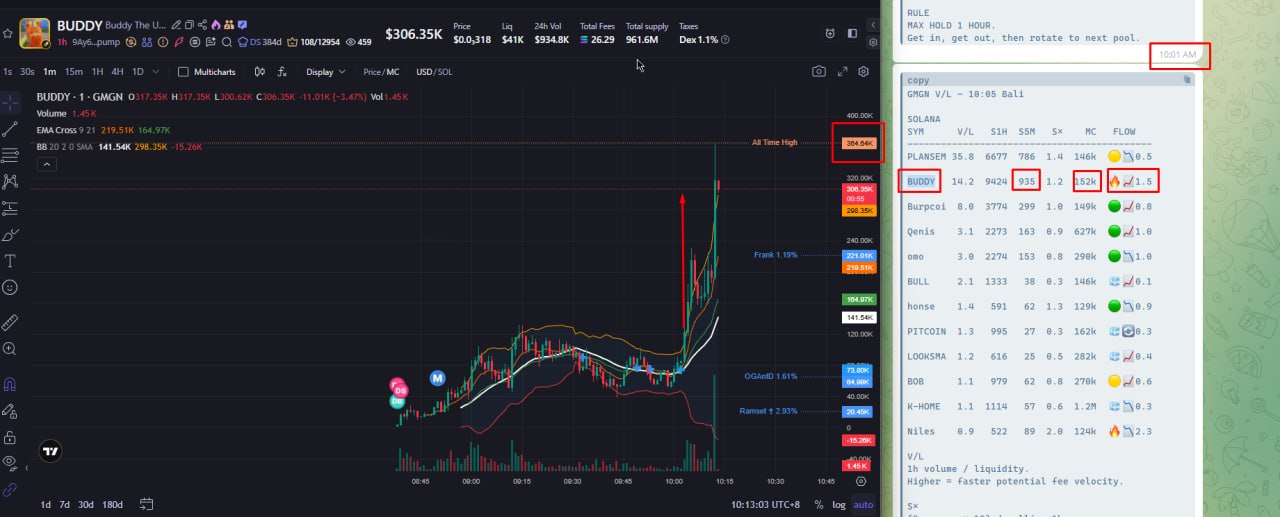
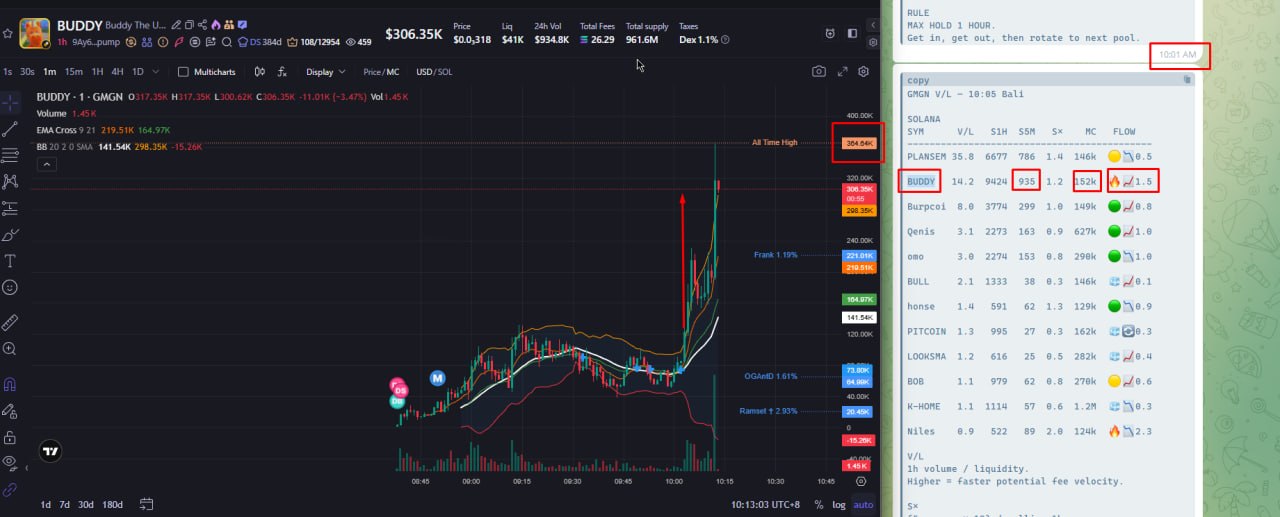
The radar can also be used to find short, high-momentum bursts. The screenshot below shows BUDDY appearing in the 10:01 AM report with:
V/L      14.2
S1H     9,424
S5M       935
S×        1.2
MC       $152k
FLOW     bullish 1.5
By about 10:13 AM, the chart showed market cap near $306.35k. That is roughly a 2.02x move in 12 minutes from the radar snapshot.
This is the fast-rotation use case:
find accelerating activity
confirm direction with FLOW
manage the position quickly
get out and rotate to the next pool
The screenshot is an example, not a performance guarantee. Market cap doubling does not guarantee that every position receives the same return. Entry timing, exit timing, liquidity, slippage, and fees all affect the result. The radar surfaces activity; it does not place trades or decide exits.
Entry discipline
The core rule: do not enter the token side at the current price. A hot V/L or busy S5M is a liquidity reading, not a reason to buy. If the goal is to accumulate lower, a spot limit order is usually the cleaner choice. It avoids inventory conversion and extra execution costs, and it does the same job when price arrives.
A few habits that keep the radar useful instead of expensive:
- Never buy the token side at the current price just because the board looks active.
- For a simple "buy lower" goal, place a spot limit order rather than a DLMM range.
- If you still want DLMM, use a single-sided bid under the price and wait for price to reach it. Do not chase the level early.
- Use DLMM single-sided bids only when price is expected to enter the range and chop there, so the position earns fees on top of the accumulation. A range placed far from the market just sits empty and earns nothing.
- Watch the pool size. A tiny pool, even with a high
V/L, can pay fees too small to matter after slippage and gas. - Exit when the thesis breaks, not when the position is merely underwater. Being down is not a reason to add; a dead range is.
Files
src/gmgn-dlmm-radar.py   scanner and Telegram sender
config/filter-query.json GMGN filter reference
config/robinhood-filter-query.json Robinhood filter reference
config/cron.json         scheduled-job settings
telegram.env.example     environment template
install.sh               local installer
Notes
- The report is a scanner, not an execution system.
- FLOW is a five-minute signal against a one-hour baseline. The report runs every ten minutes so a fresh board does not push you into overtrading.
- Each chain's board shows at most five rows.
- Token symbols are display-only. Use the token address before acting on a result.
- Maximum hold is an operating rule for this setup, not a guarantee of profit.
Comments