Axonel
A local supervisor and execution control plane for coding agents.
Run autonomous coding agents in isolated Git worktrees, verify tests on disk, and review diffs before merging.
Quickstart • The Killer Loop • Feature Tour • Architecture • Providers • Getting Started • CLI Docs • API Docs
What is Axonel?
Axonel is a local supervisor daemon and control plane for coding agents.
Running coding agents directly against your repository creates a heavy babysitting tax: agents hijack your active working directory, leave dirty untracked files, hallucinate that broken code works, and risk pushing faulty commits to main.
Axonel solves this by turning coding agents into supervised background workers:
- Isolated Worktrees: The agent executes exclusively in an isolated Git worktree. Your working files and active branch remain untouched.
- Out-of-Band Physical Verification: Axonel does not trust the agent's claim of success. It independently runs your tests (
cargo test,npm test,pytest) on disk. - Explicit Human Review Gate: Candidate commits halt at
READY FOR REVIEW. You inspect the unified diff and approve before anything merges. - Safe Git Integration: Two-phase transactional merge with target freshness checks and automatic rollback on merge conflicts.
The Killer Loop
┌───────────┐     ┌─────────��─────────┐     ┌──────────────┐     ┌────────────────┐     ┌──────────────┐     ┌───────────────┐
│ Task Goal │ ──> │ Isolated Worktree │ ──> │ Coding Agent │ ──> │ Verify on Disk │ ──> │ Human Review │ ──> │ Safe Merge    │
└───────────┘     └───────────────────┘     └──────────────┘     └────────────────┘     └──────────────┘     └───────────────┘
                        ▲                                                │
                        └────────────── Fix & Retry Loop ────────────────┘
Feature Tour
1. Isolated Worktree Execution & Executive Summary
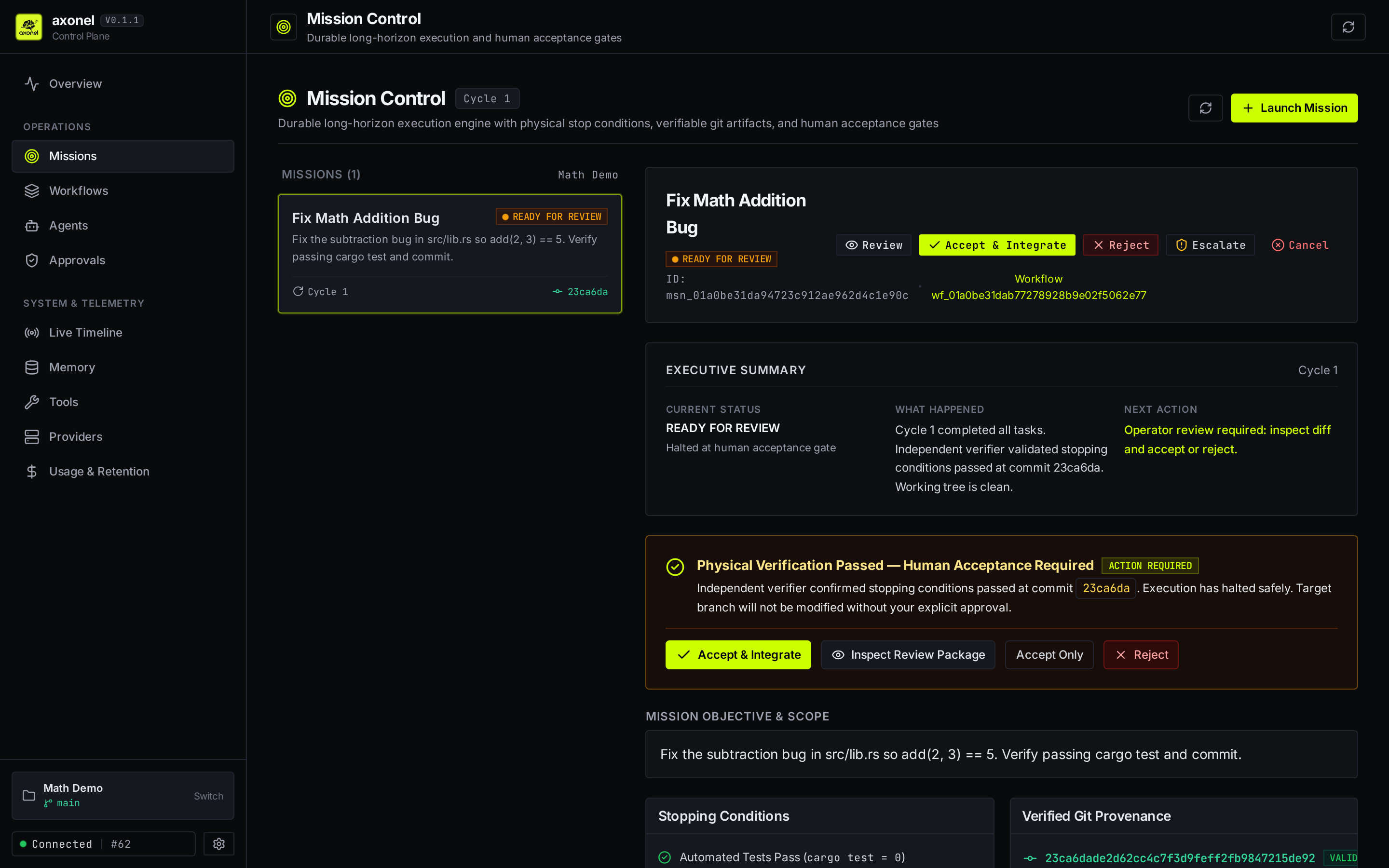
Agents execute inside isolated Git worktrees under .plexis/worktrees/. Your active branch and working files are never polluted or overwritten. The Executive Summary panel provides a high-level operational narrative (CURRENT STATUS, WHAT HAPPENED, NEXT ACTION) alongside verified Git provenance.
2. Independent Physical Verification
Never trust an LLM's self-reported "tests passed". Axonel independently executes your stopping conditions (cargo test, npm test, pytest) out-of-band and inspects exit codes and working tree cleanliness on disk.
3. Human Review & Unified Deliverable Diff
When physical verification succeeds, candidate commits halt at an explicit review gate. Inspect changed file statistics (+1 -1), line-by-line unified diffs, verification metrics, and audit event history before authorizing code changes.
4. One-Click Human Acceptance Gate
High-contrast attention banners ensure that no code touches your target branch without explicit operator consent. Reviewers can trigger Accept & Integrate, Accept Only, or Reject Deliverable with feedback that feeds directly into autonomous replanning.
5. Safe Git Integration
Candidate commits are merged into your target branch through a transactional state machine with target freshness validation and atomic rollback if merge conflicts occur.
6. Real-Time Operations Dashboard
Monitor overall control plane health, parallel task leases, multi-agent fleet activity, governance gates, and inference provider latencies across all registered project workspaces.
7. Agent Fleet Governance & Role Attribution
Inspect registered agent runtimes, specialized roles, capabilities, and active task leases. Expand any agent row to view execution state, assigned scope, and dispatch direct operator directives.
Quickstart
1. Build and Start the Daemon
git clone https://github.com/axonel/axonel.git
cd axonel

# Build web dashboard assets and release binary
npm --prefix web ci && npm --prefix web run build
cargo build --release -p plexis-server --bin axonel

# Start the supervisor daemon (binds to 127.0.0.1:3000)
./target/release/axonel serve
Open http://127.0.0.1:3000 in your browser to access the Web Dashboard.
2. Dispatch a Mission via CLI
# Initialize a workspace for your repository
axonel init /path/to/repo --name "my-project"

# Dispatch an autonomous mission
axonel mission create /path/to/repo \
  -o "Fix failing unit tests in parser.rs. Run cargo test and commit your fix." \
  -t "Fix parser tests"
3. Review and Integrate
When tests pass on disk, the mission halts at READY FOR REVIEW:
# Inspect the unified diff
axonel mission diff <MISSION_ID>

# Accept and merge into main
axonel mission accept <MISSION_ID> --integrate
📖 Looking for a full tutorial? Check out the Getting Started Guide for a step-by-step walkthrough using Google Gemini CLI or the offline test agent.
Architecture
Axonel is designed as an API-first local supervisor daemon backed by SQLite (WAL mode) and POSIX process supervision:
| Layer / Crate | Purpose |
|---|---|
axonel / plexis-server |
Axum HTTP daemon, REST API, SSE streaming, and CLI entrypoint. |
plexis-runtime |
Worktree lifecycle, POSIX PGID process supervision, and timeout enforcement. |
plexis-storage |
Persistent SQLite store for missions, checkpoints, and leases. |
plexis-providers |
Adapters for external agents (Gemini CLI, OpenAI, Ollama). |
plexis-tools |
Filesystem tools with path canonicalization and workspace containment. |
plexis-fake-agent |
Deterministic mock agent for offline regression testing and CI. |
web/ |
Embedded React + Vite Mission Control dashboard. |
See docs/architecture.md for detailed architecture and subsystem design.
Providers
| Provider / Adapter | Execution Mode | Requirements | Primary Use Case |
|---|---|---|---|
Gemini CLI (gemini) |
Subprocess (LocalAgentHost) |
gemini CLI installed, GEMINI_API_KEY |
Real-world autonomous bug fixes and refactoring |
Fake Agent (fake) |
Subprocess (plexis-fake-agent) |
Built-in Cargo binary | Offline testing, reproducible benchmarks, CI/CD |
Gemini API (gemini-api) |
HTTP API Client | GEMINI_API_KEY |
Direct API-driven planning and synthesis |
OpenAI API (openai) |
HTTP API Client | OPENAI_API_KEY |
OpenAI GPT-4o / o1 / o3 models |
Ollama (ollama) |
HTTP API Client | Local Ollama daemon | Local / air-gapped model execution |
See docs/providers.md for provider configuration and custom adapter development.
Documentation Hub
- 🚀 Getting Started Guide — Hands-on tutorial with a disposable repository.
- 💻 CLI Reference — Complete command-line documentation for
axonel. - 🔌 REST API Reference — HTTP endpoints, request/response payloads, and SSE events.
- 🏗️ System Architecture — Crate layering, state machines, and supervisor internals.
- 📖 Product Overview — Core thesis, target users, and non-goals.
- 🤖 Agent Providers — Setting up Gemini CLI, offline agents, and custom adapters.
- 🔄 Crash Recovery — Durability, state reconciliation, and Git ancestry.
- 🧪 Validation & Receipts — 74 passing tests, concurrency stress receipts, and benchmark telemetry.
- 🔧 Troubleshooting Guide — Resolving port conflicts, auth tokens, and worktree errors.
- 🛡️ Security Policy & Threat Model — Trust boundaries and vulnerability reporting.
- ⚠️ Operational Limitations — Platform support and known non-goals.
- 📦 Release Engineering — Release checklist, packaging, and checksums.
- 📜 Development History — Milestone archive from inception through v0.1.1.
Security & Operational Boundaries
- Safe Loopback Default: Axonel binds exclusively to
127.0.0.1by default. Binding to external network interfaces strictly requires an authentication token (--auth-tokenorAXONEL_AUTH_TOKEN). - Process Group Isolation: Agents execute in dedicated POSIX process groups. On timeout or cancellation,
SIGTERMfollowed bySIGKILLreaps all child processes. - Hardware Sandbox Boundary: Axonel provides worktree and process-group isolation, but not a hardware microVM (e.g. Firecracker/gVisor). Agent commands run with the permissions of the invoking OS user.
- Platform Certification: Certified strictly for Linux x86_64 (
x86_64-unknown-linux-gnu).
Comments