Serverless, in-your-own-account hybrid vector database on AWS.
dynavec fuses Amazon DynamoDB (single-digit-millisecond metadata + document store) with Amazon S3 Vectors (billion-scale, AWS-managed approximate-nearest-neighbor search) into one Python client — a drop-in alternative to Pinecone, Qdrant, Milvus, Weaviate, and OpenSearch that runs entirely inside your AWS account and bills only when you use it.
# with pip
pip install dynavec                            # base: boto3 + numpy only
pip install "dynavec[openai]"                  # + OpenAI embedder
pip install "dynavec[sentence-transformers]"   # + local/offline embedder
pip install "dynavec[all]"                     # every embedder + framework adapters

# with uv (installs from the same PyPI index)
uv add dynavec
uv add "dynavec[all]"
Type hints are included for type checkers such as mypy and pyright.
Why dynavec
| Goal | How dynavec delivers it |
|---|---|
| Cost-effective | No always-on servers, no managed-service premium. You pay S3 Vectors storage/query + DynamoDB on-demand. Idle cost ≈ storage only. |
| Lowest latency | ANN keys come from S3 Vectors; the actual documents are hydrated from DynamoDB via BatchGetItem in single-digit ms. Warm S3 Vectors queries land ~100 ms. |
| Scale | S3 Vectors is designed to search across billions of vectors with 90%+ recall. |
| Data compliance | Every byte stays in your account, your region, your AZs. dynavec only ever calls AWS with your credentials. No third-party data plane. |
| Secure / elastic | Serverless primitives scale to zero and back automatically; IAM is the only access boundary. |
What dynavec is not pretending to be
S3 Vectors is the ANN engine — AWS manages the index internally, so you don't (and can't) choose HNSW vs SPANN vs SPFresh there. dynavec's algorithmic value is the layers around it that you do control: the two-store hybrid design, metadata pre-filtering, RRF hybrid fusion, MMR diversity reranking, namespace/partition routing, and (on the roadmap) an optional in-process hnswlib hot tier for sub-10-ms hot-partition queries. See ARCHITECTURE.md.
Architecture at a glance
             ┌──────────────────────── your AWS account ────────────────────────┐
  upsert ───▶│  Embedder (BYO key: OpenAI / Gemini / Cohere / Bedrock / local)   │
             │        │                                                          │
             │        ▼                                                          │
             │  ┌─────────────┐   vector + small filterable metadata            │
             │  │ S3 Vectors  │◀──────────────────────────────────┐            │
             │  │ (ANN index) │                                    │            │
             │  └─────────────┘   full text + rich metadata        │            │
             │  ┌─────────────┐◀──────────────────────────────────┘            │
             │  │  DynamoDB   │                                                  │
             │  │ (documents) │                                                  │
             │  └─────────────┘                                                  │
             │                                                                   │
  search  ──▶│  1) query_vectors → keys+distance   2) BatchGetItem → documents   │
             │  3) MMR rerank / RRF hybrid fusion → ranked SearchResults         │
             └───────────────────────────────────────────────────────────────────┘
Quick start
Three steps to your first semantic search — everything runs inside your own AWS account.
1. Install
pip install dynavec            # or: uv add dynavec
pip install "dynavec[openai]"  # add an embedder extra so dynavec can embed for you
2. Grant AWS access
dynavec needs an IAM identity with permission for Amazon S3 Vectors + Amazon DynamoDB. Create an IAM user, attach the policy below, and export its keys (or use an IAM role / profile — see Provisioning & IAM).
export AWS_ACCESS_KEY_ID=...
export AWS_SECRET_ACCESS_KEY=...
export AWS_DEFAULT_REGION=us-east-1
Minimum IAM policy (click to expand)
Replace REGION and ACCOUNT_ID. dynamodb:Scan is only needed for the GraphRAG feature; the Create*/Delete* actions are only needed for auto_provision=True.
{
  "Version": "2012-10-17",
  "Statement": [
    {
      "Sid": "DynavecS3Vectors",
      "Effect": "Allow",
      "Action": [
        "s3vectors:CreateVectorBucket", "s3vectors:GetVectorBucket",
        "s3vectors:ListVectorBuckets", "s3vectors:DeleteVectorBucket",
        "s3vectors:CreateIndex", "s3vectors:GetIndex",
        "s3vectors:ListIndexes", "s3vectors:DeleteIndex",
        "s3vectors:PutVectors", "s3vectors:GetVectors",
        "s3vectors:ListVectors", "s3vectors:QueryVectors", "s3vectors:DeleteVectors"
      ],
      "Resource": "*"
    },
    {
      "Sid": "DynavecDynamoDB",
      "Effect": "Allow",
      "Action": [
        "dynamodb:CreateTable", "dynamodb:DescribeTable", "dynamodb:DeleteTable",
        "dynamodb:BatchWriteItem", "dynamodb:BatchGetItem",
        "dynamodb:PutItem", "dynamodb:GetItem", "dynamodb:UpdateItem",
        "dynamodb:DeleteItem", "dynamodb:Query", "dynamodb:Scan"
      ],
      "Resource": [
        "arn:aws:dynamodb:REGION:ACCOUNT_ID:table/dynavec_*",
        "arn:aws:dynamodb:REGION:ACCOUNT_ID:table/dynavec_*/index/*"
      ]
    }
  ]
}
3. Run your first query
from dynavec import Dynavec, DynavecConfig, Document
from dynavec.embeddings import OpenAIEmbedder   # or Gemini / Bedrock / SentenceTransformer

cfg = DynavecConfig(
    vector_bucket="my-vectors",     # S3 vector bucket
    index="docs",                   # vector index
    table="dynavec_docs",           # DynamoDB table
    dimension=1536,
    distance_metric="cosine",
    region="us-east-1",
    auto_provision=True,            # create bucket + index + table if missing
)

db = Dynavec(cfg, embedder=OpenAIEmbedder(model="text-embedding-3-small"))

db.upsert(
    [
        Document(id="a", text="The mitochondria is the powerhouse of the cell.",
                 metadata={"topic": "biology", "year": 2021}),
        Document(id="b", text="Rockets reach orbit at roughly 28,000 km/h.",
                 metadata={"topic": "space", "year": 2023}),
    ],
    auto_metadata=True,             # also attach hash/timestamp/word counts
)

hits = db.search(
    "how do cells make energy?",
    top_k=3,
    filter={"topic": "biology"},    # S3 Vectors metadata pre-filter
    rerank="mmr",                   # diversity-aware reranking
)
for h in hits:
    print(h.score, h.id, h.text)
Bring your own vectors (no embedder needed)
db = Dynavec(cfg)  # no embedder
db.upsert([Document(id="x", vector=my_1536_dim_vector, metadata={"lang": "en"})])
hits = db.search(vector=my_query_vector, top_k=5)
The metadata switch
- You provide metadata → stored verbatim (full copy in DynamoDB, filterable subset in S3 Vectors).
auto_metadata=True→ dynavec also derivescreated_at,content_hash,word_count,char_count. Your keys always win on conflict.
Control the split with DynavecConfig.filterable_keys (allowlist of keys pushed to S3 Vectors for filtering) — keep it small; S3 Vectors caps filterable metadata size per vector.
Framework integrations
LangChain
from dynavec.integrations.langchain import DynavecVectorStore

store = DynavecVectorStore(db, namespace="kb")
retriever = store.as_retriever(search_kwargs={"k": 4})
FastMCP Server (Claude Desktop, Cursor, AI agents)
Expose dynavec_search and dynavec_graph_search tools to any MCP client over stdio:
# Launch MCP server from environment variables
dynavec mcp
{
  "mcpServers": {
    "dynavec": {
      "command": "uvx",
      "args": ["--with", "dynavec[all]", "dynavec", "mcp"],
      "env": {
        "AWS_ACCESS_KEY_ID": "AKIA...",
        "AWS_SECRET_ACCESS_KEY": "...",
        "AWS_REGION": "us-east-1",
        "OPENAI_API_KEY": "sk-...",
        "DYNAVEC_VECTOR_BUCKET": "my-vectors",
        "DYNAVEC_INDEX": "docs",
        "DYNAVEC_TABLE": "dynavec_docs"
      }
    }
  }
}
Strands Agents
Use the framework-agnostic make_retriever_fn as a native Strands tool:
pip install "dynavec[sentence-transformers]" strands-agents
from strands import Agent, tool

from dynavec.integrations.tools import make_retriever_fn

retrieve = make_retriever_fn(db, namespace="kb", top_k=2)

@tool
def search_knowledge_base(query: str) -> str:
    """Search the dynavec knowledge base for relevant passages."""
    return retrieve(query)

agent = Agent(tools=[search_knowledge_base])
agent("Where is dynavec vector data stored?")
See examples/strands_retriever.py for a complete example that provisions a database and indexes sample documents. LlamaIndex integration remains on the roadmap; the core client works in any agent framework today.
Query expansion: Multi-Query and HyDE
Single-query vector search frequently misses relevant documents when queries are short, colloquial, or use different terminology than the corpus. Dynavec provides two first-class query expansion adapters:
MultiQueryRetriever
Expands a user query into diverse reformulations using an LLM, fans out searches concurrently, and merges results via Reciprocal Rank Fusion (RRF):
from dynavec import MultiQueryRetriever

retriever = MultiQueryRetriever(
    db.namespace("docs"),
    generate_queries=lambda q: my_llm.generate_variations(q, n=3),
    top_k=4,
)
hits = retriever.search("car won't start")
HyDERetriever
Hypothetical Document Embeddings (HyDE) asks an LLM to generate an answer passage, embeds it as a document (via embed_documents), and retrieves nearest neighbours. Supports single-passage or multi-passage Centroid averaging (strategy="average") and multi-search fusion (strategy="fuse"):
from dynavec import HyDERetriever

hyde = HyDERetriever(
    db.namespace("docs"),
    generate_hypothetical=lambda q: my_llm.generate_answer(q),
    top_k=4,
    strategy="average",
    include_original=True,
)
hits = hyde.search("explain dynamo db storage pricing breakdown")
You can also instantiate retrievers directly via db.as_multiquery_retriever(...) or db.namespace("docs").as_hyde_retriever(...).
Choosing an embedding dimension
Embedding dimension trades off recall against storage cost and latency. A larger dimension usually gives higher recall, but the right choice is the smallest dimension that meets your recall target — not the largest. See EMBEDDING_DIMENSIONS.md for a comparison table, the S3 Vectors 4096-dim ceiling, and a step-by-step picking guide.
Namespaces & multi-tenancy
Every write/read takes a namespace. dynavec tags each vector with its namespace and scopes queries to it automatically, so a single index can host many tenants (or many embedding "collections") with clean isolation. DynamoDB keys use escaped "{namespace}#{id}" components for even partition distribution, so # in namespaces, document IDs, and graph entity IDs remains unambiguous.
Provisioning & IAM
auto_provision=True (or db.provision()) creates the S3 vector bucket, the vector index, and the DynamoDB table idempotently. The caller needs s3vectors:* on the bucket/index and dynamodb:* on the table (scope these down in production — see ARCHITECTURE.md). For supported AWS regions and regional configuration, see REGIONS.md.
Inspecting what's provisioned
db.describe() returns an IndexInfo dataclass with the live bucket/index/table
config — dimension, distance metric, non-filterable metadata keys, and the
DynamoDB table's status and item count. Useful for a quick sanity check after
provision(), or for debugging a dimension-mismatch in production.
info = db.describe()
print(info.dimension, info.distance_metric, info.table_status)
Benchmarks
benchmarks/ measures recall@k, latency (p50/p95/p99), and estimated $/month, with a cost model comparing dynavec to Pinecone / Qdrant / Milvus / Weaviate / OpenSearch. See benchmarks/README.md.
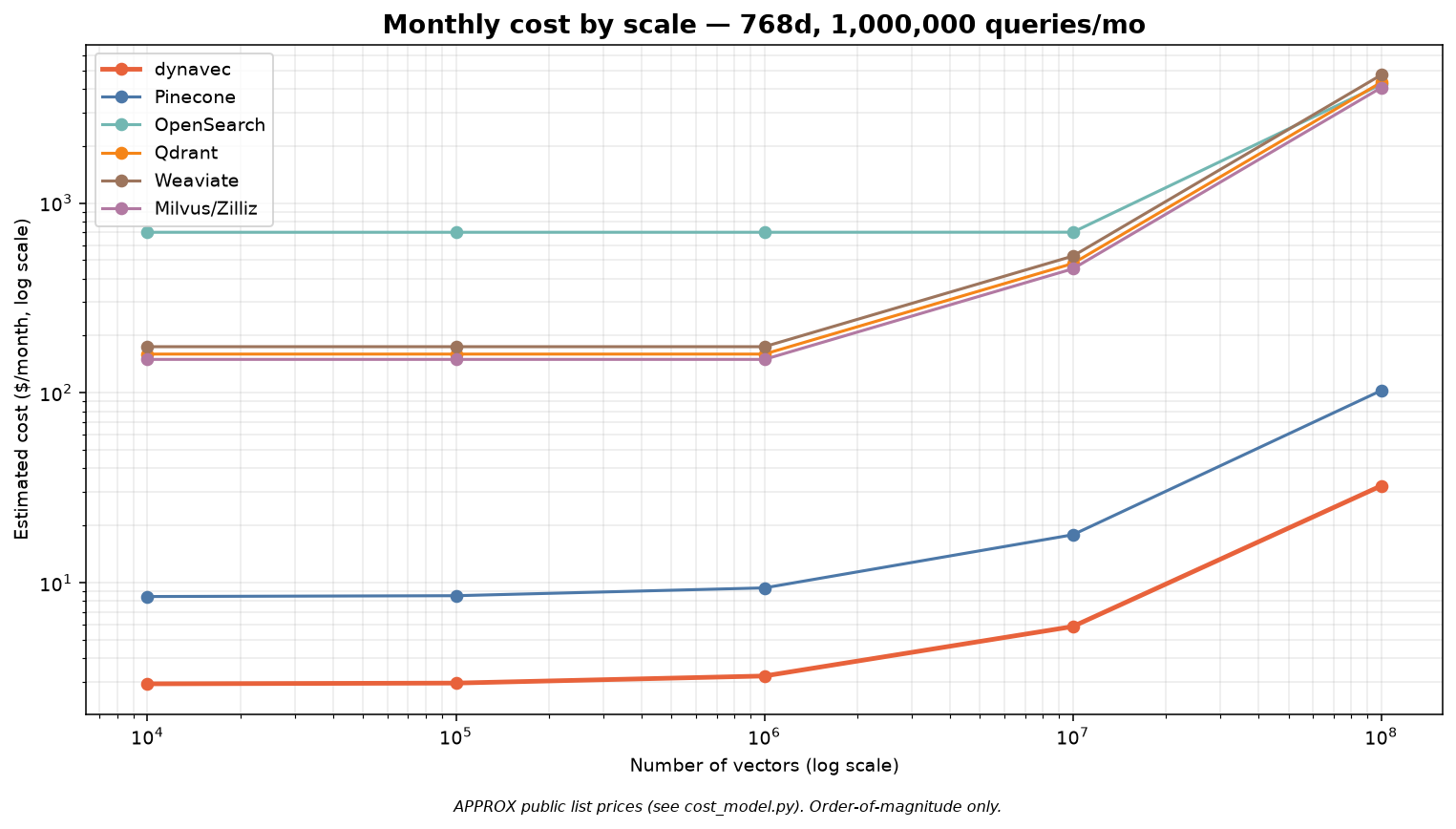
Cost by scale
dynavec has no idle floor — you pay storage + per-request, so it stays far below cluster- and OCU-based systems, and tracks serverless Pinecone while keeping your data in-account.
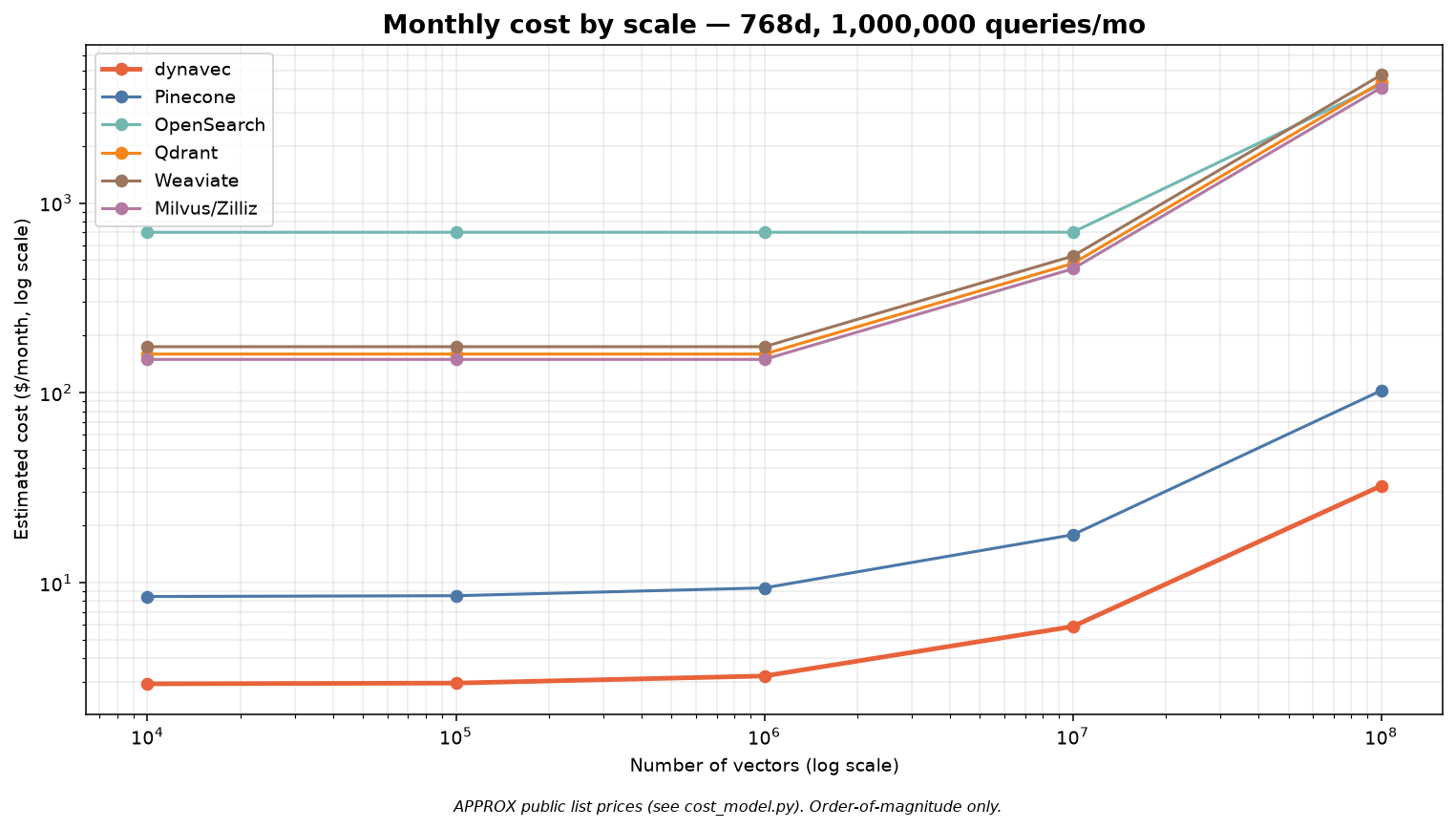
Quality & latency
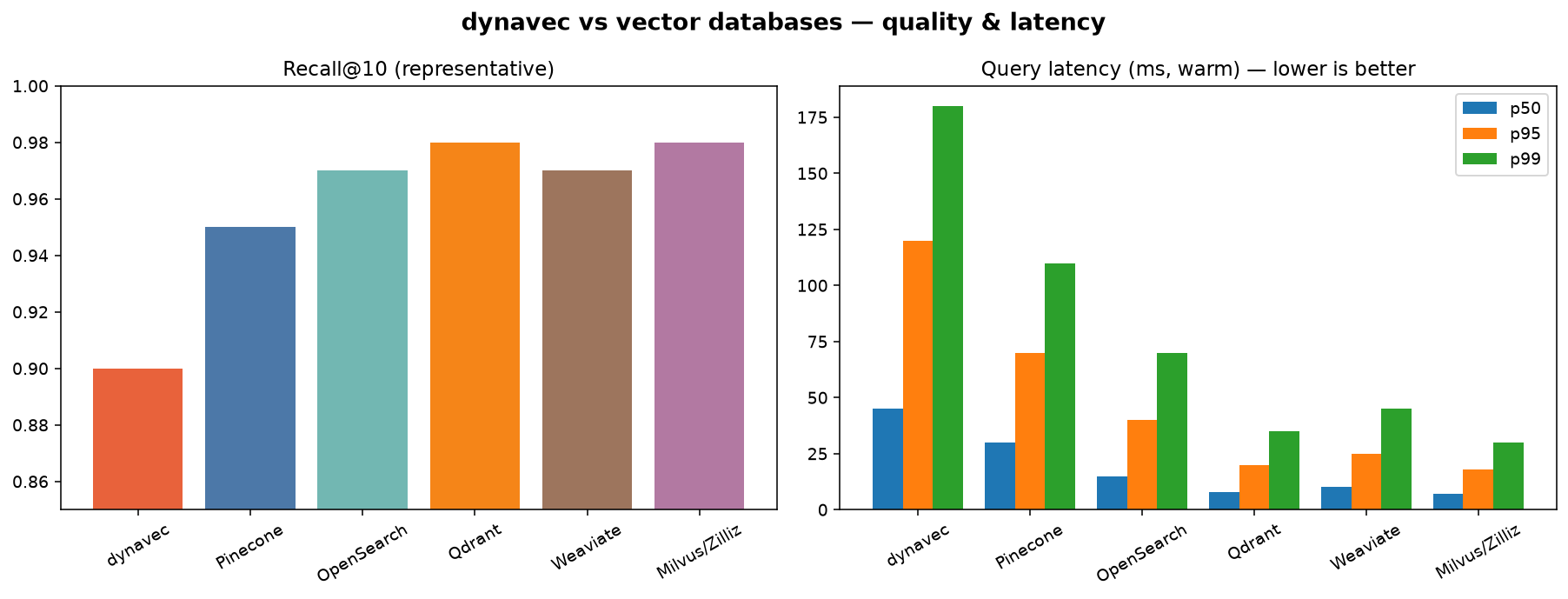
Comparison (1M × 768d, 1M queries/mo)
| Metric | dynavec | Pinecone | OpenSearch | Qdrant | Weaviate | Milvus/Zilliz |
|---|---|---|---|---|---|---|
| Recall@10 | 0.90 | 0.95 | 0.97 | 0.98 | 0.97 | 0.98 |
| Latency p50 (ms) | 45 | 30 | 15 | 8 | 10 | 7 |
| Latency p95 (ms) | 120 | 70 | 40 | 20 | 25 | 18 |
| Cost ($/mo) | $3 | $9 | $701 | $160 | $175 | $150 |
| Serverless (scale-to-zero) | Yes | Yes | No (OCU floor) | No (nodes) | No (nodes) | No (CU) |
| Data in your AWS account | Yes | No | Yes | Self-host only | Self-host only | Self-host only |
Honesty note: the cost row is computed by the repo's cost model from public list prices (order-of-magnitude; verify before quoting). Recall/latency are representative figures pending a live AWS run — regenerate real numbers with the commands below.
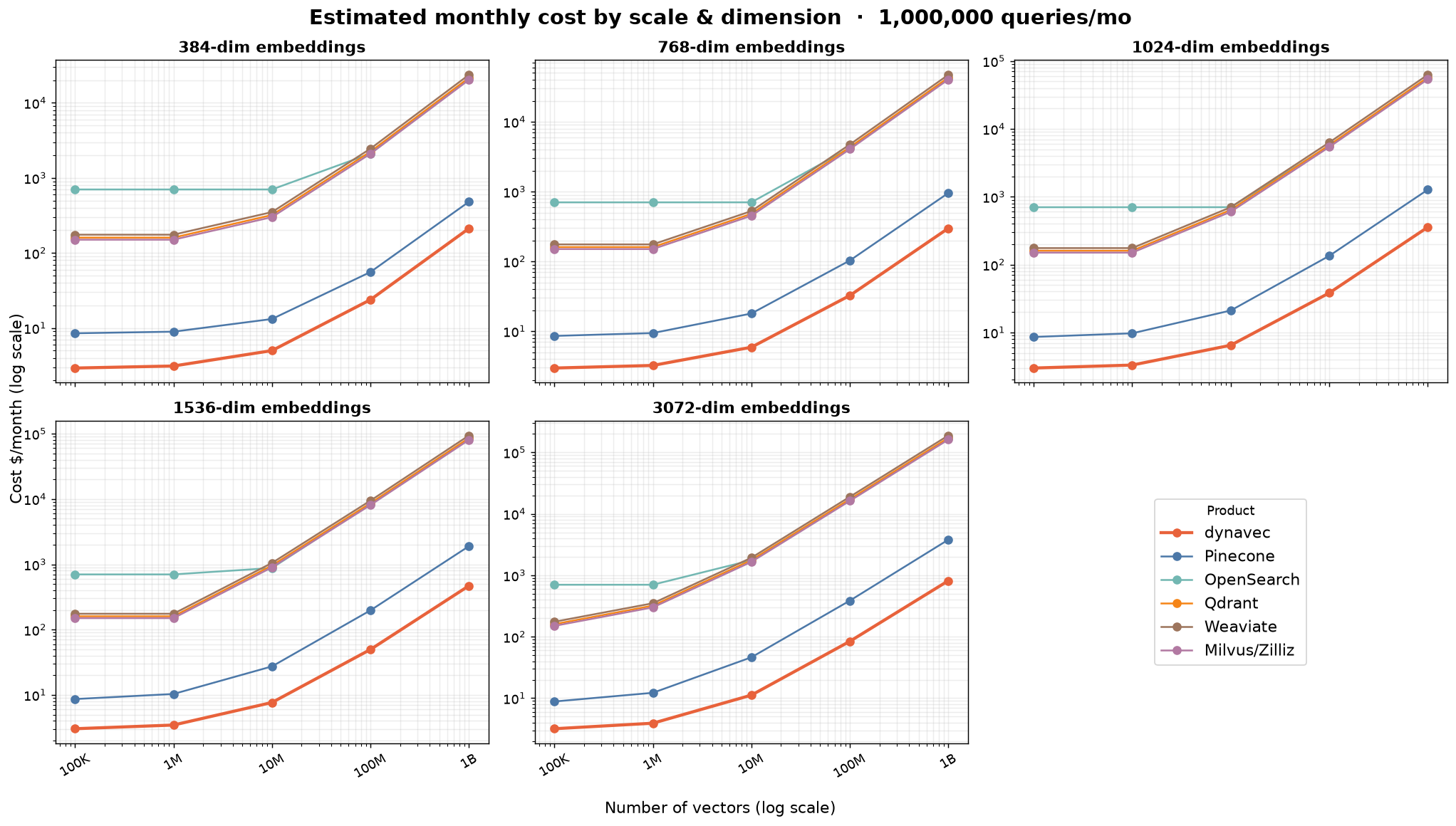
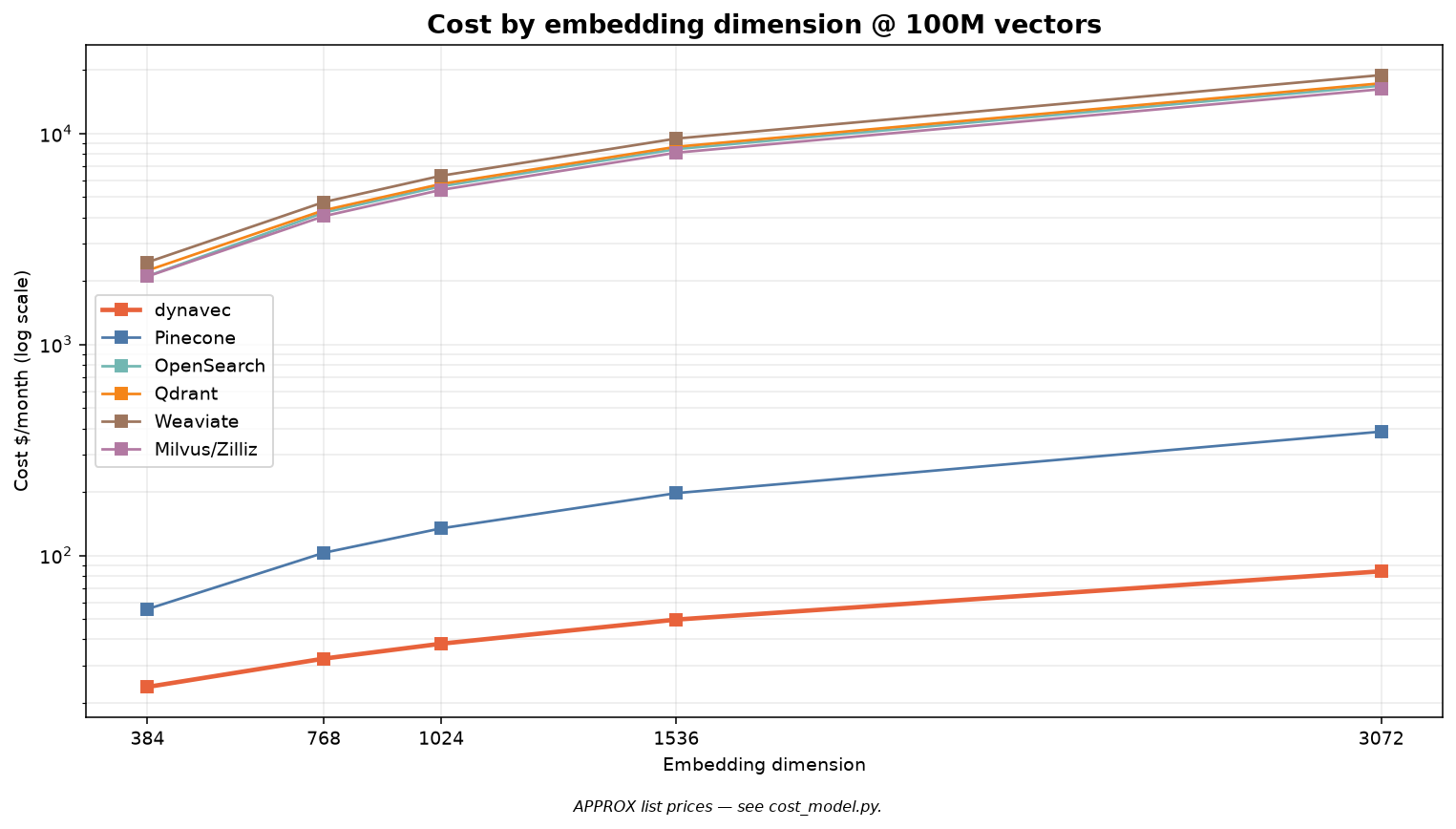
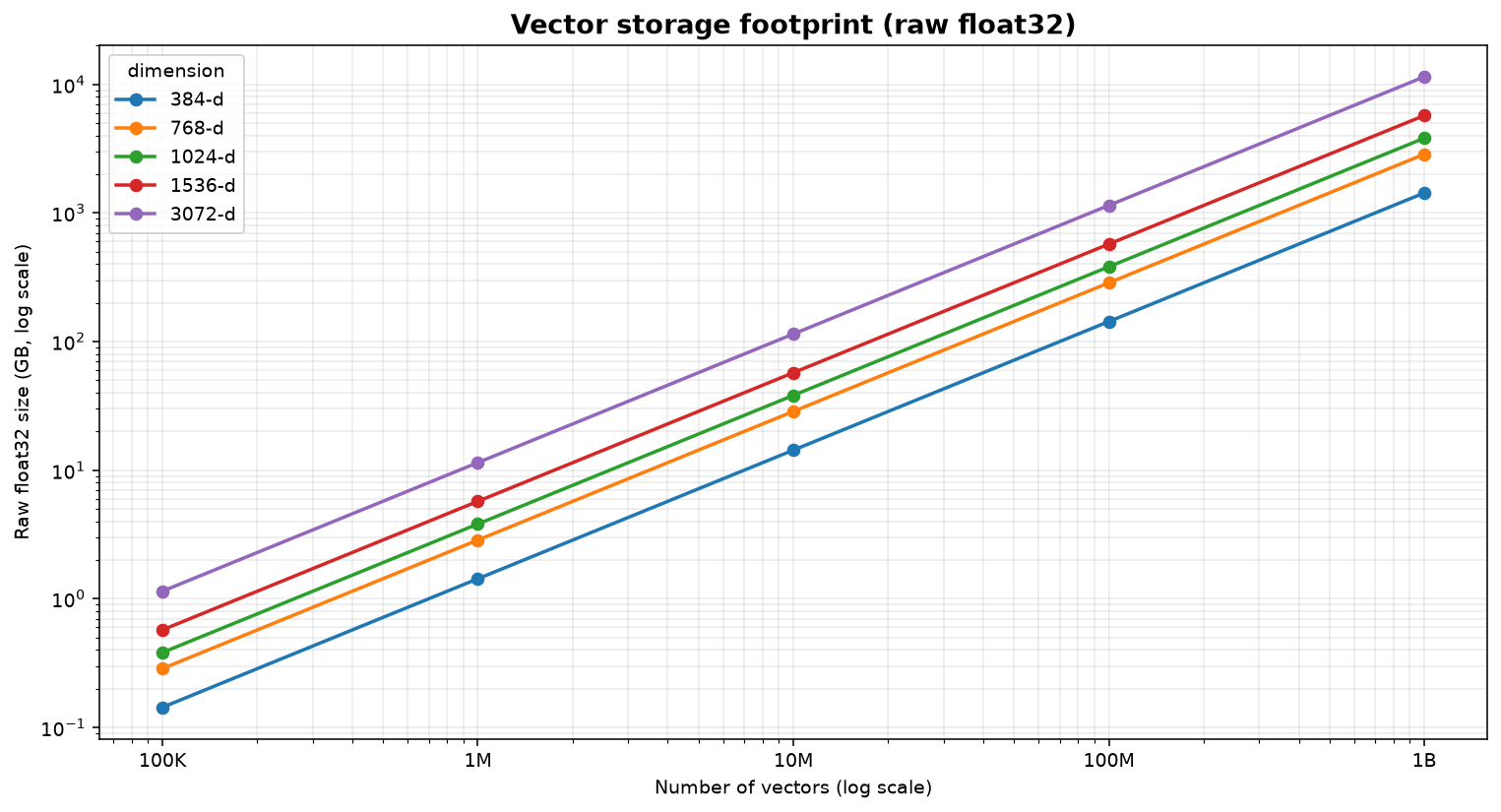
Scaling: every embedding dimension, 100K → 1 billion vectors
Cost across the common embedding dimensions (384 / 768 / 1024 / 1536 / 3072) and the full scale ladder. dynavec stays lowest at every point because its storage is priced like S3, not RAM — while cluster/OCU systems grow linearly with data held in memory.
| Cost by dimension @ 100M vectors | Raw storage footprint | |
|---|---|---|
 |
 |
1536-dim (e.g. OpenAI text-embedding-3-small) — $/month @ 1M queries/mo:
| Product | 100K | 1M | 10M | 100M | 1B |
|---|---|---|---|---|---|
| dynavec | $3 | $3 | $8 | $50 | $469 |
| Pinecone | $9 | $10 | $27 | $197 | $1,897 |
| OpenSearch | $701 | $701 | $877 | $8,423 | $83,708 |
| Qdrant | $160 | $160 | $960 | $8,640 | $85,920 |
| Weaviate | $175 | $175 | $1,050 | $9,450 | $93,975 |
| Milvus/Zilliz | $150 | $150 | $900 | $8,100 | $80,550 |
| raw float32 size | 1 GB | 6 GB | 57 GB | 572 GB | 5,722 GB |
Full tables for all five dimensions: scaling.md. At 1B × 1536-d that's ~5.7 TB of raw vectors — where dynavec's product quantization and the S3-priced tier matter most.
pip install "dynavec[benchmark]"          # or: uv add "dynavec[benchmark]"

# reproduce the charts + table above
python -m benchmarks.report --vectors 1_000_000 --dim 768 --qpm 1_000_000

# measure real recall + latency against your own AWS account
python -m benchmarks.run_benchmark --backend dynavec \
    --bucket my-vectors --index bench --table dynavec_bench --n 100000 --dim 768
Observability dashboard
A native, in-your-brand observability dashboard — a Langfuse-style view of real query telemetry (no simulated data). Attach a recorder and every search is captured with latency, cache outcome, result count, and score stats.
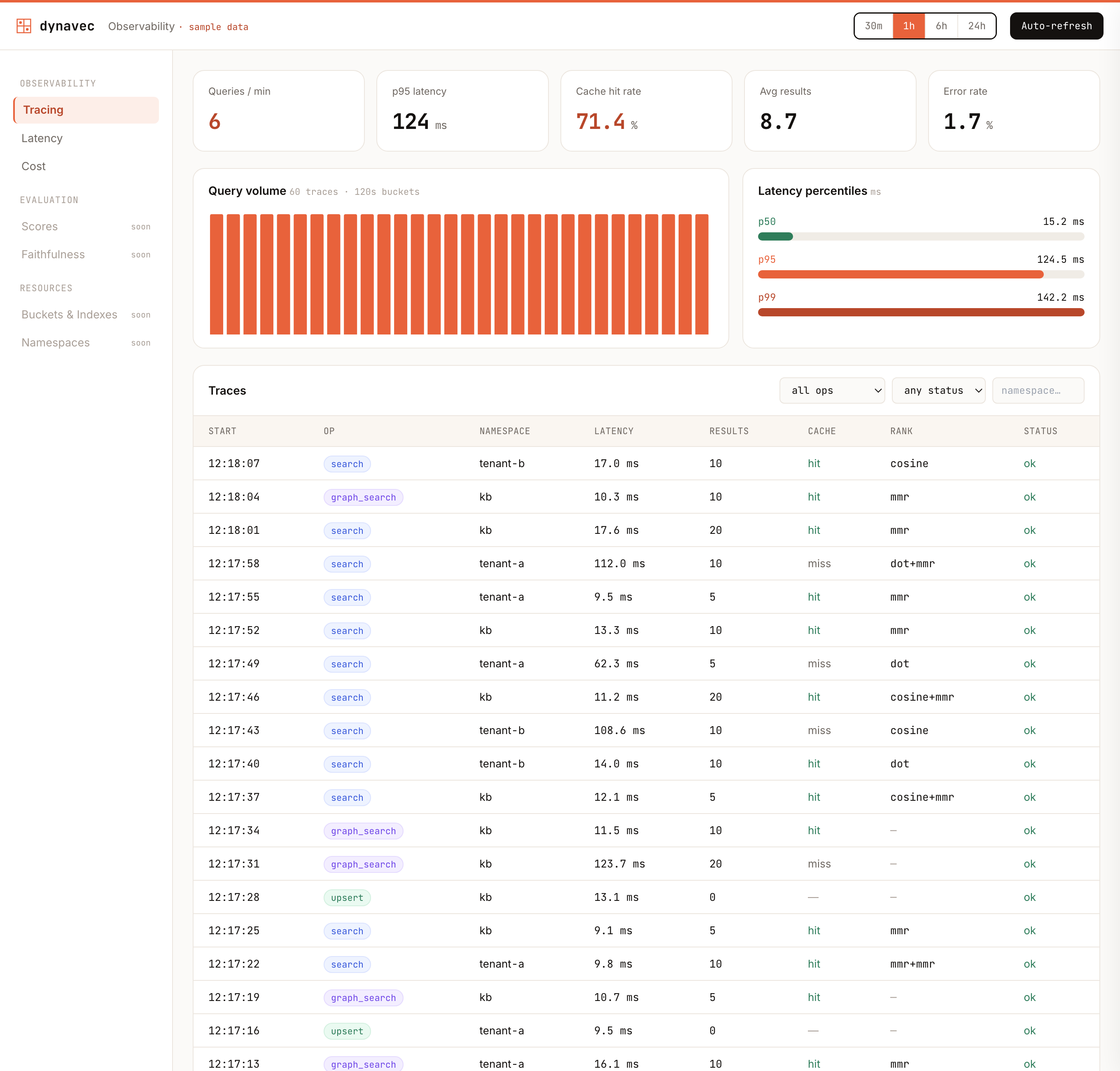
▶ Live interactive preview — in the landing-page theme.
The dashboard is a Next.js + TypeScript + Tailwind + Recharts app in dashboard/; the data comes from a tiny Python telemetry API. Two steps:
1. Expose real telemetry — attach a recorder to your client and serve the API:
from dynavec import Dynavec, DynavecConfig, SemanticCache
from dynavec.telemetry import TelemetryRecorder
from dynavec.dashboard import serve

rec = TelemetryRecorder()
db = Dynavec(cfg, embedder=emb, cache=SemanticCache(), telemetry=rec)
# ... your app runs searches; the recorder fills automatically ...
serve(rec, port=8779)          # JSON API at http://127.0.0.1:8779
2. Run the dashboard (points at that API; falls back to sample data if unset):
cd dashboard
npm install
NEXT_PUBLIC_DYNAVEC_API=http://127.0.0.1:8779 npm run dev   # http://localhost:3000
No AWS? python examples/dashboard_demo.py runs real searches against in-memory
stand-ins and serves the API on :8779 for the dashboard to read.
It shows a query-volume histogram, latency percentiles (p50/p95/p99), cache hit-rate, and a filterable traces table with per-trace drill-down. Contributors welcome: the Evaluation (recall@k, faithfulness), Resource (buckets/indexes/namespaces), and Cost panels are open under the dashboard epic (#122).
Capabilities
| Area | What you get | API |
|---|---|---|
| Distance metrics | Index on cosine/euclidean (S3 Vectors native); client-side rescore in cosine / dot / euclidean / manhattan or a weighted combination, with optional result-set normalization | search(..., rescore="dot", normalize_scores=True) |
| Concurrency | GIL-aware thread pool — real parallelism for I/O-bound AWS calls; parallel batched writes + search_many; tunable botocore connection pool (default 10, raise for high concurrency) |
DynavecConfig(max_workers=8, max_pool_connections=50), db.search_many([...]) |
| Streaming | Results yielded page-by-page as S3 Vectors paginates, so agents start consuming early | for hit in db.search_stream(q): ... |
| Namespace RAG | Per-tenant/collection handles; isolation + even partitioning | kb = db.namespace("kb"); kb.search(...) |
| Product quantization | Compress cached/hot-tier vectors up to 32× (ADC distance) | ProductQuantizer(m=96).fit(X) |
| Knowledge graph / ER | Entities + relations in DynamoDB linked to embeddings; traverse to scope/guide vector search (GraphRAG) | db.graph_add_edge(...), db.graph_search(q, seed_entities=[...]) |
| Query cache | DynamoDB-TTL exact cache, in-process semantic cache (serves near-duplicate queries), or Redis/ElastiCache | Dynavec(..., cache=SemanticCache()) |
| Ingestion / MCP | Pull + chunk + embed from any source; any MCP server's resources (Notion, Confluence, Drive, …) become a corpus | ingest(db, MCPResourceSource(session)) |
| Updates + Lambda | Update text/vector/metadata (merge or replace); transform pipeline incl. in-account AWS Lambda | db.update(id, ...), Dynavec(..., transform=LambdaTransform(...)) |
| IAM / credentials | Access keys, session tokens, named profiles, cross-account assume-role | Dynavec(..., credentials=AWSCredentials(...)) |
| Frameworks | LangChain + LlamaIndex vector stores; a framework-agnostic tool for LangGraph/CrewAI/Strands | dynavec.integrations.* |
| Benchmark report | Comparison table + recall/latency + cost-by-scale (log) charts | python -m benchmarks.report |
SemanticCache can be bounded by both entry count and approximate in-memory
size. Pass max_bytes to account for each cached float32 query vector and its
result object graph, and inspect size_bytes for the current accounted size:
cache = SemanticCache(max_size=2_048, max_bytes=64 * 1024 * 1024)
Pre-populate the cache from a list of common queries at startup with warm_cache() —
it runs each query once (through search, so results land in the cache) and
returns the number of queries processed:
from dynavec import Dynavec, DynavecConfig, SemanticCache, warm_cache

db = Dynavec(DynavecConfig(...), embedder=..., cache=SemanticCache())
warm_cache(db, ["what is vector search", "how do i upsert documents"], top_k=10)
Pass the same filter / rescore / rerank options you use at runtime so the
warmed entries share cache keys with real queries.
Remove graph entities and relations with graph_delete_node() and
graph_delete_edge(). Both are idempotent and return the number of edges removed.
Deleting a node also strips every edge pointing at it (a namespace scan) but
leaves its linked documents and their embeddings untouched:
db.graph_delete_edge("acme", "competes_with", "globex", namespace="kb", bidirectional=True)
db.graph_delete_node("globex", namespace="kb")
Status
v0.5.0 (current) — adds office-document ingestion (Docx/Pptx/Xlsx), a Hugging Face Inference embedder, a DSPy retrieval integration, opt-in structured JSON logging (with secret redaction), ProductQuantizer save/load, dashboard dark mode, and vectorized MMR reranking — on top of the v0.4 in-memory hot tier and the v0.1 hybrid core.
See the full history in CHANGELOG.md, the browsable Release notes page, or the GitHub Releases tab.
Roadmap (v0.6): optional hnswlib/faiss hot-tier backend for very large hot sets, sparse/BM25 hybrid computed from DynamoDB, and OPQ (rotated product quantization).
Publishing (maintainers)
dynavec publishes to PyPI; both pip and uv install from there (there is no separate "uv registry").
Automated (recommended) — a GitHub Release triggers .github/workflows/publish.yml, which builds and uploads via PyPI Trusted Publishing (OIDC) — no API token stored anywhere. One-time setup: on PyPI, add a pending publisher for project dynavec, repo codeforstartups/dynavec, workflow publish.yml, environment pypi. Then:
git tag v0.3.0 && git push origin v0.3.0 # then publish a GitHub Release for the tag
Manual — if you'd rather push from your machine with a token:
uv build                                      # -> dist/*.whl, dist/*.tar.gz
uv publish                                    # uses UV_PUBLISH_TOKEN / prompts
# or: python -m twine upload dist/*
Bump the version in both pyproject.toml and src/dynavec/__init__.py before releasing.
🫂 Community
If you want to get more involved with dynavec, join our WhatsApp community. It's a friendly space to talk about vector search, RAG, AWS costs, production issues, and everything in between — ask questions, share what you're building, or help others out.
Comments