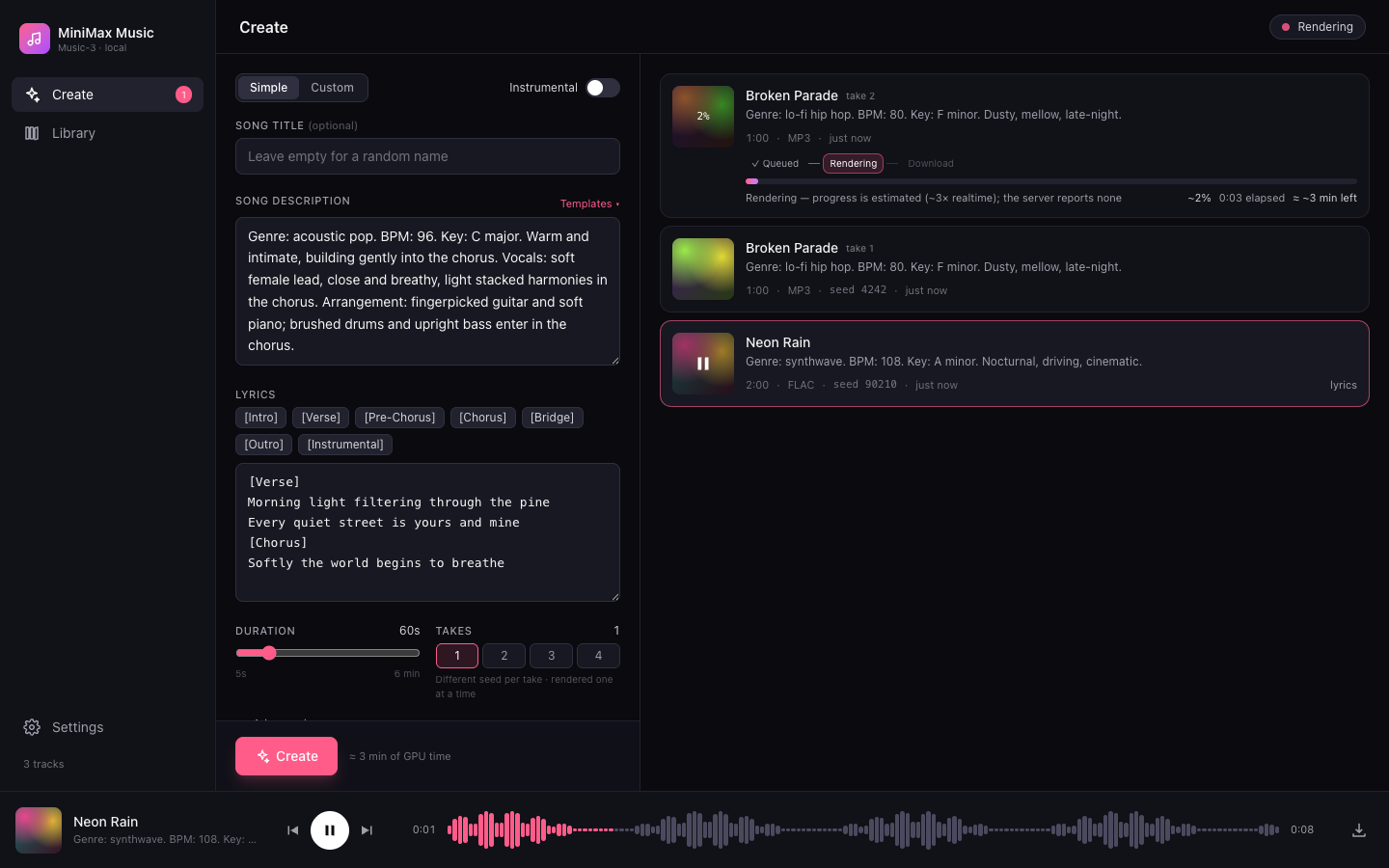
A Suno-style web interface for any self-hosted MiniMax-Music3 server.
Write a style prompt and lyrics, queue takes, watch them render, and keep a local library with a waveform player.
Talks the standard POST /v1/audio/speech route, so it works with sgl-omni serve out of the box.
Try it: demo-minimax-music.adambh.dev — a read-only demo with pre-rendered songs (Create simulates a render).
Features
- Create panel — Simple or Custom mode, song title (random name like “Velvet Horizon” if left empty), style description, lyrics editor with
[Verse]/[Chorus]/ … tag chips, instrumental toggle, duration 5–360 s, 1–4 takes per submit (each take getsseed + i), advanced seed. Output is WAV, as the official route documents (FLAC/MP3 appear in the selector but disabled). - Templates — a built-in default plus your own saved templates (style, lyrics, duration), stored server-side.
- Render queue — the UI server renders one track at a time against the blocking
/v1/audio/speechroute and shows queued / rendering / done with elapsed time and an estimated bar (~3× realtime — the official API reports no progress). Cancel while queued or rendering, retry on error. Queued tracks survive a UI-server restart (they are re-queued in order); a render that was in flight is marked as interrupted. - Live progress + play while rendering — when the server is the bundled
inference/server.py(it advertisescapabilities: ["stream"]on/health), progress is real for every render (Generating → Rendering, ETA from the measured rate). Tick Play while rendering under Advanced and the audio is streamed as it's rendered too: press play on a track that is still rendering, the waveform grows as windows arrive, the player buffers when it catches up with the renderer and swaps to the final file seamlessly. Stocksgl-omnikeeps the estimated bar. - Library — every finished render is saved into
data/tracks/with its metadata (prompt, lyrics, seed, format). Cards show duration, seed and how long the render took. Search, download, delete, "reuse settings". - Track panel — click a card to open a Suno-style side panel: big cover with play, status/progress, Download / Reuse / Retry / Delete, full style prompt and lyrics, and details (duration, seed, render time, created/finished). Esc closes it.
- Player — sticky bottom bar with waveform (decoded client-side), seek, prev/next, keyboard space to play/pause.
- Health pill — offline / loading model / idle (· live progress) / rendering · N queued (probes
GET /v1/modelsand the optionalGET /health). - Settings page — point the app at your inference server (URL + optional API key) from the UI, with a "Test connection" button. Environment variables, when set, take precedence and lock those fields. A Compatibility mode debug switch makes the UI treat any server as stock
sgl-omni(no/health, no streaming) to check the plain contract still works. - Responsive down to phone width. No external services; everything runs on your machine or tailnet.
Architecture
browser ──/api/*──▶ server/ (Express 5)  ──POST /v1/audio/speech──▶  MiniMax-Music3 server
                      │  one render at a time; audio response → disk       sgl-omni serve (:8000)  — blocking WAV
                      │  or SSE progress + PCM windows when advertised     inference/server.py (:7862) — + stream
                      └─▶ data/library.json · data/templates.json · data/settings.json · data/tracks/*.wav
| Package | What |
|---|---|
web/ |
Vite + React 19 + TypeScript + Tailwind 4 single-page app. Talks only to /api/*. |
server/ |
Express 5 + TypeScript. Owns the library, proxies generation, serves the built SPA. |
inference/ |
Optional single-GPU MiniMax-Music3 server (Python, diffusers) exposing the same API as sgl-omni serve. |
Requirements
- Node.js 20 or newer for the UI.
- A MiniMax-Music3 inference server exposing
POST /v1/audio/speech— the bundled single-GPU one below (Python 3.10+, CUDA GPU with ~24 GB VRAM), or MiniMax's ownsgl-omni serve(two GPUs). See Upstream API.
Quick start
1. Start an inference server (skip if you already have one).
git clone https://github.com/adambenhassen/minimax-music-ui.git
cd minimax-music-ui

python -m venv .venv && source .venv/bin/activate      # Windows: .venv\Scripts\activate
pip install -r inference/requirements.txt
python inference/server.py --port 7862                  # first start downloads the weights (tens of GB); /health answers 503 until loaded
Or MiniMax's reference server: sgl-omni serve --model-path MiniMaxAI/MiniMax-Music3 --port 8000 (see the model card). Details and options for the bundled one: inference/README.md.
2. Start the UI (a second terminal).
npm install
npm run build
npm start
# → http://localhost:8787
The UI talks to http://127.0.0.1:7862 by default — exactly where the bundled server listens — so it works right away. For any other address open Settings in the sidebar and enter the URL (and API key, if the server needs one). Prefer configuring from the environment? MUSIC_API / MUSIC_API_KEY override Settings and lock the fields — see Configuration.
Docker
Prebuilt multi-arch images (amd64 + arm64) are published to GitHub Container Registry on every release:
docker run -d -p 8787:8787 -v "$PWD/data:/data" ghcr.io/adambenhassen/minimax-music-ui:latest
# → http://localhost:8787 — then set the inference server URL in Settings
Or build locally:
docker compose up -d --build           # → http://localhost:8787, library persisted in ./data
# or
docker build -t minimax-music-ui .
docker run -d -p 8787:8787 -v "$PWD/data:/data" minimax-music-ui
Optional: set MUSIC_API / MUSIC_API_KEY in the environment (-e MUSIC_API=…, or a .env next to docker-compose.yml) to pin the inference server; that locks the fields in Settings. From inside Docker, an inference server on the host is http://host.docker.internal:7862.
Configuration
The inference server address is resolved in this order:
MUSIC_API/MUSIC_API_KEYenvironment variables — always win; the Settings page shows them locked- Values saved from the Settings page (
data/settings.json, written with mode0600) - Default
http://127.0.0.1:7862
| Variable | Default | Description |
|---|---|---|
MUSIC_API |
– | Base URL of the inference server, path prefix allowed, e.g. http://host:8000 (overrides Settings) |
MUSIC_API_KEY |
– | Sent as Authorization: Bearer … if the inference server was started with --api-key (overrides Settings) |
PORT |
8787 |
Port for the UI server |
DATA_DIR |
./data |
Where library.json, templates.json, settings.json and tracks/ live |
STATIC_DIR |
web/dist (if built) |
Directory of the built SPA to serve |
Development
npm run dev          # server on :8787 (tsx watch) + Vite on :5173 with /api proxied
npm run dev:fake     # same, plus a fake inference API on :7999 — no GPU needed
npm test             # server tests (vitest) against the fake upstream
npm run typecheck    # both packages
The fake upstream (server/test/fakeUpstream.ts) implements GET /v1/models and a blocking POST /v1/audio/speech. Options for the standalone runner:
FAKE_AUDIO=/path/to/real.wav FAKE_RENDER_MS=8000 npm run fake -w server
FAKE_LOADING=1 npm run fake -w server   # exposes /health → 503, UI shows "Loading model…"
FAKE_STREAM=1 npm run fake -w server    # advertises streaming; SSE progress + 4 s PCM windows
FAKE_PORT=7998 npm run fake -w server   # listen elsewhere (default 7999)
Public demo image (read-only)
Dockerfile.demo bakes a showcase library into the normal image and sets DEMO=1: the library is read-only, Settings/Templates can't be changed, and Create simulates a render (progress bar, then one of the showcase songs is handed out) — per visitor, in memory, no GPU involved. A banner and the health pill say so.
demo/prepare.sh server/data                # copy finished WAV tracks + trimmed library.json → demo/data
docker build -t minimax-music-ui .
docker build -f Dockerfile.demo -t minimax-music-ui-demo .
docker run --read-only -p 8787:8787 minimax-music-ui-demo
UI server API
| Method | Path | Description |
|---|---|---|
GET |
/api/health |
demo (read-only demo, see above), upstreamReachable (via /v1/models), ready (false only if an optional upstream /health answers 503), capabilities from that /health, queue state |
GET |
/api/library |
Tracks, newest first |
POST |
/api/generate |
{title?, prompt, lyrics?, duration, seed?, format, takes} → created tracks (queued) |
GET |
/api/tracks/:id/audio |
Stream audio (?download for an attachment); for a track still rendering, the audio so far with a valid header (Range supported) |
DELETE |
/api/tracks/:id |
Cancel (dequeue or abort the render), delete file and entry |
GET |
/api/templates |
Saved templates |
POST |
/api/templates |
{name, prompt, lyrics?, duration?, format?} — same name overwrites |
DELETE |
/api/templates/:id |
Remove a template |
GET |
/api/settings |
Effective inference URL, whether a key is set, compat flag, and which fields are env-locked (the key itself is never returned) |
PUT |
/api/settings |
{musicApi?, apiKey?, compat?} — apiKey: "" clears it; env-locked fields are rejected; compat: true skips /health and never streams |
POST |
/api/settings/test |
Probe a candidate {musicApi?, apiKey?} against /v1/models without saving |
Upstream API
The server speaks the standard MiniMax-Music3 contract (the same one sgl-omni serve exposes), relative to MUSIC_API:
| Method | Path | |
|---|---|---|
GET |
/v1/models |
Reachability probe. Optional — a 404 still counts as "up". If present, the first listed id is used as model; otherwise MiniMaxAI/MiniMax-Music3 (the model card's example) |
POST |
/v1/audio/speech |
{model: <from /v1/models or "MiniMaxAI/MiniMax-Music3">, input: <lyrics>, instructions: <style>, response_format: "wav", seed?, max_new_tokens: duration×25 (≤ 9000), stream: false} → audio bytes; X-Seed header (if present) is stored |
The call blocks for the whole render (roughly 2.5–3× the audio length), so the UI server queues renders one at a time and shows an estimated bar. Optional Authorization: Bearer <key> is sent when an API key is configured.
Two optional extensions are used only when the server offers them, and their absence changes nothing:
| Method | Path | |
|---|---|---|
GET |
/health |
Probed once per connection. 503 → "Loading model…" (Create disabled); 200 {capabilities: ["stream"]} → the UI server sends stream: true |
POST |
/v1/audio/speech + stream: true |
text/event-stream of progress {stage: semantic|denoise, done, total, secondsRendered}, audio {pcm, samples, sampleRate, channels} windows (only requested when Play while rendering is on; stream_audio: false otherwise), then done {seed} or error {message}. Closing the connection cancels the render |
The bundled inference/server.py implements both; see its README.
Comments