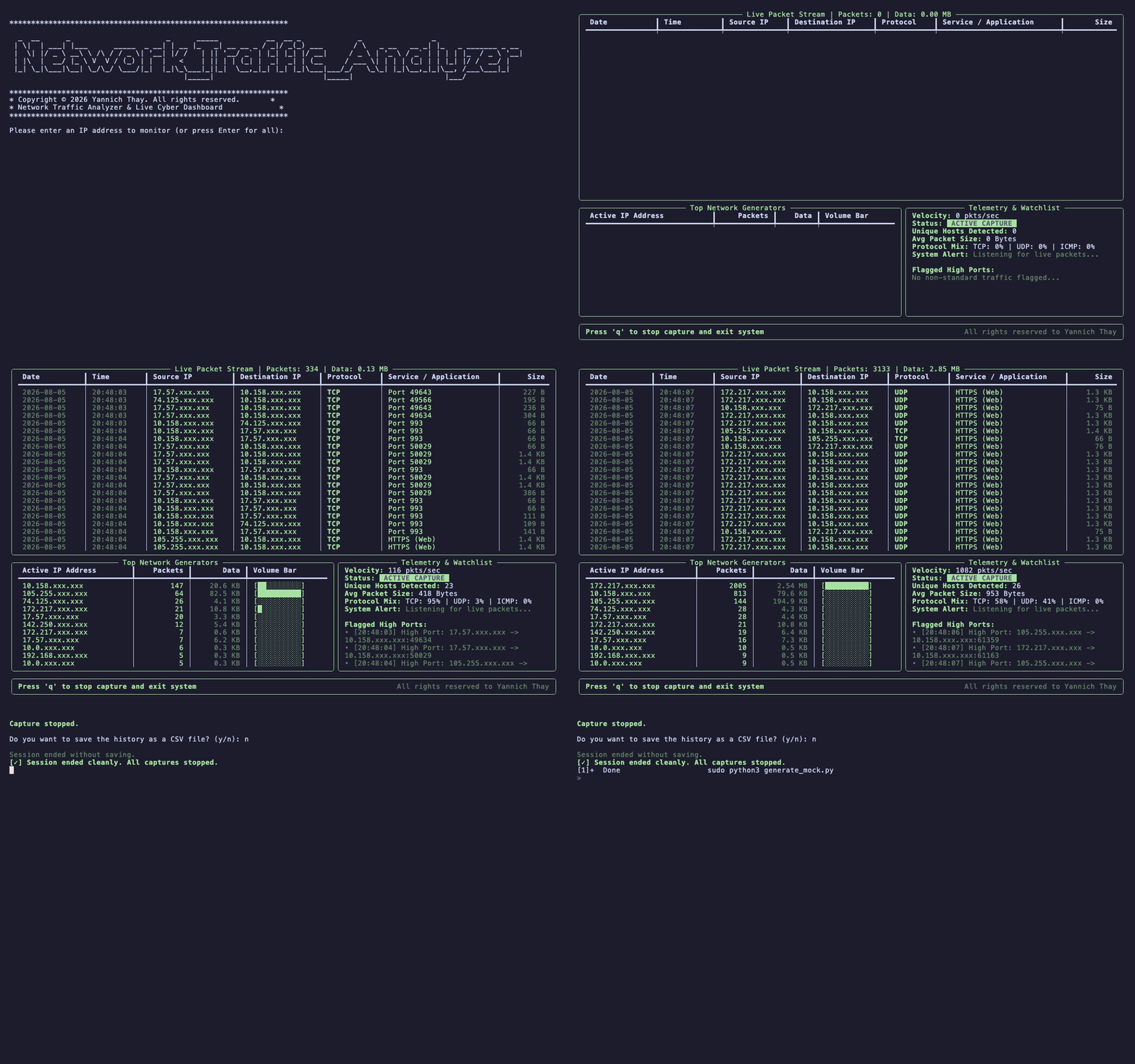
A multi-threaded, real-time command-line network traffic analyzer and security telemetry dashboard built in Python using Scapy and Rich.
✨ Features
- Live Packet Ingestion: Asynchronous packet sniffing powered by
Scapywith multi-protocol parsing (TCP,UDP,ICMP). - Real-time Telemetry Dashboard: High-frequency UI rendering (4 FPS) showing packet throughput velocity, average packet size, and protocol mix ratios.
- Top Network Generators: Dynamic host analytics tracking top talkers by packet count and volume with visual volume bar graphs.
- Threat Detection Watchlist: Flags non-standard or high dynamic port connections (>1024) in real time for traffic anomaly detection.
- Built-in Privacy Masking: Automatically obfuscates terminal display IP addresses (
X.X.xxx.xxx) during public broadcasts, recordings, and demos without altering underlying forensic log integrity. - Thread-Safe Architecture: Uses explicit thread locking (
threading.Lock) to prevent race conditions between background sniffing, calculation workers, and UI rendering loops. - Forensic Export Capability: Non-blocking session capture logging with automated CSV exports for digital forensics and historical auditing.
- Designed for low-level packet analysis, network velocity monitoring, host bandwidth tracking, and basic security threat inspection through an interactive Terminal User Interface (TUI).
🛠️ Requirements & Dependencies
- Python 3.8+ installed on your system.
- Elevated privileges (
sudoon Linux/macOS or Administrator on Windows) are strictly required for raw socket binding
🚀 How to Run
- Clone or download this repository to your local machine:
git clone https://github.com/Y6THAY/Network_Traffic_Analyzer.git
cd Network_Traffic_Analyzer
- Create a virtual environment (optional but recommended):
python3 -m venv venv
source venv/bin/activate  # On Windows use: venv\Scripts\activate
- Install dependencies:
pip install -r requirements.txt
- Run the analyzer with root/administrative privileges:
# On Linux / macOS
sudo python3 analyzer.py

# On Windows (Run Command Prompt as Administrator)
python analyzer.py
- Interactive Controls
Target IP Filtering: At launch, enter a target IP address to isolate specific traffic, or press Enter to analyze all interface traffic.
Graceful Exit: Press
qinside the live dashboard to stop capturing cleanly and restore terminal states.Export Log: Upon exit, choose
yto sanitize and save the session capture to a structured.csvfile.
🔬 Architecture Overview
The tool uses a non-blocking multi-threaded model to ensure high-speed network I/O never freezes the UI rendering pipeline:
                        ┌───────────────────────────────┐
                        │   Scapy Packet Sniffer Thread │
                        └───────────────┬───────────────┘
                                        │ (Packet Callback)
                                        ▼
┌──────────────────┐    ┌───────────────────────────────┐
│ Thread Lock      │◄───┤ Thread-Safe Packet Buffers    │
│ (threading.Lock) │    └───────────────┬───────────────┘
└──────────────────┘                    │
                                        ▼
                        ┌───────────────────────────────┐
                        │   Rich Terminal UI Layout     │
                        │   (Live Engine @ 4 FPS)       │
                        └───────────────────────────────┘
🧠 Known Limitations & Future Scope
As a lightweight diagnostic tool, this script is optimized for immediate, short-term troubleshooting sessions (5–15 minutes).
Memory Optimization: Currently, all packets are buffered in RAM to enable complete end-of-session CSV exports. For extended capture sessions exceeding 100,000+ packets, future iterations will implement streaming buffers to log directly to disk.
PCAP Generation: Future updates will support raw .pcap export capabilities for deep-dive inspection in Wireshark.
📄 Output Format (CSV Audit Log)
Exported .csv logs capture accurate, unmasked packet metadata for forensics:
| Date       | Time     | Source IP    | Destination IP | Protocol | Service             | Size (Bytes) |
| :---       | :---     | :---         | :---           | :---     | :---                | :---         |
| 2026-08-05 | 18:45:01 | 192.168.1.15 | 142.250.190.46 | TCP      | HTTPS (Web)         | 54 B         |
| 2026-08-05 | 18:45:02 | 192.168.1.1  | 192.168.1.15   | UDP      | DNS (Domain Lookup) | 78 B         |
📜 License
Copyright © 2026 Yannich Thay. All rights reserved.
Disclaimer: This tool is intended for educational purposes, authorized security auditing, and network management only. Do not scan systems without explicit permission.
Comments