Advanced EDR Evasion via AI Telemetry Spoofing & WASM Sandboxing. Project Onyx is a PoC Red Team pipeline designed to demonstrate advanced evasion techniques against modern EDR systems. It shifts away from traditional signature-based obfuscation towards behavioral camouflage and strict environmental keying.
Research Perspective: The goal of Project Onyx is not to claim a working bypass of production EDR systems, it is to explore what an unconventional, multi-layer pipeline could look like if each concept were developed further. The individual components (AI telemetry camouflage, environmental keying, in-memory WASM execution) are implemented and functional as a chain, but each layer would require significantly deeper research to be meaningful against real-world defenses. This project is best understood as an architectural sketch and a starting point for that kind of exploration.
Core Concepts
- AI Decoy (Behavioral Camouflage): Modern EDRs monitor API calls and execution flows. Project Onyx embeds a legitimate, functional ONNX neural network (a tiny MLP). Before any malicious logic is executed, the host runs a real tensor inference workload using Microsoft's
onnxruntime. This generates legitimate AI execution telemetry, masking the true intent of the process. - Environmental Keying: The payload cannot be analyzed in a sandbox or by a reverse engineer without the exact target machine. The decryption keys are dynamically derived from a SHA-256 hash of the target's
MachineGuid,Volume Serial, andCurrent User SID. - WASM Sandboxing: The actual payload is compiled to WebAssembly (WASM) and executed entirely in-memory using the
wasm3interpreter. The host C++ application acts merely as a loader and API bridge, exposing safe host functions to the WASM sandbox. - Cryptographic Vault: The AES-256 key required to decrypt the WASM payload is not stored in the binary. It is locked inside the ONNX model's metadata, protected by PBKDF2-HMAC-SHA256 and HKDF-SHA256 key derivation, and verified via constant-time HMAC checks.
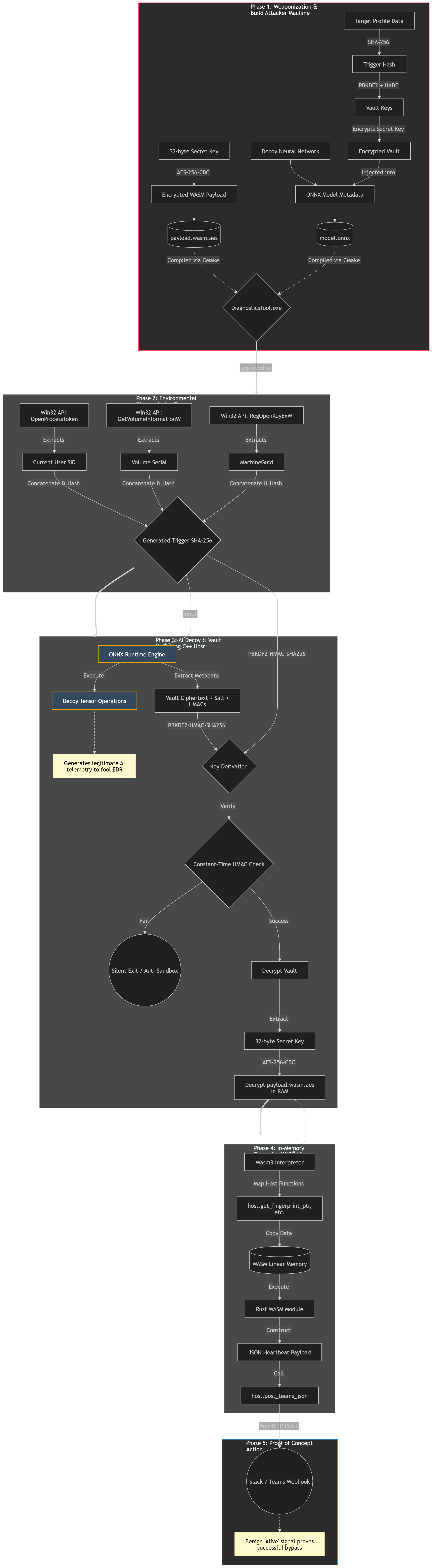
See docs/architecture.md for the full end-to-end technical sketch.
⚠️ Legal Disclaimer
This project is created solely for educational purposes, security research, and authorized Red Team operations.
The techniques demonstrated in this repository (Project Onyx) are intended to help security professionals understand advanced evasion methods and improve endpoint defenses (EDR/XDR).
Do not use this software on any system or network that you do not own or have explicit, written permission to test.
The author of this project (X-3306) assume no liability and are not responsible for any misuse, damage, or illegal activities caused by the use of this software. By downloading, compiling, or using this code, you agree to take full responsibility for your actions.
Repository Layout
DiagnosticsTool.cpp- C++ Windows host and Wasm3/ONNX integration.DiagnosticsTool.rc/resource.h- resource bindings for generated assets.build.py- helper for fingerprinting, ONNX bait/vault generation, and WASM encryption.wasm_license_module/- Rust source for the WebAssembly heartbeat module.wasm3/source/- minimal vendored Wasm3 source required by the CMake build.assets/README.md- generated asset formats.docs/architecture.md- full runtime chain and architecture notes.docs/technical-writeup.md- short narrative for the PoC.
Prerequisites
Install these on Windows before building:
- Visual Studio 2022 with Desktop development with C++.
- CMake 3.25 or newer.
- Python 3.10 or newer.
- Rustup and Cargo.
- Git.
Python dependencies:
py -m pip install onnx numpy cryptography
Rust target:
rustup target add wasm32-unknown-unknown
ONNX Runtime Static Build
The CMake file expects an ONNX Runtime source/build tree at ./onnxruntime and
links the static component libraries from:
onnxruntime/build/Windows/Release/Releaseonnxruntime/build/Windows/Release/vcpkg_installed/x64-windows-static-md/lib
From a Developer PowerShell for VS 2022, build ONNX Runtime like this:
git clone --recursive https://github.com/microsoft/onnxruntime.git onnxruntime
.\onnxruntime\build.bat --config Release --parallel --compile_no_warning_as_error --skip_tests --build_shared_lib --use_vcpkg --cmake_extra_defines VCPKG_TARGET_TRIPLET=x64-windows-static-md onnxruntime_BUILD_UNIT_TESTS=OFF
The generated onnxruntime.dll is not shipped with Project Onyx. Project Onyx
links the static component .lib files and the final executable should not list
onnxruntime.dll in dumpbin /DEPENDENTS.
Generate Assets
Get the fingerprint hash for the current Windows device:
python build.py fingerprint --show-components
Use the second printed line as the --trigger value.
Build the Rust WebAssembly module:
cargo build --manifest-path wasm_license_module/Cargo.toml --target wasm32-unknown-unknown --release
Generate assets/model.onnx and assets/license_module.wasm.aes:
python build.py build `
  --trigger "<64-char lowercase fingerprint hash>" `
  --secret "<exactly-32-demo-key-chars>" `
  --model-output assets/model.onnx `
  --wasm-input wasm_license_module/target/wasm32-unknown-unknown/release/wasm_license_module.wasm `
  --wasm-output assets/license_module.wasm.aes
Verify the ONNX metadata vault:
python build.py verify --trigger "<64-char lowercase fingerprint hash>" --model assets/model.onnx
Final Build
Configure and build the release executable:
cmake -S . -B build -G "Visual Studio 17 2022" -A x64
cmake --build build --config Release
The final executable is:
build\Release\ProjectOnyx.exe
Optional dependency check:
& "C:\Program Files\Microsoft Visual Studio\2022\Community\VC\Tools\MSVC\14.44.35207\bin\Hostx64\x64\dumpbin.exe" /DEPENDENTS build\Release\ProjectOnyx.exe
Expected: no onnxruntime.dll dependency.
Webhook Configuration
Project do not embed a real webhook URL. For authorized lab runs, set:
$env:PROJECT_ONYX_SLACK_WEBHOOK_URL = "https://hooks.slack.com/services/..."
.\build\Release\ProjectOnyx.exe
(You can also use Teams)
The variable must be visible to the process that starts ProjectOnyx.exe. If
you double-click the executable, set it as a user or system environment variable
first, then open a new terminal or restart Explorer.
Scope
The demo does not include persistence, privilege escalation, credential access, lateral movement, command execution, destructive behavior, or bundled private webhook tokens. The WebAssembly module is constrained to formatting and returning a heartbeat JSON as a simple PoC.
Comments