Canary
QA harness built for Claude Code.
Canary is a QA harness purpose built for coding agents like Claude Code. It reads your code diffs, identifies the affected UI flows, and tests them in real browser instances using Claude Code.
Under the hood, it ships with a QuickJS WASM sandbox exposing the full Playwright API, letting Claude automate any long-running UI task — from handling logins to navigating complicated UIs.
Instead of clicking through flows by hand to reproduce and verify issues, Canary provides full session recordings. You get screen recordings with console logs, network requests, HARs, and Playwright traces so you can inspect exactly what the agent did.
Every Canary run captures a reusable Playwright script. Letting you re-run it in CI with zero inference cost on replay.
Most testing tools force you to choose between two extremes:
- An opaque agent run you can't reproduce.
- Raw Playwright scripts you have to write and maintain by hand.
Canary doesn't make you choose: the agent does the QA and hands you a reproducible script.
Features
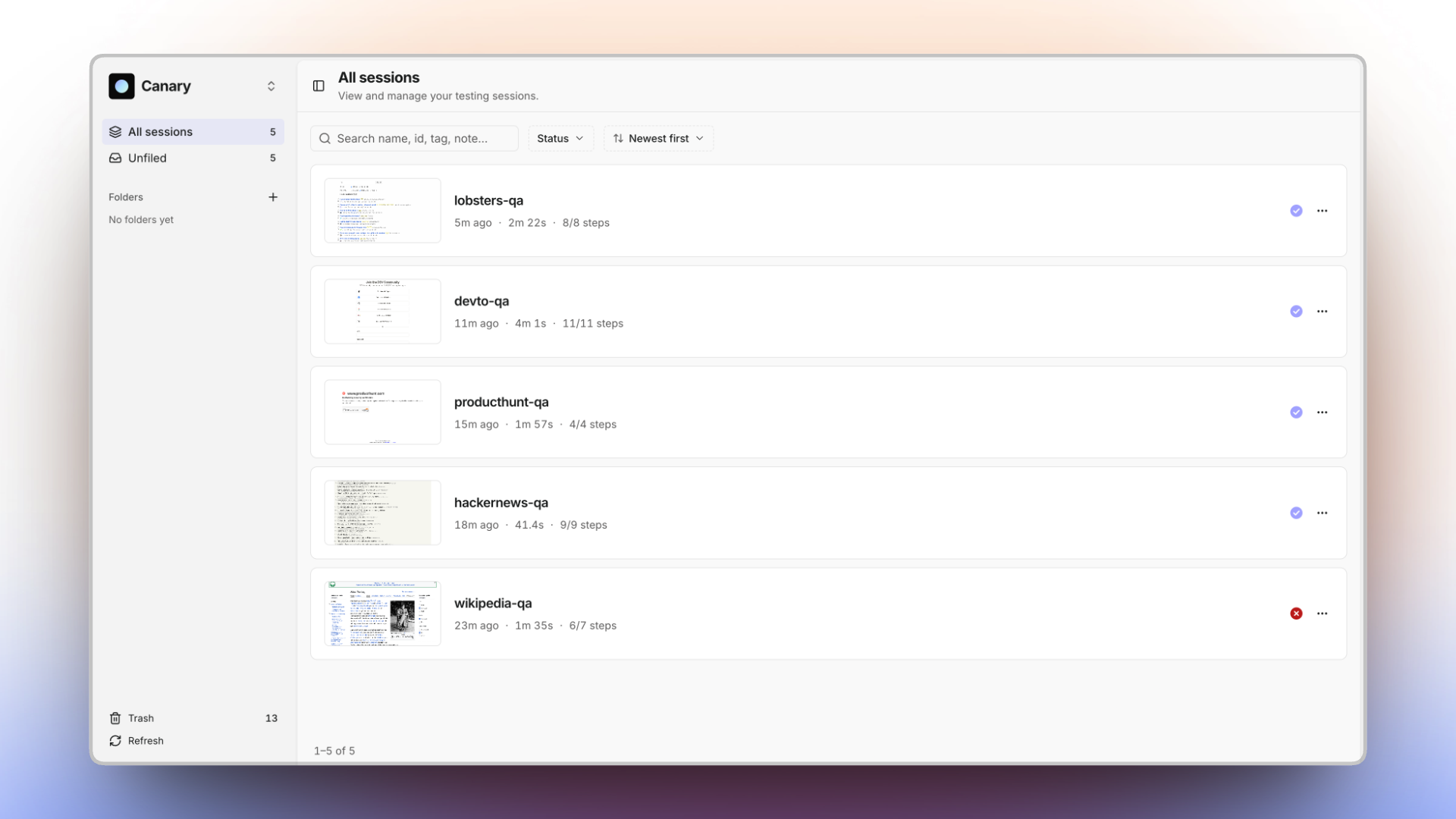
- See exactly what happened. Trace, video, network, console, and a screenshot of every step — captured automatically.
- Reproducible by default. Canary turns each run into a real Playwright script. Let your agent discover a flow once; re-run it forever.
- One file, zero setup. Every session is a self-contained
report.html— open it, commit it, send it. No server, no build. - Built for agents. Drop-in plugins for Claude Code, Cursor, and Codex.
- Sandboxed. Scripts run in a QuickJS WASM sandbox with the full Playwright
PageAPI — no Node, no host access.
Who it's for
https://github.com/user-attachments/assets/8459994a-b43c-4483-bb4a-00522d1d03fe
You describe the flow in plain language; your agent drives a real browser and hands back both a report you can just read and the exact Playwright script — plus the full trace — behind it. Most tools make you pick one: an opaque agent run you can't reproduce, or raw Playwright you write and maintain by hand. Canary gives you both.
| You are a… | Instead of… | Canary gives you… |
|---|---|---|
| Developer | Writing and maintaining Playwright/E2E scripts by hand | A reusable script captured from every run — re-run it in CI, no agent cost on replay |
| QA engineer | Clicking through flows manually to repro and verify | Evidence by default — trace, video, network, console, and a screenshot of every step |
| PM / reviewer | Waiting on a build or trusting "works on my machine" | A self-contained report.html you open and read — every step, replayable and shareable |
Get started
npm i -g @usecanary/cli @usecanary/ui   # puts `canary` + `canary-viewer` on your PATH
canary install                          # one-time: Chromium + the runtime into ~/.canary (~150 MB)
…or run the guided wizard, which offers to install all of the above for you:
npm create canary@latest # guided setup (Ink wizard)
Record a session and open the report:
id=$(canary session start --name "checkout")
canary run ./open.js   --session "$id" --step open
canary run ./submit.js --session "$id" --step submit
canary session end "$id"                # -> ~/.canary/sessions/<id>/report.html

canary-viewer                           # browse every recorded session
canary stop                             # shut the background daemon down when you're done
Just need a quick one-off with no recording? Drive the browser engine directly:
echo 'const p = await browser.getPage("main");
await p.goto("https://example.com");
console.log(await p.title());' | canary-browser
Or attach to a Chrome you already have open — launch it with --remote-debugging-port=9222, then
canary-browser --connect (it auto-discovers the port, or pass the URL explicitly). Handy for driving
a browser that's already logged in:
canary-browser --connect http://localhost:9222 <<'EOF'
const page = await browser.getPage("main");
console.log(await page.title());
EOF
Prefer not to install? Every command also runs one-off via npx, e.g.
npx @usecanary/cli session start …andnpx @usecanary/ui.
Everything your agent does, on the record
Open any session and Canary replays the whole thing — the page, the script, every Playwright call, the
console, the network, the full trace. Nothing summarized, nothing reconstructed: it's the actual run.
(Every screenshot below is real output.) Capture is on by default; switch any stream off with
--no-trace / --no-video / --no-har / --no-console.
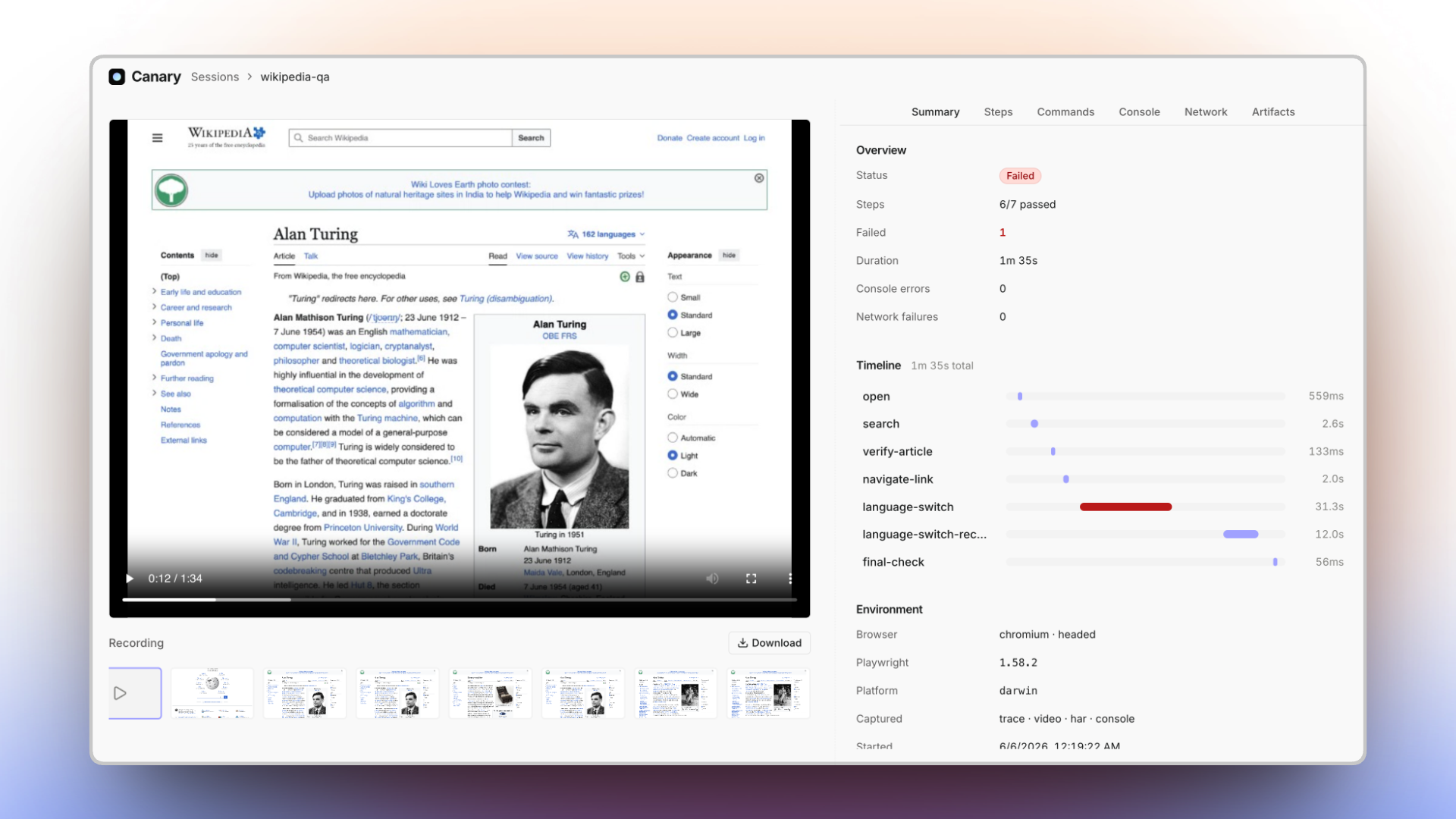
The session at a glance
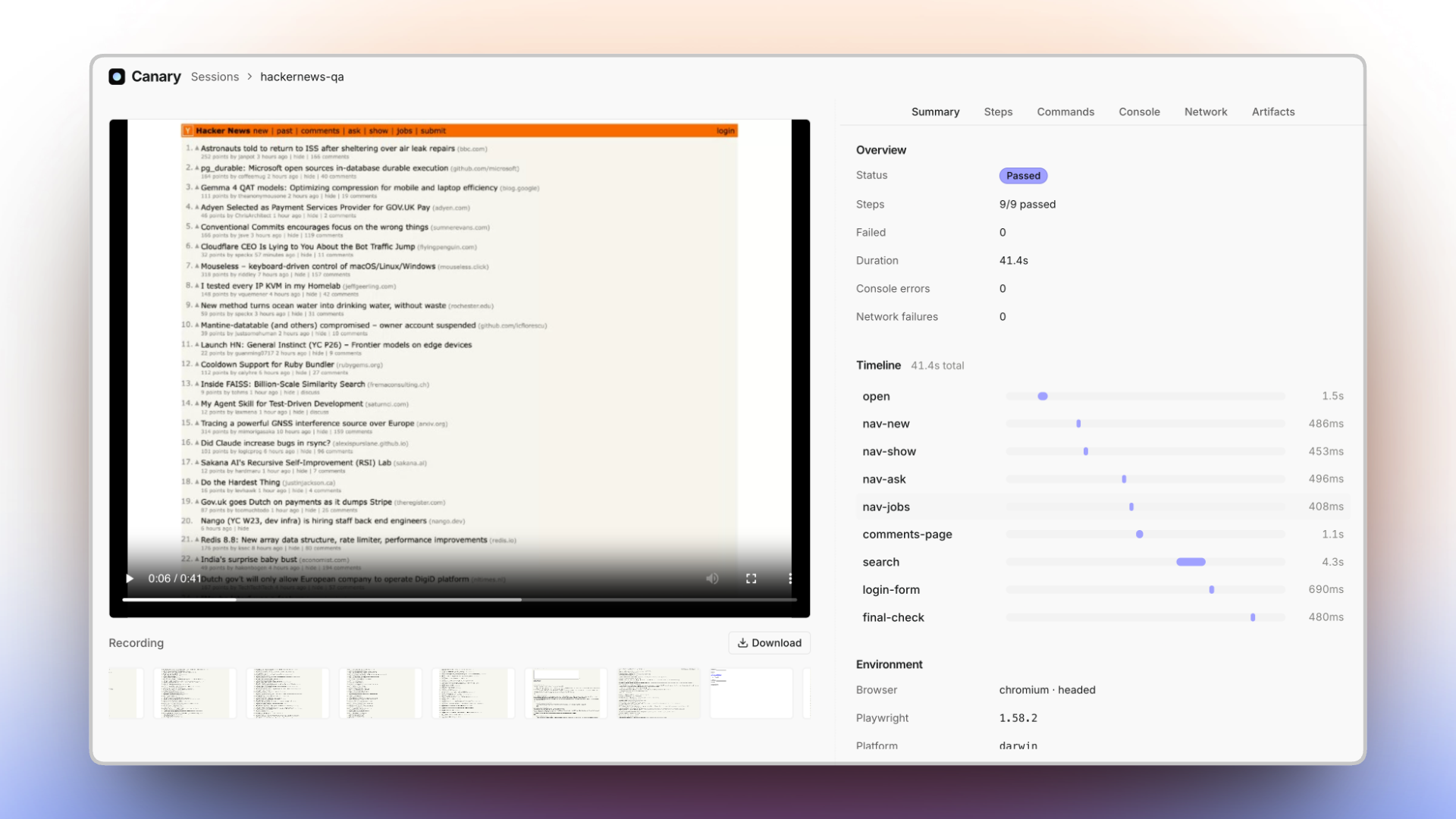
Status, a per-step timeline, the exact environment, and a full video replay of the run with a filmstrip of per-step screenshots — scrub straight to the moment something happened.
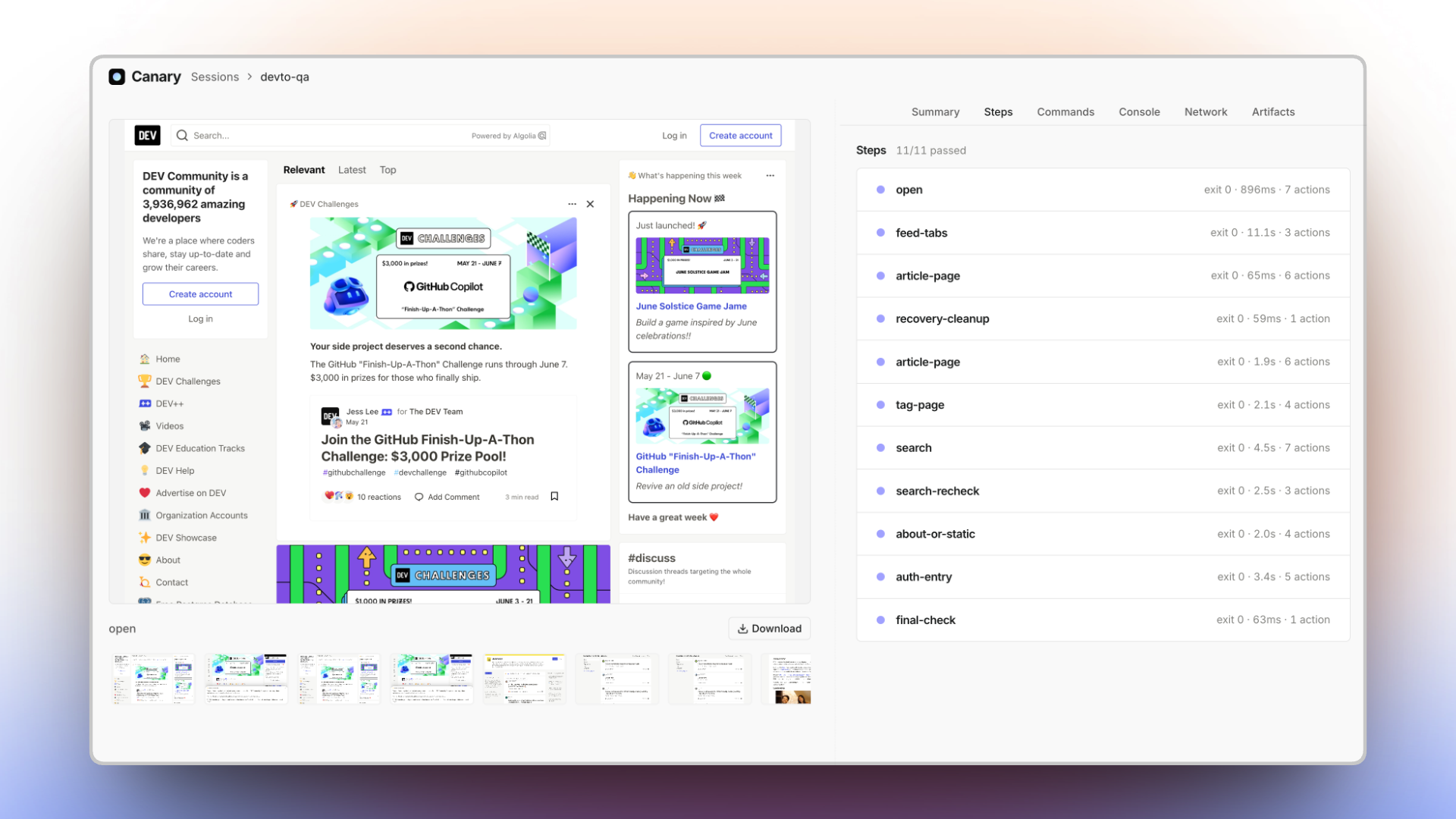
Step by step
Each step, pass or fail, with its exit code, duration, and how many Playwright actions it ran.
Reproducible Playwright scripts
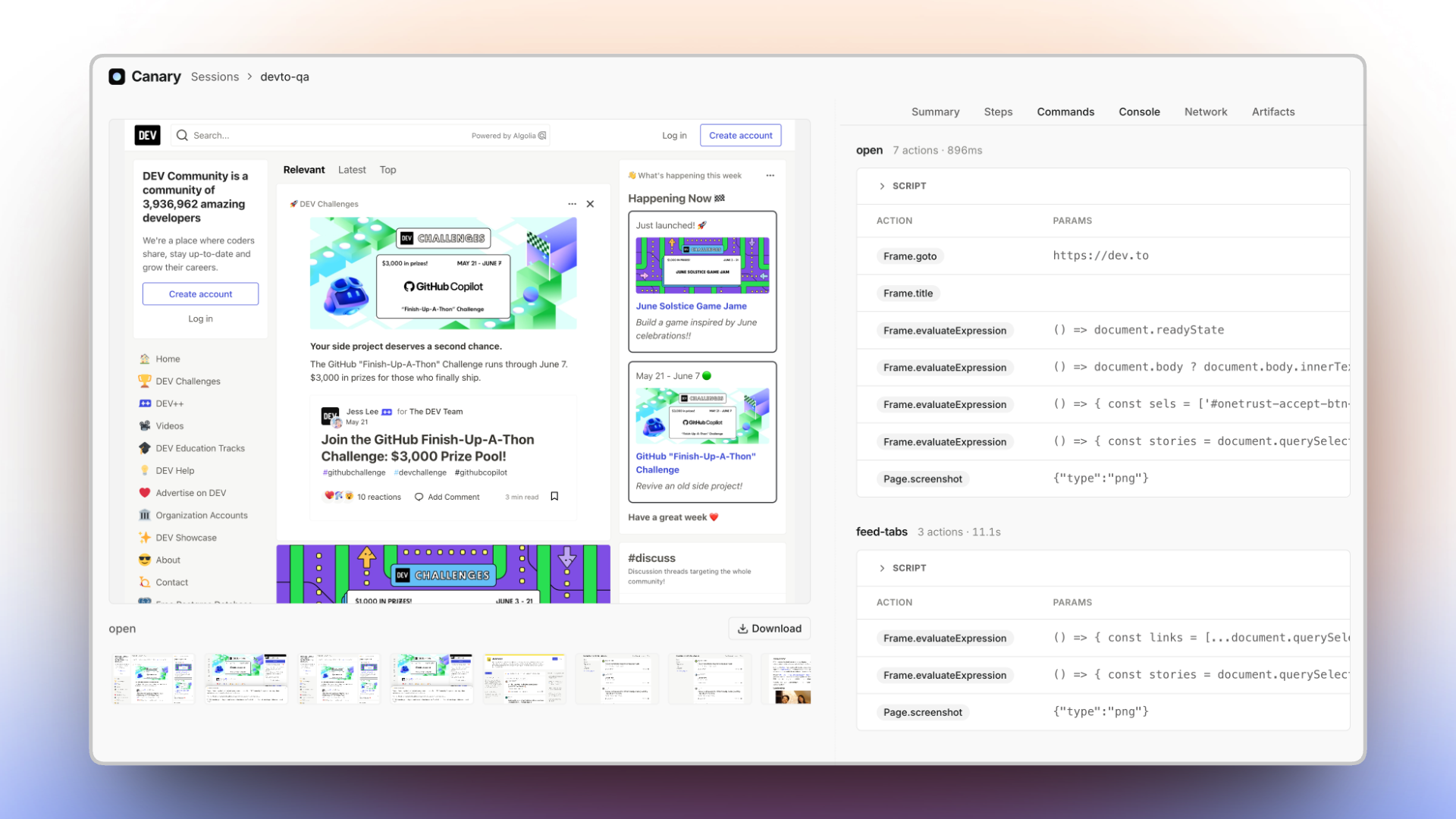
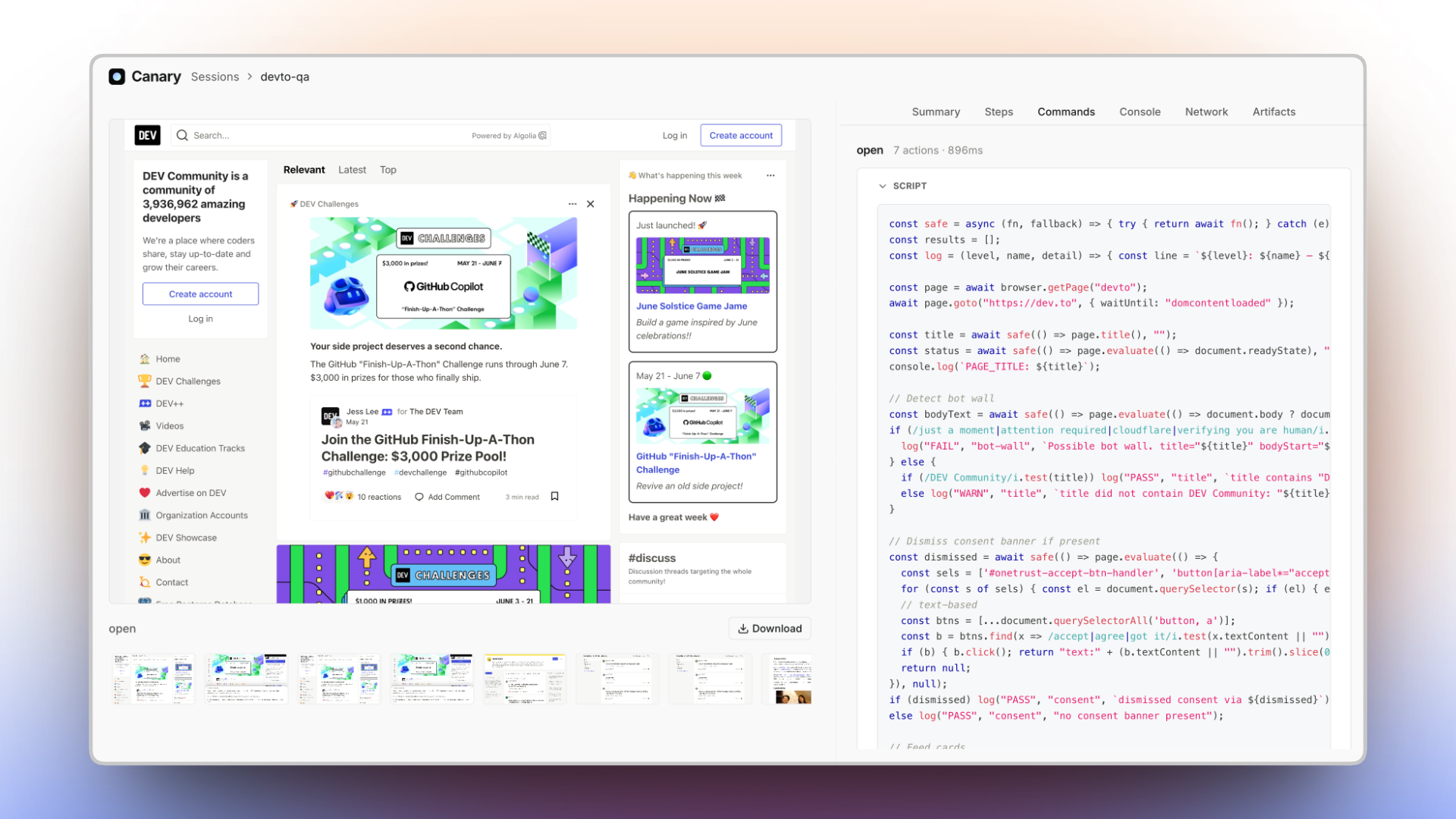
This is the one that matters. Let your agent figure a flow out once — Canary keeps the script
behind every step and decodes the full Playwright trace into the exact calls it made (goto,
waitForSelector, evaluate, screenshot), with params and timing. What you get back is a real,
reusable script. Next time you don't pay an agent to rediscover the page — you just re-run it.
Console and page errors
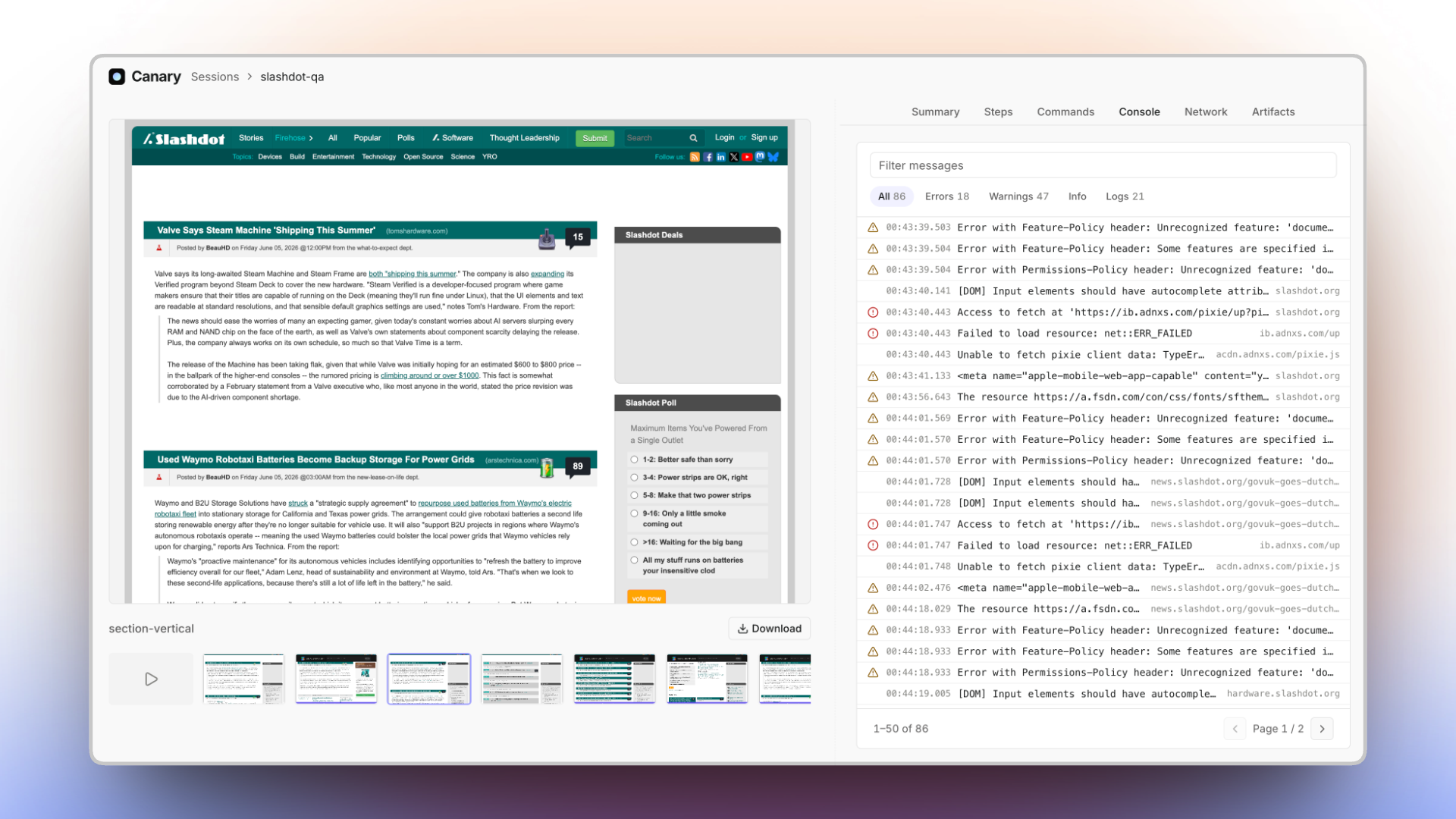
Every console message and uncaught page error, filterable by level — errors, warnings, info, logs — with the source URL. Errors flagged in red.
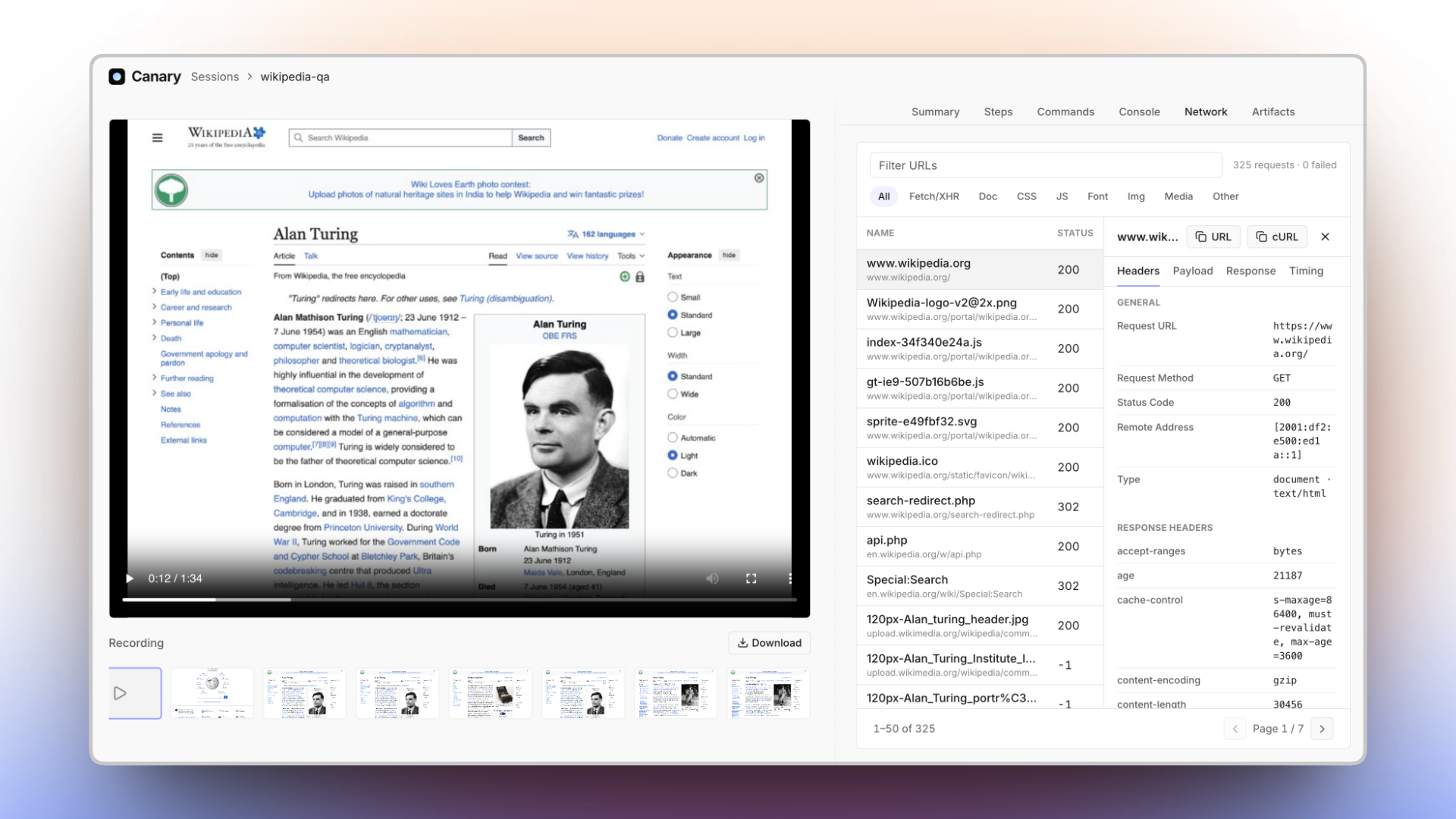
Network, request by request
Every request with status, type, size, and timing. Filter by kind, then click any row to inspect its headers, payload, and response — like a devtools network panel, frozen at the moment it ran.
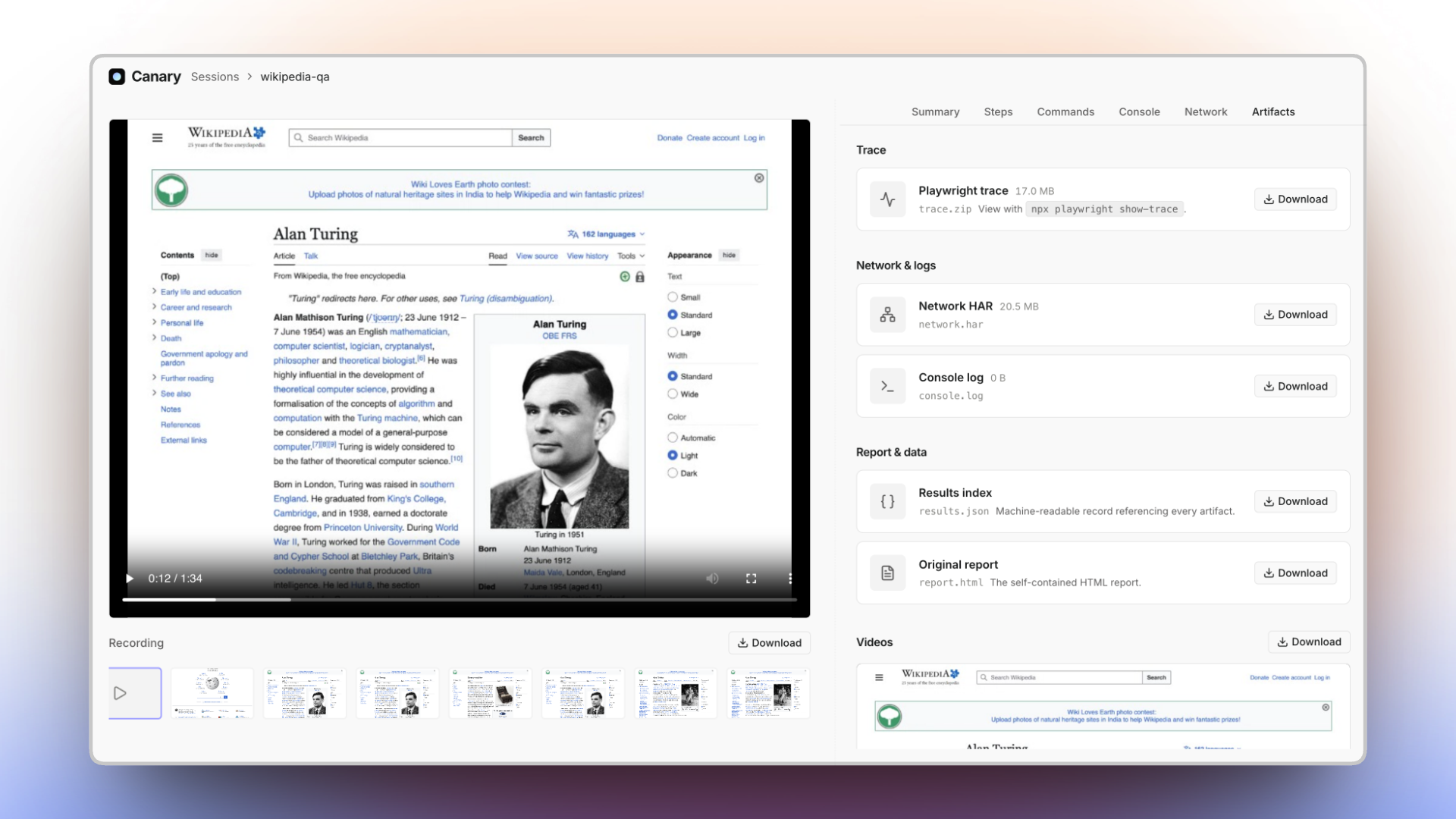
The full trace, and every artifact
The raw Playwright trace.zip, the network HAR, the console log, the machine-readable results.json,
and the self-contained report.html — all under ~/.canary/sessions/<id>/, all one click away. Open
the trace in Playwright's own viewer with npx playwright show-trace.
Claude Code, natively
In Claude Code, Canary is a first-class plugin — skills, subagents,
and /canary:* slash commands. Tell Claude what you changed or what to check; it plans the QA, drives
a real browser, and hands back the report.
/canary:verify    # what changed? → a prioritized QA plan, then record it
/canary:session   # record a flow end to end and render report.html
/canary:run       # drive the browser once, nothing recorded
/canary:review    # open the viewer and triage a recorded session
Or skip the slash and just say "QA the checkout flow and give me a report" — Canary's subagents pick it up. Install the plugin below.
Use it with your coding agent
Canary is built for agents — and it explains itself to them. Install it, then tell your agent to run
canary --help (or canary-browser --help for one-offs): each output is a complete, self-contained
usage guide — sandbox API, worked examples, a Playwright cheat sheet — written for an LLM to read.
No plugin required.
For deeper integration (slash commands, subagents, and skills), install the plugin pack. Canary ships
as a Claude Code plugin, a Cursor plugin, and a Codex plugin — all pointing at the same skills/ +
agents/ + commands/. There's no bespoke installer; each agent's own mechanism does the work.
/plugin marketplace add wizenheimer/canary
/plugin install canary@canary-marketplace

# Cursor — install "canary" from the Marketplace, or symlink for local dev:
ln -sfn "$(pwd)" ~/.cursor/plugins/local/canary

# Codex
codex marketplace add wizenheimer/canary        # then /plugins → install "canary"
You get canary-scripting (the sandbox API, with references/REFERENCE.md) plus the workflow
skills canary-verify, canary-automate, canary-session, and canary-review —
each paired with a subagent and a slash command: /canary:verify, /canary:run, /canary:session,
/canary:review.
Three tools, one runtime
| Tool | Command | Use it to |
|---|---|---|
CLI @usecanary/cli |
canary |
Record capture-enabled QA sessions and render reports. The main, user-facing tool. |
Engine @usecanary/browser |
canary-browser |
Drive a browser for quick, one-off automation — no recording, no report. |
Viewer @usecanary/ui |
canary-viewer · npx @usecanary/ui |
Browse, search, organize, and replay every recorded session locally. |
Both CLIs share one background daemon (Playwright + a QuickJS sandbox) that starts automatically when
needed. Stop it anytime with canary stop (alias: canary daemon stop, or canary-browser stop) —
it shuts down every browser and session it's running. You can also pass --stop-daemon to
canary session end to tear it down as soon as nothing else needs it.
Scripting
Scripts are plain async JavaScript with top-level await.
Scripts execute inside a QuickJS WASM sandbox with no arbitrary access to the host system. This is NOT Node.js — there is no module system and no Node API:
require()/import()— no module loading; inline any helpers in the scriptprocess,fs/path/os— no process or direct filesystem access (use the file helpers)fetch/WebSocket— no direct network access (the page does the networking)__dirname/__filename— no path globals
Memory and CPU limits are enforced, and both CPU time and wall-clock time are bounded — infinite
loops or never-settling promises abort the script. Values crossing evaluate / $eval must be
JSON-serializable.
const page = await browser.getPage("main");          // named, persistent page
await page.goto("https://example.com", { waitUntil: "domcontentloaded" });
console.log(await page.title());

const headings = await page.evaluate(() =>
  [...document.querySelectorAll("h1, h2")].map((h) => h.textContent.trim())
);
console.log(JSON.stringify(headings));

await page.locator("a.more").click();
const buf = await page.screenshot({ fullPage: false });
await saveScreenshot(buf, "page.png");               // saveScreenshot(buffer, name)
Browser
browser.getPage(nameOrId)— get-or-create a named page, or attach to an existing tab by theidfromlistPages(). Named pages persist across steps in a session — call with the same name to reuse the tab.browser.newPage()— an anonymous page, auto-closed when the script ends; does not persist.browser.listPages()— list every open tab:[{ id, url, title, name }](nameisnullfor tabs you never named).browser.closePage(name)— close and forget a named page.
Files
All file I/O is async (await it), sandboxed to ~/.canary/tmp/ (no filesystem escape), and
returns the full path to the file:
saveScreenshot(buffer, name)— persist a screenshot buffer; buffer first:const path = await saveScreenshot(await page.screenshot(), "home.png");writeFile(name, data)— write a small file (e.g. JSON state):await writeFile("results.json", JSON.stringify(data));readFile(name)— read it back (returns the contents as a string):const data = JSON.parse(await readFile("results.json"));
Output
console.log/console.infowrite to stdout;console.warn/console.errorwrite to stderr. Top-levelconsole.logis your script's output channel.console.loginsidepage.evaluate(() => …)runs in the page and is captured into the session's console artifact instead.
Pages returned by browser.getPage() and browser.newPage() are full Playwright Page objects —
the same API (goto, click, fill, locator, evaluate, getByRole, waitForSelector, …):
https://playwright.dev/docs/api/class-page
For element discovery, await page.snapshotForAI() returns an LLM-friendly outline of the page —
the canary-scripting skill and its references/REFERENCE.md carry the full API.
Updating
Already installed? Grab the latest CLIs from npm, then refresh the runtime:
npm i -g @usecanary/cli@latest @usecanary/ui@latest   # update canary + canary-viewer
canary install                                        # refresh the runtime (Chromium + Playwright)
canary install is safe to re-run — it pulls the browser/runtime versions the new CLI pins. Running
via npx instead of a global install? npx @usecanary/cli@latest … always fetches the newest release.
Agent integrations update through each agent's own mechanism:
# Claude Code — refresh the marketplace catalog, then update from /plugin:
/plugin marketplace update canary-marketplace
# or turn on auto-update: /plugin → Marketplaces → canary-marketplace → Enable auto-update
# (third-party marketplaces ship with auto-update OFF)

# Cursor / Codex — update "canary" from each marketplace UI.
Claude Code detects plugin updates by comparing manifest versions (bumped every release); Cursor
and Codex do the same against their plugin manifests, so every release makes the latest skills/
update-visible.
Comments