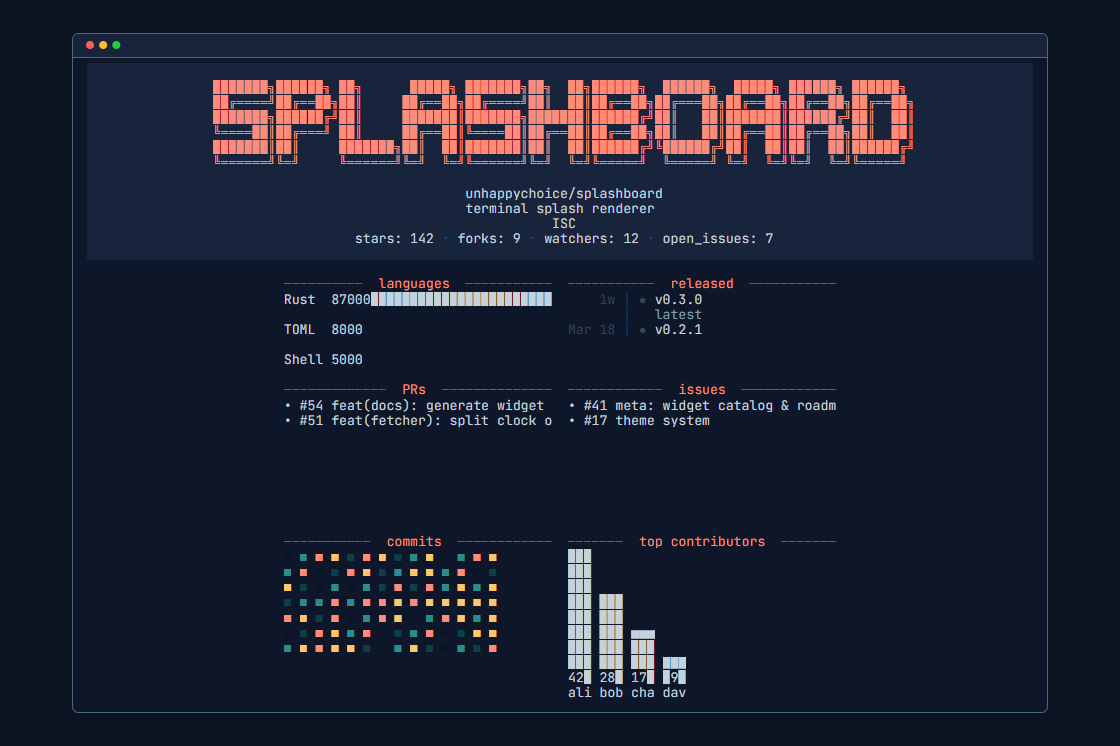
Splashboard displays a customizable dashboard in the terminal each time a shell session starts or a directory changes via cd. Developed in Rust by unhappychoice, this project (73 GitHub stars) replaces the default blinking cursor with relevant information such as greetings, git status, CI health, open PRs, a contributions heatmap, or even the moon phase. The name combines "splash" and "dashboard," reflecting its role as a dynamic screen that appears briefly before the prompt.
A standout aspect is its adaptation to specific repositories. When changing into a directory containing ./.splashboard/dashboard.toml, splashboard automatically loads that configuration, tailoring the display to the project's context—such as repo-specific widgets for build status or issues. This happens without manual intervention, making it useful for developers who frequently switch between codebases.
Core features
Splashboard structures its displays around widgets, each composed of a fetcher (data source), renderer (visualization), and layout slot. Key capabilities include:
- Plugin-based data sources: Pulls live info from git, GitHub (PRs, contributions), CI systems, weather, or custom scripts.
- Directory-aware configs: Repo-specific
dashboard.tomlfiles override the global setup oncd. - Themes and presets: Curated color palettes and full dashboard templates available via the docs site.
- Shell integration: Works with zsh, bash, fish, and PowerShell; auto-wires into shell rc files during setup.
- Sandboxing: Per-directory configs run in a trust model that limits potential risks from untrusted repos (detailed in the docs).
Screenshots on the GitHub repo and website show examples like a centered git graph with branch status or a grid of CI badges. The project maintains CI status, code coverage tracking, and releases via crates.io and GitHub, with the latest version badged on the README.
Getting it running
Installation pulls prebuilt binaries for Linux (x86_64/aarch64), macOS (x86_64/aarch64), and Windows (x86_64) from GitHub releases, or builds from source.
The quickest method uses the provided script:
curl -fsSL https://raw.githubusercontent.com/unhappychoice/splashboard/main/install.sh | bash
Run splashboard install afterward. It detects the shell, offers template and theme pickers, and appends the necessary lines to ~/.zshrc, ~/.bashrc, or equivalent.
For manual control or other package managers:
# Cargo (requires Rust toolchain)
cargo install splashboard

# Homebrew
brew install unhappychoice/tap/splashboard

# cargo-binstall (faster, uses prebuilts)
cargo binstall splashboard

# Nix
nix run github:unhappychoice/splashboard
nix profile install github:unhappychoice/splashboard
To add without the installer, append a single line sourcing the init command:
echo 'eval "$(splashboard init zsh)"' >> ~/.zshrc
echo 'eval "$(splashboard init bash)"' >> ~/.bashrc
echo 'splashboard init fish | source' >> ~/.config/fish/config.fish
echo 'Invoke-Expression (& splashboard init powershell | Out-String)' >> $PROFILE
Upgrades update the init snippet automatically. Configuration lives in TOML files, with full schema, presets, and reference docs at https://splashboard.unhappychoice.com/. Start with splashboard init for a template, then edit ~/.splashboard/dashboard.toml for global settings or add ./.splashboard/dashboard.toml per repo.
The getting started guide walks through rendering the first splash, while concepts explain the widget model: fetchers grab data (e.g., github_prs), renderers format it (e.g., as a list or graph), and layouts position them (matrix-based grid).
Who this is for
Developers who spend hours in the terminal and cd between multiple git repos benefit most. It surfaces at-a-glance context without cluttering the prompt—git diffs appear on directory entry, not every command. Teams can commit repo-specific dashboards to show CI pipelines or issue counts, aiding onboarding or quick status checks.
If you manage open-source projects, widgets for contributions heatmaps or PR lists provide instant visibility. The moon phase or weather fetchers suit those wanting light personalization. Status notes confirm it's usable daily, with a widget roadmap in GitHub issue #41.
How it compares
Splashboard differs from prompt customizers like Starship or Oh My Posh, which update the PS1 on every command. Here, the splash renders once per directory change or shell start, keeping the screen clean afterward. Tools like Neofetch or Fastfetch offer static system info on login but lack git integration or repo-specific dynamism.
Powerlevel10k provides rich git segments in the prompt but requires constant visibility. Splashboard's plugin system (fetchers/renderers) offers more modularity, though its 73 stars indicate a smaller ecosystem than Starship's thousands. It's heavier than a simple prompt due to Rust binary size and network fetches, but prebuilts mitigate build times.
For Docker-heavy workflows, no container image exists in the README—run natively. Windows support via PowerShell makes it cross-platform, unlike shell-specific alternatives.
Configuration details
Global config at ~/.splashboard/dashboard.toml defines widgets in a matrix layout. Example from docs reference:
[matrix]
rows = 10
cols = 60

[[matrix.slots]]
widget = { fetcher = "git_branch", renderer = "git_graph" }
position = { row = 1, col = 1, width = 60, height = 3 }
Per-repo overrides load safely under the trust model, executing only whitelisted fetchers/scripts. Themes adjust colors via presets like "gruvbox" or custom palettes. Full options cover every fetcher/renderer pair in the reference matrix.
The project licenses under the crates.io badge (MIT/Apache-2.0 typical for Rust crates).
Splashboard suits terminal users wanting contextual splashes without prompt bloat, but minimalists or offline-only setups may prefer lighter tools. Source at https://github.com/unhappychoice/splashboard; docs at http://splashboard.unhappychoice.com/.
Comments