🇺🇸 English | 🇨🇳 中文 | 🇫🇷 Français | 🇪🇸 Español | 🇯🇵 日本語 | 🇰🇷 한국어 | 🇺🇦 Українська
One interface for your entire Cursor history.
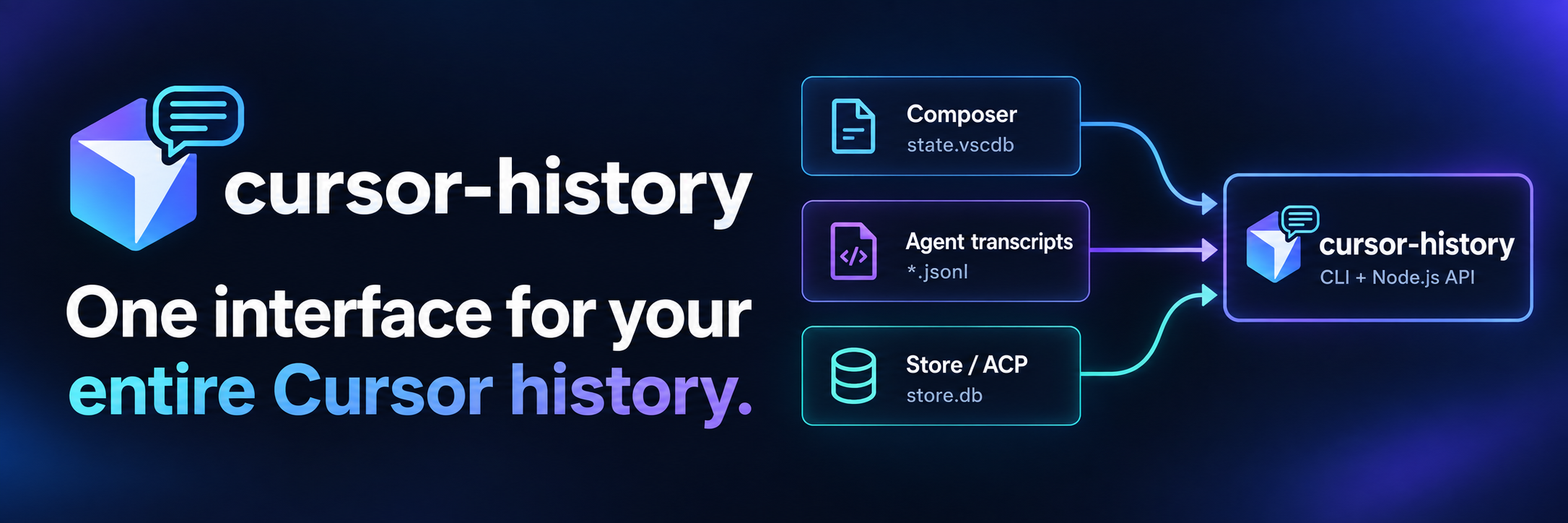
Cursor conversations can be spread across workspaces, IDE databases, Agent transcripts, and newer CLI / ACP session stores. cursor-history discovers supported local sources and brings them together through one CLI and Node.js library.
Search conversation content across workspaces, inspect messages and available tool activity, and export to Markdown or JSON. Back up and restore Composer history, or migrate supported Composer sessions when projects move.
Already have months of Cursor history? No prior capture or indexing setup is required. Search runs locally, with no embeddings or API key.
Prefer an MCP server interface? Connect cursor-history-mcp to expose history as MCP tools. Agents can also call this project's CLI or Node.js API directly—choose the interface that fits your workflow. The packages release independently; check MCP storage compatibility and release information.
Quick Start
npm install -g cursor-history

cursor-history list --all
cursor-history search "authentication"
cursor-history show 1
cursor-history export 1
cursor-history backup
Requires Node.js 20.x or 22.x–26.x and existing local Cursor history. To try without a permanent install, run npx cursor-history list --all.
The numbers in show and export refer to the list from the same data source and workspace scope; use the session UUID for saved commands. The backup command archives Composer databases, not Store databases or transcripts.
Installation · Usage · Example output · Library API · Roadmap · Compatibility and safe upgrades
Why this exists
You may remember solving a problem with Cursor without remembering which project, session, or Cursor interface you used. A keyword search across the local history can bring that conversation back.
Cursor's Agent CLI provides agent ls, agent resume, and agent --resume=<id> to find or resume CLI sessions. cursor-history adds workflows for reading and managing supported local history across workspaces and storage formats.
| What you want to do | Where to start |
|---|---|
| Continue a conversation in Cursor Agent CLI | Cursor's agent ls or agent --resume=<id> |
| Find a phrase in conversation content across workspaces | cursor-history search "connection pool" |
| Read or export a discovered local session | cursor-history show 1 or cursor-history export 1 |
| Back up or restore Composer history | cursor-history backup / cursor-history restore (usage) |
| Move supported Composer sessions to another workspace | cursor-history migrate-session (usage) |
| Build on history in your own application | The Node.js API |
Works across Cursor storage generations and surfaces
Different Cursor versions and interfaces can leave different local representations on the same machine. cursor-history discovers these supported sources:
| Source | Local files | How they are used |
|---|---|---|
| Legacy / Composer | workspaceStorage/*/state.vscdb and globalStorage/state.vscdb under the Cursor user data directory |
Workspace records and global conversation data |
| Agent transcripts | ~/.cursor/projects/**/agent-transcripts/**/*.jsonl |
Conversation text and tool calls available in the transcript |
| Store / CLI | ~/.cursor/chats/**/store.db |
Per-session Store conversation data |
| ACP sessions | ~/.cursor/acp-sessions/**/store.db |
Per-session Store data discovered under the ACP root |
See Where Cursor Stores Data for platform paths, custom roots, and WSL configuration.
These representations do not always contain the same fields. A transcript may omit timestamps or tool results. When a usable Store database and transcript coexist within scope, the database supplies the Store conversation and the transcript remains provenance. Source details and timestamp provenance distinguish stored information from inferred values and partial views.
Reading support does not imply backup or migration support: current backup archives contain Composer data only, and Store-only or merged-source sessions cannot be migrated. Broader coverage is on the roadmap. See the Compatibility and Data-Integrity Contract for the full boundaries.
Three things you can do with your history
Find it
cursor-history list --all
cursor-history search "connection pool"
cursor-history show 1
Find the conversation where you already solved the problem, even if it belongs to another workspace. Existing supported local history is searchable without having installed this tool beforehand.
Preserve it
cursor-history export 1
cursor-history backup
cursor-history migrate-session 1 /path/to/new/workspace --dry-run
Export readable sessions to Markdown or JSON. Back up Composer history and preview migration of supported Composer sessions before moving them to another workspace.
Reuse it
Use the Node.js library directly, or connect the separate cursor-history-mcp server so an MCP-capable assistant can search your existing development history.
Months of decisions, fixes, prompts, and tool activity may already be on disk. Make that context easier to find the next time you need it.
Features
- Dual interface - Use as CLI tool or import as a library in your Node.js projects
- List sessions - View all chat sessions across workspaces
- View conversations - Inspect the content available in each source, including:
- AI responses with natural language explanations
- Full diff display for file edits and writes with syntax highlighting
- Detailed tool calls showing all parameters (file paths, search patterns, commands, etc.)
- AI reasoning and thinking blocks
- Message timestamps with explicit stored/inferred provenance
- Search - Search conversation content across workspaces by keyword with highlighted matches
- Export - Save sessions as Markdown or JSON files
- Migrate - Move or copy supported Composer sessions between workspaces (e.g., when renaming projects)
- Backup & Restore - Back up Composer databases and restore them when needed
- Cross-platform - Works on macOS, Windows, and Linux
Installation
From NPM (Recommended)
# Install globally
npm install -g cursor-history

# Use the CLI
cursor-history list
If you prefer pnpm:
# Install globally
pnpm add -g cursor-history

# Use the CLI
cursor-history list
From Source
# Clone and build
git clone https://github.com/S2thend/cursor_chat_history.git
cd cursor_chat_history
npm install
npm run build

# Run directly
node dist/cli/index.js list

# Or link globally
npm link
cursor-history list
Equivalent pnpm workflow:
# Clone and build
git clone https://github.com/S2thend/cursor_chat_history.git
cd cursor_chat_history
pnpm install
pnpm build

# Run directly
node dist/cli/index.js list
node dist/cli/index.js show 1 --json
Requirements
- Node.js 20.x or 22.x–26.x (Node 21 is not supported; Node.js 22.5+ is recommended for built-in SQLite support)
- Existing local history from Cursor IDE or Agent CLI in a supported format
SQLite Driver Configuration
cursor-history supports two SQLite drivers for maximum compatibility:
| Driver | Description | Node.js capability boundary |
|---|---|---|
node:sqlite |
Built-in module; selected only when it provides every API required by the operation | Import/read support starts in 22.5; online backup starts in 22.16.0 and 23.8.0 |
better-sqlite3 |
Native binding and automatic fallback when capable | Supported project majors: 20 and 22–26 |
Automatic Driver Selection
Driver selection is per operation and probes capabilities, not only whether a module imports. In automatic mode cursor-history:
- prefers node:sqlite when it implements all APIs required by that operation; then
- falls back to an installed, capable better-sqlite3.
If neither provider is capable, the operation returns an actionable typed error. Store snapshot capability failures are fatal and are not silently converted into an empty/partial session or a transcript fallback.
Manual Driver Selection
You can force a specific driver using the environment variable:
# Force better-sqlite3
CURSOR_HISTORY_SQLITE_DRIVER=better-sqlite3 cursor-history list

# Force node:sqlite (the runtime must support every API needed by this operation)
CURSOR_HISTORY_SQLITE_DRIVER=node:sqlite cursor-history list
A forced driver never falls back. If it lacks a required capability, cursor-history reports the driver, operation, missing capability, available alternative, and remedy.
Debug Driver Selection
To see which driver is being used:
DEBUG=cursor-history:* cursor-history list
Library API Driver Control
When using cursor-history as a library, you can control the driver programmatically:
import { setDriver, getActiveDriver, listSessions } from 'cursor-history';

// Force a specific driver before any operations
setDriver('better-sqlite3');

// Check which driver is active
const driver = getActiveDriver();
console.log(`Using driver: ${driver}`);

// Or configure via LibraryConfig
const result = await listSessions({
  sqliteDriver: 'node:sqlite'  // Force node:sqlite for this call
});
Usage
List Sessions
# List recent sessions (default: 20)
cursor-history list

# List all sessions
cursor-history list --all

# List with composer IDs (for external tools)
cursor-history list --ids

# Limit results
cursor-history list -n 10

# List workspaces only
cursor-history list --workspaces
list --workspaces is intentionally unscoped discovery and cannot be combined with --workspace.
Choose a path from its output, then use that same --workspace value for scoped session commands.
View a Session
# Show session by index number
cursor-history show 1

# Show with truncated messages (for quick overview)
cursor-history show 1 --short

# Show full AI thinking/reasoning text
cursor-history show 1 --think

# Show full tool call details (commands, content, results)
cursor-history show 1 --tool

# Show full error messages (not truncated to 300 chars)
cursor-history show 1 --error

# Filter by message type (user, assistant, tool, thinking, error)
cursor-history show 1 --only user
cursor-history show 1 --only user,assistant
cursor-history show 1 --only tool,error

# Combine options
cursor-history show 1 --short --think --tool --error
cursor-history show 1 --only user,assistant --short

# Output as JSON
cursor-history show 1 --json
Search
# Search for keyword
cursor-history search "react hooks"

# Limit results
cursor-history search "api" -n 5

# Adjust context around matches
cursor-history search "error" --context 100
Export
# Export single session to Markdown
cursor-history export 1

# Export to specific file
cursor-history export 1 -o ./my-chat.md

# Export as JSON
cursor-history export 1 --format json

# Export all sessions to directory
cursor-history export --all -o ./exports/

# Overwrite existing files
cursor-history export 1 --force
Migrate Sessions
Migration supports eligible Composer sessions. Store-only, merged-source, and ambiguous sessions are rejected; use --dry-run to preview a migration.
# Move a single session to another workspace
cursor-history migrate-session 1 /path/to/new/project

# Move multiple sessions (comma-separated indices or IDs)
cursor-history migrate-session 1,3,5 /path/to/project

# Copy instead of move (keeps original)
cursor-history migrate-session --copy 1 /path/to/project

# Preview what would happen without making changes
cursor-history migrate-session --dry-run 1 /path/to/project

# Move all sessions from one workspace to another
cursor-history migrate /old/project /new/project

# Copy all sessions (backup)
cursor-history migrate --copy /project /backup/project

# Force merge with existing sessions at destination
cursor-history migrate --force /old/project /existing/project
Backup & Restore
Backup archives contain Composer state.vscdb data. They do not include Store databases, Agent transcripts, or ACP session stores. Export readable sessions from those sources to Markdown or JSON when you need a portable copy; exports are not restorable backup archives.
# Create a backup of Composer chat history
cursor-history backup

# Create backup to specific file
cursor-history backup -o ~/my-backup.zip

# Overwrite existing backup
cursor-history backup --force

# List available backups
cursor-history list-backups

# List backups in a specific directory
cursor-history list-backups -d /path/to/backups

# Restore from a backup
cursor-history restore ~/cursor-history-backups/backup.zip

# Restore to a custom location
cursor-history restore backup.zip --target /custom/cursor/data

# Force overwrite existing data
cursor-history restore backup.zip --force

# View sessions from a backup without restoring
cursor-history list --backup ~/backup.zip
cursor-history show 1 --backup ~/backup.zip
cursor-history search "query" --backup ~/backup.zip
cursor-history export 1 --backup ~/backup.zip
Global Options
# Output as JSON (works with all commands)
cursor-history --json list

# Use custom Cursor data path
cursor-history --data-path ~/.cursor-alt list

# Filter by workspace
cursor-history --workspace /path/to/project list
Example Output
List Sessions
cursor-history list

cursor-history - Chat History Browser

Sessions (showing 3 of 42):

  #1  12/26 09:15 AM  cursor_chat_history
      15 messages · Updated 2 min ago
      "Help me fix the migration path issue..."

  #2  12/25 03:22 PM  my-react-app
      8 messages · Updated 18 hours ago
      "Add authentication to the app..."

  #3  12/24 11:30 AM  api-server
      23 messages · Updated 2 days ago
      "Create REST endpoints for users..."
Show Session Details
cursor-history show 1

Session #1 · cursor_chat_history
15 messages · Created 12/26 09:15 AM

────────────────────────────────────────

You: 09:15:23 AM

Help me fix the migration path issue in the codebase

────────────────────────────────────────

Assistant: 09:15:45 AM

I'll help you fix the migration path issue. Let me first examine
the relevant files.

────────────────────────────────────────

Tool: 09:15:46 AM
🔧 Read File
   File: src/core/migrate.ts
   Content: export function migrateSession(sessionId: string...
   Status: ✓ completed

────────────────────────────────────────

Tool: 09:16:02 AM
🔧 Edit File
   File: src/core/migrate.ts

   ```diff
   + function transformPath(path: string): string {
   +   return path.replace(sourcePrefix, destPrefix);
   + }
   ```

   Status: ✓ completed

────────────────────────────────────────

Thinking: 09:16:02 AM
💭 Now I need to update the function to call transformPath
   for each file reference in the bubble data...

────────────────────────────────────────

Assistant: 09:16:30 AM

I've added the path transformation logic. The migration will now
update all file paths when moving sessions between workspaces.

─────────────���──────────────────────────

Error: 09:17:01 AM
❌ Build failed: Cannot find module './utils'

────────────────────────────────────────
What You Can View
When browsing your chat history, you'll see:
- Complete conversations - All messages exchanged with Cursor AI
- Every message rendered - Each resolved message is shown once in order; consecutive duplicates are not folded, so distinct tool calls, provenance, and token data are never hidden
- Timestamps - Composer sessions retain their historical timestamp recovery and interpolation; Store messages show a time only when Cursor provides a directly mapped turn timestamp
- Resolved cross-stack sessions - When one byte-exact UUID exists in Composer and Store, compatible Composer identities are preserved while permitted sources produce one provenance-rich resolved view. Workspace scope is applied before payload reads: known off-scope sources remain unopened and make the result partial; permitted sources follow the documented backbone/alignment policy rather than an unconditional field union.
- AI tool actions - Detailed view of what Cursor AI did:
- File edits/writes - Full diff display with syntax highlighting showing exactly what changed
- File reads - File paths and content previews (use
--toolfor complete content) - Search operations - Patterns, paths, and search queries used
- Terminal commands - Complete command text
- Directory listings - Paths explored
- Tool errors - Failed/cancelled operations shown with ❌ status indicator and parameters
- User decisions - Shows if you accepted (✓), rejected (✗), or pending (⏳) on tool operations
- Errors - Error messages with ❌ emoji highlighting (extracted from
toolFormerData.additionalData.status)
- AI reasoning - See the AI's thinking process behind decisions (use
--thinkfor full text) - Code artifacts - Mermaid diagrams, code blocks, with syntax highlighting
- Natural language explanations - AI explanations combined with code for full context
Display Options
- Default view - Full messages with truncated thinking (200 chars), file reads (100 chars), and errors (300 chars)
--shortmode - Truncates user and assistant messages to 300 chars for quick scanning--thinkflag - Shows complete AI reasoning/thinking text (not truncated)--toolflag - Shows full tool call details, including commands, content, and results--errorflag - Shows full error messages instead of 300-char preview--only <types>flag - Filter messages by type:user,assistant,tool,thinking,error(comma-separated)
A natural-language assistant response that also contains structured tool calls matches both the assistant and tool filters. Tool-only records match only tool.
Where Cursor Stores Data
| Platform | Composer stack | Store stack |
|---|---|---|
| macOS | ~/Library/Application Support/Cursor/User/ |
~/.cursor/ |
| Windows | %APPDATA%/Cursor/User/ |
%USERPROFILE%\.cursor\ |
| Linux / WSL | ~/.config/Cursor/User/ |
~/.cursor/ |
The tool automatically finds and reads both stacks. Per-session store.db is the primary Store
message source. After a capable snapshot/read setup succeeds, the transcript may be a fallback
when the database is absent, contains no usable messages, or has a source-data corruption/read
failure. Driver capability and snapshot-infrastructure failures are fatal and never become a
transcript fallback. A usable database remains the sole Store backbone; a coexisting transcript is
retained only as superseded provenance.
Use --data-path <path> or CURSOR_DATA_PATH to point at a custom Cursor data tree. Use CURSOR_STORE_ROOT to configure the Store root independently. A Store root itself, or its chats, projects, or acp-sessions child, is accepted and normalized to the same root.
Inside WSL, Windows-side Store data is normally mounted at /mnt/c/Users/<windows-user>/.cursor. For example: CURSOR_STORE_ROOT=/mnt/c/Users/<windows-user>/.cursor cursor-history list --all. Use the WSL-side ~/.cursor path instead when the sessions were created by a Cursor agent running inside that WSL distribution.
When running the CLI inside WSL against a Windows-mounted project, do not reuse Windows-installed native node_modules. Native packages are platform-specific; install dependencies with Linux Node.js in a separate WSL dependency tree before running Linux-side tests or builds. cursor-history never installs or removes dependencies automatically.
Library API
In addition to the CLI, you can use cursor-history as a library in your Node.js projects:
import {
  listSessions,
  getSession,
  searchSessions,
  exportSessionToMarkdown
} from 'cursor-history';

// List all sessions with pagination
const result = await listSessions({ limit: 10 });
console.log(`Found ${result.pagination.total} sessions`);

for (const session of result.data) {
  console.log(`${session.id}: ${session.messageCount} messages`);
}

// Get a specific session (zero-based index)
const session = await getSession(0);
console.log(session.messages);

// Search across all sessions
const results = await searchSessions('authentication', { context: 2 });
for (const match of results) {
  // Complete message-array index, UTF-16 offset in complete content, and complete source line.
  console.log(match.messageIndex, match.offset, match.match);
}

// Export to Markdown
const markdown = await exportSessionToMarkdown(0);
These search-coordinate semantics are corrected in 0.18.0. If you persisted values returned by
v0.16/v0.17, recompute them after upgrading; they are not message identities. Library JSON exports
include an additive zero-based session index, consistent with the read API.
Migration API
import { migrateSession, migrateWorkspace } from 'cursor-history';

// Move a session to another workspace
const moveResults = await migrateSession({
  sessions: 3,  // index or ID
  destination: '/path/to/new/project'
});
console.log(moveResults);

// Copy multiple sessions (keeps originals)
const copyResults = await migrateSession({
  sessions: [1, 3, 5],
  destination: '/path/to/project',
  mode: 'copy'
});
console.log(copyResults);

// Migrate all sessions between workspaces
const workspaceResult = await migrateWorkspace({
  source: '/old/project',
  destination: '/new/project'
});
console.log(`Migrated ${workspaceResult.successCount} sessions`);
Backup API
import {
  createBackup,
  restoreBackup,
  validateBackup,
  listBackups,
  getDefaultBackupDir,
  listSessions
} from 'cursor-history';

// Create a backup
const result = await createBackup({
  outputPath: '~/my-backup.zip',
  force: true,
  onProgress: (progress) => {
    console.log(`${progress.phase}: ${progress.filesCompleted}/${progress.totalFiles}`);
  }
});
console.log(`Backup created: ${result.backupPath}`);
console.log(`Sessions: ${result.manifest.stats.sessionCount}`);

// Validate a backup
const validation = await validateBackup('~/backup.zip');
if (validation.status === 'valid') {
  console.log('Backup is valid');
} else if (validation.status === 'warnings') {
  console.log('Backup has warnings:', validation.corruptedFiles);
}

// Restore from backup
const restoreResult = await restoreBackup({
  backupPath: '~/backup.zip',
  force: true
});
console.log(`Restored ${restoreResult.filesRestored} files`);
// Check restoreResult.warnings: corrupt entries are skipped, never restored.

// List available backups
const backups = await listBackups();  // Scans ~/cursor-history-backups/
for (const backup of backups) {
  console.log(`${backup.filename}: ${backup.manifest?.stats.sessionCount} sessions`);
}

// Read sessions from backup without restoring
const sessions = await listSessions({ backupPath: '~/backup.zip' });
Available Functions
| Function | Description |
|---|---|
listSessions(config?) |
List sessions with pagination |
getSession(index, config?) |
Get full session by index |
searchSessions(query, config?) |
Search across sessions |
exportSessionToJson(index, config?) |
Export session to JSON |
exportSessionToMarkdown(index, config?) |
Export session to Markdown |
exportAllSessionsToJson(config?) |
Export all sessions to JSON |
exportAllSessionsToMarkdown(config?) |
Export all sessions to Markdown |
migrateSession(config) |
Move/copy sessions to another workspace |
migrateWorkspace(config) |
Move/copy all sessions between workspaces |
createBackup(config?) |
Back up Composer chat history |
restoreBackup(config) |
Restore chat history from backup |
validateBackup(path) |
Validate backup integrity |
listBackups(directory?) |
List available backup files |
getDefaultBackupDir() |
Get default backup directory path |
getDefaultDataPath() |
Get platform-specific Cursor data path |
setDriver(name) |
Set SQLite driver ('better-sqlite3' or 'node:sqlite') |
getActiveDriver() |
Get currently active SQLite driver name |
Configuration Options
import type { MessageType } from 'cursor-history';

interface LibraryConfig {
  dataPath?: string;       // Custom Cursor data path
  workspace?: string;      // Filter by workspace path
  limit?: number;          // Pagination limit
  offset?: number;         // Pagination offset
  context?: number;        // Search context lines
  backupPath?: string;     // Read from backup file instead of live data
  sqliteDriver?: 'better-sqlite3' | 'node:sqlite';  // Force specific SQLite driver
  messageFilter?: MessageType[];  // Filter messages by type (user, assistant, tool, thinking, error)
}
Error Handling
import {
  listSessions,
  createBackup,
  restoreBackup,
  isDatabaseLockedError,
  isDatabaseNotFoundError,
  isSessionNotFoundError,
  isWorkspaceNotFoundError,
  isBackupError,
  isBackupPublishedPermissionError,
  isRestoreRollbackError,
  isRestoreError,
  isInvalidBackupError,
  validateMessageTypes
} from 'cursor-history';

try {
  const result = await listSessions();
} catch (err) {
  if (isDatabaseLockedError(err)) {
    console.error('Database locked - close Cursor and retry');
  } else if (isDatabaseNotFoundError(err)) {
    console.error('Cursor data not found');
  } else if (isSessionNotFoundError(err)) {
    console.error('Session not found');
  } else if (isWorkspaceNotFoundError(err)) {
    console.error('Workspace not found - open project in Cursor first');
  }
}

try {
  await createBackup({ outputPath: '/private/backups/cursor.zip' });
} catch (err) {
  if (isBackupPublishedPermissionError(err)) {
    if (err.details.pathIdentityVerified) {
      console.error('Verified published backup needs a mode correction:', err.details.outputPath);
    } else {
      // The commit point was crossed, but this pathname is untrusted. Do not chmod it from here.
      console.error('Published backup path requires identity recovery:', err.details.outputPath);
    }
  }
}

// Validate untyped filter values before passing them to a read operation
const invalidTypes = validateMessageTypes(['invalid']);
if (invalidTypes.length > 0) {
  console.error('Invalid filter types:', invalidTypes);
}

// Backup-specific errors
try {
  await createBackup();
} catch (err) {
  if (isBackupError(err)) {
    console.error('Backup failed:', err.message);
  } else if (isInvalidBackupError(err)) {
    console.error('Invalid backup file');
  } else if (isRestoreError(err)) {
    console.error('Restore failed:', err.message);
  }
}

try {
  await restoreBackup({ backupPath: '/private/backups/cursor.zip', force: true });
} catch (err) {
  if (isRestoreRollbackError(err)) {
    // These are manifest-relative paths, never private physical locators.
    console.error('Manual recovery required for:', err.details.residualFiles);
  }
}
Compatibility and safe upgrades
The authoritative identity, scoped-index, workspace-I/O, source-fidelity, timestamp, input-limit, backup-permission, and upgrade rules are in the shipped Compatibility and Data-Integrity Contract. Library consumers that persist cursor-history output should read that contract before changing versions.
Warning for v0.17 incremental-library consumers
v0.17 introduced transitional Store/merged behavior that can change positional message keys, replacement signals, and timestamp-watermark assumptions. If your application incrementally stores library output—such as a vibe-history archive—keep cursor-history v0.16 pinned until you can validate the 0.18.0 corrective path. Back up the downstream archive before upgrading.
The confirmed no-consumer-change upgrade path is deliberately narrower: an archive populated from
v0.16 Composer-only data can become a complete Composer-backed merged view while retaining every
old session, Composer-message, and existing ordinal-derived tool key byte-for-byte. A changed
complete view still reports source: "global", so the unchanged consumer performs its existing
whole-session atomic replacement; a second identical sync performs no session/content mutations.
The unchanged consumer still executes one existing sync_metadata schema-version upsert statement
per synchronization; a fresh target may initialize that metadata row, while later same-version
upserts are value-preserving bookkeeping outside the session/content mutation count. Store-only turns
may be interleaved without renumbering old Composer identities. Do not use a maximum timestamp as the
incremental boundary, and never replace complete archived data with
source: "workspace-fallback".
Complete affected v0.17 Store/merged data instead has a documented one-time whole-session replacement path. Unstable v0.17 Store positional/cross-format synthetic IDs are not preserved. A degraded v0.17 result must be pinned, retried from complete sources, or migrated manually.
Identity, addressing, and source meaning
Session.idremains the native Cursor UUID. Physical source instances and locators are separate and are never encoded into the public ID.- CLI/core indices are one-based, public-library read indices are zero-based, and public-library migration selectors are one-based. All are ephemeral within the exact data source, workspace, catalog snapshot, and invocation that produced them; persist the native UUID instead.
- Migration resolves both numbers and UUIDs through the complete scoped logical catalog. Ambiguous rows retain their displayed positions and return the same typed ambiguity by either selector; they are never skipped, shifted, treated as not found, or mutated.
- For unchanged Composer input, sessions tied on
createdAtretain v0.16's stable discovery order. Composer-backed merged or ambiguous rows keep that tie position; new-only rows follow the legacy tie group in deterministic UUID order. - Structured numeric output declares
indexScope: "global" | "workspace"; workspace rows also carry the fullindexWorkspacePath. - Workspace matching uses normalized exact matching first, then one unambiguous complete-component suffix. Ambiguity fails before conversation payload is read.
- A workspace is a payload-I/O boundary by default.
--include-cross-workspace-sourcesorincludeCrossWorkspaceSources: truecan load complementary sources only for UUIDs already selected in scope; omitted contributors make the default view explicitly partial. - Legacy
sourcereports fidelity:globalis complete/replacement-safe andworkspace-fallbackis partial/unsafe to overwrite complete data.resolvedSource,sources, andresolutionreport actual Composer/Store provenance additively. - Every resolved message includes deterministic timestamp provenance. Human output marks inferred
times as approximate; JSON/library consumers receive
timestampSource. A legacy timestamp of unprovable origin is retained asunknown, not presented as directly stored. - When a usable Store database and transcript coexist inside the permitted scope, this is a supported normal case: the database is the sole Store conversation backbone and the transcript is retained as superseded provenance rather than merged heuristically. A known representation outside the workspace I/O boundary is not opened and makes the scoped view explicitly partial.
Round-trip a CLI index only inside the same workspace scope:
cursor-history --json --workspace /work/a list --all
cursor-history --json --workspace /work/a show 1
cursor-history --json --workspace /work/a search needle-a
cursor-history --workspace /work/a migrate-session 1 /work/destination --dry-run
Use a stable UUID for reusable library addressing (read indices are zero-based):
import { getSession, listSessions } from 'cursor-history';

const workspace = '/work/a';
const page = await listSessions({ workspace, limit: 20 });
const first = page.data[0];

if (first) {
  const session = await getSession(first.id, { workspace });
  console.log(session.id, session.source, session.resolvedSource);
}
Fatal JSON migration note: some v0.17 command-owned failures wrote JSON to stdout. The corrective release writes every fatal JSON object to stderr and leaves stdout empty; successful output remains on stdout. Existing error fields/types/values and exit-category meanings are preserved for the same fixture, with only documented safe additive fields allowed. Scripts that parsed fatal JSON from stdout must read stderr after a nonzero exit.
Public-library search correction in 0.18.0: existing messageIndex now identifies the matched
message in the complete returned session.messages array, offset is a zero-based UTF-16
code-unit position in that message's complete original content, and match/context values are
complete original source lines. v0.16/v0.17 returned placeholder or snippet-relative values;
consumers that persisted those coordinates must recompute them after upgrade. Session, message, and
tool identities do not change under this correction. Public-library JSON exports also gain an
additive zero-based index; v0.16/v0.17 exports omitted that property.
Backup permissions
Temporary plaintext snapshot workspaces are owner-only (0700 directories and 0600 files on
POSIX) and cleaned on success and failure. New final archives default to 0600; force-overwrite
preserves an existing mode. backup --shared explicitly requests 0666 & ~currentUmask without
broadening temporary files, changing the process umask, or modifying parent permissions. Windows
uses its system per-user temporary directory, inherited ACLs, exclusive paths, and the same cleanup
contract; this release does not claim independently verified cross-user ACL isolation on Windows.
New manifests record the actual running package version as diagnostic producer metadata; it never
changes session/message identity, replica equivalence, deduplication, or incremental sync.
New backups keep the enclosing manifest.version at 1.0.0 and add an optional canonical
metadata-only Composer workspace/UUID inventory with its own independently validated
schemaVersion: 1; existing v1 readers may ignore this additive field. This
lets --workspace select an archived workspace without extracting other workspace databases. A
scoped backup read never extracts the shared global database; it returns the selected workspace
view as explicitly partial. Legacy backups with one workspace remain scoped-readable, while legacy
multi-workspace backups without this inventory fail closed with
BACKUP_WORKSPACE_SCOPE_METADATA_REQUIRED before database extraction.
Session-ID lookup is byte-exact and case-sensitive, including for canonical UUID syntax, matching
v0.16 behavior. Persist and reuse the exact Session.id spelling returned by Cursor. A differently
cased value is a distinct ID: it is not an alias for lookup, grouping, Composer/Store association,
or migration.
Rename/link to the requested backup path is the publication commit point. If a later permission
read, adjustment, or identity check fails, the command exits nonzero with
BACKUP_PUBLISHED_PERMISSION_FAILED. details.published: true means the commit point was crossed;
trust the reported pathname and inspect/correct its mode only when
details.pathIdentityVerified: true. When it is false, the pathname may have been replaced or
become unverifiable: do not chmod it based on the error, do not assume rollback, and do not blindly
retry with --force.
On POSIX the permission step follows no links: it verifies the published regular file has the same
lossless device/inode identity as private staging, changes mode only through that open descriptor,
and rechecks the final path. A replacement race fails without chmodding the replacement.
If non-force publication commits but its private sibling cannot be removed safely,
BACKUP_PUBLISHED_CLEANUP_FAILED reports output-path identity plus verified and unverified residue
paths. Never blindly delete, chmod, or force-retry an unverified path; a concurrent replacement is
left untouched.
Restore rejects empty inventories, unmanifested file payloads, invalid manifest type/path pairs,
duplicate destinations, and observed links beneath the canonical selected Cursor user root. It
stages only size/checksum-valid entries and preflights all destinations; --force does not bypass
those checks. Integrity-mismatched entries are reported and skipped. New destinations use an
atomic no-clobber publication, while forced replacements publish a new owner-private same-directory
inode instead of writing through an existing hard link. Portable Node path APIs cannot atomically
compare and then replace or unlink a destination, so a failure after any publication never attempts
automatic rollback. It leaves every published destination untouched and throws typed
RESTORE_ROLLBACK_INCOMPLETE details containing all safe manifest-relative residual entries plus
any verified or unverified private temporary residue paths. Stop Cursor and recover those entries
from a known-good backup; never blindly delete an unverified path.
Use an owner-controlled destination tree: Node 20 has no portable directory-relative no-follow
creation API, so restore does not claim atomic defense against a hostile process swapping an
ancestor between the final validation and directory-entry publication.
Roadmap
Extend preservation and migration to the newer sources already supported for reading. These are planned directions; no release version or date is committed yet.
- Store / ACP backup and restore — Include Store databases, Agent transcripts, and associated metadata in restorable archives, preserving source relationships and validating round trips.
- Store-only session migration — Move or copy Store-only sessions between workspaces, with workspace bindings and path references updated and checked against Cursor's session discovery.
- Merged-source session migration — Move or copy sessions represented in both Composer and Store while preserving native identities and keeping the contributing sources consistent.
Until these land, backup and restore cover Composer data, and migration supports eligible Composer sessions. Markdown and JSON exports remain available for readable Store / ACP sessions, but are not restorable backup archives.
Share use cases and reproducible storage examples through GitHub Issues to help prioritize this work.
Development
Building from Source
npm install
npm run build
With pnpm:
pnpm install
pnpm build
Running Tests
npm test              # Run all tests
npm run test:watch    # Watch mode
With pnpm:
pnpm test             # Run all tests
pnpm test:watch       # Watch mode
pnpm typecheck
Releasing to npm
Releases use npm trusted publishing through GitHub Actions. No NPM_TOKEN repository secret is
used. Before the first release:
- Configure the npm package's trusted publisher for this exact GitHub repository, enter
npm-publish.ymlas the workflow filename (the file lives at.github/workflows/npm-publish.yml), set the environment tonpm-release-verification, and allow thenpm publishaction. - Create the GitHub environment
npm-release-verification, require designated maintainer reviewers, and prevent unreviewed bypass according to the repository's protection policy.
For each release:
- Update and validate all versioned package metadata and release notes, complete the documented release gates, and freeze one clean revision.
- Confirm the version tag does not already exist, then push only that tag (for example,
git push origin v0.18.0). Do not push or move a release tag before the revision is frozen. - The workflow validates sources and every supported runtime, packs exactly once, and binds the
candidate to its revision and SHA-256. After those gates pass, the actual
publishjob pauses at the protectednpm-release-verificationenvironment before it can request its OIDC token. - Download that checksum-addressed candidate and complete the private exact-artifact checks in docs/release-verification.md. Approve the environment only after those checks pass.
- Approval publishes those same preserved bytes with npm provenance; the workflow does not rebuild or repack them.
Any failed source, runtime, artifact, or private verification blocks publication. Never silently force-move a release tag; remediate an unpublished failed candidate explicitly, and use a new version if any bytes have already been published.
Comments