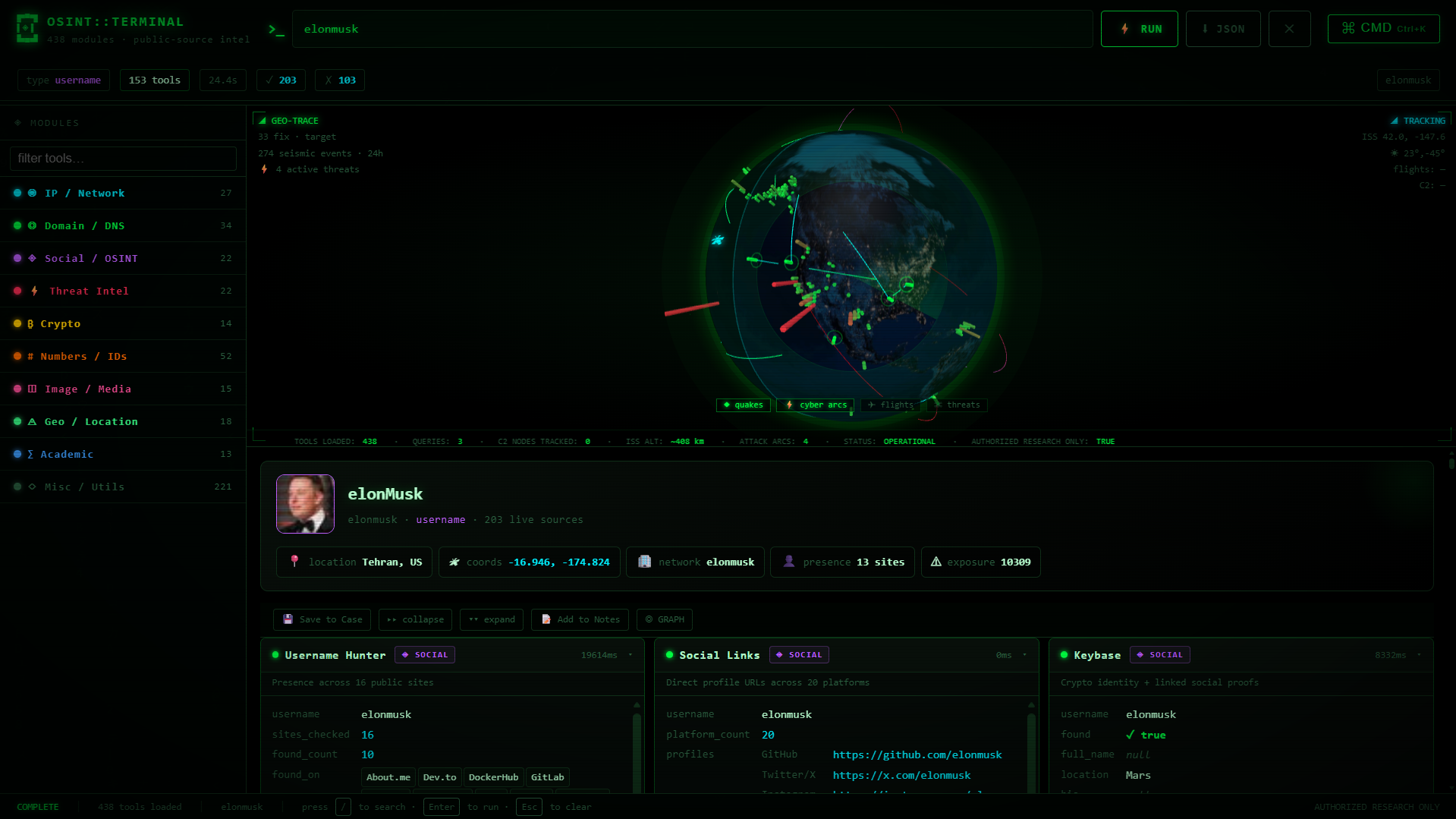
A self-hosted OSINT dashboard exposing 438 keyless investigation tools through a
single-file Python server and a dependency-free web UI.
Every tool relies only on free, public data sources — no API keys, no accounts, no telemetry.
⚠️ Legal & responsible use
This project is for authorized security research, education, and defensive investigation only. You are responsible for complying with all applicable laws and for having explicit permission before investigating any target. The tools query public data sources and perform read-only lookups; do not use them to harass, stalk, or gain unauthorized access. See SECURITY.md for the full responsible-use policy.
Highlights
- 438 keyless tools spanning network, domain, email, identity, phone, image, crypto, threat-intel, academic, geo, and encoding categories.
- Interactive 3D globe (via globe.gl) with live overlays: earthquakes (USGS), aircraft (OpenSky), C2 infrastructure (Feodo Tracker), ISS position, and animated attack arcs.
- Investigation workflow — group results into named cases, pivot across related indicators, and run batch queries across many tools and targets at once.
- Zero heavy dependencies — the backend is the Python standard library plus
requests; the frontend is vanilla JavaScript with no build step. - Local-first — history, stats, favorites, and cases persist to plain JSON on disk. Nothing leaves your machine except the outbound lookups you trigger.
Quick start
Requires Python 3.10+.
git clone https://github.com/RojanSapkota/OSINT-Terminal.git
cd OSINT-Terminal
pip install -r requirements.txt
python server.py
Then open http://localhost:8080.
On Windows the commands are identical from PowerShell or cmd; use py instead of
python if that is how Python is registered on your system.
Verify the install without starting the server:
python server.py --selftest
Run with Docker
docker build -t osint-terminal .
docker run --rm -p 8080:8080 -v "$(pwd)/data:/app/data" osint-terminal
The -v mount persists the result cache, history, and stats across container
restarts. Set a different port with -e PORT=9000 -p 9000:9000.
Configuration
The server reads two optional environment variables:
| Variable | Default | Purpose |
|---|---|---|
PORT |
8080 |
HTTP port to bind. |
CACHE_TTL |
3600 |
Result-cache lifetime, in seconds. |
PORT=9000 CACHE_TTL=600 python server.py
Every tool works with no API key, account, or token — there is nothing to configure before running.
Dependencies
| Package | Required | Enables |
|---|---|---|
requests |
yes | HTTP-based lookups (most tools). |
Pillow |
optional | Image EXIF / GPS / perceptual-hash tools. |
phonenumbers |
optional | Richer offline phone-number parsing. |
Tools whose optional dependency is missing degrade gracefully — they return an explanatory message instead of failing.
API
The server is a thin JSON API over the tool registry in osint.py.
| Method | Endpoint | Description |
|---|---|---|
GET |
/api/tools |
Tool registry metadata (label, accepts, desc) |
GET |
/api/run/<tool>?q=<input> |
Run a single tool and return its JSON result |
GET/POST |
/api/batch |
Run many {tool, query} pairs in parallel |
GET |
/api/history |
Recent queries |
DELETE |
/api/history |
Clear history |
GET |
/api/stats |
Per-tool usage and latency stats |
GET |
/api/favorites |
List / add / remove favorite tools |
GET |
/api/export?format=csv|json |
Export history |
GET |
/api/cases |
List saved cases |
GET/POST/DELETE |
/api/cases/<name> |
Read / append-to / delete a case |
GET |
/api/health[?force=1] |
Smoke-test tools against known fixtures |
GET |
/api/threat?q=<ioc> |
Check an IP/URL/hash against IOC blocklists |
GET |
/api/threat-feed |
Geo-resolved C2 points for the globe |
GET |
/api/cache/stats |
Result-cache size and TTL |
GET |
/api/cache/clear |
Clear the result cache |
Example:
curl "http://localhost:8080/api/run/dns?q=example.com"
curl "http://localhost:8080/api/run/ipgeo?q=8.8.8.8"
curl -X POST "http://localhost:8080/api/batch" \
  -H "Content-Type: application/json" \
  -d '{"queries":[{"tool":"dns","query":"example.com"},{"tool":"tls","query":"example.com"}]}'
Tool categories
All 438 tools are keyless and grouped by the indicator type they accept. The UI auto-detects the input type (IP, domain, email, phone, coordinates, hash, and 25+ others) and filters the sidebar accordingly.
| Category | Example tools |
|---|---|
| IP / Network | IP geolocation, ASN/BGP, reverse DNS, port scan, Tor-exit check |
| Domain / Web | DNS, WHOIS/RDAP, subdomains, TLS certs, security headers, tech stack |
| MX/SPF/DMARC posture, Gravatar, disposable detection, breach lookup | |
| Identity | Username hunting, GitHub/GitLab, Bluesky, Keybase, HackerNews |
| Phone | E.164 parsing, carrier, region, timezone (offline) |
| Image | EXIF, GPS extraction, perceptual hashing |
| Crypto | BTC/ETH address & transaction lookups, wallet validation |
| Threat intel | IOC reputation, CVE detail, MITRE ATT&CK, C2/malware feeds |
| Academic | arXiv, PubMed, DBLP, Wikidata, ORCID |
| Geo | Reverse geocode, sun times, earthquakes, ISS, flights |
| Encoding | Base64/32, hex, morse, ROT-13, Caesar, JWT decode |
Browse the full registry at runtime via GET /api/tools or the sidebar.
Architecture
index.html   Single-page dashboard — vanilla JS/CSS, globe.gl loaded from CDN.
server.py    Stdlib ThreadingHTTPServer: routing, caching, persistence, batch pool.
osint.py     The tool registry — 438 functions, each query -> dict, keyless sources.
- Backend:
http.server.ThreadingHTTPServer— no Flask/Django. Responses are gzip-compressed; the tool catalog and static page are memoized and ETag-cached. - Concurrency: batch and health checks fan out over a
ThreadPoolExecutor. - Persistence: history, stats, favorites, and result cache live under
data/; cases live undercases/. Both directories are created on first run and are git-ignored so investigation data never gets committed.
See docs/ARCHITECTURE.md for a deeper walkthrough.
Security
To report a vulnerability or a tool that behaves unsafely, see SECURITY.md. Please do not open public issues for security reports.
Comments