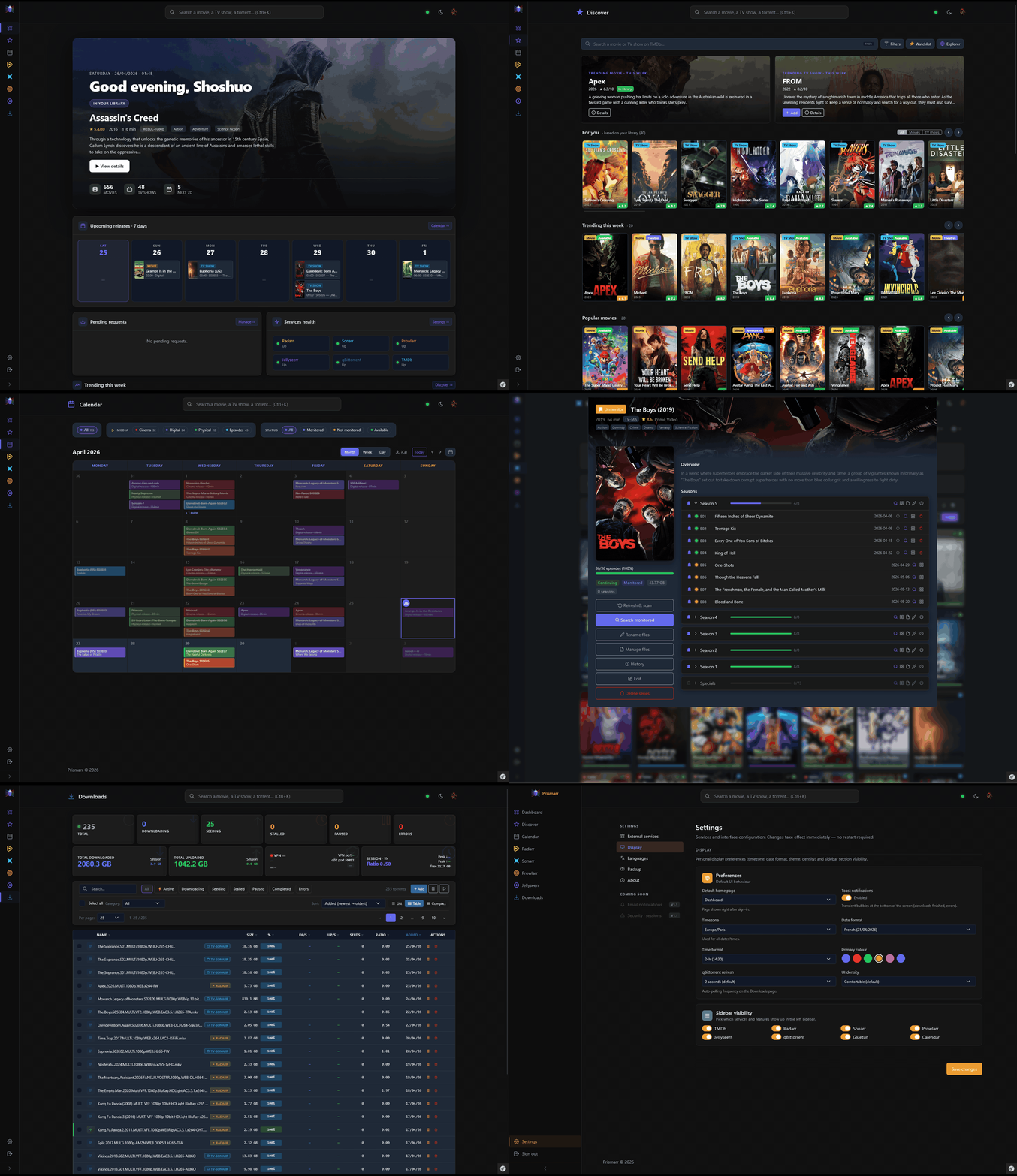
Prismarr is a self-hosted media dashboard designed to consolidate multiple services—Radarr, Sonarr, Prowlarr, Jellyseerr, qBittorrent, and TMDb—into a single web interface. It does not replace those tools. Instead, it acts as a unified control layer, addressing the friction of managing a media stack across six separate tabs, each with its own authentication, settings, and search logic. Built on Symfony 8 and rendered with Twig, Prismarr runs in a single Docker container with an embedded SQLite database—no external dependencies like PostgreSQL, Redis, or separate config files. Its goal is simplicity: one search bar, one calendar, one dashboard, and one settings page for all connected services.
What it does
- Unified search: A single input field queries both your local Radarr/Sonarr libraries and TMDb simultaneously—no switching tabs to compare availability or metadata.
- Merged calendar: Combines movie release dates (from Radarr + TMDb) and TV episode air dates (from Sonarr + TMDb) into a single view, color-coded by type.
- Integrated dashboard: Aggregates real-time status—recent qBittorrent downloads, pending Jellyseerr requests, upcoming releases, and trending TMDb picks—onto one page.
- Centralized settings: All API keys and service URLs are entered once, stored encrypted in SQLite, and never exposed in environment variables or plaintext files.
- Setup wizard: On first launch, a guided 7-step flow handles admin user creation, service connection, and basic configuration—no manual editing of
.envor config files.
Getting it running
Prismarr is distributed as a Docker image on Docker Hub. The README confirms it supports multi-arch platforms and ships with FrankenPHP 1.3 as the web server, PHP 8.4, and SQLite preconfigured. No external database setup is required.
To start it, run:
docker run -d \
  --name prismarr \
  -p 8080:80 \
  -v /path/to/prismarr/data:/var/www/prismarr/var/data \
  -v /path/to/prismarr/logs:/var/www/prismarr/var/log \
  -e TZ=America/New_York \
  --restart unless-stopped \
  shoshuo/prismarr:latest
The container exposes port 80 by default (so http://localhost:8080 after the above). Persistent storage is limited to two volumes: one for application data (including the embedded SQLite database and service configurations), and another for logs. Environment variables are minimal—only TZ is documented; no API keys or service URLs are passed via environment.
Once running, the browser-based setup wizard launches automatically. It walks through creating an admin account, then connecting Radarr, Sonarr, Prowlarr, Jellyseerr, qBittorrent, and TMDb—all via form fields in the UI. There’s no CLI configuration step or YAML editing.
Who this is for
Prismarr targets users already running the standard *arr stack (Radarr, Sonarr, Prowlarr) alongside Jellyseerr for requests and qBittorrent for downloads. It assumes those services are already installed, accessible over HTTP, and have working API keys. It’s not for people looking to replace Radarr or Sonarr—it requires them to be running independently. It’s also not for users needing enterprise-scale infrastructure: there’s no support for external databases, LDAP, SSO, or high-availability clustering. If you want a lightweight, single-binary-like experience—where “installing” means docker run and “configuring” means clicking through seven web forms—Prismarr fits.
It’s especially relevant for home lab setups where minimizing moving parts matters. The embedded SQLite, lack of Redis or external DB requirements, and zero-config startup reduce failure surfaces. The AGPL-3.0 license means modifications must remain open if distributed—but the project itself is fully self-contained and doesn’t phone home.
How it compares
Prismarr differs from broader dashboards like Homepage or Heimdall in scope: those are generic link aggregators, while Prismarr deeply integrates with specific media APIs and understands release calendars, download states, and request workflows. It also differs from *arr-specific UIs like Overseerr (which focuses only on requests and lacks Radarr/Sonarr management) or Ombi (discontinued, and never supported qBittorrent or calendar merging).
Compared to building custom dashboards with tools like Grafana or custom React frontends, Prismarr trades flexibility for speed—it delivers working integrations out of the box, but doesn’t allow arbitrary widget placement or third-party service plugins.
It’s also lighter than full-stack replacements like MediaBrowser (Emby) or Jellyfin, which aim to be all-in-one media servers—not dashboards for existing tools. Prismarr doesn’t handle playback, transcoding, or user management beyond its own admin account.
Final notes
Prismarr has 44 stars on GitHub as of its latest commit. Its interface uses Symfony 8 and Twig, and the Docker image is published at shoshuo/prismarr on Docker Hub. The project does not require Node.js, Python, or Rust toolchains to run—just Docker and a reachable *arr stack. It does not support reverse proxy authentication (e.g., Authelia) out of the box, and the README makes no mention of OIDC or SAML.
It’s not for users who need audit logs, role-based access control, or multi-tenant support. It’s also not for those uncomfortable granting API keys to a PHP application—even though keys are encrypted at rest in SQLite, the architecture assumes trust in the container’s runtime environment.
The source code is available at https://github.com/Shoshuo/Prismarr and the Docker image at https://hub.docker.com/r/shoshuo/prismarr.
Comments