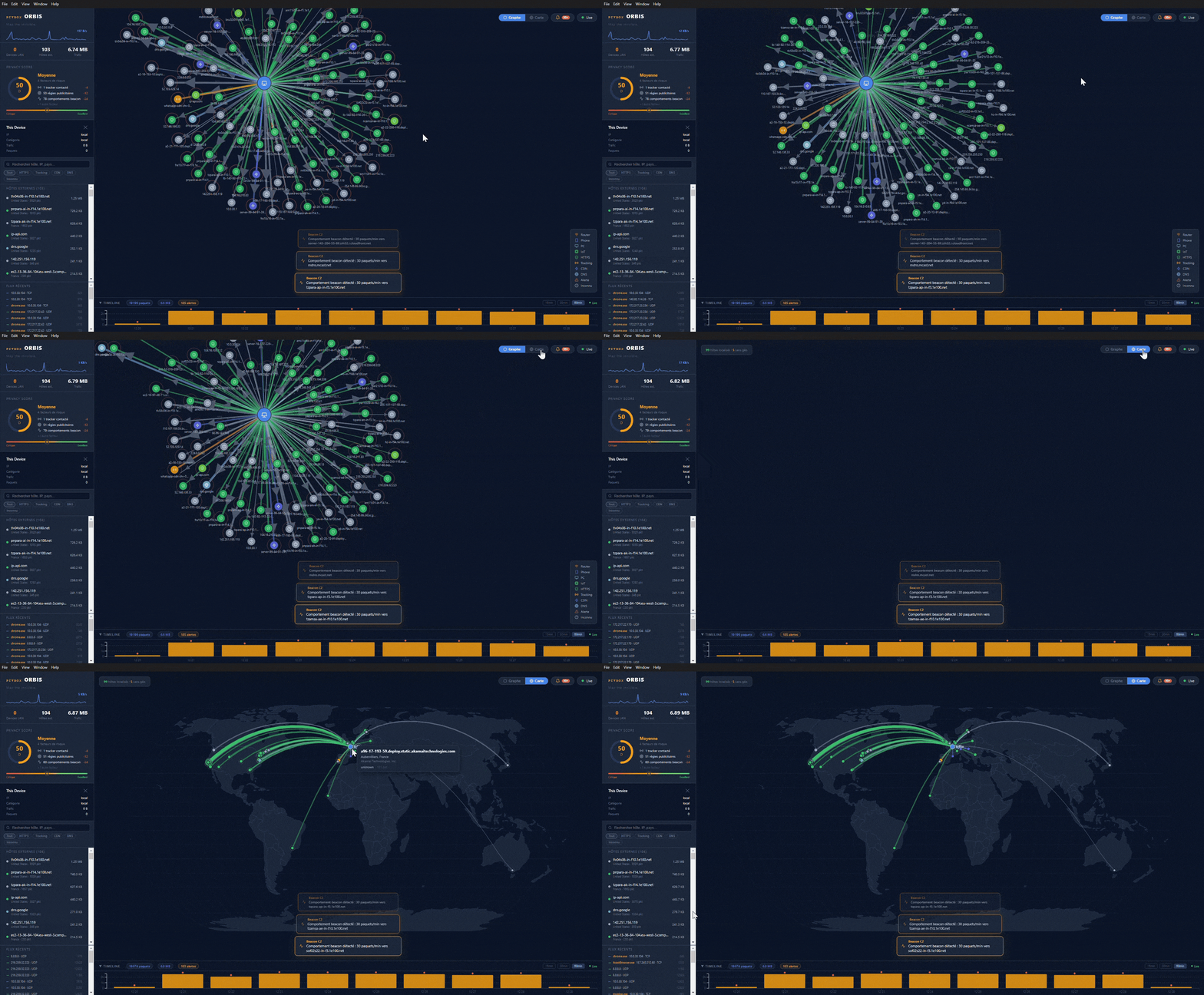
PCYBOX Orbis visualizes network traffic from a Windows machine in real time. It displays connections as a force-directed graph with the local machine at the center, supplemented by a geolocated world map showing animated arcs between IPs. The tool attributes traffic to specific processes, stores a 60-minute timeline in SQLite, and flags anomalies like port scans or beaconing. Version 1.0.0 runs as a free Electron app on Windows 10/11, built with JavaScript as the primary language on GitHub (79 stars).
This addresses the challenge of opaque network activity on personal computers. Users often lack insight into outbound connections—apps phoning home, background updates, or unexpected scans—without diving into Wireshark logs or command-line tools. Orbis renders this data interactively: nodes for remote hosts, edges for traffic volume, process names (top 5 per connection), and a privacy score based on outgoing exposure.
Core features
Orbis packs several visualization and analysis tools into one interface:
- Force Graph: A live node graph where the local machine sits central. Edges represent connections, sized by bandwidth; nodes show IP, country, and top processes.
- World Map: Interactive globe with geolocated IPs. Arcs animate data flow; hover for details like port and bytes transferred.
- 60-minute Timeline: Sliding view of recent history, stored in a local SQLite database.
- Anomaly Detection: Alerts on port scans, beaconing patterns, or potential data exfiltration.
- Process Attribution: Links traffic to Windows processes (e.g., chrome.exe or svchost.exe).
- LAN Scanner: Uses ARP to list local network devices.
- Privacy Score: Numeric gauge of exposure risk from outbound traffic.
- Bandwidth Monitor: Sparkline showing real-time MB/s usage.
These draw from packet capture via Npcap, processed through Scapy in Python.
Getting it running on Windows
Download the installer from the latest release: PCYBOX Orbis Setup 1.0.0.exe (101 MB, 64-bit). Run as administrator—the app needs this for raw packet capture. On first launch, it installs Npcap 1.79 automatically.
Windows SmartScreen may block it as unsigned code. Click More info then Run anyway; this is standard for independent releases without a code-signing certificate.
Once installed, launch the app. It starts the backend API (FastAPI with WebSockets), frontend (React 18 via Vite), and Electron wrapper. The interface loads immediately, capturing traffic without further setup. For geolocation, it uses MaxMind GeoLite2 (place GeoLite2-City.mmdb in data/ for offline mode) or falls back to ip-api.com (45 requests/minute, no API key).
Linux deployment with Docker
Linux users can run Orbis via Docker, which uses network_mode: host to access host traffic. This requires Docker and root privileges for raw sockets.
git clone https://github.com/Mister-iks/pcybox-orbis
cd pcybox-orbis
mkdir -p data  # Optional: Add MaxMind GeoLite2-City.mmdb here
sudo docker compose up --build
Access the UI at http://localhost:8000. For detached mode:
sudo docker compose up -d --build
Note limitations: process attribution sees only container PIDs (not full host visibility), and LAN scanning may fail on some networks. Docker Desktop on macOS/Windows won't capture host traffic due to VM isolation—use the Windows installer there instead.
Development and local setup
To modify or build Orbis, install prerequisites: Python 3.11+, Node.js 18+, and Npcap. Use an administrator terminal for the backend.
Backend (packet capture and API):
cd backend
pip install -r requirements.txt
python run_backend.py  # Serves API at http://127.0.0.1:8000
Frontend (in a separate terminal):
cd frontend
npm install
npm run dev  # UI at http://localhost:5173
Electron wrapper (optional, admin terminal):
cd electron
npm install
set VITE_DEV=1  # For dev server proxying
npx electron .
Building the installer involves PyInstaller for the backend (pyinstaller backend.spec --distpath ../dist/backend), Vite frontend build (npm run build), and electron-builder (npm run build:dir then npx electron-builder --win nsis --prepackaged .).
The stack includes Python/Scapy for capture, FastAPI/SQLite backend, React/D3.js/TopoJSON frontend, and Electron 28 for desktop.
Who this is for
Privacy-focused Windows users benefit most. Spot telemetry from browsers, check VPN leaks, or monitor IoT devices on the LAN. Security researchers can watch for anomalies without sifting pcap files—process attribution pinpoints culprits like malware droppers.
Home network admins use the LAN scanner and bandwidth sparkline for quick overviews. Developers testing network-heavy apps get visual feedback on connection patterns. It's suited for desktops/laptops, not servers, given the Electron footprint and Windows focus.
If you run multiple VMs or containers, pair it with host-level monitoring; the graph scales to dozens of connections but may lag under heavy load.
Comparisons and limitations
Orbis stands out for its all-in-one visuals—no need to pipe Wireshark to separate graph tools. Compared to ntopng (web-based, multi-platform but heavier), Orbis is lighter at 101 MB installed and Windows-native. Wireshark offers deeper protocol dissection but lacks real-time graphs or geolocation out-of-box.
Alternatives like SmokePing focus on latency, not full traffic viz. For CLI fans, nethogs per-process bandwidth works but skips maps/anomalies. Orbis requires admin rights and Npcap, adding ~50 MB; no mobile or headless modes.
Docker limits process visibility on Linux, and anomaly detection rules aren't user-configurable (hardcoded for common threats). The 60-minute timeline suffices for short sessions but not long-term logging.
Check the project website, GitHub repo, or issues for updates. Source code under AGPL v3.
Comments