
TurboLLM
Run any local LLM engine, auto-tuned to your GPU — with a polished web UI
and an OpenAI/Anthropic-compatible API.
Bring your own llama.cpp fork. No compiling. No Electron. No Python. Point Claude Code at
your own machine in one command — fully offline.
npx turbollm
That one command starts a local daemon, opens a browser UI, and serves your models over an API any tool can talk to. TurboLLM is the performance & bleeding-edge layer for local LLMs — built for people who today hand-compile forks and hunt forums for the right flags.
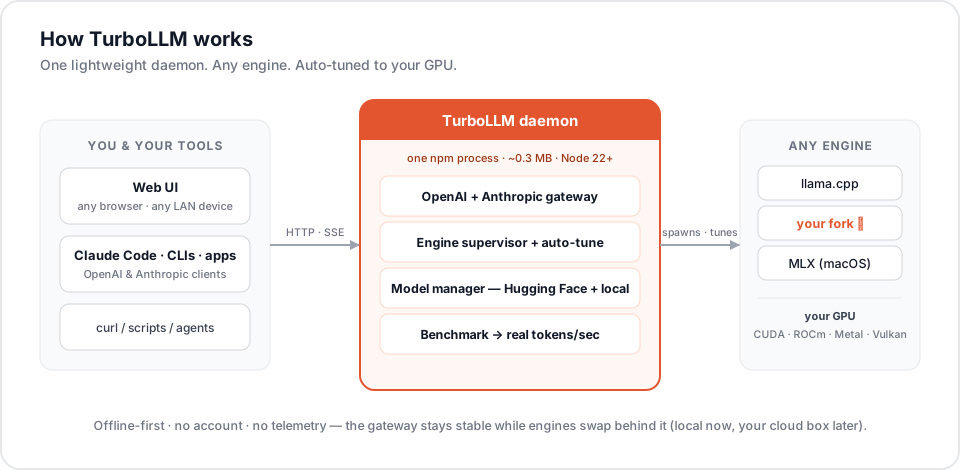 one lightweight daemon -> any engine on your GPU" />
Why TurboLLM
Local-LLM tools make two choices for you, and both cost you performance:
- They pick the engine. LM Studio ships one blessed runtime; Ollama hides the engine entirely. The fastest community innovations — new quant formats, speculative decoding, low-bit KV cache — land in forks first, and you can't use them without compiling.
- They don't tell you what speed to expect, and they don't tune the dozens of launch
flags (
-c,-ngl,--n-cpu-moe, KV type, threads, flash-attn, draft models) that make the difference between 20 and 80 tokens/sec on the same hardware.
TurboLLM does the opposite:
- 🔌 Any engine, including forks. Point it at any
llama-server-compatible binary — a build you compiled, a community fork, or the one it auto-provisions for your GPU. It probes the binary's real capabilities and adapts the UI to them. This is the whole point. - ⚡ Auto-tuned to your hardware. It benchmarks on load, derives fast defaults, and shows a VRAM-fit verdict before you load — no more flag guessing.
- 📊 Real tokens/sec, never faked. Speed in the model list is measured on your machine from actual generation — live while you chat, and remembered per model.
- 🪶 Lightweight. A ~0.3 MB npm package on Node — no Electron, no bundled Chromium, no Python. It downloads only the engine your GPU actually needs (Vulkan ≈ 38 MB).
- 🔌 Drop-in APIs. OpenAI and Anthropic-compatible — so Claude Code and every existing tool work unchanged.
- 🔀 A gateway that loads models for you. Name any model in your API request and TurboLLM loads it on demand, keeping your favorites hot in a small pool — so an agent that hops between models just works, with nothing to pre-wire.
- 🔒 Offline-first & private. No account, no backend, no internet, no telemetry.
Speed: TurboLLM vs LM Studio
Same GPU (RTX 5070 Ti 16 GB), same model, same 200K context — measured generation speed. TurboLLM is faster than LM Studio on the very same official llama.cpp, and faster still when you run a community fork LM Studio can't.
① On official llama.cpp, TurboLLM is faster. It auto-provisions a GPU-native engine build (CUDA 13 for Blackwell here) and tunes expert-offload to the layer, so at the same KV-cache quant it beats LM Studio's bundled runtime:
| Qwen3.6-35B-A3B · 200K | TurboLLM | LM Studio | Speed-up |
|---|---|---|---|
official llama.cpp — q4_0 |
74.7 t/s | 61.0 t/s | 1.2× |
official llama.cpp — q8_0 |
72.3 t/s | ~66 t/s* | 1.1× |
② Run a faster engine and pull far ahead. Because TurboLLM runs any engine, you can drop in
the TurboQuant fork — a llama.cpp fork with a low-bit turbo4 KV cache that LM Studio simply
can't load — in one click. On a large-KV model it delivers q8_0-level quality at more than
double the speed:
| Qwen3.6-27B · 200K · matched quality | TurboLLM + TurboQuant | LM Studio | Speed-up |
|---|---|---|---|
turbo4 vs q8_0 |
24.6 t/s | 11.4 t/s | 2.2× |
Same run, 1.7× faster prefill too (1288 vs 757 tok/s).
*LM Studio's q8_0 mildly spilled VRAM at its best offload. A low-bit KV cache helps most
when the cache is large; TurboLLM's auto-tuner and on-screen measured t/s pick the fastest engine +
config for each model, so you don't have to.
Features
The headline — running any engine, including community forks — has its own section below. Everything else is grouped here; each summary is the gist, expand for the detail:
📦 Models — bring your own, or browse Hugging Face
- Use the folders you already have. Point TurboLLM at any directory of GGUFs — your existing LM Studio / Ollama / manual downloads — no re-downloading. It parses GGUF metadata (arch, params, quant, context, vision) for every file.
- Browse & download from Hugging Face, in-app: search, see the file tree, pick a quant, and download with resume + SHA-256 verification. Gated models (Llama, Gemma) work via your own HF token, which never leaves your machine.
- Import from any URL — not just Hugging Face. Paste a direct
.gguflink (model-author sites, mirrors, private servers); it disk-space-checks and downloads through the same manager. - Quant recommendation per GPU and a VRAM-fit verdict so you pick a quant that actually fits before you commit.
- Primary download folder, real-time measured t/s per model, and delete-from-disk.
⚡ Auto-tuning & performance
- Auto-benchmark on load derives fast defaults for your exact GPU.
- Recommended sampling from the model card — auto-tune reads the model's Hugging Face card
(falling back to the original model behind a requant) and prefills the author's recommended
temperature / top_k / top_p / min_p. No recommendation → your sampling is left untouched. - Real measured tokens/sec in the model list — live while generating, last-session when idle (never a synthetic estimate).
- Full load-parameter UI, a superset of what other tools expose: context length, GPU offload
(
-ngl), MoE CPU-offload (--n-cpu-moe), parallel slots, KV-cache quant type (incl. low-bit on supporting forks), CPU threads, flash attention, and speculative decoding (NextN / MTP / draft). - Fast by default: flash attention on, NextN self-speculative decoding on for models that carry a draft head, threads auto — safely gated to what your engine actually accepts.
- Multi-GPU, per model — split a model across cards (layer/row split + main-GPU pick on llama.cpp, tensor-parallel on vLLM). Defaults are no-ops, so single-GPU rigs are untouched.
- Saved per-model profiles — tune once, and it loads that way every time.
💬 Chat & agentic tools — a genuinely good UI, not an afterthought
- Streaming with a stop button, live tokens/sec, prompt-processing % and prefill t/s, time-to-first-token, total time, exact token counts, and a context-usage meter (filled / max) on every reply.
- Thinking control — toggle reasoning off for a direct answer, or leave it on with collapsible, timed "thought for N s" blocks.
- Markdown + syntax-highlighted code with one-click copy — plus inline Unicode charts the model draws when a comparison, trend, or hierarchy is genuinely worth a visual.
- Live artifacts —
html,svg, andmermaidreplies render as sandboxed, offline previews shown as an image, with one-click export to PNG / JPEG / SVG / animated GIF / HTML. - Personas — pick a style (Default · Designer · Concise · Detailed · Blunt · Formal · Tutor · Creative · Research) per conversation, no prompt-wrangling required. The Designer persona produces polished, self-contained, previewable designs by default.
- Edit, regenerate, delete, copy any message; persistent, searchable conversations with rename, delete, and auto-generated titles.
- Per-chat system prompt and per-chat sampling overrides — temperature, top-p/k, min-p, repeat/presence/frequency penalties, and stop strings.
- Image input for vision models, and TurboLLM Expert — a built-in assistant that knows the app and your hardware for onboarding and troubleshooting without leaving the UI.
- Agentic tools — built-in
web_search(Tavily),fetch_url, and sandboxedrun_code, plus MCP server support (stdio / SSE) so any MCP server's tools appear in every chat. A Research persona forces multi-step web search and cites sources inline.
🤖 Background agents — long-running tasks that don't tie up your chat
- Launch an agent and walk away. The Agents screen runs tasks in the daemon, separate from the chat tab — describe the task, pick which tools it may use (web search / fetch URL / run code), and let it work.
- Live, reconnectable progress. Watch the run stream in real time; navigate away or reload and the view reconnects to the in-progress output. Runs queue behind any active run and persist across restarts.
- Cancel anytime, and review completed runs (messages + the tool calls they made) later.
🔌 APIs & integrations — OpenAI + Anthropic, plus a model-loading gateway
With a model loaded, TurboLLM serves two compatible APIs on the same port:
curl http://127.0.0.1:6996/v1/chat/completions \
  -H "Content-Type: application/json" \
  -d '{"model":"local","messages":[{"role":"user","content":"hello"}]}'
- OpenAI-compatible
/v1/chat/completions,/v1/embeddings, … — point any OpenAI client or tool at it. Embedding models are auto-detected and pooled separately, so a RAG pipeline and a chat model can stay loaded side by side. - Anthropic-compatible
/v1/messages— including tool use and streaming — which powers Claude Code below. No other local host offers this. - Structured output — constrain any response to a GBNF grammar (or JSON shape).
- API-key auth you can require when sharing over a LAN (Settings → Network).
The gateway loads models for you. Most local hosts make you load a model first, then call it.
TurboLLM's gateway reads the model field of any incoming request, fuzzy-matches it to your
library, and loads it on the fly if it isn't already running — then keeps up to four models
hot in an LRU pool so the next switch is instant. An agent (or Claude Code) that hops between a
coding model, a vision model, and an embedder just names each one and it works — no pre-wiring.
🎨 Share the GPU with ComfyUI
If you run ComfyUI on the same GPU, an LLM holding VRAM while ComfyUI renders means both fight for memory (and one usually OOMs). TurboLLM can hand the GPU over automatically:
- The instant ComfyUI starts a render, TurboLLM unloads its model and pauses new loads.
- When ComfyUI's queue drains, TurboLLM reloads the exact model it unloaded.
It's push-based, not polling — ComfyUI signals TurboLLM the moment a job starts/ends, so the handoff is immediate and deterministic (the model is gone before ComfyUI executes).
One-time setup (Settings → ComfyUI): turn on Pause for ComfyUI, enter your ComfyUI folder
(the one containing custom_nodes), click Install gate (it writes a small custom node wired to
this daemon), then restart ComfyUI once. The panel shows a live indicator (rendering / idle /
connected); Remove undoes it.
🪶 Platform — tiny, offline, private
- A ~0.3 MB npm package on Node — no Electron, no bundled Chromium, no Python.
- Offline-first — no account, no backend, no internet, no telemetry.
- Windows · macOS · Linux, with a CPU fallback when there's no GPU.
Quick start
# run without installing (recommended for first try)
npx turbollm

# or install globally
npm install -g turbollm
turbollm
On first run the daemon:
- Detects your GPU and downloads a matching
llama-serverbuild (CUDA for NVIDIA, ROCm for AMD, Metal for Apple, SYCL for Intel, Vulkan otherwise — with a CPU fallback). - Starts on http://127.0.0.1:6996 and opens your browser.
- Drops you on the Chat screen, ready to load a model.
Then open Models, download or pick a GGUF, click Load, and start chatting. Stop the daemon any time with Ctrl+C.
⭐ Bring any engine — the headline feature
No other local-LLM app lets you run whatever inference engine you want. TurboLLM treats the engine as a swappable component.
Add a custom engine (Engines screen → Add engine):
- Compile or download any
llama-server-compatible binary — stock llama.cpp, a community fork, or your own build. - Point TurboLLM at the folder — it scans for the
llama-serverbinary, runs a capability probe, and learns exactly which flags and features that build supports. (Optional: paste the source repo URL so TurboLLM flags when a newer build ships.) - Activate it. The load-parameter UI adapts to that engine — features the build doesn't support are hidden; ones it adds (e.g. low-bit KV cache, NextN) light up.
No prebuilt for your OS? The build-from-source guide checks your toolchain (git / CMake / CUDA / MSVC), hands you the exact build commands, then drops you into the folder scan above.
Auto-provisioned default. Don't want to fetch anything? On first run TurboLLM downloads the right upstream prebuilt for your GPU automatically — and a backend picker lets you switch between CUDA / ROCm / Metal / SYCL / Vulkan / CPU at any time (it downloads the variant you choose, LM Studio-style).
Engine types. llama.cpp / GGUF, KoboldCpp and llamafile (GGUF, every OS), MLX (macOS), and vLLM (Linux + NVIDIA) are all first-class engine kinds — install from the curated catalog, pick the right one per model, and switch from a single dropdown.
Fully supervised. Every engine runs under a real state machine: health-gated readiness, graceful stop, an idle auto-stop watchdog, and live logs + clear error surfacing in the UI when something fails to load.
Why it matters: fork-exclusive features — speculative decoding (NextN / MTP / draft), low-bit KV cache, new quant formats — are usable on day 0, with zero compiler knowledge on your part beyond producing the binary (and often not even that).
Run Claude Code on your own GPU
TurboLLM's Anthropic-compatible endpoint means Claude Code can run against whatever model you've loaded — no cloud key, fully offline. One command wires it up:
turbollm launch claude               # auto-loads a model if none is running, then opens Claude Code
turbollm launch claude --model qwen3-8b   # load a specific model first, then launch
It sets Claude Code's ANTHROPIC_BASE_URL / ANTHROPIC_MODEL at TurboLLM and execs claude;
extra args are forwarded. If no model is loaded it auto-loads your last-used one (or the first
in your library); --model picks a specific one by key or name. If claude isn't installed,
it tells you how. The in-app
Developer screen also shows copy-paste env snippets for any OpenAI- or Anthropic-compatible
tool (Open WebUI, Kilo Code, opencode, …).
Use it from any device on your network
The UI runs in the browser, so any phone, tablet, or laptop on your LAN can use the model on your GPU box:
turbollm --addr 0.0.0.0:6996 # bind all interfaces, then open http://<your-ip>:6996
Turn on Require API key in Settings → Network when you expose it.
Command-line reference
turbollm                        # start on :6996, open browser
turbollm --port 9000            # listen on a specific port
turbollm --no-open              # start without opening a browser
turbollm --addr 0.0.0.0:6996    # bind all interfaces (LAN sharing)
turbollm --stop                 # stop a running daemon (any terminal)
turbollm launch claude          # start Claude Code (auto-loads a model if none is running)
turbollm launch claude --model qwen3-8b   # load a specific model, then launch
| Flag | Description |
|---|---|
--port <n> |
Listen on a specific port (default: 6996) |
--addr <host:port> |
Full host:port override, e.g. 0.0.0.0:6996 for LAN sharing |
--no-open |
Start without opening a browser window |
--config <file> |
Path to a custom config file |
--stop |
Stop a running TurboLLM daemon (reads ~/.turbollm/daemon.pid) and exit |
--help, -h |
Show usage and exit |
turbollm launch claude also accepts --model <key|name> to load a specific model before
launching; without it, an already-loaded model is used, or the last-used / first model is
auto-loaded.
Configuration & data
Everything lives under ~/.turbollm/ on every OS — config.json, the SQLite chat
database, downloaded engines, models cache, and logs. Back it up or delete it to reset.
Use --config <file> to point at an alternate config (its directory becomes the data dir).
Requirements
- Node.js 22 or newer — enforced at startup with a clear message. https://nodejs.org
- Windows, macOS, or Linux.
- A GPU is recommended but not required — a CPU build is provisioned as a fallback.
- On Windows, the first time the auto-downloaded
llama-serverruns, SmartScreen/Defender may prompt (it's an upstream binary). Allow it once.
Privacy
TurboLLM is offline-first: core local use needs no account, no backend, and no internet. No analytics or telemetry are collected. Your prompts, chats, files, and keys never leave your machine.
How TurboLLM compares
Focused on the differences that matter — all four are good tools, and the others move fast. Marks reflect mid-2026; verify the moving rows against each tool's current docs.
| TurboLLM | LM Studio | Ollama | Open WebUI | |
|---|---|---|---|---|
| Run any engine / community forks | ✅ | ❌ llama.cpp/MLX only | ❌ hidden | ❌ frontend |
| Benchmark-based auto-tune of launch flags | ✅ | ◐ basic offload | ◐ basic offload | ❌ |
| Measured t/s in the model list | ✅ | ◐ per-run | ◐ --verbose |
❌ |
Anthropic API (/v1/messages) → Claude Code |
✅ | ✅ 0.4.1+ | ✅ v0.14+ | ❌ |
| OpenAI-compatible API | ✅ | ✅ | ✅ | ◐ proxy |
| Auto-load the requested model / multi-model pool | ✅ | ✅ JIT | ✅ | ❌ |
| Use existing model folders (no re-download) | ✅ | ◐ import | ◐ import | ❌ frontend |
| Speculative decoding (draft / MTP) | ✅ | ✅ | ◐ env flag | ❌ |
| Web UI from any LAN device | ✅ | ❌ | ❌ | ✅ |
| Lightweight (no Electron / no Python) | ✅ npm | ❌ Electron | ✅ Go | ❌ Python |
| Offline-first · no telemetry | ✅ | ◐ analytics on by default | ✅ | ✅ |
LM Studio and Ollama both added Anthropic /v1/messages endpoints in 2026, so the API rows are
now parity — Claude Code works against any of them. TurboLLM's durable edges are any engine
including community forks, benchmark-based auto-tuning with a VRAM-fit verdict + measured t/s
before you commit, and zero telemetry.
Prefer Open WebUI's chat breadth? It works great pointed at TurboLLM's OpenAI endpoint.
Troubleshooting
TurboLLM requires Node.js 22 or newer— upgrade Node: https://nodejs.org.- Model won't load / OOM — pick a smaller quant (the VRAM verdict warns you), lower GPU offload, or close other GPU apps. Failures surface in the Engines screen with the engine log.
- Windows Defender / SmartScreen prompt — that's the upstream
llama-serverbinary on first run; allow it once. - Port already in use —
turbollm --port 9000. - Slow generation — open the model's load params; ensure GPU offload is high and flash attention / NextN are on for supported models.
Develop from source
npm install                  # daemon deps
cd web && npm install && cd ..

npm run build:web            # build the React UI -> src/webdist
npm run start                # run the daemon in dev (hot TS via tsx) -> :6996

npm run build                # production bundle -> dist/cli.js (web assets included)
node dist/cli.js --port 6996
Frontend hot-reload: cd web && npm run dev (proxies /api and /v1 to the daemon on
:6996).
Stack: Node ≥22 · TypeScript · Hono · node:sqlite · tsup — and a React 19 + Tailwind v4 +
shadcn/ui frontend. One TypeScript codebase, shipped as an npm package.
Community
Questions, ideas, and show-and-tell — join the Discord.
Comments