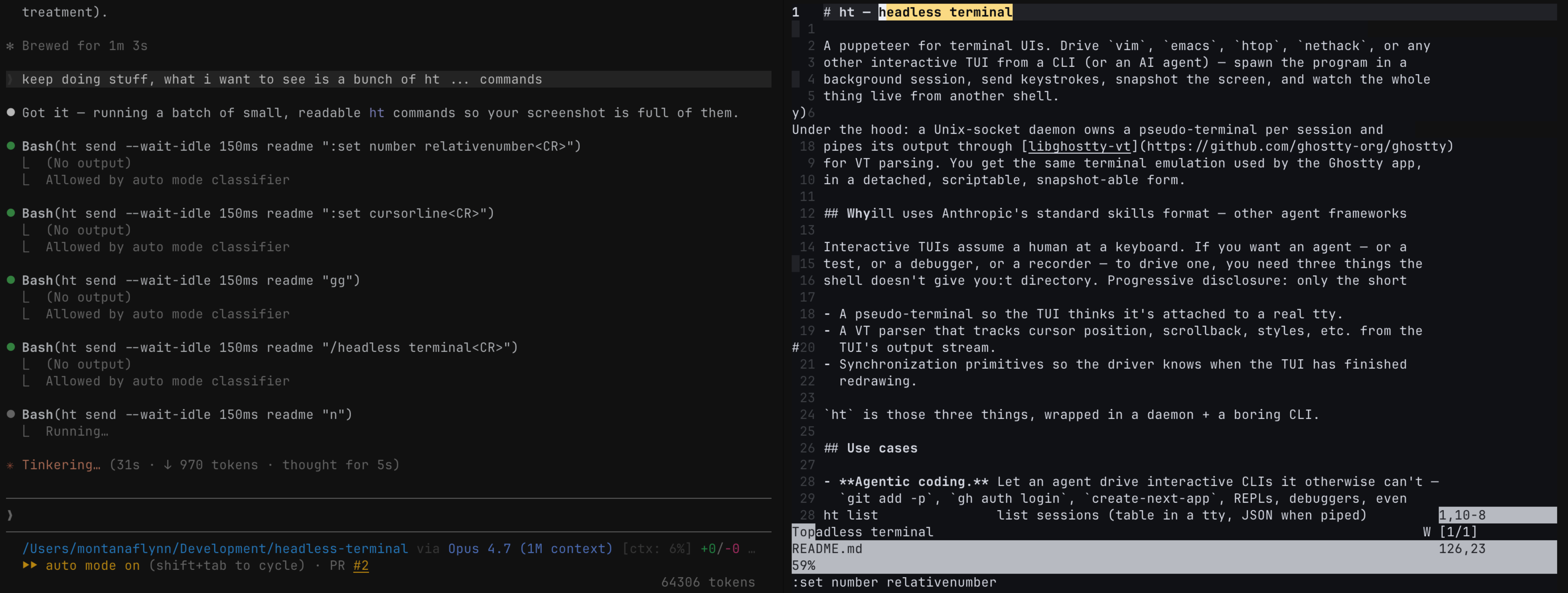
Headless-terminal provides a command-line interface to automate and interact with terminal user interfaces (TUIs) like vim, emacs, htop, or nethack. It acts as a "puppeteer for TUIs," running programs in headless background sessions on pseudo-terminals. Users send keystrokes, capture screen snapshots as text or PNG, and monitor sessions live from another shell. The tool runs as a daemon using Unix sockets, with each session tied to a pseudo-terminal that pipes output through libghostty-vt for accurate VT parsing, including cursor position, scrollback, and styles.
This addresses a gap in shell scripting: TUIs expect a real tty, a parser for their output streams, and synchronization to detect redraws. Tools like expect or pexpect handle basic input but falter on features such as alternate screens, colors, or precise cursor tracking. Headless-terminal supplies these via its Go-based CLI, hosted at montanaflynn/headless-terminal with 91 GitHub stars.
Core features
The tool centers on a few key commands for session management and interaction:
ht run: Starts a TUI in a background session, returning a short session ID. Supports options like--namefor labeling,--sizefor dimensions (e.g.,--size 78x46).ht send: Injects keystrokes using vim-style notation (<CR>for enter,<Esc>,<C-c>,<F1>). Includes--wait-idlefor redraw sync (e.g.,--wait-idle 200ms) or--wait-duration, plus--viewto return the current screen.ht view: Outputs the session screen as text or PNG (--format png), useful for assertions or screenshots.ht watch: Streams a session live to the current terminal, blocking until the named session starts.- Other commands:
ht stop,ht removefor cleanup;ht recordfor keystroke recordings convertible to GIFs via external tools like agg.
These build on libghostty-vt from the Ghostty terminal emulator, providing detached, scriptable access without a graphical display.
Getting it running
Installation targets macOS (Apple Silicon) and Linux (x86_64). Homebrew users run:
brew install montanaflynn/tap/ht
For manual setup from releases:
macOS (Apple Silicon):
curl -L https://github.com/montanaflynn/headless-terminal/releases/latest/download/ht-v0.1.0-darwin-arm64.tar.gz | tar xz
sudo mv ht /usr/local/bin/
Linux (x86_64) requires a similar curl and tar extraction, though the README excerpt cuts off; check the releases page for the full tarball.
Once installed, the daemon starts implicitly on first ht run. Basic workflow:
# Launch vim session
ht run --name notes vim /tmp/notes.md

# Send keys and view output
ht send notes "ihello from an agent<Esc>:wq<CR>" --view

# Clean up
ht remove notes
Output from --view shows parsed text; pipe it to grep or save as PNG for verification. Sessions persist across shells until stopped.
Use cases
Automation of interactive CLIs stands out for AI agents. An agent can drive git add -p, gh auth login, create-next-app, REPLs, debuggers, or vim for targeted edits without manual intervention.
In CI pipelines, like GitHub Actions, it scripts TUIs and asserts renders:
ht run --name smoke vim /tmp/demo.md
ht send smoke "ihello from CI<Esc>" --wait-idle 200ms
ht view smoke | grep -q "hello from CI" || { echo "render failed"; exit 1; }
ht send smoke ":q!<CR>"
For documentation or demos, capture PNGs mid-session:
ht run --name demo bash
ht send demo "echo 'headless terminal'<CR>" --wait-idle 200ms
ht view demo --format png > screenshot.png
ht stop demo
Debugging benefits from ht watch, which mirrors a session live. Run ht watch nethack-demo in one pane; in another, ht run --size 78x46 --name nethack-demo nethack -u Claude followed by sends like ht send nethack-demo "y" --wait-duration 150ms --view. The watcher displays updates in real time, aiding agent skill tuning or pair programming.
Who this is for
Developers building AI agents that need TUI access will find it direct—Claude or similar models can chain ht commands for tasks beyond non-interactive CLIs. CI engineers testing TUIs gain pixel-perfect checks on colors and layouts that expect skips. Those generating docs, asciicasts, or bug reports get reproducible screenshots without screen recording hacks. It's suited for Unix environments where pseudo-terminals matter, like macOS or Linux servers.
How it compares
Expect and pexpect simulate input on pseudo-terminals but lack built-in VT parsing for scrollback, styles, or sync after redraws. Headless-terminal fills this with libghostty-vt, handling alternate screens and cursor positions natively. No Docker or container focus here—it's a lightweight CLI daemon, heavier than pure-shell scripts but lighter than full browser automation like Puppeteer (which targets web UIs). For recording, it pairs with agg for GIFs, unlike self-contained tools like ttyrec.
If you need TUI automation in scripts or agents, it covers gaps expect leaves open. Casual shell users scripting non-interactive commands have simpler options like plain bash.
Headless-terminal suits TUI-heavy workflows on Unix but skips Windows natively and demands some CLI familiarity. Source at github.com/montanaflynn/headless-terminal.
Comments