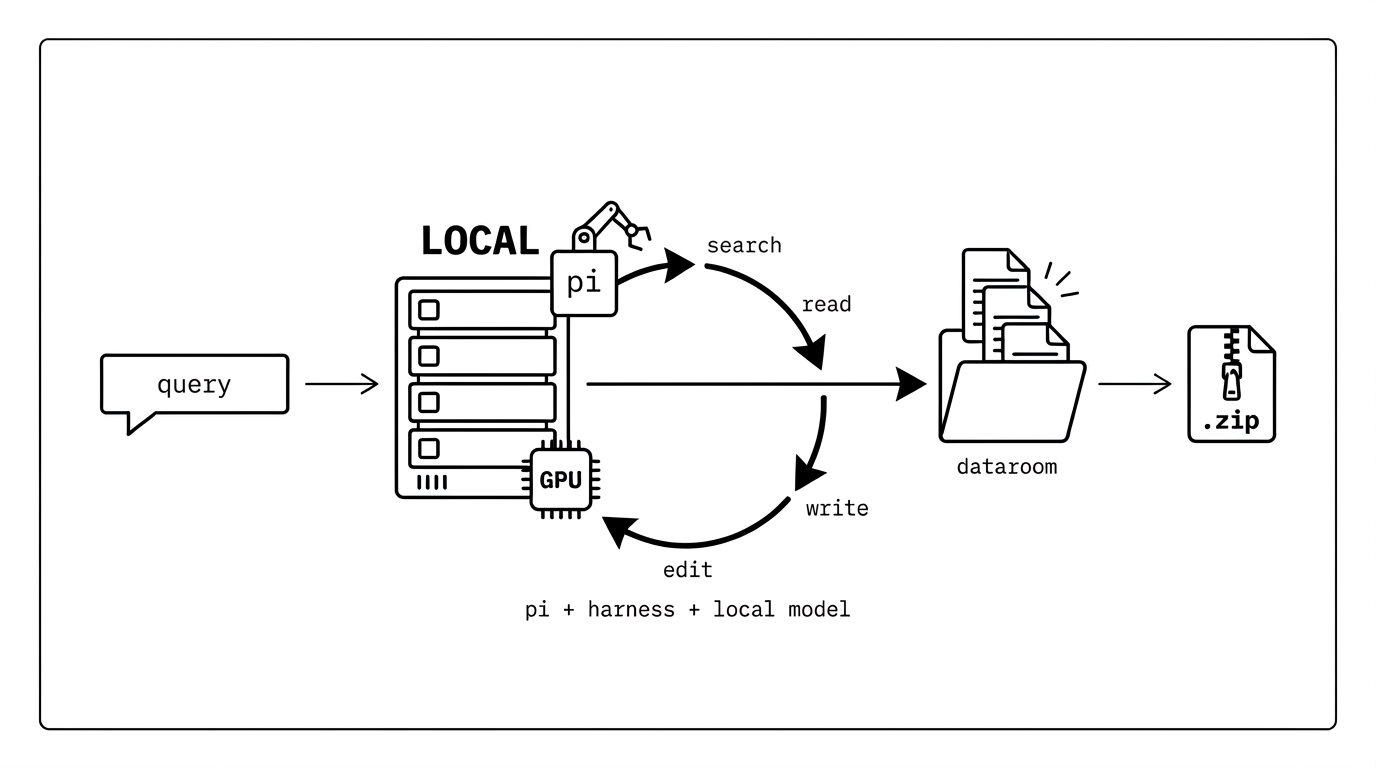
Give it a query. A local model in a Pi harness loops search-read-write until it has built a comprehensive, fully-cited dataroom on disk - a .zip you hand to a frontier model for the long-horizon task.
Live demo → dataroom.hanxiao.io
Why
For long-horizon task you need a grounded, well-organized knowledge dump before the real work can start. That upfront research is mostly a search-read-write loop, and few things are usually wrong with how it gets done today.
- Research is mechanical, so don't pay frontier tokens for it. Gathering and organizing sources is tool-calling, not deep reasoning - a small local model in a disciplined harness (search, dedup, cite, verify) does it fine. And because it runs on your own GPU at near-zero marginal token cost, it can keep going for hours until the dataroom is actually comprehensive, instead of stopping when a metered budget runs out.
- The output is context for a machine, not a report for a human. A 2025-style deep-research run ends in a long PDF nobody reads. Dataroom ends in a structured
.zip-topics/,sources/,data/, aSUMMARY.md, every claim cited - built to be consumed by the next agent, not skimmed. - It is stage one of a two-stage pipeline. Unzip the dataroom into a frontier model's context and let it do the expensive second stage (usually implementation). The research does not have to be perfect - its consumer is intelligent and can spot gaps - it has to be comprehensive and grounded.
Everything runs locally on your own GPU: the model is self-hosted (llama.cpp), and the only thing that leaves the box is the web search/read the agent chooses to do.
How it works
Submit a query and an async job spins up a headless Pi coding agent backed by a self-hosted Qwen3.6-35B-A3B (llama.cpp). The agent runs its own research loop: pi --mode json --continue resumes the same per-cwd session across turns, and on each turn it searches, reads, reranks, and writes sourced files into a dataroom/ directory on disk.
- Autonomous loop: the agent is not micromanaged. It is handed tools and a one-page methodology, then drives itself - search, read, dedup, write, verify - until the work is done.
- Outcome-based stopping:
DONEis honored only once the dataroom holds enough substantive sourced files, all sub-questions are closed, and aSUMMARY.mdexists. Turns / seconds / Jina-call caps are only hard backstops, and a prematureDONEis rejected so the agent keeps going. The reason it stopped is surfaced on the dashboard. - jina CLI: the
jinaCLI is on PATH (search / read / rerank / embed / dedup), driven from bash and composable via pipes (jina search Q | jina rerank R,cat urls.txt | jina read,xargs -P 8for parallel fan-out) so bulky intermediates stay out of the LLM context. - Embedding dedup index:
jina-embeddings-v5-nanois preloaded for the dataroom index (embed / semantic search / dedup), with server-side reconciliation so it never drifts from disk. The agent must search the index before adding anything, to avoid duplicates and keep structure. - Live dashboard: real-time context utilization, throughput, tool-call distribution, live activity feed, warnings/errors, progress-to-floor, a stop-reason banner, and the dataroom file tree, at
GET /jobs/{id}/dashboard.
The live dashboard for a finished job - progress-to-floor, total tokens, tool-call distribution, throughput, the activity feed, and the dataroom file tree:
Get Started
An NVIDIA Docker host runs two containers (llama-server + the app). scripts/setup.sh installs Docker + the NVIDIA toolkit, downloads the model, and brings the stack up. The only value you must set is JINA_API_KEY; everything else in .env.example ships with working defaults. No NVIDIA GPU? Option C runs it on an Apple Silicon Mac.
Clone and set the key once:
git clone https://github.com/hanxiao/dataroom.git
cd dataroom
cp .env.example .env
sed -i 's/^JINA_API_KEY=.*/JINA_API_KEY=jina_your_real_key/' .env
Then pick one (each brings the stack up and prints the API URL when done):
Option A: prebuilt image (fastest)
Pull the published app image from GHCR instead of building it locally (skips the ~14GB build). setup.sh still installs Docker + the toolkit and downloads the model, then pulls + starts the stack:
DAAS_PULL=1 bash scripts/setup.sh
Pulls ghcr.io/hanxiao/dataroom:latest.
Option B: build from source
Build the app image locally (no pull). Same one-shot, just slower the first time:
bash scripts/setup.sh
Option C: Apple Silicon (Mac, Metal)
No Docker, no NVIDIA. The model runs on Metal via Homebrew llama.cpp; the app, Pi agent, and embedder run in a local uv venv. Needs 32 GB+ unified memory (the Q4 model wires ~22 GB).
brew install llama.cpp
npm install -g @earendil-works/pi-coding-agent@0.78.0
uv venv --python 3.11 .venv
uv pip install --python .venv/bin/python torch -r server/requirements.txt jina-cli huggingface-hub hf_transfer
mkdir -p models/mtp
HF_HUB_ENABLE_HF_TRANSFER=1 HF_TOKEN=hf_... .venv/bin/python -c "from huggingface_hub import hf_hub_download; \
hf_hub_download('unsloth/Qwen3.6-35B-A3B-MTP-GGUF','Qwen3.6-35B-A3B-UD-Q4_K_XL.gguf',local_dir='models/mtp')"
cp .env.example .env && sed -i '' 's/^JINA_API_KEY=.*/JINA_API_KEY=jina_your_real_key/' .env
bash scripts/mac-run.sh
GGUF and Metal-flag details (MTP needs llama.cpp >= 9430): docs/MAC.md.
Option D: Windows (WSL2 + Docker Desktop)
The same Docker stack as A/B, run from a WSL2 shell with Docker Desktop (GPU via WSL integration, no NVIDIA toolkit). It validates Docker + GPU, downloads the model, and starts the stack:
bash scripts/setup-win.sh # or DAAS_PULL=1 bash scripts/setup-win.sh to pull the prebuilt image
Prereqs:
- An NVIDIA GPU with the driver installed (
nvidia-smimust work) and thenvidia-container-toolkit(Options A/B/D).setup.shinstalls the toolkit on Debian/Ubuntu hosts; on RHEL-family hosts install it yourself first. The llama-server needs the GPU; the app's v5-nano embedder runs on CPU by default (EMBED_DEVICE=cpu) to leave VRAM for the Q4 model (setEMBED_DEVICE=cudato move it onto the GPU). - A Jina API key: https://jina.ai/api-dashboard/
- Disk for a ~22GB model download plus the CUDA + pytorch base images and job data under
./data. The model download alone can take several minutes on a slow link; it resumes from the Hugging Face cache if interrupted.
Skill & API usage
Skill
Another LLM/agent can commission a dataroom from a deployed instance with the use-dataroom skill (skills/use-dataroom/SKILL.md): submit a query with a minutes time-box (like handing an intern a time-boxed task), poll until it finishes, then download and unzip the result. One-shot:
BASE="https://dataroom.hanxiao.io"          # the deployed instance
QUERY="Competitive landscape of self-hosted small embedding models in 2026"
MINUTES=30                                  # time box: works up to this long, then hands over

JOB=$(curl -s -X POST "$BASE/jobs" -H 'content-type: application/json' \
  -d "{\"query\": $(python3 -c 'import json,sys;print(json.dumps(sys.argv[1]))' "$QUERY"), \"max_seconds\": $((MINUTES*60))}" \
  | python3 -c 'import sys,json; print(json.load(sys.stdin)["job_id"])')
echo "watch: $BASE/jobs/$JOB/dashboard"

while :; do
  S=$(curl -s "$BASE/jobs/$JOB" | python3 -c 'import sys,json; print(json.load(sys.stdin).get("status","?"))')
  case "$S" in done|stopped|failed) break;; esac; sleep 30
done

curl -s -OJ "$BASE/jobs/$JOB/result" && unzip -oq "dataroom-$JOB.zip" -d "$JOB"   # -> $JOB/dataroom/
stopped (time box reached) is a success, not an error - you still get the dataroom built so far. See the skill file for status meanings, partial /snapshot downloads, and the full endpoint table.
API
Once the stack is up, the API is on port 8000 (open, no auth). {JOB} is the 12-hex id returned by POST /jobs.
# submit a job -> {"job_id":"<12hex>","status":"queued"}
curl -s -X POST localhost:8000/jobs -H 'content-type: application/json' \
  -d '{"query":"Competitive landscape of self-hosted small embedding models in 2026"}'
# optionally cap work: -d '{"query":"...","max_turns":50,"max_seconds":3600}'

JOB=abc123def456

# list all jobs (live + on-disk), newest first
curl -s localhost:8000/jobs

# single job status
curl -s localhost:8000/jobs/$JOB

# per-job metrics feed (drives the dashboard)
curl -s localhost:8000/jobs/$JOB/stats

# tail of the Pi agent log (last 8000 chars)
curl -s localhost:8000/jobs/$JOB/log

# download the dataroom AS-IT-IS-NOW (works mid-run)
curl -s -OJ localhost:8000/jobs/$JOB/snapshot

# download the FINAL dataroom zip (409 until the job stops)
curl -s -OJ localhost:8000/jobs/$JOB/result

# read one dataroom file (path is relative to the job's dataroom/ dir)
curl -s 'localhost:8000/jobs/'$JOB'/file?path=SUMMARY.md'

# open the live dashboard in a browser
open http://localhost:8000/jobs/$JOB/dashboard
There is also a minimal submit page at GET / and a liveness probe at GET /health ({"ok":true}).
Architecture
Two containers on a single GPU host: daas-llama serves the model, daas-app runs the FastAPI orchestrator + the Pi agent + the embedding index. The agent loops turns until the dataroom meets the outcome floor, then the orchestrator zips it.
flowchart LR
user([User / curl / Web UI]) -->|POST /jobs query| api
subgraph host["NVIDIA Docker host (single L4 24GB)"]
subgraph appc["container: daas-app (:8000, GPU)"]
api["FastAPI app.py<br/>/jobs /result /snapshot<br/>/file /stats /log /dashboard /health"]
orch["orchestrator<br/>run_dataroom.py<br/>floor + ceiling guard"]
pi["Pi coding agent<br/>pi --mode json --continue"]
jina["jina CLI on PATH<br/>search / read / rerank / embed"]
emb["v5-nano embedder<br/>EMBED_DEVICE=cpu (off-GPU)<br/>dataroom_index"]
disk[("/data/jobs/<id>/<br/>dataroom/ + meta + logs")]
end
subgraph llamac["container: daas-llama (:8080, GPU)"]
llama["llama-server<br/>Qwen3.6-35B-A3B UD-Q4_K_XL<br/>+ MTP draft, ctx 131072"]
end
end
jinacloud([Jina API<br/>jina.ai]):::ext
api -->|spawn thread + subprocess| orch
orch -->|loop turns| pi
pi -->|OpenAI-compat /v1<br/>LLAMA_URL| llama
pi -->|bash| jina
jina -->|JINA_API_KEY| jinacloud
pi -->|index / search / dedup| emb
pi -->|read / write / edit| disk
emb -.reconcile.- disk
orch -->|zip dataroom/| disk
disk -->|GET /result or /snapshot .zip| user
classDef ext fill:#eee,stroke:#999,stroke-dasharray:4 3;
By default llama-server serves Qwen3.6-35B-A3B-UD-Q4_K_XL.gguf (repo unsloth/Qwen3.6-35B-A3B-MTP-GGUF) with MTP draft flags, and the agent model id is qwen3.6.
Switching the model
One knob. Set MODEL=<hf_repo>/<file.gguf> in .env and re-run scripts/setup.sh. It derives the download repo and filename from MODEL, pulls the GGUF, and persists the filename so docker-compose serves the same file - download and serve stay in sync.
# .env  (default)
MODEL=unsloth/Qwen3.6-35B-A3B-MTP-GGUF/Qwen3.6-35B-A3B-UD-Q4_K_XL.gguf
That is all you change to swap the LLM. The rest are advanced overrides, rarely needed (leave unset to use the defaults derived from MODEL):
| Env var | Default | Role |
|---|---|---|
MODEL_ID |
qwen3.6 |
Agent-facing model id (Pi models.json / defaultModel). A free label; need not match the GGUF. |
CHAT_TEMPLATE_FILE |
/templates/chat_template.jinja |
Jinja chat template inside the llama-server container. |
SPEC_ARGS |
--spec-type draft-mtp --spec-draft-n-max 2 |
MTP / speculative-draft flags appended to llama-server. |
Non-Qwen caveat: switching to a non-Qwen GGUF is not just a filename swap. The bundled chat template is Qwen3.6-specific - point CHAT_TEMPLATE_FILE at the new model's Jinja template (a wrong template silently corrupts tool-calling), or drop the flag to use the GGUF's embedded template. --spec-type draft-mtp needs a GGUF that ships an MTP draft head (the ...-MTP-GGUF repo does); for a plain GGUF set SPEC_ARGS= (empty). The CTX_SIZE default of 131072 is tuned to Qwen3.6's hybrid GDN+MoE KV math; a dense model of similar size uses far more KV per token, so lower CTX_SIZE or it may OOM on the L4. Re-measure VRAM with nvidia-smi for any other weights. See docs/DEPLOY.md for the deeper reproducibility detail.
The default L4 tune. The shipped llama-server settings are the best we could squeeze out of a low-budget L4 (24GB VRAM) without sacrificing generation quality, tuned in Qwen3.6-35B-A3B-MTP-L4:
| Setting | Value | Why |
|---|---|---|
| Quant | Qwen3.6-35B-A3B UD-Q4_K_XL (~22GB) |
best quality that still fits 24GB alongside MTP + KV |
| MTP draft | --spec-type draft-mtp --spec-draft-n-max 2 (no --spec-draft-p-min) |
~80-90% draft acceptance; n-max 2 is the sweet spot on this MoE, p-min hurts MoE |
| KV cache | --cache-type-k/v q4_0 |
this hybrid GDN+MoE has only 10/40 KV-bearing layers, so q4_0 KV is tiny (~0.65GB at 131072) |
| Batch | -ub 256 -b 2048 |
measured-best prefill throughput |
| Context | --ctx-size 131072 |
full native window; fits with q4_0 KV |
| Offload | -ngl unset (auto-fit) + mmap on |
forcing all layers to GPU OOMs once MTP + KV load; auto-fit spills compute-light expert layers to CPU |
| Cache reuse | omitted | GDN recurrent-state drift can silently corrupt digits (llama.cpp#21681) |
Measured 22.2GB used at the full 131072 window, no OOM. A smaller Q3_K_XL (17GB) would free enough VRAM to also put the v5-nano embedder on the GPU - but embedding is not the bottleneck (LLM decode is), so we keep the embedder on CPU and spend the freed headroom on Q4 for slightly better generation quality instead.
Local dev (no GPU)
Point the agent at any OpenAI-compatible endpoint (or a remote Qwen box) via LLAMA_URL, then run the harness directly:
uv venv && uv pip install -r server/requirements.txt
JINA_API_KEY=... LLAMA_URL=http://<host>:8080 \
  uv run python -m server.run_dataroom --query "your query" --out ./out
Comments