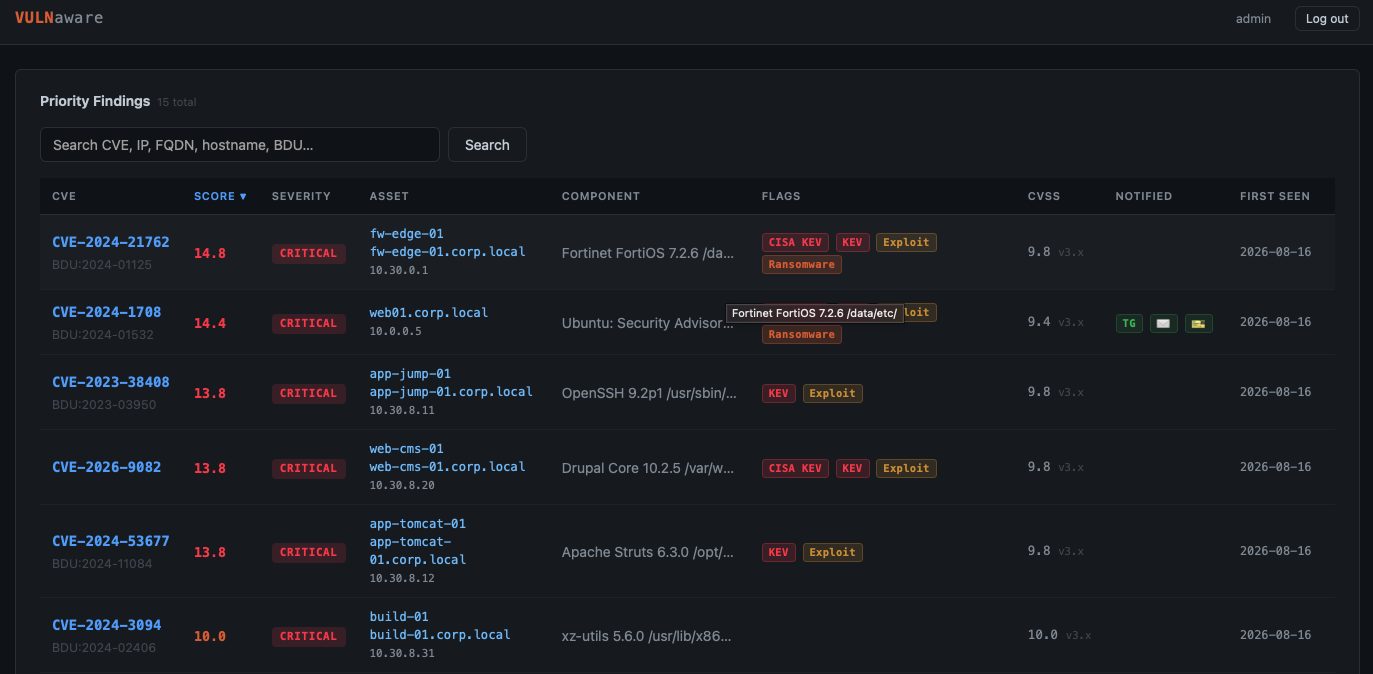
Vulnerability Prioritisation & Awareness Engine
Nowadays, vulnerability scanners produce thousands of rows. Most of them don't matter right now. Vulnaware was made to answer one question reliably: which of these findings, on which hosts, need urgent attention today.
Vulnaware ingests exports from vulnerability scanners, enriches them against public threat-intel feeds, and computes a priority score — then gets the findings that actually matter in front of the right people: SOC alerts, email notifications, and ITSM tickets.
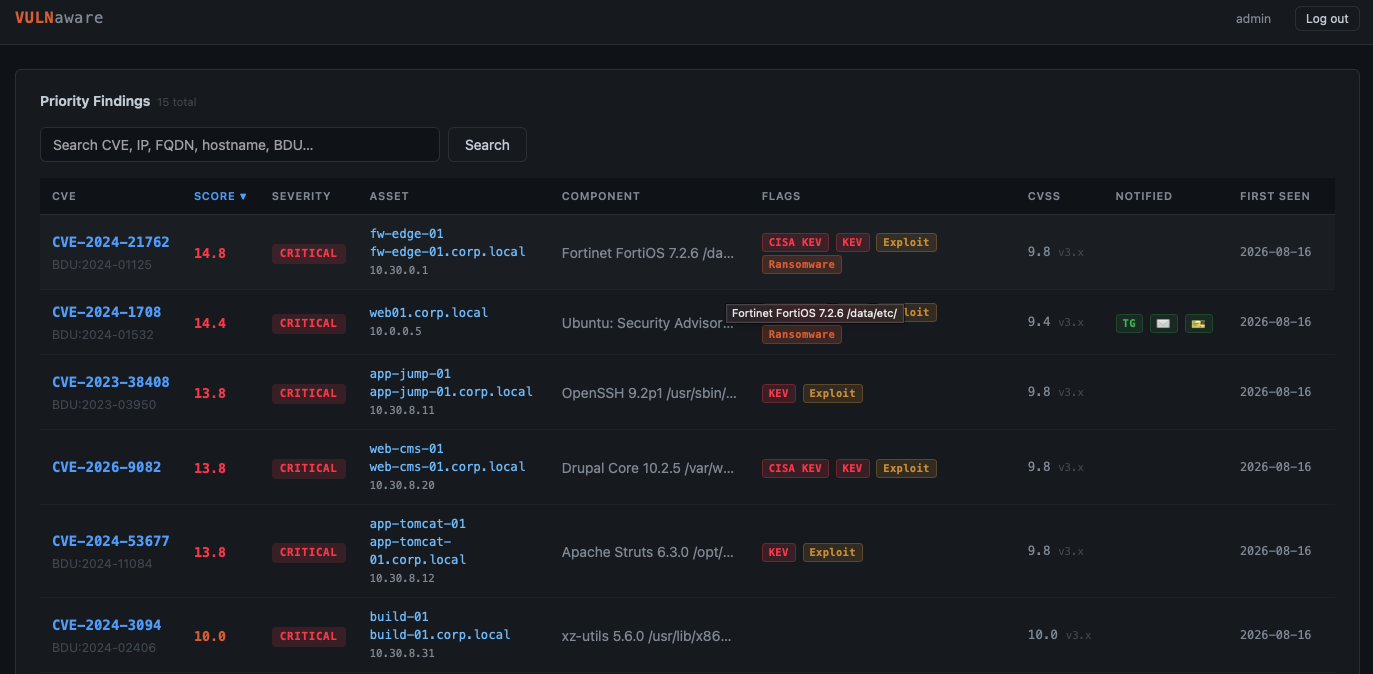
Key features
1. Popular vulnerability scanners integration
Protected environment and attack surface should be taken into account during vulnerability prioritisation. Most critical vulnerabilities should be prioritised on the most critical hosts from the attacker's perspective. This is often hosts located in the DMZ and internet-facing services.
Vulnaware extracts host vulnerabilities from scanners via an API, based on specific criteria configured on the scanner side.
| Vuln Scanner | Criteria |
|---|---|
Nessus Pro |
Name of the scanning task |
Greenbone/OpenVAS |
Name of the tag assigned to host |
MaxPatrol VM |
Number of group contaning hosts |
Scanner ingestion is made from four source-specific drop folders, each watched on its own schedule tick:
- MaxPatrol VM CSV (
vuln_scanners/MaxpatrolVM/vuln_import/, semicolon-delimited, comma-decimal CVSS, newline-joined vuln IDs is hand-copied, or freshly pulled straight from the MaxPatrol VM REST API). - Nessus Pro CSV (
vuln_scanners/Nessus/vuln_import/, one file per scan is hand-copied, or pulled from the Nessus REST API. - Greenbone/OpenVAS CSV (
vuln_scanners/Greenbone/vuln_import/, one file per scan task is hand-copied, or pulled over GMP from a tagged host scope and enriched with host FQDN/OS; a single row's comma-separatedCVEscell expands into one finding per CVE). - Custom-CSV importer (
vuln_scanners/custom_csv/vuln_import/, hand-copied). One row per CVE, deduplicated, with an import gate (vuln_id+ at least one of ip/hostname/fqdn, or the row is skipped).

2. Best community vulnerability feeds
Threat-intel enrichment from:
- CISA KEV catalog
- VulnCheck KEV + NVD++ (self-downloaded via the VulnCheck v3 backup API)
- FSTEC BDU IDs (self-downloaded from the CIRCL HuggingFace dataset)
- Positive Technologies trending is not from feed: it is read from the
MaxPatrol VM CSV export's
trendcolumn, so it is simply absent (and unscored) for other scanners.

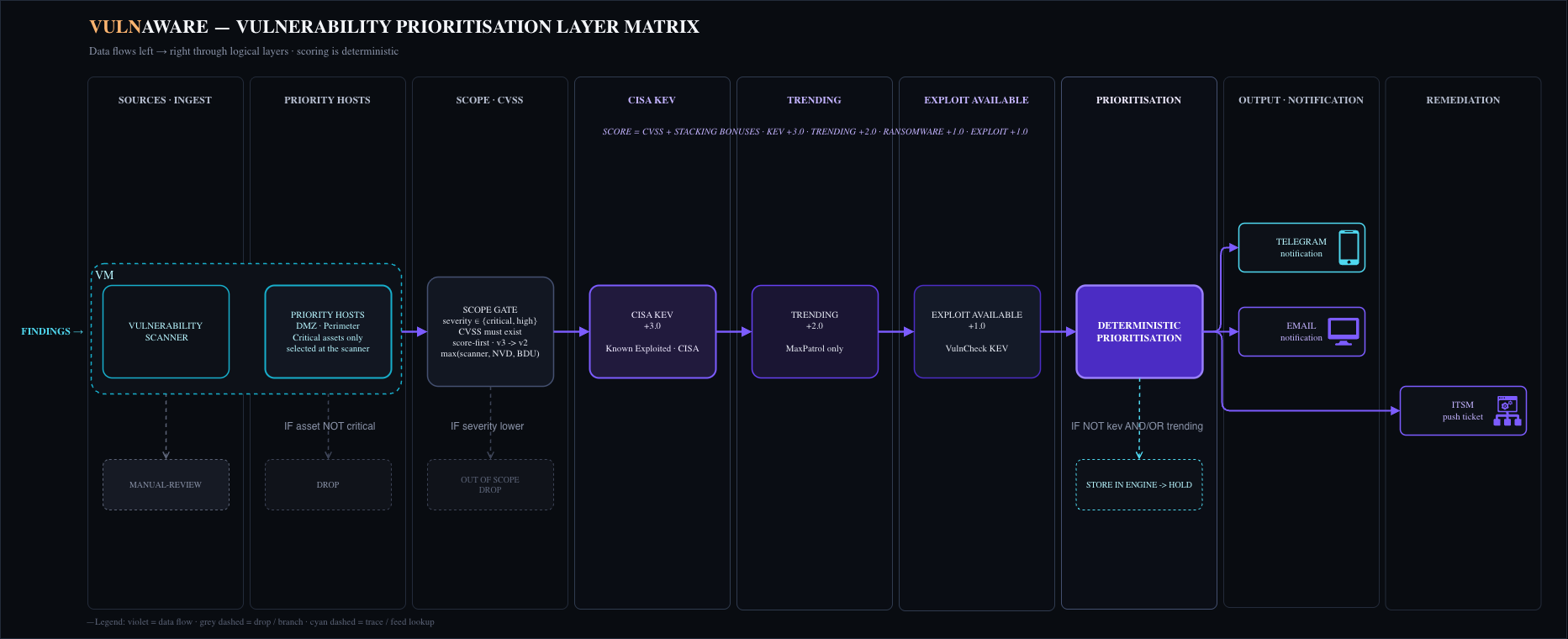
3. Vulnerability prioritisation
Deterministic prioritization:
- Vulnerabilities with severity below the limit are excluded from the scope.
- KEV/trending/exploit tags are added on top and prioritized. CISA KEV has higher priority than KEV.
Prioritization means notification and ticket creation in ITSM.
NOTE: Some vulnerabilities exist without a CVE assigned but might have some national vulnerability ID assigned. Such an example is the FSTEC BDU ID. Such vulnerabilities are prioritised differently; see BDU-keyed findings.
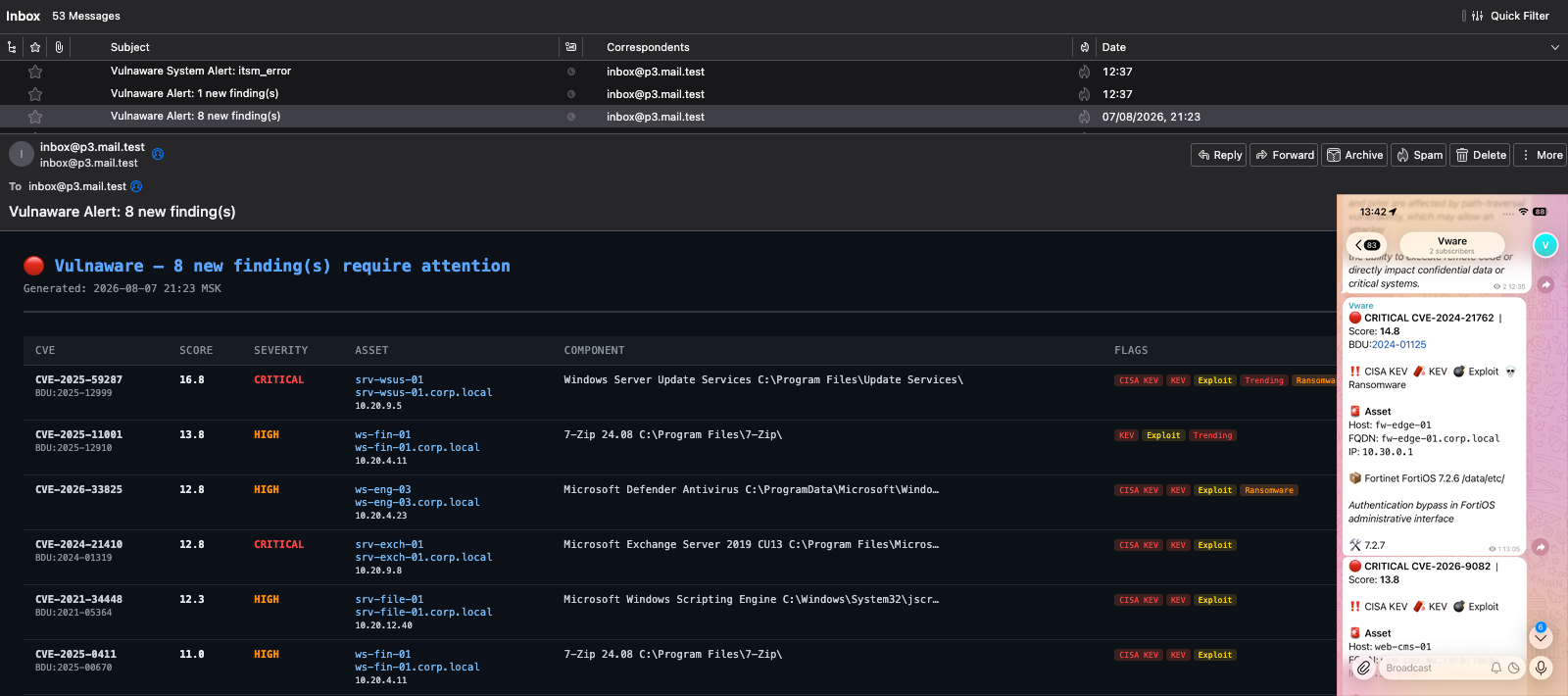
4. Realtime urgent notifications
During the process of prioritisation, notifications can be sent by two channels:
- Telegram bot (one card per finding, to a channel and/or a group).
You get notifications straight on your phone.
You can hide asset information like hostname and IP address from Telegram messages
by changing the setting
hide_assetstotruein thevulnaware/config.yamlfile. - Email message (digest).
Each finding is notified once. You can also send it manually through the web interface.
5. ITSM integration
After notification, a ticket is created in ITSM:
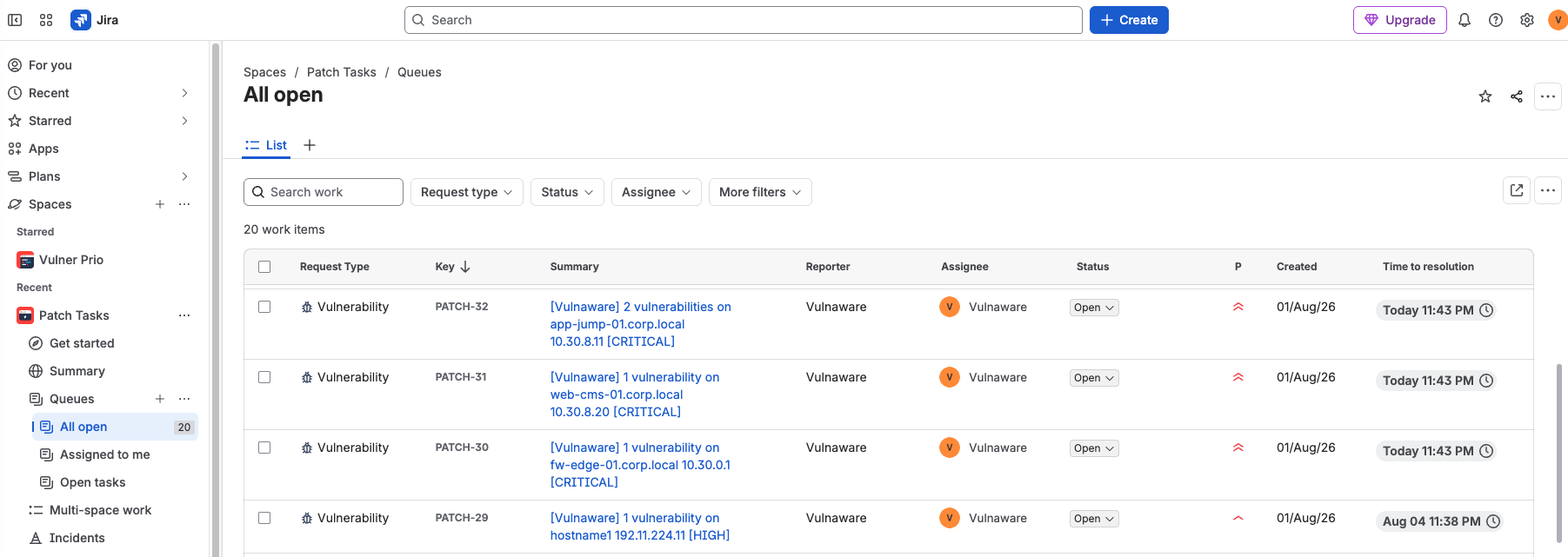
- Jira Service Management(one ticket per host, auto-updated with new CVEs as they appear)
- GLPI
- Znuny
- osTicket
6. Simple web application to track vulnerabilities
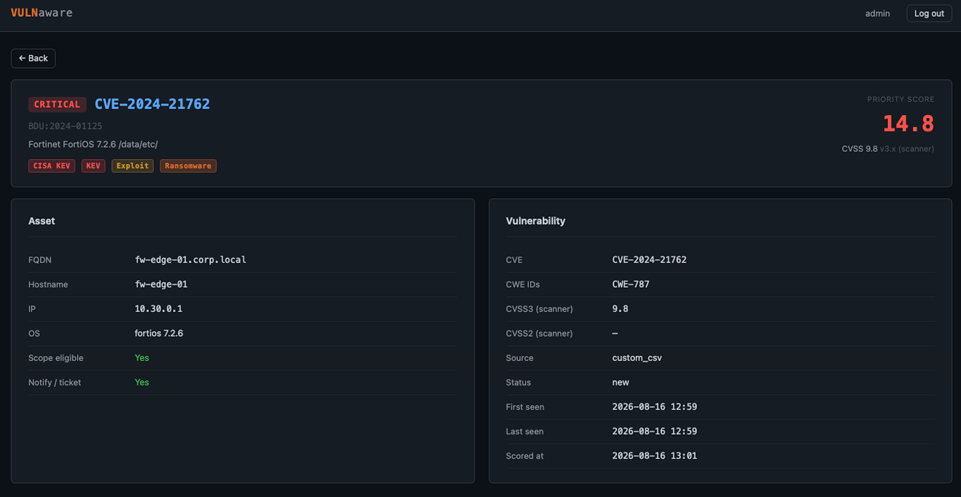
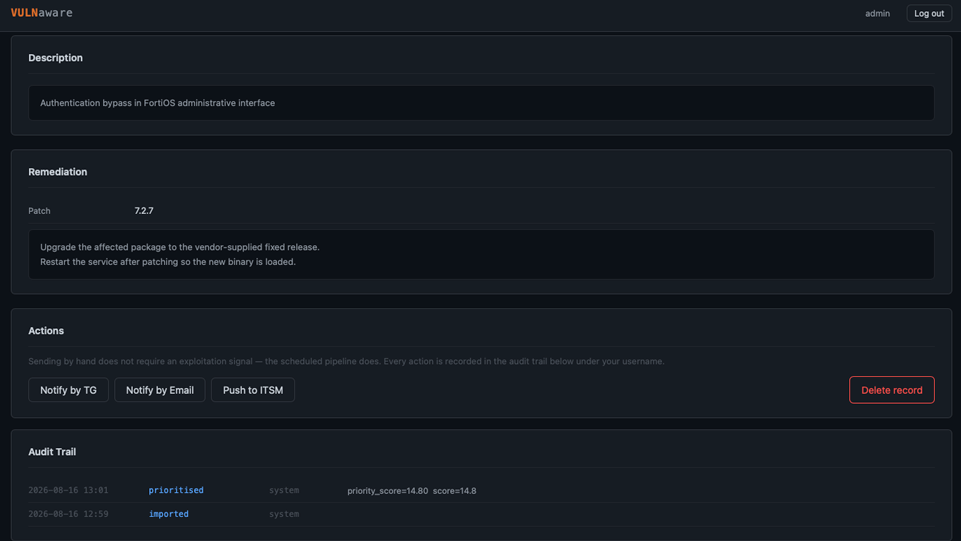
Web application is a searchable findings table, and a per-finding card with an audit trail and four actions: notify by Telegram or email, push the host ticket to ITSM, or delete the finding. See working with the dashboard.
7. Auto or manual modes
You can prioritise vulnerabilities in auto or manual dispatch.
By configuring the mode setting in the vulnaware/config.yaml file,
you decide whether the worker sends notifications and tickets on its own,
or whether an analyst reviews the ranked queue and dispatches from the web app
by hand. Scoring runs the same either way.
Architecture
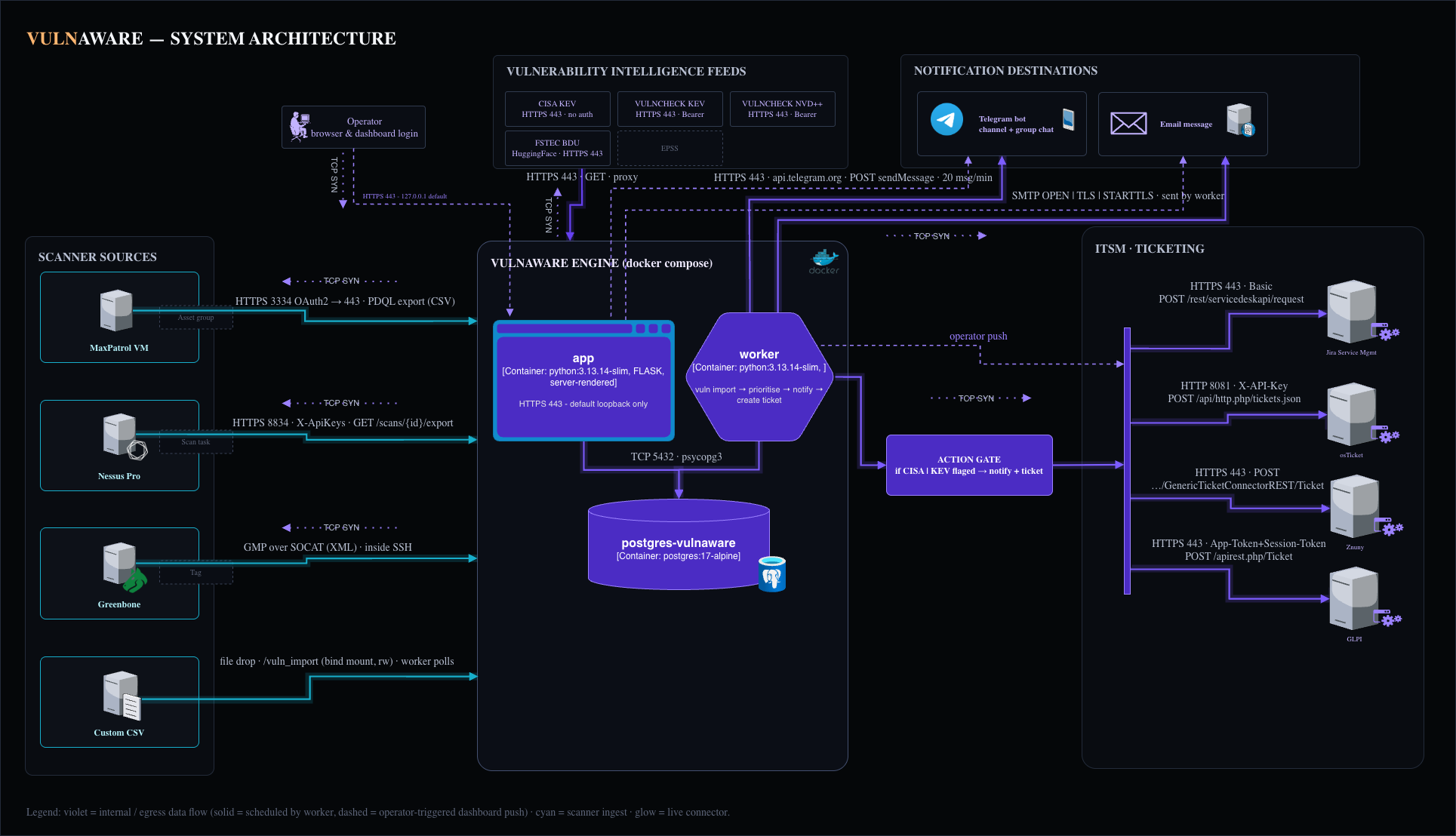
A single vulnaware:latest Docker image serves Web app & Scheduler(worker).
| Container | Role |
|---|---|
postgres |
PostgreSQL 17 |
app |
Web dashboard, terminates TLS on 443, loopback-bound |
worker |
APScheduler — runs ingestion / feeds / prioritisation / notify / ITSM on schedule |
Tech stack
Python 3.13 · PostgreSQL 17 · SQLAlchemy 2 + Alembic · Flask + Jinja2 · APScheduler · argon2-cffi · pandas · requests (MaxPatrol VM / Nessus APIs) · python-gvm (Greenbone GMP) · Docker / docker-compose.
Getting started
git clone <this-repo>
cd Vulnaware

cp config.example.yaml config.yaml
cp .env.example .env

# Create a virtual environment for running run_config.py
python3 -m venv myenv
source .venv/bin/activate
# First upgrade the environment’s package installer:
python -m pip install --upgrade pip
# Then install the project dependencies:
python -m pip install -r requirements.txt

# 1. Configure — run the console on the HOST for settings + secrets
#    (config.yaml and .env live here; the container mounts config.yaml
#    read-only and never sees the host .env, so 'save' must happen here)
#    You can set these two ways: by hand (edit config.yaml / .env directly)
#    or via the run_config.py console below — both are equivalent.
python run_config.py
#   (config)> settings                        # list every configurable setting
#
#   -- timezone (drives cron, log timestamps and every displayed time) --
#   (config)> set timezone UTC
#
#   -- database (required) --
#   (config)> set database.host localhost
#   (config)> set_secret database.user
#   (config)> set_secret database.password
#
#   -- feeds (CISA KEV + FSTEC BDU work with no token; VulnCheck needs one) --
#   (config)> set_secret feeds.vulncheck.api_token
#
#   -- notifications (optional — see docs/telegram.md for the bot walkthrough) --
#   (config)> set_secret notifications.telegram.bot_token
#   (config)> set_secret notifications.telegram.chat_id
#   (config)> set notifications.telegram.enabled true
#
#   -- email (optional — see docs/email_notify.md) --
#   (config)> set notifications.email.smtp_host smtp.corp.local
#   (config)> set notifications.email.enabled true
#   -- self-signed or internal-CA relay? drop the CA in certs/ca (step 2) --
#   (config)> set notifications.email.tls_ca_path /run/ca
#
#   -- ITSM ticketing (optional — one platform: example below is a Jira Service Management) --
#   (config)> set itsm.jira.base_url https://myorg.atlassian.net
#   (config)> set itsm.jira.project_key VULN
#   (config)> set itsm.jira.request_type "Report a vulnerability"   # portal name
#   (config)> set_secret itsm.jira.user
#   (config)> set_secret itsm.jira.api_token
#   (config)> set itsm.jira.enabled true
#
#   -- behind a corporate proxy? (optional — see Configuration > Outbound proxy) --
#   (config)> set proxy.url socks5h://proxy.corp:1080
#   (config)> set proxy.feeds.enabled true
#
#   -- persist: non-secrets → config.yaml, secrets → .env (chmod 600) --
#   (config)> save

# 2. Generate the dashboard TLS cert (bind-mounted into the app container)
openssl req -x509 -newkey rsa:4096 -sha256 -days 825 -nodes \
  -keyout certs/vulnaware.key -out certs/vulnaware.crt -subj "/CN=vulnaware"

sudo chown 1000 certs/vulnaware.crt && chmod 640 certs/vulnaware.key

# Self-signed or internal-CA mail relay? Put the CA — or the relay's own
# certificate — in certs/ca/ and set notifications.email.tls_ca_path=/run/ca.
# See docs/email_notify.md § TLS trust.

# 3. Bring up the postgres
docker compose up -d postgres

# 4. Migrate the DB + create the first dashboard login
python run_config.py
#   (config)> db init
#   (config)> add_user admin

# 5. Bring up the stack
docker compose --profile full up -d      # app + worker

#    You can restart the worker so the pipeline runs now.
#    Every job is scheduled with next_run_time=now, so they all fired once in
#    step 3 — before the schema existed — and failed. This restart is also
#    what force-retries the feeds immediately (see "Feed health states"
#    below) instead of waiting out their own failed attempt's retry window.
docker compose --profile full restart worker
Configuration
Vulnaware settings come from two files, both managed through run_config.py:
| Console command | Writes to | Contains |
|---|---|---|
set <key> <value> |
vulnaware/config.yaml |
Everything except auth info — mounted read-only into containers |
set_secret <key> |
.env (chmod 600, gitignored) |
Passwords, tokens, API keys, and usernames |
db init / add_user |
PostgreSQL | Schema migrations / dashboard login rows |
Run settings [section] in the console at any time to list every configurable key.
save command persists all staged changes and also scaffolds every known secret into .env as an empty
NAME="" placeholder, so the file always shows the complete list of configurable secrets
even before they're set. Note: a console save rewrites config.yaml via yaml.dump,
which drops hand-written comments from the shipped file — keep a copy if you rely on them.
If postgres sits on an internal-only Docker network, unreachable from the host
then run run_config.py in Docker deployments: set / set_secret / save
on the host; db init / db check / add_user in the container.
Use command below to run run_config.py in the container.
docker compose run --rm app python run_config.py
Full options reference
Every configurable key, grouped by section, lives in docs/options.md —
default, storage location (config.yaml vs .env), and description for all
settings.
MaxPatrol VM API export
Vulnaware can pull data from the MaxPatrol VM REST API on every scanner-import tick, It's opt-in and off by default:
# vulnaware/config.yaml
scanner:
  maxpatrol:
    api:
      enabled: true
      host: "mpvm.example.local"
      group_id: "..."          # asset group ID for exportByPDQLByGroup
# .env
MP_CLIENT_SECRET=...
MP_LOGIN=...
MP_PWD=...
docs/source_mpvm.md walks through the MaxPatrol side: creating the
asset group that scopes the export, finding its group_id, and the API account.
Nessus API export
Vulnaware can export every scan located in a configured Nessus folder directly from the Nessus REST API on every scanner-import tick.
# vulnaware/config.yaml
scanner:
  nessus:
    scans_folder: "My Scans"    # Nessus folder NAME or numeric id — required
    api:
      enabled: true
      host: "nessus.example.local"
# .env
NESSUS_ACCESS_KEY=...
NESSUS_SECRET_KEY=...
scans_folder(configured in Nessus) is required whenever scanner.nessus.api.enabled is true — an empty value
is a configuration error, never "export the whole appliance".
It accepts either the folder's display name (as shown in the UI) or its numeric id.
docs/source_nessus.md walks through the Nessus side: organising scans
into a folder, generating the API key pair, and what CVE-less rows mean for this source (there is
no manual_review bucket here — see the doc for why).
Greenbone/OpenVAS export
Vulnaware can pull every task's latest report directly over GMP (Greenbone Management Protocol) on every scanner-import tick. GMP is a session protocol — connect, authenticate, issue commands.
# vulnaware/config.yaml
scanner:
  greenbone:
    min_qod: 70              # Quality-of-Detection floor, matches the GSA UI default
    api:
      enabled: true
      host: "greenbone.example.local"
      ssh_port: 22             # see "The transport is SSH, not TLS" below
      tag: "vulnaware"        # Greenbone tag on host assets — required, scopes everything
# .env, two independent credential pairs, see below
GVM_SSH_USERNAME=...
GVM_SSH_PASSWORD=...
GVM_USERNAME=...
GVM_PASSWORD=...
scanner.greenbone.api.tag is required whenever the API export is enabled — an empty value never means "export
every host on the appliance". It names a tag you assign to host assets in the Greenbone UI
(Assets → Hosts).
The transport is SSH, not TLS. Greenbone's own gvmd process is
bound to a Unix socket only (/run/gvmd/gvmd.sock) — there is no GMP TCP port to connect to. It's
reached through an SSH endpoint whose forced command bridges every login to that socket via
socat:
python-gvm -> SSH (ssh_port) -> socat -> /run/gvmd/gvmd.sock -> gvmd
Which is why there are two independent credential pairs — GVM_SSH_USERNAME/GVM_SSH_PASSWORD
log into the SSH bridge, GVM_USERNAME/GVM_PASSWORD authenticate the GMP session once
connected.
docs/source_greenbone.md walks through the Greenbone side: tagging the hosts you want monitored, setting up the SSH bridge and GMP account.
Custom CSV export
Vulnaware can import every scan from custom CSV file on every scanner-import tick.
docs/source_custom_csv.md walks through the custom CSV import process.
Example vulnerability source files
Vulnaware ships three sanitized example vulnerability exports, so you can prove the pipeline
works during deployment — before any real scanner data exists. They use reserved-range
addresses (192.11.224.x, 10.0.0.x) and placeholder hosts (Hostname1, example.com,
corp.local); no real asset data is in the repo.
| File | Rows | What it exercises |
|---|---|---|
vuln_scanners/MaxpatrolVM/example_csv.csv |
6 | The full 15-column export: multi-line quoted cells, comma-decimal CVSS (8,8), multi-id vuln_id blocks (CVE + BDU + CWE + GHSA + PT), and a CVE-less high row |
vuln_scanners/Nessus/example_csv.csv |
4 | A multi-CVE row, a Low-severity row (out of scope on the default eligible_severities), a CVE-less informational plugin (dropped), and the host-enrichment columns (Host IP/Host FQDN/Host OS) an API-driven export carries |
vuln_scanners/Greenbone/example_csv.csv |
4 | Two multi-CVE advisory rows (one an 8-CVE fan-out), a Low-severity row with a real port (tcp/22), a CVE-less advisory row (dropped), and the Host FQDN/Host OS enrichment columns an API-driven export carries |
Feed downloads (CISA KEV, VulnCheck NVD2/KEV, FSTEC BDU)
CISA KEV needs no token — it is a public JSON catalog fetched with a single GET and cached to
vulnaware/vuln_feeds/cisa_kev/cisa_kev.json, re-parsed only when the file hash changes.
VulnCheck KEV and NVD2 download themselves via the VulnCheck v3 backup API by default
(GET /backup/<index> → pre-signed ZIP URL → extract).
FSTEC BDU loads the CIRCL-curated Parquet dataset from HuggingFace via the datasets library.
Each feed gets its own folder under vulnaware/vuln_feeds/:
vulnaware/vuln_feeds/
├── cisa_kev/            # CISA KEV JSON catalog (cisa_kev.json)
├── vulncheck/
│   ├── vulncheck-kev/   # VulnCheck KEV backup archive + extracted JSON
│   └── vulncheck-nvd/   # VulnCheck NVD 2.0 mirror — extracted .json.gz files
└── fstec_bdu/           # HuggingFace `datasets` cache (CIRCL/Vulnerability-FSTEC)
# .env — never committed
VULNCHECK_API_TOKEN=...   # set via: run_config.py > set_secret feeds.vulncheck.api_token
HF_TOKEN=...              # optional — the CIRCL dataset is public
Set feeds.vulncheck_kev.download: false / feeds.vulncheck_nvd.download: false to fall
back to reading an already-downloaded local file/directory instead (air-gapped operation);
likewise, an empty feeds.fstec_bdu.hf_dataset falls back to a direct CSV/JSON/JSONL URL.
A VulnCheck 402/403 (no entitlement for that index) or a missing token skips the feed for
that run rather than triggering a stale-feed HOLD.
Feed health states (feed_state.status, visible via run_config.py):
| Status | Meaning | HOLD? |
|---|---|---|
ok |
Parsed and upserted normally | No |
skipped |
Config gap or no entitlement — nothing was fetched | No |
degraded |
Fetched fine, but the upstream returned an empty catalog | No |
error |
The run raised — download, parse or database failure | Yes |
degraded is the case worth understanding. An upstream can answer with valid JSON and zero
entries — a partial deploy, a CDN error page, a schema change. Nothing raises, so this used
to record a clean success. Your existing data keeps working and keeps scoring (feed upserts
never delete), which is why it does not trigger a HOLD; but last_success_at is not
advanced and an ops health alert (feed_degraded) fires, because a feed that has silently
stopped updating should not look healthy. The stored file hash is deliberately not advanced
either, so the next run re-parses instead of skipping on an unchanged-file check.
Retrying a failed feed. A feed left error/never_run (or is_stale) retries every
feeds.retry_minutes (default 30) rather than waiting out its full cadence_hours — and is
force-retried immediately on every worker container restart, regardless of how recently it last tried.
degraded and skipped do not get this fast retry: neither will fix itself sooner, and
for vulncheck_nvd/vulncheck_kev a retry re-downloads the entire backup archive (hundreds
of MB), so retrying a broken upstream every 30 minutes instead of every cadence_hours would
just multiply the wasted bandwidth.
Notifications (Telegram / email)
Enable channels in config.yaml (notifications.telegram.enabled /
notifications.email.enabled); the credentials for both are secrets. See
docs/telegram.md for how to create the bot and add it to a channel or
group, and docs/email_notify.md for SMTP setup, recipient lists and
the digest.
# .env
TG_BOT_TOKEN=...      # set via: run_config.py > set_secret notifications.telegram.bot_token
TG_CHAT_ID=...        # set via: run_config.py > set_secret notifications.telegram.chat_id
TG_GROUP_CHAT_ID=...  # second vuln-card destination, e.g. a group (optional)
TG_OPS_CHAT_ID=...    # ops/health alerts channel (optional)
SMTP_USER=...         # when email is enabled
SMTP_PASSWORD=...     # when email is enabled
ITSM Integration
Vulnaware creates one host-ticket per asset, carrying its actionable findings. itsm: in
config.yaml has one sub-block per supported platform
(jira, osTicket, GLPI, znuny) — exactly one
itsm.<platform>.enabled may be true at a time; the one that is decides where tickets go.
Enabling more than one is refused rather than guessed at, with a health alert.
Jira is one of several supported ITSM platforms — see documents below for other ITSM support.
| Part of the request | What Vulnaware sets |
|---|---|
| docs/itsm_jira.md | Covers the Jira Service Management setup |
| docs/itsm_glpi.md | Covers the GLPI setup |
| docs/itsm_osticket.md | Covers the osTicket setup |
| docs/itsm_znuny.md | Covers the Znuny setup |
Outbound proxy (HTTP / SOCKS)
If the host reaches the Internet through a corporate proxy, point Vulnaware at it with one shared endpoint and switch it on per traffic category — each toggle is independent:
proxy.feeds.enabled— feed downloads (CISA KEV, VulnCheck KEV/NVD2, FSTEC BDU incl. the HuggingFace path)proxy.telegram.enabled�� Telegram Bot API callsproxy.itsm.enabled— ITSM API calls, whichever platform is active (SaaS outside the local network)
Supported schemes: http://, socks4://, socks5://, and socks5h:// (like
socks5 but DNS is resolved by the proxy — use this when the host cannot resolve
external names itself). Authentication is optional; credentials are secrets and live in
.env, never in config.yaml or inside the URL (the console rejects
http://user:pw@host forms):
python run_config.py
#   (config)> set proxy.url socks5h://proxy.corp:1080
#   (config)> set_secret proxy.username            # skip both when the proxy
#   (config)> set_secret proxy.password            # needs no authentication
#   (config)> set proxy.feeds.enabled true
#   (config)> set proxy.telegram.enabled true
#   (config)> set proxy.itsm.enabled true
#   (config)> save
# .env — never committed
PROXY_USER=...        # set via: run_config.py > set_secret proxy.username
PROXY_PASSWORD=...    # set via: run_config.py > set_secret proxy.password
SOCKS support uses the PySocks package (in requirements.txt); HTTP proxies need no
extra dependency. Everything not covered by an enabled toggle keeps connecting
directly — the dashboard, PostgreSQL, the MaxPatrol VM, Nessus and Greenbone APIs are internal and are never proxied.
Deployment smoke test
The MaxPatrol example is the one to use — see the caveat below for why it is the only file that reaches Telegram and Jira:
# Copy, don't move: scanner.delete_after_import is true by default, so the
# importer deletes the file once it has read it.
cp vulnaware/vuln_scanners/MaxpatrolVM/example_csv.csv \
   vulnaware/vuln_scanners/MaxpatrolVM/vuln_import/

# Wait one scanner-import tick (5 min by default), or force one now:
docker compose --profile full restart worker

docker compose logs -f worker | grep -iE "import|jira|telegram"
Then check, in order: the finding appears on the dashboard, a card arrives on Telegram or in the email digest, and a Jira request is created. That single pass exercises ingestion, prioritisation and both outbound integrations.
Expect 1 stored finding from 6 rows. That is the pipeline working, not data loss: four rows
are low/medium and fall outside the default prioritisation.eligible_severities
(critical, high), and one high row carries no CVE — CVE-less rows are only kept at
critical. What survives is CVE-2025-43859 (high, CVSS 9.1).
Only the MaxPatrol example can trigger notifications and tickets. Its row is flagged
trend=trueand comes from the MaxPatrol importer, so it earns the trending signal that the notify/ticket gate requires.
Scheduling — when the engine runs what
The worker container runs an APScheduler instance that owns every recurring action. Nothing
is event-driven: dropping a CSV in import folder does not trigger an import, it waits for the next tick.
See docs/scheduling.md for more information about scheduling and how it designed.
Documentation Reference
| Doc | What's in it |
|---|---|
| docs/options.md | Full settings reference — every config.yaml / .env key, default, and description, grouped by section. |
| docs/source_mpvm.md | Setting up MaxPatrol VM as a source — the asset group that scopes the export, its group_id, the API account, and the manual-CSV alternative. |
| docs/source_nessus.md | Setting up Nessus as a source — the scan folder that scopes the export, the API key pair, host enrichment, and what "no CVE" means for this source (no manual_review bucket). |
| docs/source_greenbone.md | Setting up Greenbone / OpenVAS as a source — the GMP-over-SSH session model, the API export vs. the manual GSA CSV, and the shared drop folder both end in. |
| docs/greenbone_setup/setup_greenbone.md | Standing up Greenbone Community Edition itself — the official Docker Compose stack plus the separate SSH endpoint python-gvm connects through. |
| docs/source_custom_csv.md | Importing from a plain CSV — the canonical lowercase header names, which columns are required, and the drop folder the importer watches. |
| docs/BDU_keyed_findings.md | MaxPatrol VM rows that carry an FSTEC BDU: id instead of a CVE — the manual_review table, and the two ways they behave differently from CVE findings. |
| docs/telegram.md | Step-by-step guide to creating a Telegram bot and adding it to a channel or group for notifications. |
| docs/email_notify.md | Configuring email notifications — SMTP host/port/TLS, credentials, SOC vs. ops recipient lists, verification and troubleshooting. |
| docs/itsm_jira.md | Configuring Jira Service Management so Vulnaware's host-tickets land — API token, service desk permissions, request type and priority prerequisites, dedup behaviour. |
| docs/itsm_glpi.md | Configuring GLPI so Vulnaware's host-tickets land — enabling the v2 REST API, the OAuth2 client, TLS trust, and the one-ticket-per-asset grouping. |
| docs/itsm_osticket.md | Configuring osTicket so Vulnaware's host-tickets land — API key and its source-IP binding, submitter identity, and why a host's ticket is never updated after it is created. |
| docs/itsm_znuny.md | Configuring Znuny so Vulnaware's host-tickets land — importing the GenericInterface web service, matching its name to itsm.znuny.webservice, the agent account and TLS trust. |
| docs/dashboard.md | Working with the dashboard. |
| docs/ssh_tunnel.md | Reaching the loopback-bound dashboard from a workstation over an SSH tunnel — port forward, certificate trust, persistent config, hardening. |
| docs/scheduling.md | What the worker runs and how often — each job's interval and the setting behind it, the run-once-on-worker-start behaviour, and how to change the cadence. |
| docs/docker_dns.md | Making a LAN-only hostname resolve from inside the app / worker containers via extra_hosts — the fix for name-resolution failures against a scanner, SMTP relay or ITSM host. |
Comments