LodeDB
🔥 the fastest and most compact embedded vector database in the world 🌍
Built by Egoist Machines, Inc. - efficient full-stack infrastructure for reliable AI systems.
LodeDB is great for local RAG; it's extremely fast, exact, in-process, and on-disk. We're the best drop-in durable memory backend for LangChain, LlamaIndex, and mem0 across all metrics that matter: the most compact on disk, GPU-accelerated, and sub-millisecond on durable writes. Point any of them at LodeDB instead of its default store. Over 17.5k documents, per framework default:
| vs the framework's default store | LangChain InMemoryVectorStore |
LlamaIndex SimpleVectorStore |
mem0 Qdrant |
|---|---|---|---|
| On-disk footprint | 7.2× smaller (28 vs 199 MB) | 5.3× smaller (28 vs 145 MB) | 4.6× smaller (15 vs 70 MB) |
| Single-query p50 (CPU) | ~410× faster (0.8 vs 345 ms) | ~500× faster (0.9 vs 427 ms) | ~25× faster (0.9 vs 23 ms) |
| Batched retrieval, 64 (GPU) | ~2,000× (6,280 vs ~3 qps) | ~2,800× (5,744 vs ~2 qps) | ~62× (2,686 vs 43 qps) |
| Durable add of one memory | ~10,000× faster (0.8 ms vs 8.6 s) | ~22,000× faster (0.9 ms vs 19.3 s) | 0.9 vs 0.5 ms (both sub-ms) |
LodeDB matches sqlite-vec/qdrant's per-add latency with a significantly more compact footprint:
| embedded stores | add p50 | memory footprint |
|---|---|---|
| sqlite-vec | 0.4 ms | 101 MB |
| qdrant | 0.5 ms | 85 MB |
| LodeDB | 0.6 ms | 29 MB |
| pgvector | 2.3 ms | 50 MB |
| lancedb | 3.2 ms | 37 MB |
| chroma | 6.5 ms | 151 MB |
Full benchmark, all backends (FAISS, Chroma, Qdrant, LanceDB, sqlite-vec, pgvector), and method.
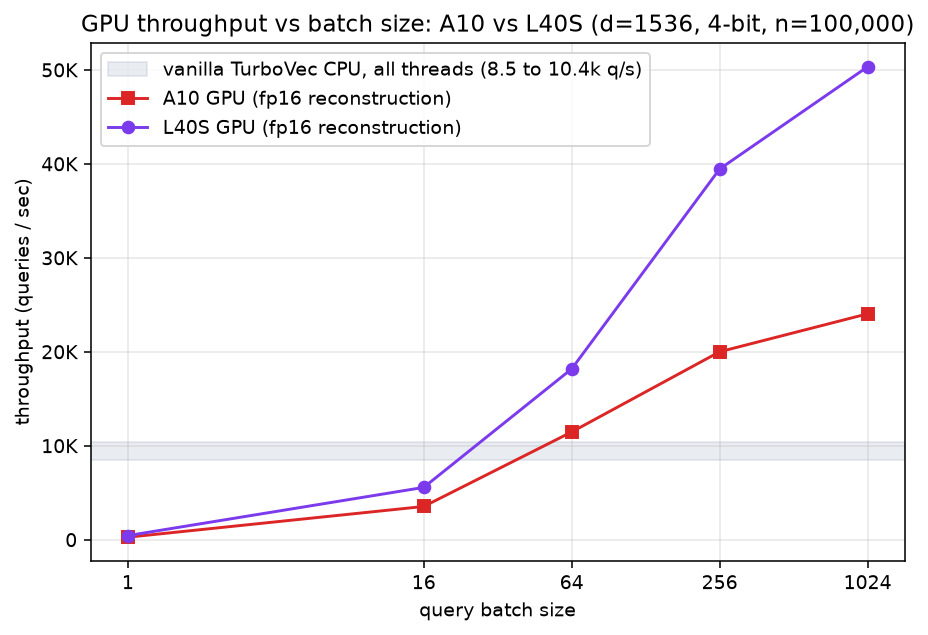
Most embedded vector databases stop at the CPU. LodeDB runs the same on-disk index on the GPU when you have one: batched search hits 24k queries/sec on an A10 and 50k qps on an L40S, 2.8× to 4.8× the all-CPU ceiling, with recall unchanged. It also persists changed rows incrementally, so a commit stays sub-millisecond even at 1M vectors.
- GPU-resident batch search: an fp16 copy of the index lives on the GPU, scored with a
tiled GEMM plus a streaming top-k (
[gpu], Linux/CUDA). How it works. - O(changed) persistence: commits only the rows that changed, 173× to 1,308× faster than a full rewrite. How it works.
- Compact storage: the MIT TurboVec core packs vectors into 2/4-bit codes and scans them with SIMD CPU kernels.
- In-process, on-disk (
.tvim/.tvd/.jsd): no daemon, no account, no API key. - Safe concurrency: one writer and many lock-free readers per path; every commit is crash-atomic and rolls back to the last committed state on failure, never a torn store. How it works.
- Private by default: text, ids, and vectors stay local; telemetry is metrics-only (counts, bytes, latency), never raw payloads.
- Local embeddings: ONNX Runtime by default (lower per-query latency), with a PyTorch
sentence-transformersfallback; runs on CPU, CUDA, or MPS. Pick withembedding_runtime=. - Batteries included: a
lodedbCLI, a loopback dev server, an MCP server, LangChain, LlamaIndex, and mem0 adapters (VectorStores, plus a LlamaIndexPropertyGraphStore), and a one-line PrivateGPT vector-store provider built on the LlamaIndex adapter.
🏢 Enterprise The LodeDB core is Apache-2.0 and free to use. Enterprise licensing is available for commercial support, managed and at-scale serving, and on-prem / BYOC deployment. Contact sales@egoistmachines.com.
Install
pip install lodedb
That's it. Prebuilt wheels cover Linux, macOS (Apple Silicon and Intel), and Windows on
Python 3.11+, and bundle the TurboVec (Rust) core, so there's nothing to compile. Confirm
the install with lodedb doctor. Optional extras:
pip install "lodedb[gpu]"                            # GPU-resident scan (Linux/CUDA)
pip install "lodedb[mcp,langchain,llama-index,mem0]" # MCP server + LangChain/LlamaIndex/mem0 adapters
pip install "lodedb[onnx-export]"                    # export ONNX for a custom model (Optimum); presets need no export
Using LodeDB as memory for a coding assistant? After installing the mcp extra, register its
server in one step (details under Use as an MCP server):
lodedb mcp install --client claude-code # or: claude-desktop | cursor | lm-studio | codex | all
Windows: NVIDIA GPU embeddings
On Windows, PyPI serves the CPU-only PyTorch build by default, so pip install lodedb (and
uv) leave embeddings on the CPU even on a CUDA machine, and no package metadata can override
which torch wheel pip resolves. lodedb doctor detects this and prints the fix; lodedb doctor --fix reinstalls the CUDA build for you:
lodedb doctor          # flags a CPU-only PyTorch on Windows and prints the command
lodedb doctor --fix    # reinstalls the CUDA build so embeddings use your NVIDIA GPU
Or reinstall manually, picking the index for your CUDA version (cu121, cu124, ...) from the
PyTorch install guide:
pip install torch --force-reinstall --no-deps --index-url https://download.pytorch.org/whl/cu121
uv pip install torch --reinstall --index-url https://download.pytorch.org/whl/cu121   # with uv
This is Windows-only: the default Linux PyPI wheel already bundles CUDA, and macOS uses CPU or MPS.
Build from source (contributors, or a platform without a wheel)
Needs a Rust toolchain and a CBLAS provider (Accelerate on macOS, libopenblas-dev on
Linux). uv builds and bundles the core for you:
git clone https://github.com/Egoist-Machines/LodeDB && cd LodeDB
uv sync                                 # builds + bundles the TurboVec core via maturin
uv sync --extra mcp --extra langchain --extra llama-index --extra mem0  # + MCP server, adapters
uv sync --extra gpu                                                     # + GPU-resident scan (Linux/CUDA)
Run with uv run (e.g. uv run lodedb doctor).
Quickstart
from lodedb import LodeDB

db = LodeDB(path="./data", model="minilm")   # "minilm" (fast) | "bge" (quality)

fox = db.add("the quick brown fox jumps", metadata={"topic": "animals"})
db.add("a lazy dog sleeps all day", metadata={"topic": "animals"})

for score, doc_id, meta in db.search("fox", k=5):
    print(score, doc_id, meta)

for hits in db.search_many(["fox", "dog"], k=5):   # batched; the GPU can serve this
    print([(h.score, h.id, h.metadata) for h in hits])

db.search("fox", k=5, filter={"topic": "animals"})                      # bare scalar = exact
db.search("fox", k=5, filter={"$or": [{"topic": "animals"}, {"year": {"$gte": 2020}}]})

# hybrid search: vector recall plus exact lexical matches the embedding misses
db.search("E1234", k=5, mode="hybrid")     # surfaces error codes, serials, dates in the body

db.get(fox)     # -> "the quick brown fox jumps"  (text retained by default)
db.persist()    # durable .tvim/.tvd/.jsd snapshot; replays on reopen
Reopen with LodeDB(path="./data"); no migration step. Original text is kept in a
.tvtext sidecar for db.get; pass store_text=False to keep none. Presets are minilm
(384-dim) and bge (768-dim), with weights pulled from Hugging Face on first use. More in
examples/.
Need to read a store another process is writing to? Open it read-only. It takes no writer lock, so it never blocks on (or is blocked by) the writer:
reader = LodeDB.open_readonly("./data")   # or LodeDB(path="./data", read_only=True)
reader.search("fox", k=5)                 # reads a committed snapshot
reader.add("nope")                        # raises ReadOnlyError
Hybrid search
Vector search alone misses exact tokens the embedding does not capture: error codes
(E1234), serial numbers (ABC-123), dates (2024-01-15). Pass mode="hybrid" to run a
lexical BM25 ranker alongside the vector scan and fuse the two ranked lists with Reciprocal
Rank Fusion. The lexical ranker matches those tokens exactly, so a document whose body carries
the code is recovered even when the embedding ranks it nowhere near the top.
db.add("the turbine tripped and reported fault code E1234 overnight", metadata={"unit": "t3"})

db.search("E1234", k=5)                 # mode="vector" (default): may miss the exact code
db.search("E1234", k=5, mode="hybrid")  # BM25 + RRF: surfaces it in the top-k
db.search("E1234", k=5, mode="lexical") # BM25 ranking alone, no vector scan
Prerequisites
mode="hybrid" and mode="lexical" build a BM25 index over your text, so they need a text
source enabled when you open the database. mode="vector" (the default) needs nothing.
| Mode | Enable | Source of the BM25 index |
|---|---|---|
"vector" (default) |
nothing | not used |
"hybrid", "lexical" |
store_text=True (on by default) |
rebuilt in memory from the retained raw text |
"hybrid", "lexical" |
index_text=True |
a durable on-disk postings store, no raw text required |
Either source is enough and you can enable both. store_text=True is the default, so hybrid
works out of the box. With neither source enabled, a hybrid or lexical query raises a clear,
actionable error rather than silently degrading.
How it works
A filter constrains both rankers, so mode="hybrid" with a filter returns the true top-k of
the matching subset. The vector half of a hybrid query runs on the same scan as mode="vector",
including the GPU-resident batch scan that serves search_many; only the BM25 ranking and the
fusion run on the CPU, and the vector kernel and on-disk format are untouched. The serving BM25
index lives in memory and is maintained incrementally: a small mutation folds just the changed
chunks into the existing index, so a single add never forces a full re-tokenization.
Durable lexical index (`index_text=True`)
By default the BM25 index is rebuilt from the retained raw text, so it needs store_text=True
and is re-tokenized on the first hybrid query after opening. Pass index_text=True to persist
it instead: each document's per-chunk terms are captured at add time into a dedicated .tvlex
sidecar (a base plus a .lxd delta journal, committed O(changed) per write), so hybrid and
lexical search survive a reopen rebuilt straight from the persisted terms, with no
re-tokenization and without retaining the raw text at all. The .tvlex sidecar holds
payload-derived terms only and, like the raw-text sidecar, never reaches the redacted artifacts
or telemetry. The tokenizer lowercases and splits on punctuation but keeps code-like tokens
whole, so ABC-123 and 2024-01-15 stay findable as single tokens. Reopen with the same
index_text value you wrote with.
db = LodeDB(path="./data", index_text=True, store_text=False)  # durable lexical index, no raw text
db.add("the turbine tripped and reported fault code E1234 overnight")
db.close()

reopened = LodeDB(path="./data", index_text=True, store_text=False)
reopened.search("E1234", k=5, mode="hybrid")  # works after reopen, rebuilt from persisted terms
GPU-resident index
With the [gpu] extra on a CUDA host, LodeDB reconstructs the compact index into an fp16
matrix resident on the GPU and scores batched search_many with a tiled GEMM plus a
streaming top-k. It is opt-in and lazy: single queries, non-CUDA hosts, and GPU-memory
rejection fall back to the CPU scan, which stays the source of truth.
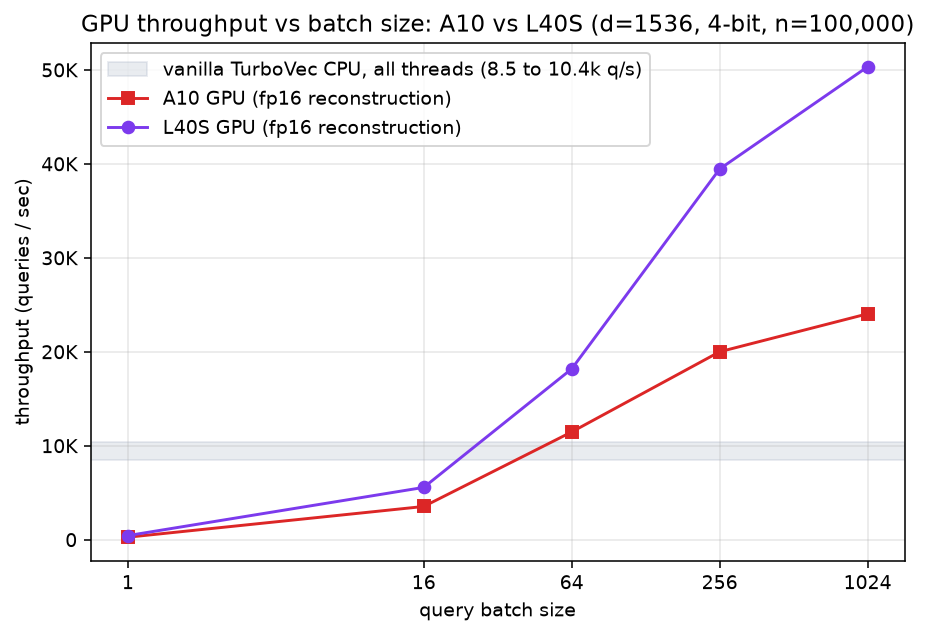
GPU throughput climbs with batch size while the CPU scan is flat. Same 4-bit index (d=1536, 100K), same host, only the scoring step differs. Crossover is around batch 50:
| query batch | A10 GPU | L40S GPU |
|---|---|---|
| 1 | 261 q/s | 432 q/s |
| 16 | 3,531 | 5,562 |
| 64 | 11,463 | 18,175 |
| 256 | 19,998 | 39,449 |
| 1024 | 24,037 | 50,326 |
Vanilla TurboVec CPU (all threads) on the same boxes: 8,497 q/s (A10 host), 10,420 q/s (L40S host). At batch 1024 the GPU is 2.8× / 4.8× that, and it scales with GPU class.
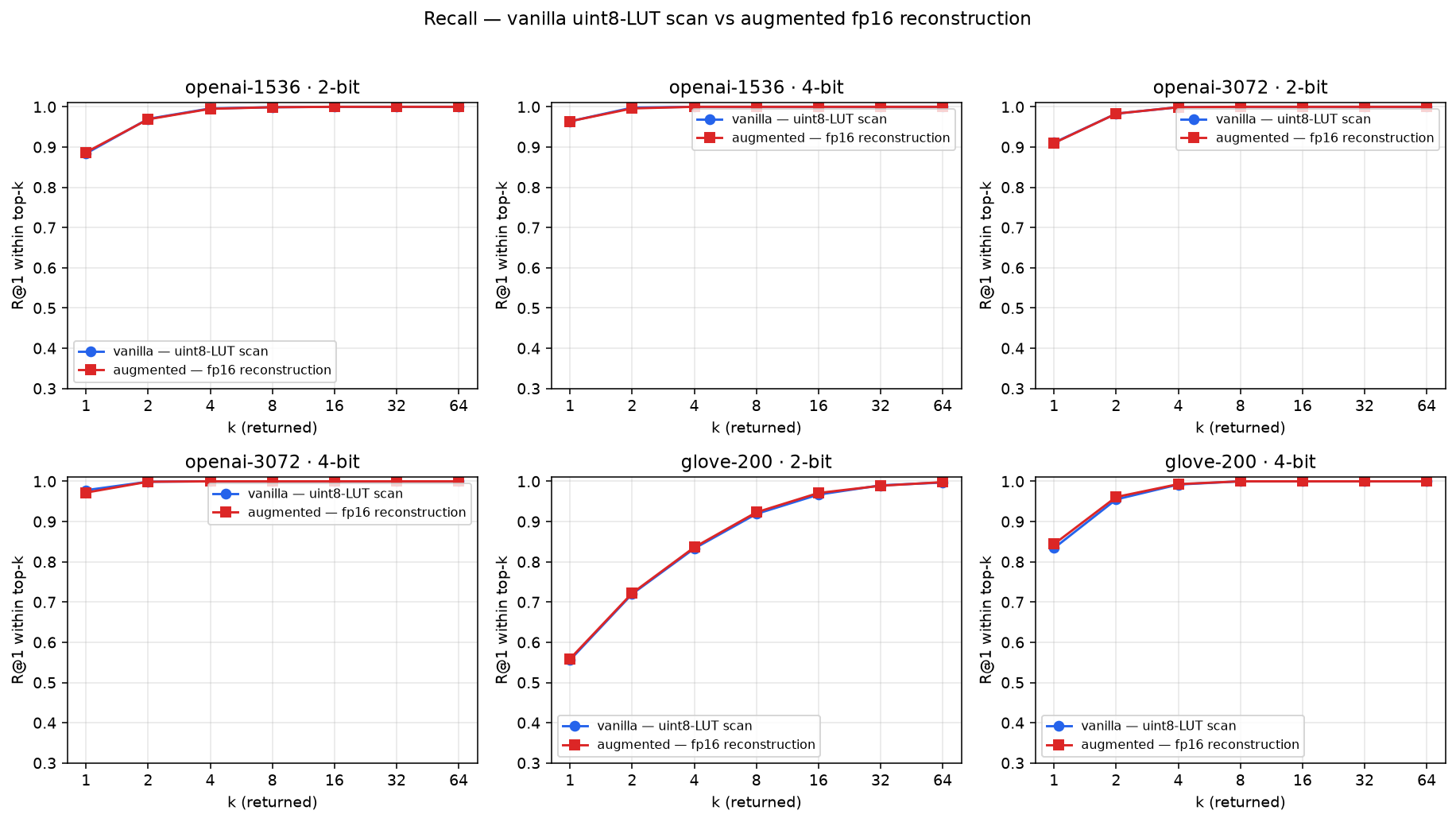
Recall is unchanged: the GPU scores the exact 4-bit reconstruction, so R@1 tracks the CPU scan across datasets and bit-widths, and edges ahead on GloVe-200 where quantization error is largest.
Other in-process vector databases stay CPU-bound. Alibaba's zvec reports about 8.4k q/s (VectorDBBench, 16-vCPU CPU, Cohere 768-dim): the same class as the TurboVec CPU scan, and a different regime from ours, so read it as the CPU-class baseline. The GPU-resident path is what clears it.
Scope. GPU search is Linux/CUDA-only and opt-in ([gpu]). macOS scans on the CPU by
default; a first-class opt-in MPS exact scan exists (LODEDB_MPS_DIRECT_TURBOVEC) but NEON
stays the default. On the measured M1 it was slower than NEON at every batch size; newer Apple
GPUs should be re-measured before any default change. See docs/benchmarks.md and
docs/architecture.md.
Delta persistence
Most embedded indexes rewrite the whole file on every change (O(N)). LodeDB writes only the rows that changed (O(changed)), so a 1,000-row commit stays sub-millisecond at any size:
| corpus | full rewrite | delta export | speedup |
|---|---|---|---|
| 100K | 42.4 ms | 0.25 ms | 173× |
| 500K | 190.4 ms | 0.24 ms | 782× |
| 1M | 404.9 ms | 0.31 ms | 1,308× |
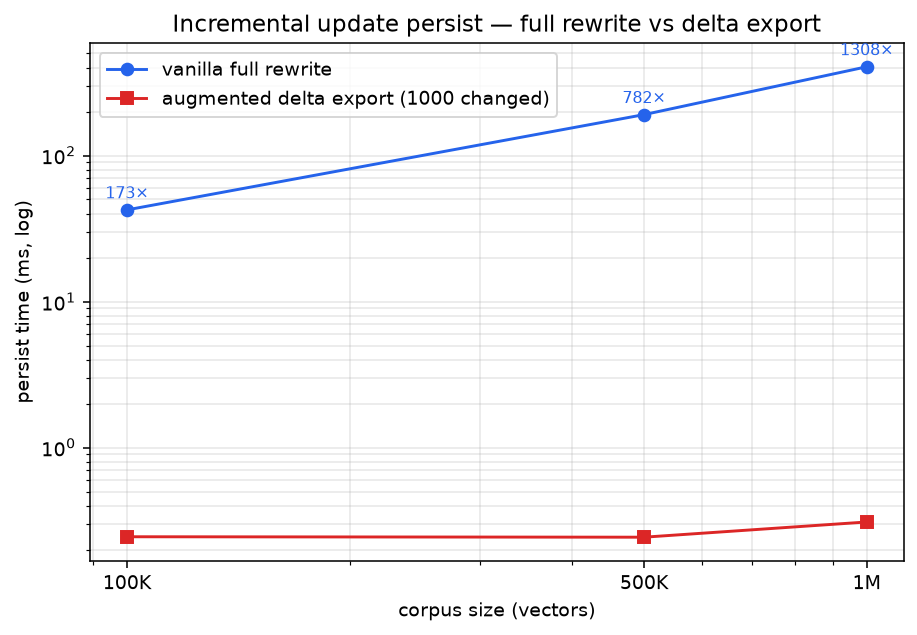
The GPU path makes reads fast; the delta makes writes cheap. The on-disk format stays a plain snapshot that replays on reopen.
The opt-in raw-text store (store_text=True) is journaled the same way: an incremental commit
appends a small .txd text delta instead of rewriting the whole document_id -> text map, so
enabling text retrieval keeps commits O(changed) too. Isolated, the per-commit text write drops
from a full-map rewrite (57 ms at 20K docs, ~244 ms at 80K) to a flat **0.7 ms** regardless of
corpus size.
And the rest of an incremental add() is O(changed) too: a single-doc update no longer rebuilds
the whole index layout or rewrites the full text map on the commit path, so write latency stays
flat as the corpus grows instead of climbing with it.
Benchmarks
All artifacts are metrics-only (counts, bytes, latency), never payloads. Full methodology and the complete figure set are in docs/benchmarks.md; each benchmarks/ folder has a README and a one-line reproduction command.
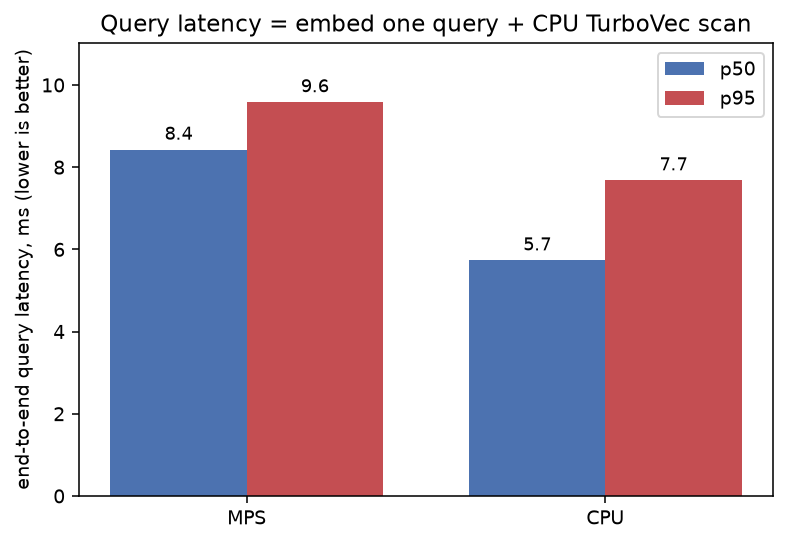
Local is the common case. On an Apple M1 (MiniLM, 20K docs) the CPU scan is ~0.25 ms p50, and end-to-end single-query latency is 5.7 ms p50.
CLI
lodedb doctor      # capability report: embedding / GPU / TurboVec backend
lodedb index ...   # build / add to an on-disk index
lodedb query ...   # search
lodedb serve       # loopback dev server (127.0.0.1, no auth)
lodedb mcp         # stdio MCP server for agent memory
lodedb benchmark   # local, metrics-only benchmark
Use as an MCP server
LodeDB ships a Model Context Protocol server, so an agent
can use a local on-disk database as long-term memory or a RAG store. It runs over stdio, adds
no storage logic of its own, and your data stays on the machine. Install the extra and point
your host at lodedb mcp:
pip install "lodedb[mcp]"

# for coding assistant:
lodedb mcp install --client claude-code  # or: claude-desktop | cursor | lm-studio | codex | all
It exposes lodedb_add, lodedb_search, lodedb_remove, and lodedb_stats, plus
lodedb_get when text is available. lodedb_search returns each hit's stored text alongside
the score, id, and metadata, so a model can rank and answer in a single call rather than
chaining a follow-up lookup. It runs hybrid search (BM25 lexical + vector,
fused with RRF) by default when text is retained, so exact tokens like error codes and serials
surface next to semantic matches; with no text retained it falls back to a vector scan. Start
the server with --exclude-text to return metrics only (this also withdraws lodedb_get), or
--no-store-text to keep no text on disk at all. lodedb_stats is always metrics-only and raw
query text never leaves the process.
One command install
lodedb mcp install writes the correct entry to a client's config for you, so you do not have to
find the file or hand-write the JSON/TOML:
lodedb mcp install --client claude-code        # or: claude-desktop | cursor | lm-studio | codex | all
lodedb mcp install --client cursor --path ./data --model bge
It resolves the launch command for your environment, so command and args are correct even when
lodedb is not on PATH (it falls back to the uv run --project ... form, then an absolute path to
the entry point), and it resolves --path to an absolute path so the server opens the right
directory wherever the client starts it. The edit is idempotent (an existing lodedb entry is
updated, never duplicated) and never touches other servers in the file. It passes through the same
options as lodedb mcp (--path, --model, --device, --exclude-text, --no-store-text);
--dry-run prints the entry and target file without writing, and lodedb mcp uninstall --client <client> removes it again. Override the config location with --config <path> (Claude Desktop and
LM Studio paths differ per OS), and use --project <dir> to write Cursor's project-level
.cursor/mcp.json. For Claude Code it runs claude mcp add; for the others it edits the config file
directly.
Register by hand (Claude Code, Claude Desktop, Cursor, LM Studio, Codex)
The lodedb command must be on the host's PATH; if you installed into a virtual environment
(including a uv project) where it isn't, use the uv run form at the bottom.
Claude Code, Claude Desktop, Cursor, LM Studio: add the stdio entry to the host's MCP
config (claude_desktop_config.json, .cursor/mcp.json, or LM Studio's mcp.json), or run
claude mcp add lodedb -- lodedb mcp --path ./data:
{ "mcpServers": { "lodedb": { "command": "lodedb", "args": ["mcp", "--path", "./data"] } } }
Codex: add to ~/.codex/config.toml:
[mcp_servers.lodedb]
command = "lodedb"
args = ["mcp", "--path", "./data"]
From a virtual environment (uv), when lodedb is not on PATH:
{ "mcpServers": { "lodedb": { "command": "uv",
  "args": ["run", "--project", "/path/to/LodeDB", "lodedb", "mcp", "--path", "/path/to/data"] } } }
See examples/mcp_config.json for a copy-paste starting point.
Concurrency & durability
- Single writer, many readers, per path. One handle holds the path open for writing at
a time (an exclusive OS advisory lock); a second writer waits for it to close, then fails
fast (
ConcurrentWriterError) afterLODEDB_PERSIST_LOCK_TIMEOUT(default 30s). Read-only handles (LodeDB.open_readonly(path)orread_only=True; used bylodedb query/get) take no lock, so they read one consistent committed snapshot while a writer is open. They just don't auto-see the writer's in-flight changes (no live cross-process refresh). Within one process the engine serializes operations under an in-process lock, so the threadedlodedb servesafely shares one handle. - Crash-atomic commits. A commit spans several files, but it is sealed by atomically
swapping one
<key>.commit.jsonroot pointer over generation-addressed artifacts, so a crash mid-commit rolls back to the last committed generation on reopen (never a torn, half-applied store) and readers always load one consistent generation. - Durability is
fastby default. Commits are atomic but not fsync'd. Passdurability="fsync"(or--durability fsync/LODEDB_DURABILITY=fsync) to fsync each file and its directory on commit for power-loss durability, at some commit-throughput cost. - WAL commit by default for low-latency durable writes. Each
add/removeappends one framed record to a<key>.wallog and a full generation is checkpointed periodically, so a durable single add costs roughly an order of magnitude less than publishing a whole generation per write, into the sqlite-vec/qdrant range (see the comparison up top). The WAL is replayed crash-atomically on reopen (a half-written trailing record is discarded), every writable open folds it into a clean committed generation, andclose()/persist()checkpoint it. WAL is single-writer: a concurrentopen_readonlyreader still loads a consistent committed generation, but the last checkpointed one, not the writer's in-flight WAL. Passcommit_mode="generation"(orLODEDB_COMMIT_MODE=generation) for the classic path that publishes a crash-atomic, MVCC-readable generation on every write; pick it when many out-of-process readers must see each write the instant it commits. - Local filesystems only. The OS advisory lock is unreliable on NFS/SMB.
Limitations
- Exact scan, no ANN. Built for small-to-mid corpora where exact recall matters, not billion-scale.
- GPU-resident scan is Linux/CUDA-only and opt-in (
[gpu]). macOS has a first-class, opt-in Metal (MPS) exact scan (LODEDB_MPS_DIRECT_TURBOVEC=auto); NEON is the default and was faster on the measured M1, so the MPS scan stays off by default until newer Apple GPUs are re-measured. - Single queries run on the CPU; the GPU serves batched
search_many. - Hybrid search needs a lexical source and serves from memory.
mode="hybrid"/"lexical"need eitherstore_text=True(the index built from raw text) orindex_text=True(a durable.tvlexpostings store that survives reopens without raw text). The serving index is held in memory and maintained incrementally across mutations. - Single writer per path. One writer at a time (many concurrent readers), with no live cross-process refresh, on local filesystems only. See Concurrency & durability.
- Model weights download from Hugging Face on first use, then cache locally.
TurboVec
The compact core is the upstream MIT TurboVec
project (© Ryan Codrai), vendored under third_party/turbovec/
with its license preserved. LodeDB's lifecycle patches (encoded-row export/import,
upsert_with_ids, calibration) are Apache-2.0. See NOTICE.
Comments