A small companion service for Frigate that treats a person's walk across your property as one scenario across multiple cameras — and gives Frigate's face recognition an independent second opinion.
The learning module works end to end: a learning run walks through the person events Frigate already recorded, harvests the usable faces, groups them into recurring people, and lets you name a whole cluster at once instead of labeling single images. Named clusters go straight into recognition. Camera areas are the part still being built.
The latest-* image tags follow the newest release, so docker compose pull gets you
what this README describes. To pin a version instead, use its tag explicitly:
ghcr.io/bennobaer-dev/suslik:0.1.0.109-gpu.
Why this exists
Frigate's built-in face recognition works per frame and per camera, and on difficult footage it can assign a confident label to the wrong person. suslik runs a stronger, independent verify layer:
- It triggers on Frigate person events (robust), not on Frigate's face recognition (the part that struggles).
- It pulls the full-resolution recorded clip and searches across all frames itself for the best face — largest, sharpest, most frontal — instead of relying on one live crop.
- It matches against a calibrated reference library and requires time consistency: a person counts as recognized only when several frames within a short window agree. A single lucky frame is not enough.
- When it isn't sure, it says "unknown" — instead of a confident wrong guess.
The result is honest recognition: on good footage suslik and Frigate agree; on bad footage suslik declines rather than mislabels.
What it looks like
The Today page answers "who was on the property, when, and where did they go" — one card per person, one block per pass, unknowns kept visible instead of buried:
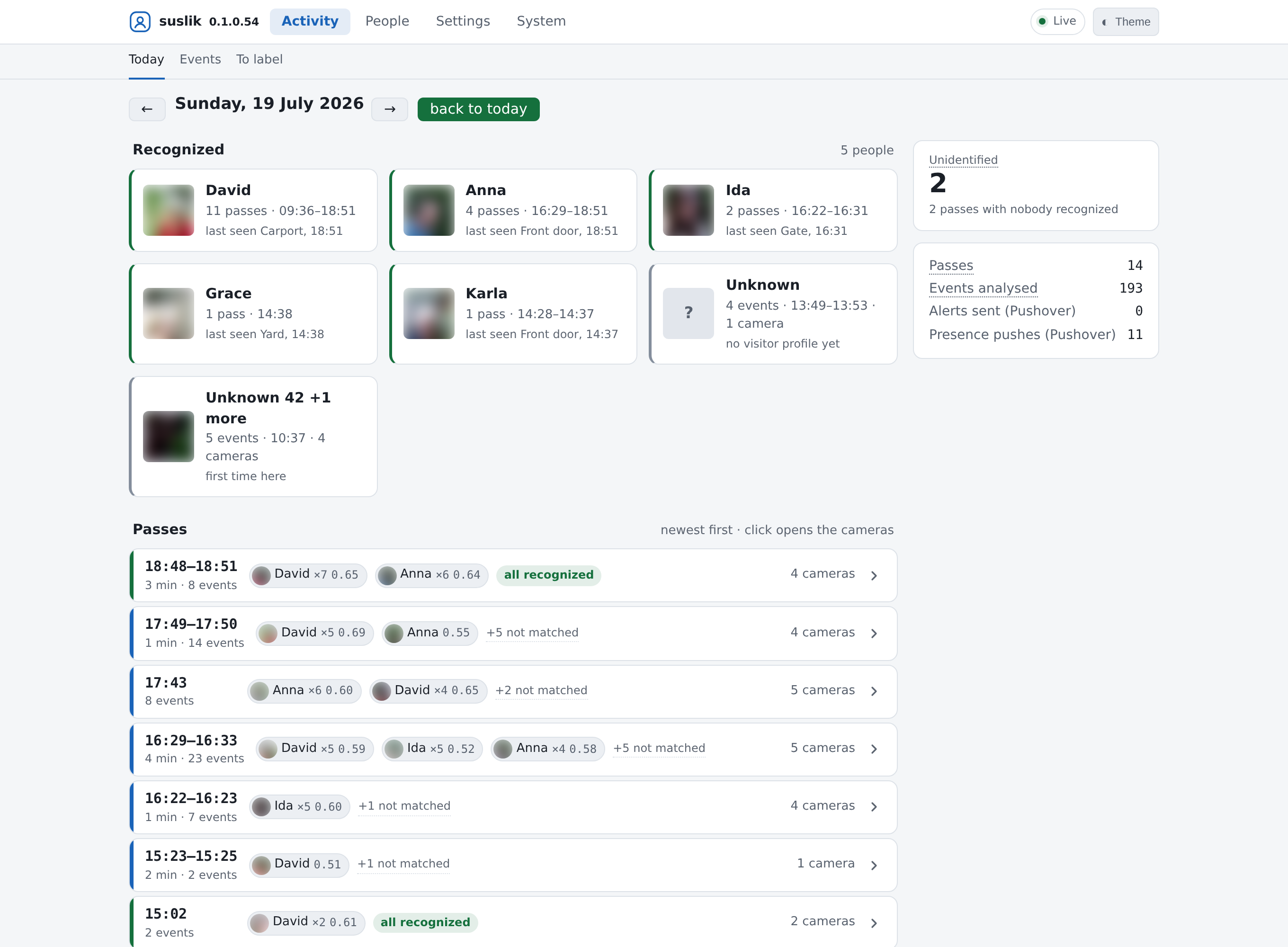
(Screenshot from a live install of v0.1.0.54; names and faces anonymized.)
Features
- Scenario grouping across cameras — one walk = one verdict, not N noisy events.
- Time-window confirmation (several consistent frames, not a single frame).
- Reference-library hygiene tools (find no-face / mislabeled / confusable references).
- Runs locally — no cloud required. Hardware-accelerated on Intel (iGPU/NPU via OpenVINO) or NVIDIA (CUDA), with a CPU fallback that runs anywhere.
- Alerts & integration — Pushover, Telegram (via Home Assistant), and MQTT.
- Notifications tab — configure the Pushover / Telegram / MQTT channels in the UI (secrets kept in the data volume, shown masked) and send a test message per channel.
- Config backup/restore — download all settings as a single JSON file and restore them from it.
- Web UI with a guided setup wizard, scenario view, reference/unknown management, and a
startup self-check you can read from
docker logs. - Optional write-back to Frigate (
sub_labelcorrection) — off by default (read-only).
What suslik is not: a real-time trigger
suslik works on the finished clip, after the event ends — it waits for more evidence and then tries to be right. That is a design decision, and it has a measurable cost: from a person appearing to suslik's verdict is typically 25 seconds at the very best, usually noticeably more (event duration + clip availability + analysis; measured across 414 real events by a user, median around a minute). Don't build arrival automations on it — a light that should turn on as someone walks up, or a spoken greeting, needs Frigate's own real-time events as the trigger. suslik's job is the part Frigate can't do: deliver the reliable answer afterwards and correct the record.
Quick start
Run the variant that matches your hardware (CPU shown here; see the guide for Intel/NVIDIA):
# compose.yml
services:
  suslik:
    image: ghcr.io/bennobaer-dev/suslik:latest-cpu   # -gpu = Intel · -cuda = NVIDIA · latest-<variant> = newest of that variant
    restart: unless-stopped
    ports:
      - "8199:8199"
    environment:
      - TZ=Europe/Berlin
    volumes:
      - ./suslik-data:/data
docker compose up -d
docker compose logs -f          # watch the startup self-check
Using the Intel (
latest-gpu, or thegpu-legacyversion tag for 6th–10th gen Core iGPUs) or NVIDIA (latest-cuda) variant? Those additionally need device passthrough (devices:/group_add:for Intel,--gpusfor NVIDIA) — without it they silently fall back to CPU. See installation for the full compose blocks. suslik runs happily next to Frigate on the same machine as a second container.
Then open http://<host>:8199/ and follow the setup wizard (connect Frigate → pick
cameras/zones → choose backend).
Updating — suslik never updates itself. Run docker compose pull && docker compose up -d when
you want a newer version; your data lives in the volume and is untouched. Details, and how to pin a
fixed version instead: installation.md.
Documentation
- Changelog — what changed per release. Worth a look right now:
0.1.0.63 adds pass drill-down pages, a
gpu-legacyimage variant (testing) for older Intel iGPUs (UHD 6xx, 6th–10th gen Core), and a hardware hint that tells you when a different image variant would suit your machine better. (0.1.0.47 was the performance wave — from roughly a CPU-minute per event to seconds.) - Installation — the five image variants (CPU / Intel / Intel legacy / NVIDIA / AMD-testing),
pull from GHCR or build from the source in this repository,
docker runanddocker compose. - Configuration — the setup wizard, config keys, environment
variables, and the
/datalayout. - Usage — a tour of the web UI, enrollment, and the scenario view.
- Learning people — the guided learning run over your own recordings: harvest, grouping into recurring people, naming a cluster once, adoption.
- Architecture — how the verify layer works and why there are separate hardware images.
- Supported hardware — the full matrix (integrated GPUs are first-class; NVIDIA, CPU-only, and what is explicitly not supported) with a measured performance comparison across Intel iGPU+NPU, CUDA and CPU.
- Hardware acceleration — backend selection, benchmarks, and the Intel/NVIDIA specifics.
- Known issues & limitations — an honest list of current bugs, limitations and what comes next.
Status
This is an alpha and a published work in progress. suslik runs daily on the author's own setup, and the current focus is on two things at once: the learning module (harvesting faces from your existing recordings and clustering recurring people) and camera areas (grouping cameras into parts of the property as views, with per-area alerting to follow). The learning side already holds up well — a learning run over any number of past events reliably surfaces the people who keep coming back, ready to be named in one step. Everything around it is moving: treat version jumps as normal, and please open an issue if something doesn't fit your setup — known issues & limitations lists what we already know.
The CPU, Intel and NVIDIA/CUDA image variants are published on GHCR and validated on
real hardware (the CUDA image is large, since it bundles the multi-GB CUDA runtime, so it takes
longer to pull); the gpu-legacy variant for older Intel iGPUs is in testing with a community
tester and has no latest tag yet.
Source code: published in this repository as of 0.1.0.103-alpha (MIT). The images remain self-contained: everything runs locally, nothing is downloaded at runtime, and internet access is only needed for the optional push-notification channels.
What's being worked on right now
(updated 2026-08-01 — this section changes with every release)
- Learning module (active construction, usable today): a guided learning run harvests faces from as many past person events as you choose (a wizard estimates the duration on your hardware first), grades them through quality gates, and clusters them into recurring people across days and cameras — the postman who shows up four times in three weeks ends up as one cluster you name once. Naming is in (per-perspective recommendations, duplicate guards, collision checks); adoption into recognition is what's being built right now.
- Camera areas (stage 1 shipped in 0.1.0.103-alpha): group cameras into parts of your property (driveway, backyard, …). One camera belongs to one area, everything else stays in Default; areas act as views on Today/Appearances/Events, and alerts name the area. Passes are still always grouped and judged across the whole property — an area never re-judges a pass. Per-area alert behavior is stage 2.
- Performance — honestly not done yet: recognition inference itself is fast on a GPU (measured ~13 ms per inference on CUDA), but the full per-event analysis still takes longer than I want — the wall time sits in the CPU side around the detector, not in the GPU. I'm not satisfied with it and will keep digging.
- Exploring a live path (go2rtc): instead of waiting for the recorded clip, check the live stream frame by frame until a face is recognized really well — with the explicit goal of firing a Home Assistant action the moment a known face is confirmed (open the door light, disarm a scene, whatever you wire up). Early exploration, not built yet; the clip-based judgment stays the reference.
- Performance wave (shipped in 0.1.0.47): a persistent analysis worker keeps the models warm, recognition can run on the Intel NPU (picked automatically by a one-time startup benchmark), the detector follows the clip's aspect ratio, browser copies are transcoded lazily, and NVIDIA gets a full-hardware NVENC pipeline. Net effect on the author's box: from roughly a CPU-minute per event to ~8–13 CPU-seconds warm — with fixed-point acceptance proving judgments unchanged on CPU, Intel GPU/NPU and CUDA.
- Today redesign, part 1 (shipped in 0.1.0.54): click a person and see their passes of the day — camera route, best shot, and how the face developed across the pass — plus a calibrated false-detection filter that keeps wheel hubs and foliage out of the unknown-visitor pool (recognition itself untouched). Part 2 (a pass detail page, per-pass unknown numbering, small UI polish) is next.
- Automatic false-trigger class: passes where Frigate saw a "person" but the whole clip contains no usable face will get their own quiet class instead of counting as unknown visitors.
- Smaller images: yes, I know the images are big — models, drivers and runtimes are baked in on purpose so nothing is ever downloaded at runtime. Docker only pulls changed layers on updates, but shrinking the images properly is planned for a later pass.
- Checked — Google Coral TPU: I actually ran the test instead of guessing. A Coral-sized recognition model (~3 MB INT8) does fit the chip and even keeps strangers out — but it loses real residents: the separation band the every-frame method needs collapses to ~0.02 (the full model keeps ~0.18). No threshold fixes that, so the verdict is a measured no. Details in known-issues.md.
- Further out — recognizing people beyond the face: once a person has been positively identified by face, keep a few appearance snapshots and use a local vision model to recognize them even when no usable face is visible. Local-first, baked into the images like everything else.
Thanks to everyone testing and reporting back — the feedback is directly shaping this list.
Comments