Take a long-form story from its bible to a deliverable manuscript.
Hosted demo · Releases · User guide · Source · 中文
The hard part of a novel is rarely generating the next paragraph. It is keeping characters, chronology, promises, outline decisions, and tens of thousands of existing words in agreement. A change may affect several chapters, and an AI suggestion should not become part of the book simply because it was generated.
NarraLume keeps that work in one writing environment. You can maintain structured story material, write by hand, save versions, annotate and review a chapter, or delegate a selection, one chapter, or a continuous run to an AI model. Generated prose, revisions, and story changes remain candidates until the author accepts them.
It is a complete manual writing tool first and an AI-assisted tool second. Creating books, importing manuscripts, organizing the story, writing, exporting, and backing up do not require a model. The interface supports both Chinese and English; you can switch it at any time under Settings → Interface language.
How it approaches long-form writing
| Principle | NarraLume's approach |
|---|---|
| Story knowledge should not live in scattered chats | Author intent, outline, entities, canon facts, relationships, timeline events, and foreshadowing live in one story bible shared by writing and review. |
| An AI suggestion is not a saved decision | Prose, revisions, and story changes are staged as candidates that the author can compare, accept, reject, or keep for later. |
| A long task should survive navigation and failure | AI work has steps, states, checkpoints, and run records. The author can leave a page and return from the overview or run center. |
| A manuscript must be portable and recoverable | Delivery formats, single-project bundles, project snapshots, and full SQLite backups are separate tools with explicit recovery boundaries. |
These constraints make AI behave more like a collaborator who submits reviewable work than a chat box that can silently replace the current draft.
From an idea to a deliverable manuscript
- Create or import a book. Begin from a blank project, let AI organize an initial direction, or import Markdown, plain text, DOCX, HTML, EPUB, or a NarraLume project bundle.
- State the author's intent. Record the reading promise, themes, audience, tone, ending direction, current focus, and boundaries that planning and review should respect.
- Build the story bible. Organize volumes, chapters, scenes, entities, confirmed facts, relationships, chronology, and foreshadowing.
- Write in the studio. Edit Markdown manually, save versions and comments, request a selection edit, or delegate a chapter.
- Review and revise. Inspect findings with evidence, accept or reject them, mark false positives, and create revision candidates when useful.
- Decide story changes. New character states, facts, relationships, timeline events, and foreshadowing do not enter canon silently. A conflict with a locked fact pauses the task for an author decision.
- Deliver and preserve. Review quality reminders, export the manuscript, create a project snapshot, and make a full-library backup before upgrades or migration.
idea or existing manuscript
  -> author intent, story bible, and outline
  -> manual writing / selection edit / chapter delegation / continuous writing
  -> review findings and story-change candidates
  -> author decision
  -> saved version, export, and backup
Feature map
| Workspace | Main capabilities |
|---|---|
| Bookshelf | Blank and AI-guided creation, manuscript import, custom covers, search, duplication, archive, and a 30-day recycle bin. |
| Project overview | Chapter and word-count progress, active tasks, review findings, story changes, and the next useful entry point. |
| Story bible | Author intent, outline, entities, canon, relationships, timeline, and foreshadowing, with AI changes shown as diffs. |
| Writing studio | Markdown prose, versions, comments, selection edits, chapter delegation, review, revisions, story changes, and a co-creation sandbox. |
| AI quick creation | Direction and boundary confirmation, multi-chapter production, chapter-by-chapter review, pause, steer, retry, and hand-back to manual writing. |
| Project assistant | Context from the current project, page, and selection, with persistent actions still requiring confirmation. |
| Run center | Task steps, model calls, checkpoints, errors, and available recovery actions. |
| Long-form lab | Story-memory search, plot prediction, memory management, and impact previews that do not modify the book. |
| Delivery and settings | Quality reminders, exports, snapshots, full backups, providers, model assignments, Writing Skills, and Agent Skills. |
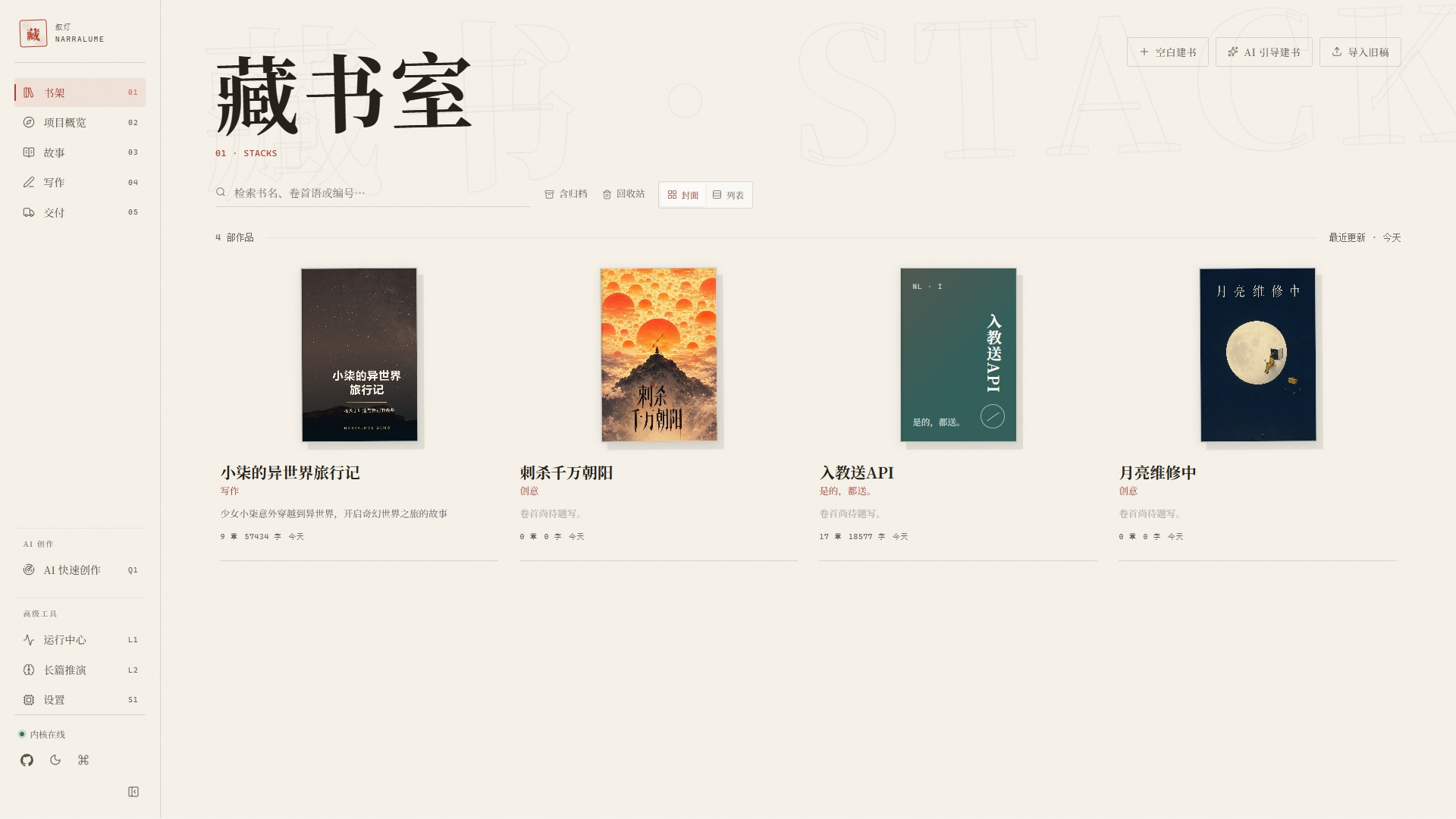
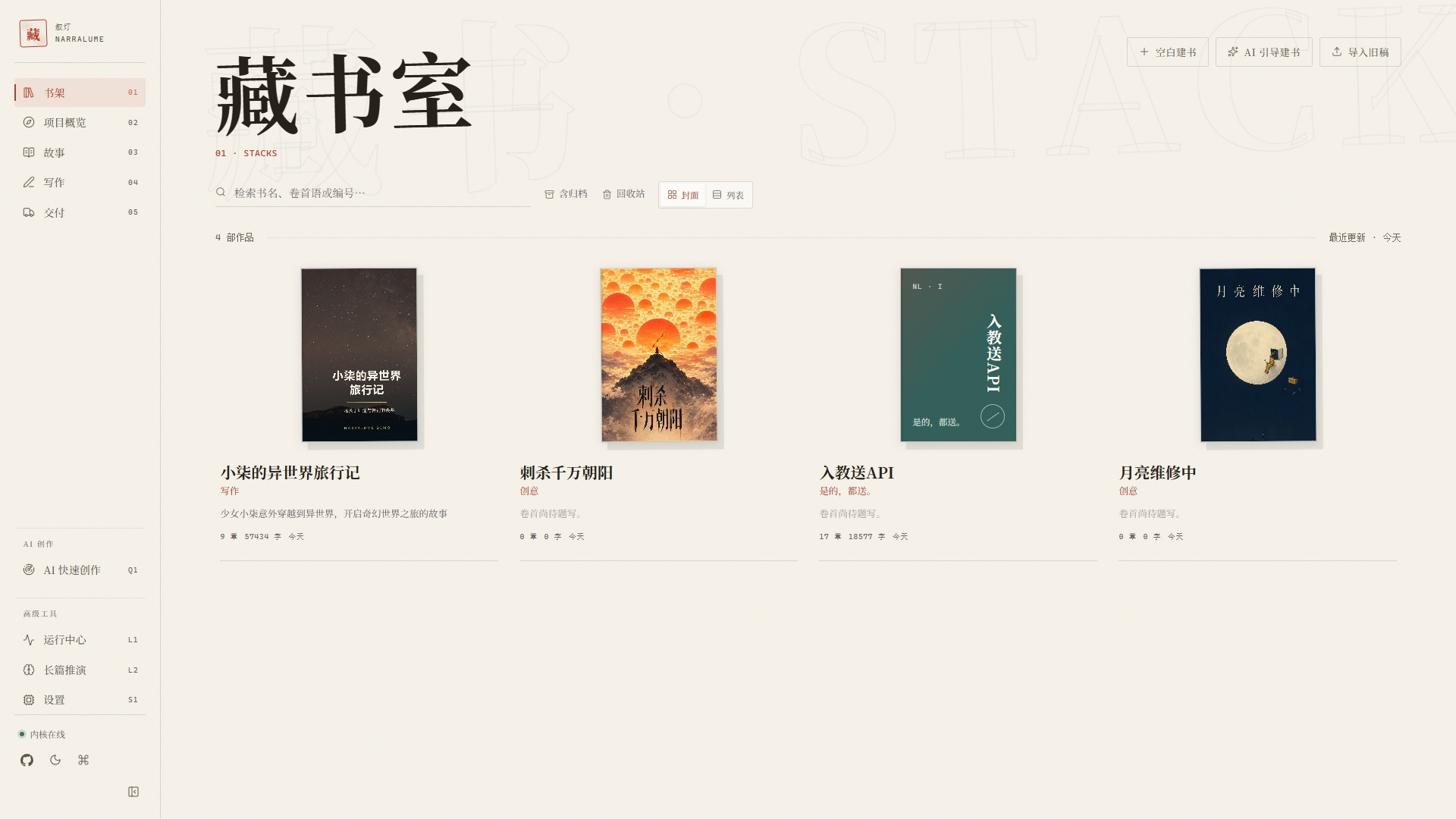
Bookshelf
The bookshelf is where books begin: start from a blank project, let the AI guide creation, or import an existing manuscript. Covers are customizable, and deleted books stay in a recycle bin for 30 days.
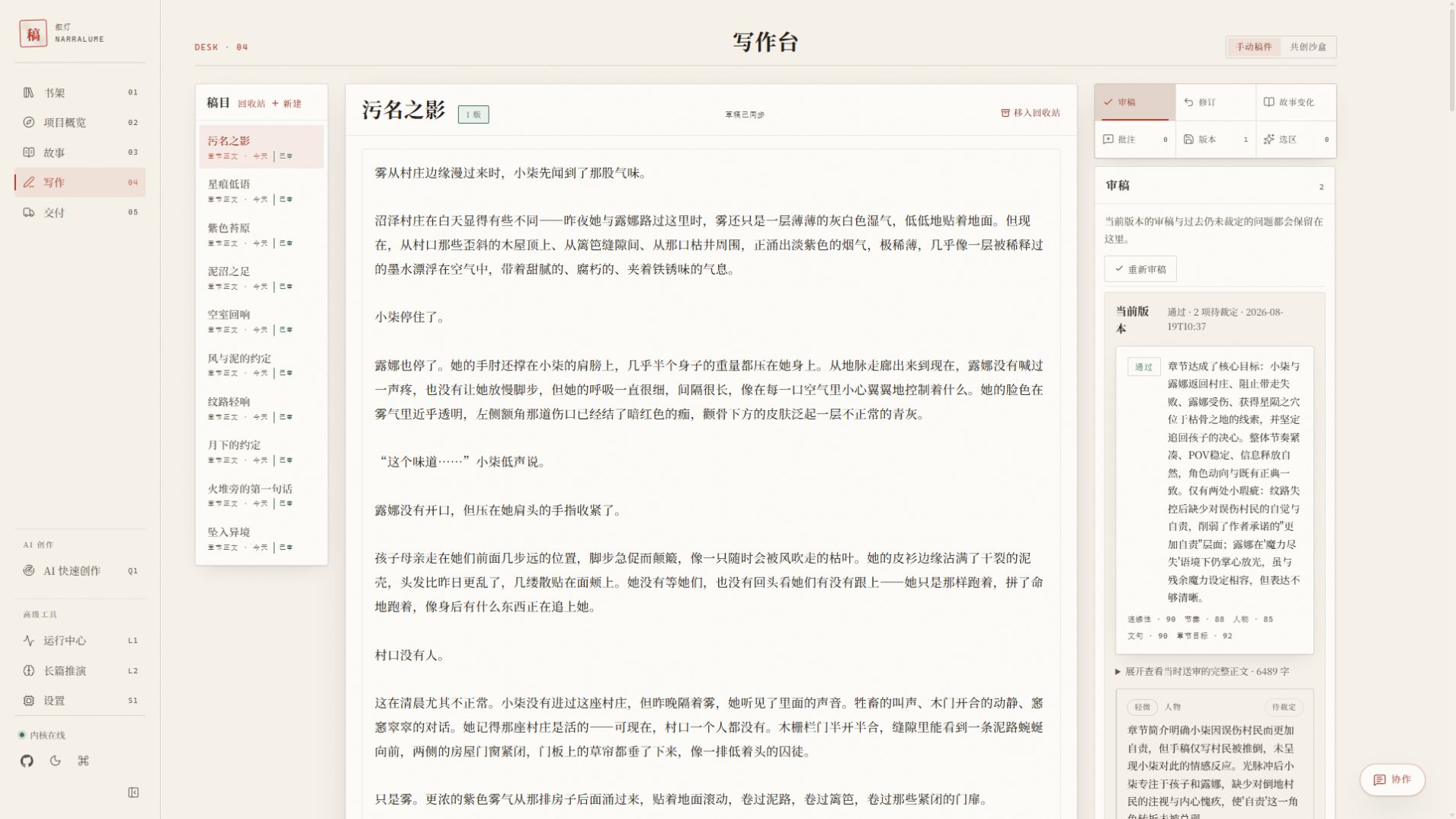
Writing studio
The studio keeps chapters, prose, versions, and review tools on one screen: structure on the left, writing in the middle, and review findings or story-change candidates handled right beside them, without jumping to another tool. AI output always lands as a candidate first and enters the manuscript only after the author accepts it.
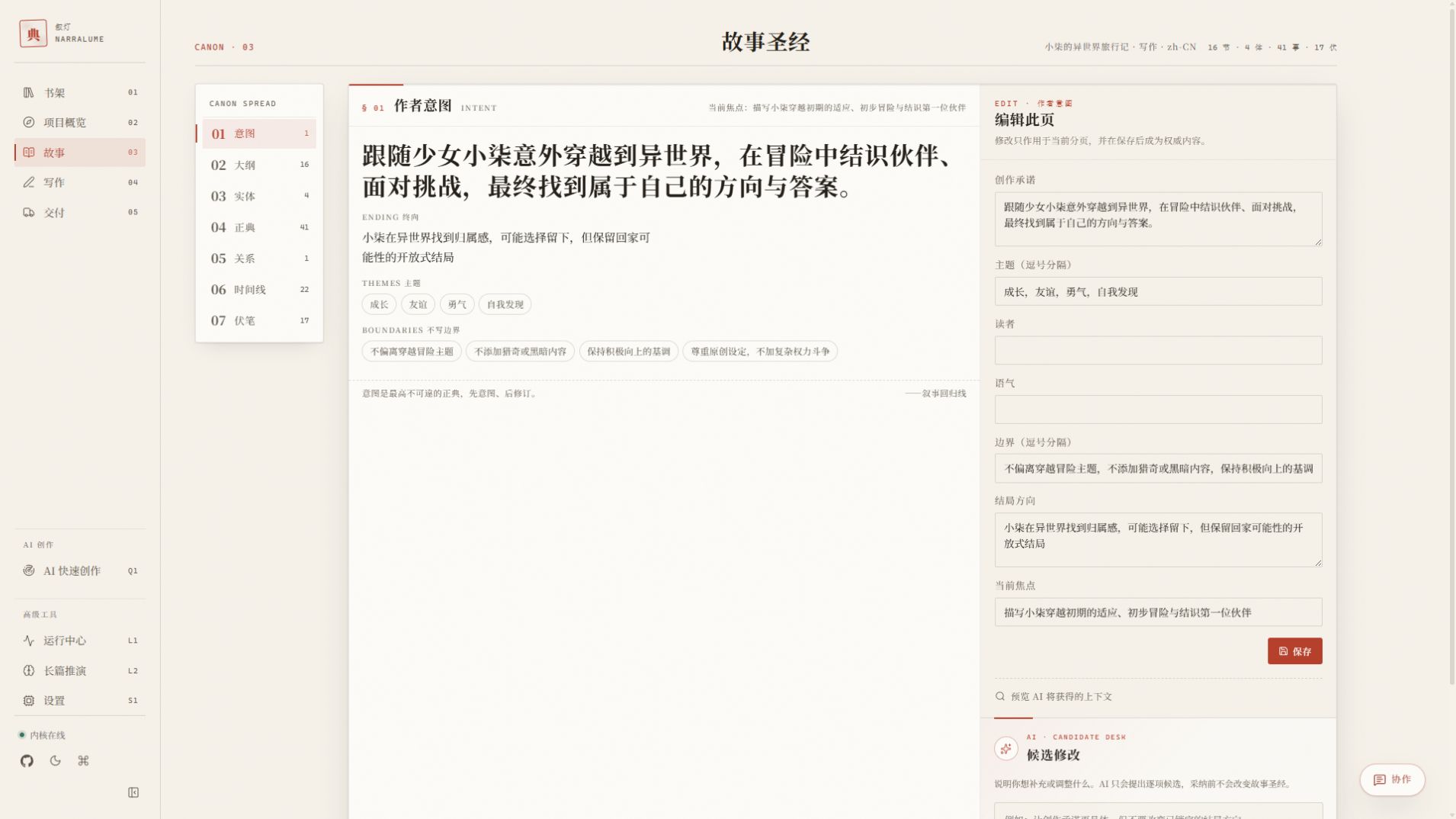
Story bible
Seven sections keep author intent, outline, entities, canon, relationships, timeline events, and foreshadowing separate but available to the same writing workflow. The editing panel can save a direct change or stage an AI suggestion for the author to review first.
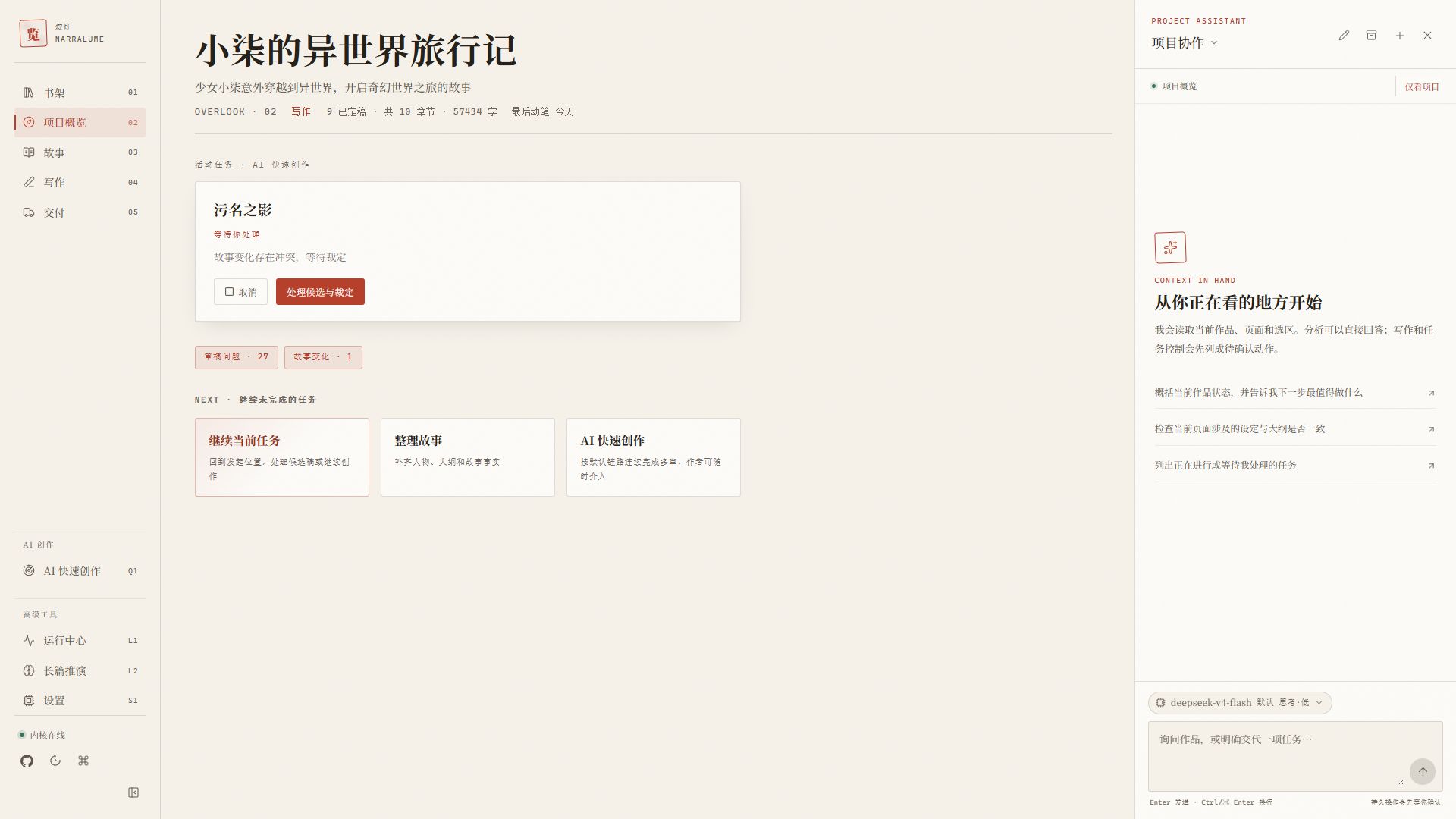
Project assistant
The assistant stays beside the current project and understands the page or selection already in view, so the author does not have to reconstruct context in every message. It can explain, locate work, and propose actions, while persistent changes still wait for confirmation.
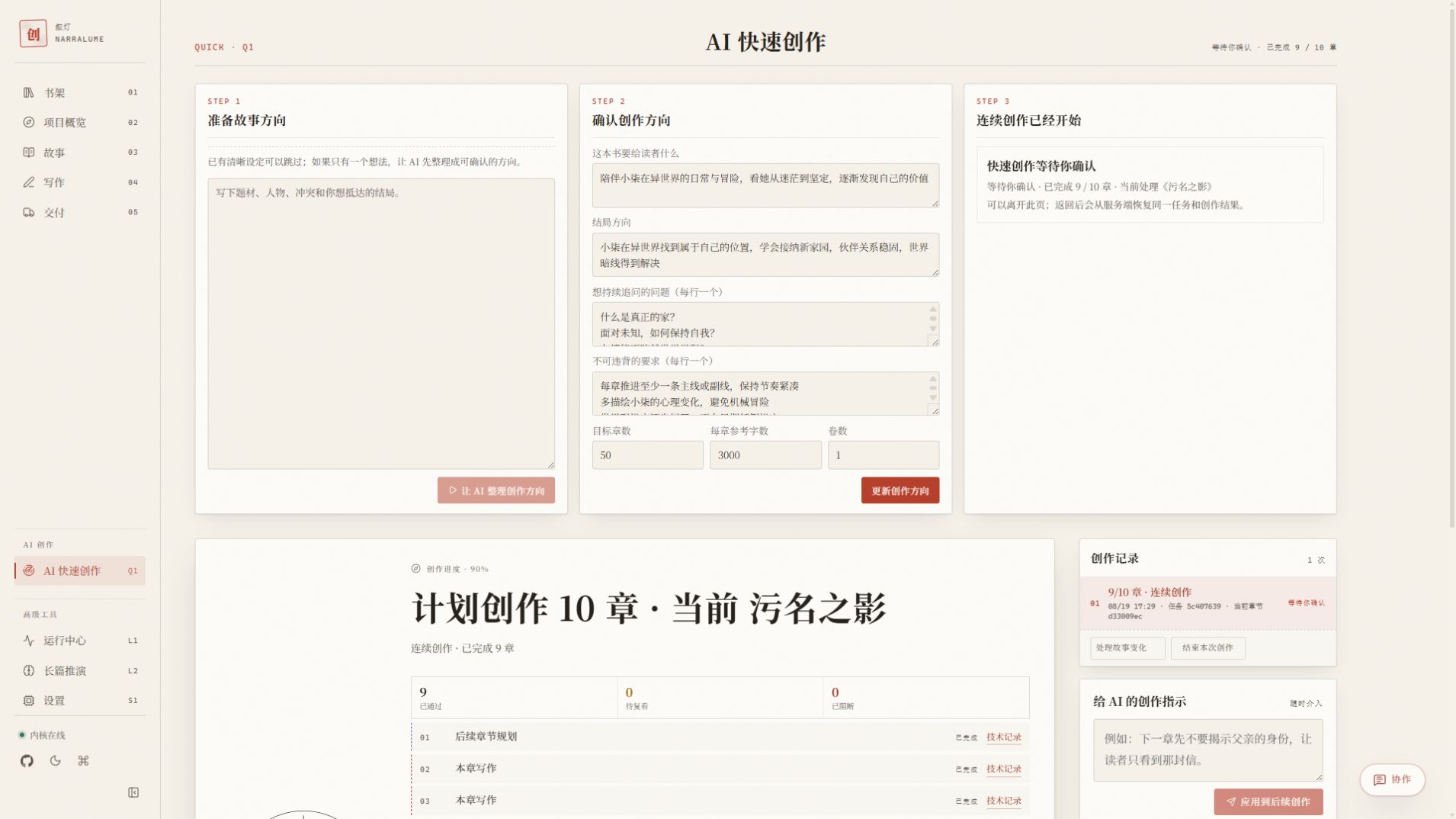
AI quick creation
Quick creation is a three-step workflow for preparing a direction, confirming boundaries, and producing chapters. The author can pause, steer, review chapter by chapter, and resolve canon conflicts before the task continues.
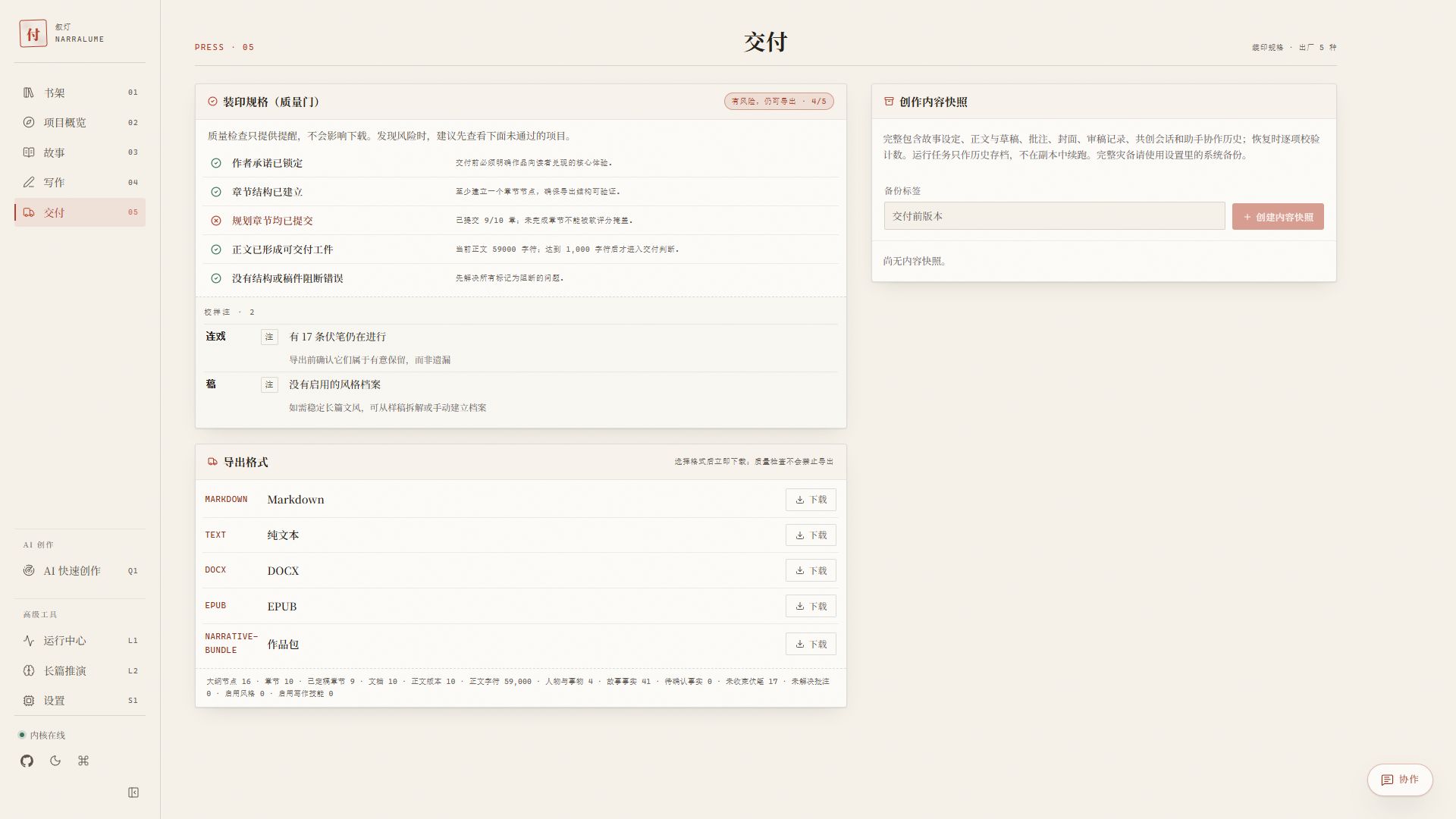
Delivery
Delivery brings quality reminders, common export formats, and project snapshots into one place. The checks point out unfinished work without pretending to decide whether the manuscript is ready.
Three ways to write
| Mode | When it fits | What remains under author control |
|---|---|---|
| Fully manual | The plan is already clear, or the manuscript should not pass through a model | All prose, versions, story material, exports, and backups |
| Focused assistance | A passage needs editing, a scene needs options, a chapter needs review, or one chapter should be delegated | Selection, instruction, candidate acceptance, and story-change decisions |
| Continuous writing | The direction is confirmed and several chapters should move forward in one run | Boundaries, chapter target, pause and steering, chapter results, and conflict resolution |
All three modes use the same manuscript versions and canon. Switching modes does not create incompatible copies of the project.
Choose an entry point
| Audience | Entry point | Prerequisites | Default data location |
|---|---|---|---|
| First-time visitor | Hosted demo | A modern browser with OPFS and Web Worker support | The current site's browser OPFS |
| Windows writer | Windows launcher | Windows x64; first launch may need network access | data/ beside the release files |
| macOS writer | macOS launcher | Apple Silicon; first launch may need network access | data/ beside the release files |
| Linux writer | Linux launcher | Linux x64; first launch may need network access | data/ beside the release files |
| Contributor | Development guide | Node.js 24+, npm 11+ | NARRATIVE_DATA_DIR, default ./data |
| Self-hosting operator | Docker Compose | Docker Engine/Desktop and Compose v2 | A Docker volume and a separate backup directory |
| Public-demo maintainer | Cloud deployment guide | Wrangler, domains, upstream model, and a security policy | Advanced path; most users do not need Bridge |
A ten-minute first workflow
- Start NarraLume and open the bookshelf. Local release users can run the
Start-NarraLumelauncher for their platform. - Create a blank book and enter a title and premise. Model configuration can wait.
- Open Story, write the author intent, and create one chapter outline. Characters and facts can be added as the draft grows.
- Create a chapter in the writing studio, enter text, and save a new version.
- Open Delivery, confirm that the project exports, and create a project snapshot.
After that path works, add model configuration, review, or continuous creation as needed. The detailed user guide, quick start, and the rest of the product documentation are available in both Chinese and English.
Import, export, and recovery
| Object | Format or scope | Intended use |
|---|---|---|
| Manuscript import | Markdown, plain text, DOCX, HTML, EPUB, NarraLume project bundle | Analyze existing work into candidates before applying it to a project |
| Reading and editing export | Markdown, plain text, DOCX, EPUB | Submission, layout work, or reading in another tool |
| Project bundle | One book and its author-visible material | Move a project between NarraLume environments without model credentials |
| Project snapshot | Story material, manuscript versions, comments, reviews, and collaboration history | Restore a new project inside the current library without overwriting the original |
| Full SQLite backup | The entire library and local settings | Upgrade, migration, and disaster recovery; may contain locally stored provider credentials |
These objects are not cloud sync and are not interchangeable. Read Data, privacy, and backup before placing real work in any mode.
Models and data
Configure AI by creating a provider channel, registering its upstream model, and assigning that model to the default generation role. Planning and review inherit the default unless explicitly overridden; embeddings are configured separately for semantic search.
NarraLume supports OpenAI Chat Completions, OpenAI Responses, and Anthropic Messages. Direct browser requests require the provider to allow the current origin through CORS; the local Server does not have that browser restriction. See Configuration.
Bridge and Relay are only for maintainers running a public demo with a private or local upstream. Most users can skip them and use the hosted browser kernel, local Server, or Docker directly.
| Runtime | Work and run history | Important boundary |
|---|---|---|
| Hosted demo / browser kernel | Site-scoped OPFS SQLite in the current browser | Clearing site data, using private browsing, or changing browsers may make the library inaccessible |
| Local launcher / local Server | data/narralume.sqlite by default |
Do not copy the live database directly; use backup features or scripts |
| Docker Compose | The narralume-data volume |
docker compose down --volumes deletes the volume; keep backups on an independent host path |
Browser, local Server, and Docker libraries do not synchronize automatically. A downloaded full library may contain bring-your-own provider credentials and should be protected like the manuscript and API keys.
Who it is for
NarraLume fits authors who expect to maintain a book over time, care about continuity, want manual writing to remain primary, or prefer to choose their own models and data location.
It is not currently a real-time multi-user document or an account-based cloud sync service. A general chat tool is simpler for a one-off question; NarraLume becomes useful when the outline, versions, canon changes, and long-running tasks need to remain connected.
Documentation
| Document | Purpose |
|---|---|
| User guide | Feature-by-feature use of the bookshelf, story bible, writing, AI, delivery, and settings |
| Quick start | Hosted, Windows, macOS/Linux, and development startup paths |
| Configuration | Providers, model assignments, environment variables, Bridge, and Relay |
| Data, privacy, and backup | Storage locations, bundles, snapshots, full backups, and recovery rehearsal |
| Docker Compose | Local self-hosting, update, stop, and backup |
| Cloudflare deployment | Advanced path for maintainers running a public Web, Relay, and local Bridge; most users do not need it |
Development
npm ci
npm run dev
The development Web app listens on http://127.0.0.1:4318; the Server/API listens on http://127.0.0.1:4317.
| Command | Purpose |
|---|---|
npm run verify |
Run formatting, linting, type checks, tests, evidence checks, license checks, and the production build |
npm run test:e2e |
Exercise cross-page and responsive workflows with Playwright |
npm run release:build |
Build the release archive for the current supported platform |
npm run deploy:web / npm run deploy:relay |
Preview or deploy your own Cloudflare Web and Relay |
The repository is split by responsibility: apps/web contains the UI and browser kernel, apps/server contains the local API and backup service, packages/ contains domain, task, persistence, and shared contracts, and deploy/ plus scripts/ handle delivery and operations.
Common questions
- Can it work without a model? Yes. Books, story material, outlines, manual writing, versions, comments, imports, exports, and backups remain available.
- Why can a provider fail in the browser? Check the protocol, Base URL, key, and CORS. An upstream that cannot allow browser CORS can be reached through the local Server.
- Why is a book missing after an upgrade? Confirm that the new instance points to the original data directory. Do not replace an existing
data/directory with an empty one. - Can AI overwrite the manuscript? Generated prose, revisions, and story changes pass through candidate and acceptance steps. Destructive operations are not completed by a chat instruction alone.
- Can it be exposed publicly? It can be self-hosted, but remote access requires a high-entropy token, TLS, access control, and independent backups. Do not expose the local Server directly.
NarraLume is licensed under Apache-2.0. Read CONTRIBUTING.md before opening a pull request, report security issues privately through SECURITY.md, and see THIRD_PARTY_NOTICES.md for dependency and demo-cover attribution.
Comments