Official Bot Artwork by @br_lie
discord music bot. unfortunately. A self-hosted, Lavalink-free Discord music bot & web dashboard.
“Gua cuma Professional AI Prompter. Kalo kodenya agak ajaib tapi lagunya muter lancar jaya, berarti prompt gua gacor.”
— zidanaetrna (Professional AI Prompter)
Showcase & Feature Demo
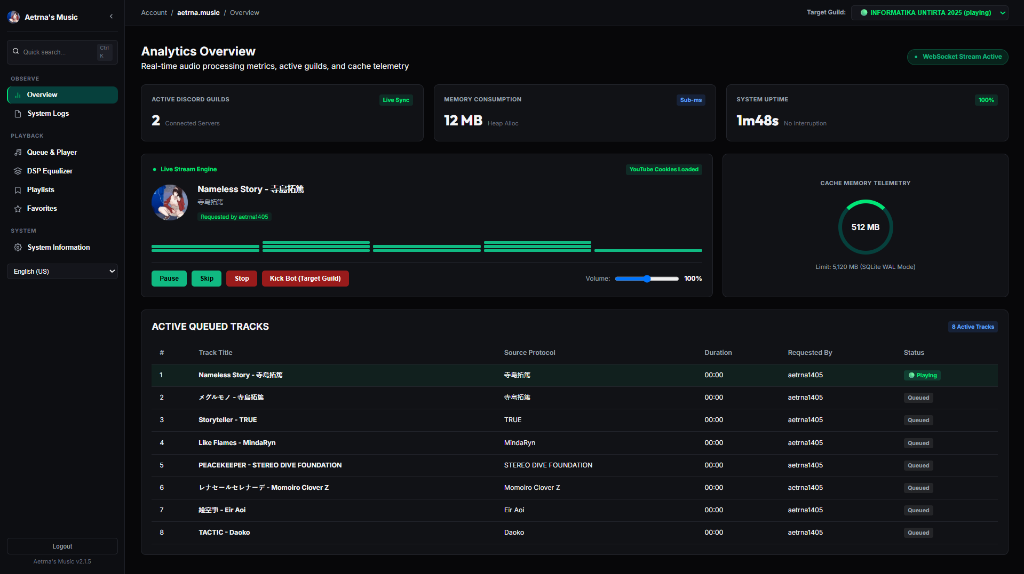
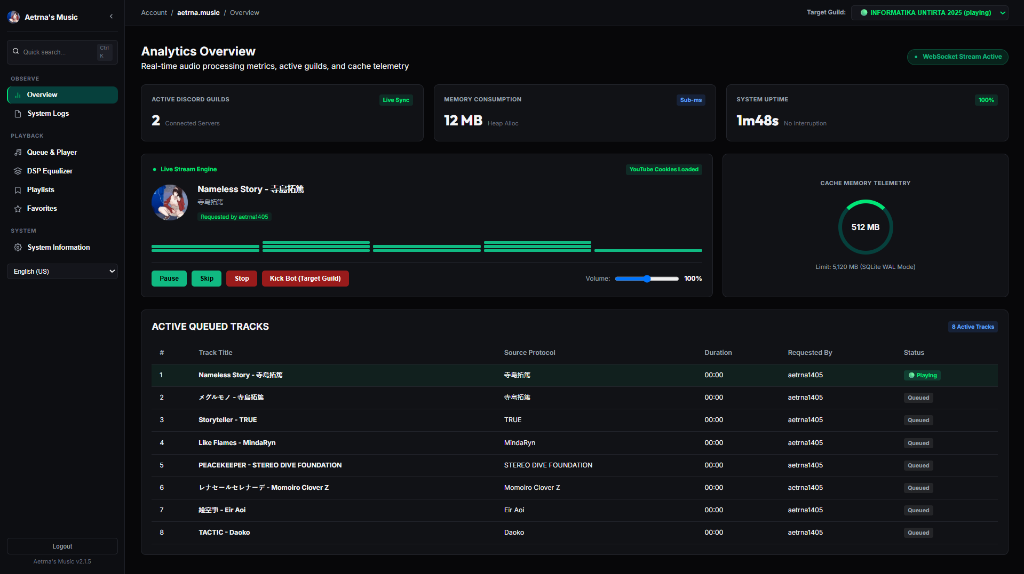
Real-Time Web Control Panel
Analytics overview, live audio stream telemetry, memory consumption metrics, active queue inspector, and multi-guild server selector.
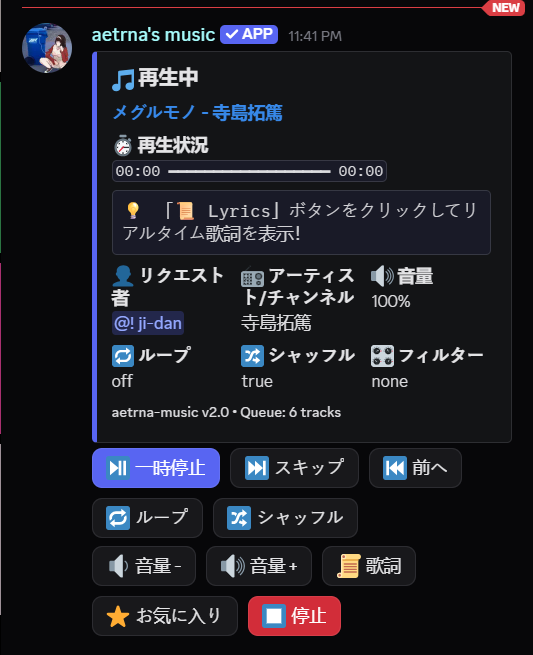
Interactive Now Playing Card (/nowplaying) |
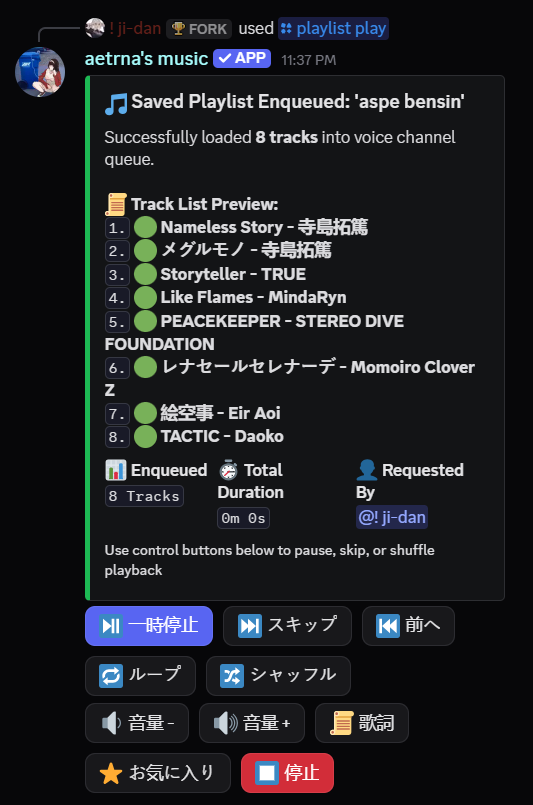
Rich Hybrid Embed Playlist (/playlist play) |
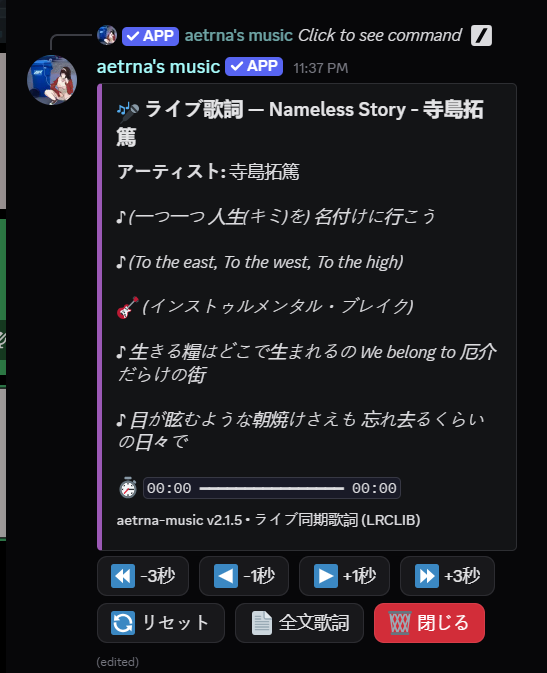
Live Synced LRC Lyrics (/lyrics) |
|---|---|---|
 |
 |
 |
Why aetrna-music?
- Lavalink-Free: No separate Lavalink server or Java runtime required. Lightweight native Go + Node.js architecture.
- Self-Hosted: Run everything on your own server with full control.
- Web Dashboard: React 18 + TypeScript control panel with real-time stream status, active queue inspector, memory consumption telemetry, and multi-guild switcher.
- Rich Hybrid Embed UI: Aesthetic Discord embed cards with full-width thumbnails, clickable track list previews (
1. [Title](https://github.com/zidanaetrna/aetrna-music/blob/main/URL) (3:45)), and 2-row interactive control button matrices ([ Pause ],[ Skip ],[ Prev ],[ Loop ],[ Shuffle ],[ Vol- ],[ Vol+ ],[ Lyrics ],[ Favorite ],[ Stop ]). - Custom Saved Playlists: Create, save, manage, and play custom user playlists (
/playlist create,/playlist add-track,/playlist play,/playlist list-tracks). Supports YouTube links, Spotify URLs, and manual title searches (query: FLOW Sign). - Synced LRC Lyrics: Live line-by-line synchronized lyrics directly in Discord embeds with dual-orientation candidate matching (
Title - ArtistvsArtist - Title) for Japanese/Anime/J-Pop tracks (/lyrics). Read full documentation in docs/lyrics-ranking.md. - Audio Filters: On-the-fly FFmpeg DSP filters (
bassboost,nightcore,vaporwave,8d,pop). - Docker-Ready: Instant containerized setup without assembling dependencies manually.
- Smart YouTube Search Ranker: Deterministic 5-candidate ranking in Go (< 0.05ms) with zero network overhead. Solve broadcaster TV-size clip traps for anime/J-Pop queries without query manipulation. Read full documentation in docs/search-ranking.md.
Try the Bot
A public instance is available if you want to test things out before setting up your own.
It's the same codebase. No guarantees on uptime.
Quick Start & Installation
Option 1: Interactive CLI Setup Wizard (Recommended)
Run the interactive wizard to generate .env and initialize configuration:
npx aetrna-music init
Option 2: Docker Compose (Recommended for servers)
Clone repository:
git clone https://github.com/zidanaetrna/aetrna-music.git
cd aetrna-music
Copy environment template:
cp .env.example .envEdit
.envand set at minimum yourDISCORD_TOKENandADMIN_KEY(fallback:DASHBOARD_PASSWORDstill works for legacy configs).Optional: Add YouTube cookies for unrestricted playback:
# Copy your exported Netscape-format YouTube cookies here
cp /path/to/exported.txt ./cookies.txt
See the YouTube Cookies Setup Guide for step-by-step instructions.
docker-compose.ymlautomatically mounts./cookies.txtinto/app/cookies.txtinside the container (read+write, not read-only — yt-dlp needs to update cookie expiry state).Start container:
docker compose up -d --buildYour bot is now running, and the Web Dashboard is live at
http://localhost:8080!
Option 3: Manual Execution (Local Run)
Prerequisites:
- Go:
1.23+ - Node.js:
22+ - FFmpeg: Installed and added to system
PATH - yt-dlp: Installed and added to system
PATH
Install Node dependencies:
npm installStart Voice Worker (Terminal 1):
node voice-server/server.jsStart Go Core Bot & Web Server (Terminal 2):
go run ./cmd/bot
Web Control Panel / Dashboard
aetrna-music comes with a modern React 18 + TypeScript Web Dashboard accessible at http://localhost:8080.
- React 18 + TypeScript + Vite: Built with modern component architecture, strict type safety, and embedded into the Go executable (
//go:embed all:dist). - Real-Time Telemetry & Audio Stream Inspector: Live WebSocket status updates for active guild stream engine, RAM consumption, and current playing track artwork.
- System Logs Tab: Real-time SSE-streamed Go process logs (500-entry ring buffer) with live color-highlighting for
[ERROR],[WARN],[INFO], and[DEBUG]— useful for diagnostics without SSHing into the container. - Cloudflare Dark Charcoal UI: Collapsible sidebar (
250pxvs64px), quick search shortcut (Ctrl + K), and unified Deep Emerald Green theme (#10B981). - Multi-Guild Target Selector: Switch between connected Discord servers to manage queues and playback controls.
- Multi-Language Support: Switch between English, Natural Tech Indonesian, and Japanese with sleek toast notifications.
- Password Protected: HMAC-SHA256 authenticated session via
.env(ADMIN_KEY). Supports three auth paths interchangeably: HTTPAuthorization: Bearer <token>header,aetrna_sessioncookie, or?token=query parameter (required for browser EventSource/SSE which can't set custom headers).
Command Reference
| Command | Category | Description |
|---|---|---|
/play <query> |
Playback | Search or queue track/playlist from YouTube or Spotify |
/search <query> |
Playback | Search tracks with interactive dropdown menu |
/playlist create <name> |
Playlist | Create a new custom saved playlist |
/playlist add-track <playlist> <query> |
Playlist | Add a song, YouTube link, or Spotify link/playlist to a saved playlist |
/playlist play <name> |
Playlist | Play a saved playlist into your voice channel with Rich Hybrid Embed & Control Buttons |
/playlist list |
Playlist | List all your custom saved playlists |
/playlist list-tracks <name> |
Playlist | View tracks in a saved playlist |
/playlist delete <name> |
Playlist | Delete a saved playlist |
/pause / /resume |
Playback | Pause or resume audio playback |
/skip |
Playback | Skip to the next track in queue |
/previous |
Playback | Play previous song from history |
/stop |
Playback | Stop playback, clear queue, and leave voice channel |
/queue |
Queue | View paginated queue table with progress bar |
/nowplaying |
Queue | View Now Playing card with interactive control buttons |
/lyrics |
Playback | Fetch synced line-by-line LRC lyrics for current track with live time-offset adjustment |
/shuffle |
Queue | Shuffle current track queue |
/loop |
Queue | Toggle loop mode (Off / Song / Queue) |
/volume <level> |
Playback | Set playback volume level (0 – 200%) |
/favorite |
Favorites | Save current song to your personal SQLite favorites |
/favorites |
Favorites | View and play your saved favorite songs |
/filter <name> |
DSP Filter | Apply FFmpeg audio filters (bassboost, nightcore, vaporwave, 8d, pop) |
/stats |
System | View bot performance & RAM usage |
/ping |
System | Check bot heartbeat and WebSocket latency |
/language <lang> |
Admin | Set server bot language (Admin only: English, Indonesian, Japanese) |
/ytauth |
Admin | YouTube authentication & cookie troubleshooting guide |
Environment Variables Reference
Full list of supported environment variables (see .env.example for raw copy-paste):
| Variable | Default | Required | Description |
|---|---|---|---|
DISCORD_TOKEN |
unset | Yes | Discord bot account token from the Developer Portal |
ADMIN_KEY |
unset | Recommended | Web Dashboard login password. Falls back to DASHBOARD_PASSWORD for legacy configs |
DASHBOARD_PASSWORD |
unset | Alias | Legacy alias for ADMIN_KEY (still supported, not recommended for new installs) |
OWNER_ID |
unset | No | Discord User ID for /leave-all admin-only commands |
PREFIX |
ajg |
No | Legacy text command prefix (slash commands are recommended) |
DB_PATH |
./data/aetrna.db |
No | SQLite database path (WAL journal mode). Docker mount: ./data → /app/data |
MAX_QUEUE_SIZE |
10000 |
No | Maximum track count per guild queue |
MAX_PLAYLIST_SIZE |
500 |
No | Maximum tracks per /collection save <name> |
DEFAULT_VOLUME |
0.8 |
No | Initial Opus encoder volume (0.0 – 1.0 float) |
SPOTIFY_CLIENT_ID |
unset | No | Required for direct Spotify URL parsing (YouTube fallback used if unset) |
SPOTIFY_CLIENT_SECRET |
unset | No | Required for direct Spotify URL parsing (YouTube fallback used if unset) |
CACHE_DIR |
./data/cache |
No | Yt-dlp stream fragment cache directory |
MAX_CACHE_SIZE_MB |
2048 |
No | Automatic cache eviction ceiling (rolling LRU-style trim) |
COOKIES_PATH |
./cookies.txt |
No | Path to Netscape-format YouTube cookies file. Size validation > 100 bytes enforced before use |
YTDLP_CLIENTS |
ios,web,android,tv |
No | Comma-separated player_client pool for yt-dlp --extractor-args youtube:player_client=…. Affects bot behavior for rate-limit evasion |
VOICE_PORT |
3005 |
No | Node.js voice worker listener port (must match what Go side expects — avoid PORT env to prevent collision with Go dashboard 8080) |
INTERNAL_IPC_TOKEN |
dev-default | Strongly recommended | Shared secret for bidirectional IPC auth between Go (:47392) and Node (:3005). Requests without valid X-Internal-IPC-Token header are rejected 401 Unauthorized. Change this in production. |
YouTube Cookies Configuration
YouTube frequently blocks data center IPs or restricts age-gated tracks. To ensure smooth playback, supply a cookies.txt file at project root. Filename must be cookies.txt (not youtube_cookies.txt) — this matches both the default COOKIES_PATH=./cookies.txt and the docker-compose.yml volume mount. Refer to the YouTube Cookies Setup Guide for the browser-extension walkthrough.
Architecture Overview
graph TD
    subgraph Discord Client & Web Users
        A[Discord User / Slash Commands]
        W[Web Dashboard Browser http://localhost:8080]
    end

    subgraph aetrna-music Single Container / Server
        subgraph Go Core Engine
            B[Go Bot Server]
            C[SQLite Database WAL]
            D[Web API & Embedded Static Server]
            E[Auth Manager HMAC-SHA256]
        end

        subgraph Node.js Voice Server
            F[Voice Worker Server port 3005]
            G[yt-dlp Audio Stream Engine]
            H[FFmpeg DSP Audio Filter Pipeline]
            I[Prism-Media Opus Encoder]
        end
    end

    subgraph External Gateways
        J[YouTube / Audio Sources]
        K[Discord Voice Gateway UDP/WS]
    end

    A -->|Slash / Legacy Cmds| B
    W -->|HTTP REST / Auth| D
    D --> E
    B -->|State & Favorites| C
    B -->|Local IPC / HTTP + X-Internal-IPC-Token| F
    F -->|Local IPC / HTTP + X-Internal-IPC-Token| B
    F -->|Fetch Track| G
    G -->|Stream Raw Audio| J
    G --> H
    H --> I
    I -->|Opus RTP Streams| K
Comments