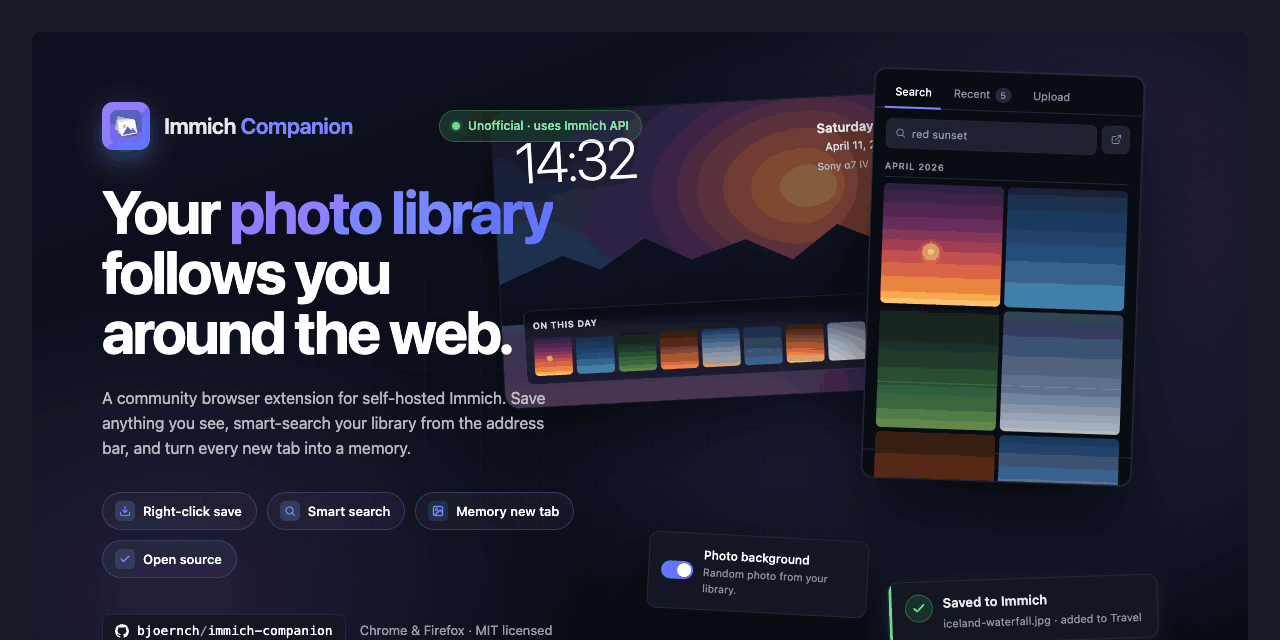
Immich Companion extends the functionality of self-hosted Immich instances directly into the browser. Developed by bjoernch on GitHub, this JavaScript-based project has garnered 60 stars. It targets users running Immich, an open-source photo and video management server, by adding tools to save web content, search libraries from the toolbar, and integrate memories into daily browsing.
The extension bridges the gap between web surfing and a personal Immich server. Users can grab images or videos from any site without leaving the page, query their photo library on demand, and even replace bland new tabs with personal photo feeds. All interactions stay between the browser and the Immich server—no external services involved.
Core features
Immich Companion packs several targeted capabilities into a toolbar-accessible package.
- Web saves via right-click: Select any image or video on a website, right-click, and upload it straight to the Immich library. Items can automatically join a designated default album.
- Quick share links: A single click handles upload, generates a public Immich share URL, and copies it to the clipboard for instant pasting elsewhere.
- Toolbar search popup: Opens a timeline view resembling a phone gallery, grouped by month with sticky date headers and a year scrubber. Search results mirror this layout. Each asset offers actions like copy to clipboard, share link, download original, or open location in maps. Recent items appear alongside results.
- Google integration: On Google search pages, matching photos from the user's Immich library surface as a top card. Queries process locally between browser and server.
- New tab memory feed: Displays a random library photo on new tabs, paired with an "On this day" strip from past years. Toggle EXIF details (camera, lens, ISO, aperture, shutter, focal length, dimensions) below the date. Source from a specific album, set auto-rotation, or disable.
These features keep interactions lightweight and server-direct.
Installation options
Setup involves installing the extension from official stores, with no local building required for most browsers. Configuration happens post-install via the extension's settings, where users enter their Immich server URL.
Chromium-based browsers handle installation through the Chrome Web Store at https://chromewebstore.google.com/detail/immich-companion/kdgjgohclpdgnhkifmlidoncogokjkkd. This covers Chrome, Edge, Brave, and Opera (Opera needs the Install Chrome Extensions add-on). Click the store link for your browser icon:
| Browser | Install Link |
|---|---|
| Chrome | Chrome Web Store |
| Edge | Chrome Web Store |
| Brave | Chrome Web Store |
| Opera | Chrome Web Store + extension enabler |
Firefox users install from Mozilla Add-ons: https://addons.mozilla.org/firefox/addon/immich-companion/.
Safari support remains experimental on macOS. It requires self-building via Xcode—follow instructions in the project's SAFARI.md file on GitHub.
Once installed, pin the extension to the toolbar, grant permissions for tabs and storage, and input the Immich server details. The popup activates immediately for searches and new tabs take effect on restart.
Who this fits
This extension suits Immich self-hosters who browse heavily and want frictionless library access. Photographers or casual users snapping web finds—recipes with images, social media clips, article visuals—benefit from right-click uploads that skip phone transfers or desktop apps. The toolbar timeline aids quick asset retrieval during work or research; no need to switch to the full Immich web UI.
Search overlay on Google proves handy for visual thinkers cross-referencing ideas with personal media. New tab users get a subtle daily photo ritual, pulling from albums like vacations or pets without manual curation. Families sharing Immich libraries find the one-click share links useful for quick external sends.
It assumes a running Immich server. Mobile-heavy users might stick to Immich's native apps, but desktop browsers see the most value.
Comparisons to alternatives
Immich itself offers web and mobile apps for uploads and searches, but lacks browser-native web scraping or new tab integration. No official Immich extension exists, making Companion the direct fit for this niche.
Broader photo tools like Photoprism or LibrePhotos provide self-hosted storage without Companion equivalents. Browser extensions for other services, such as Google Photos helpers, send data externally—Companion avoids that by design.
For pure web clipping, tools like Raindrop.io or Pocket focus on links, not direct asset uploads to a photo server. If avoiding extensions entirely, Immich's API allows custom scripts, though that's more work than a store install.
Companion stands lighter than full bookmark managers, clocking in at JavaScript simplicity versus heavier Electron apps. Its 60 GitHub stars reflect a focused community tool, not a bloated suite.
Server setup notes
While the extension handles client-side work, ensure Immich runs with external API access enabled. Default setups expose endpoints at /api/—test connectivity via curl or the Immich web UI first. No special Immich config changes needed beyond public sharing if using share links.
Permissions stay minimal: reads tabs for saves, storage for settings, and network to the user's server only.
Users on Safari face build friction due to Apple's extension limits, better suited for Chromium fans. Those preferring Firefox get parity without store compromises.
Source code and issues live at https://github.com/bjoernch/immich-companion. Install links above point to verified stores. If browser extensions don't align, Immich's apps cover core needs without extras.
Comments