
A portable, single-file WYSIWYG Markdown editor.
One .md file is the whole document: no sidecars, no lock-in, no database.
What you write stays plain Markdown that any editor, GitHub, or an LLM can read.
What is Monoleaf?
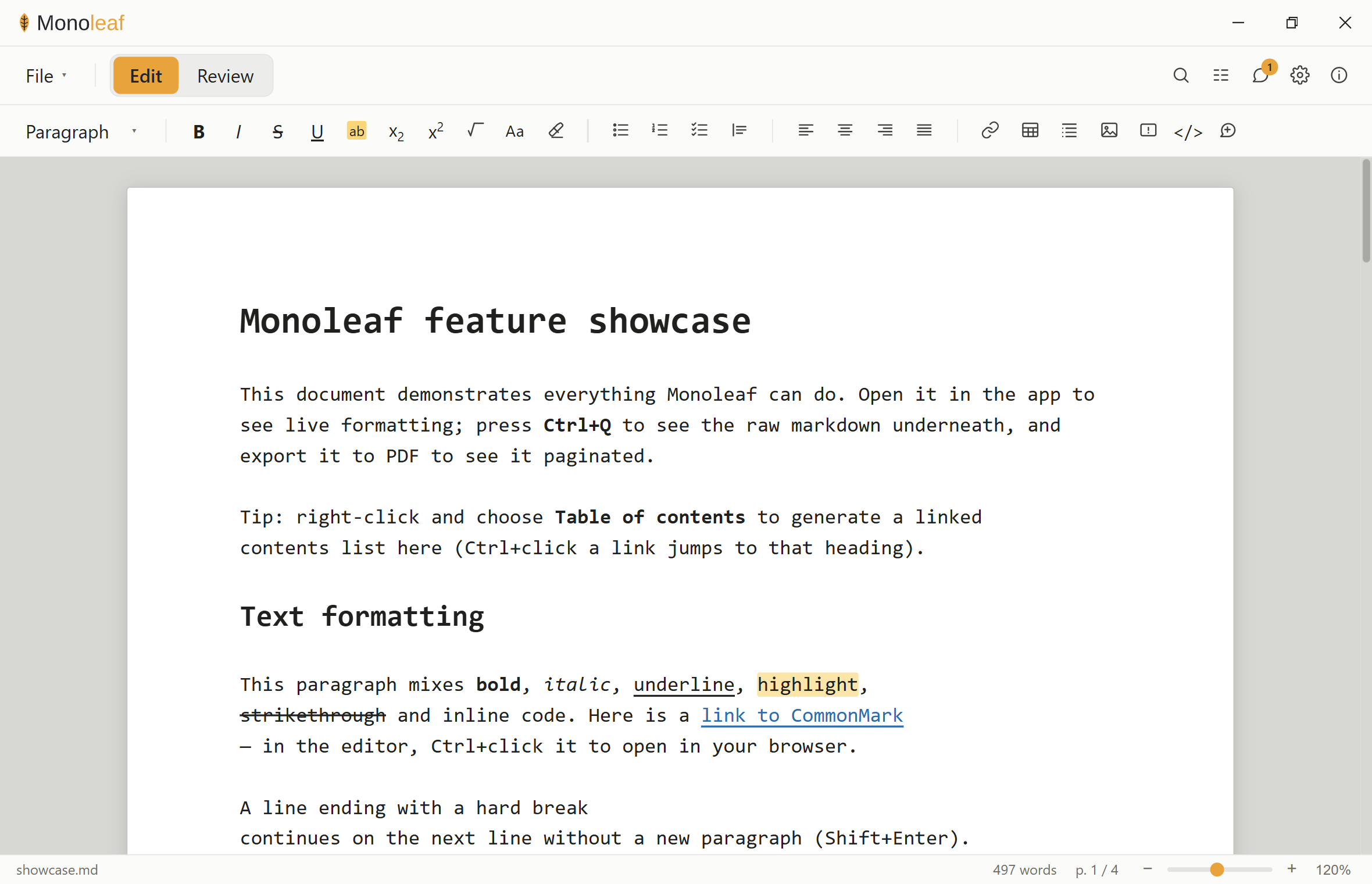
Monoleaf is a desktop Markdown editor that renders your document as you type
(headings, bold, tables, math, diagrams-as-text, callouts) while the underlying
file stays pure Markdown. There is no proprietary format and no companion
folder: the single .md you save is the document, byte for byte.
It is built for people who want the comfort of a word processor and the longevity of plain text: scientists writing protocols and reports, engineers writing docs, anyone who wants their work to still open cleanly in ten years.
Why Monoleaf is different
- The raw Markdown is the single source of truth. The editor never keeps a
hidden model; it edits the text directly. Toggle to the raw view any time
(
Ctrl+Q) and it's exactly what's on disk. - One file, and only that file. Everything travels inside the
.md: page setup, document properties, the table of contents, review comments, tracked changes. No.meta, noassets/folder. (The single exception is PDF/HTML export, which you ask for explicitly.) - Lossless, byte-for-byte round-trip. Open a file and save it untouched and it is identical: line endings (CRLF/CR/LF), BOMs, missing trailing newlines and all. This is enforced by tests, not hoped for.
- Graceful degradation everywhere else. Constructs that other viewers don't understand (callouts, comments, page config) are written as ordinary blockquotes or HTML comments, so the file still reads perfectly on GitHub or in any plain editor.
- Local and private. No account, no cloud, no telemetry. Your files never
leave your machine. Monoleaf can optionally check
github.comfor a new version at startup; it is off until you turn it on, and it sends nothing but the request itself.
Features
Writing
- Silent WYSIWYG live preview: formatting renders in place, syntax markers stay hidden while you edit
- Bold, italic, strikethrough, inline code, underline, highlight, sub/superscript
- Headings, bullet/numbered/task lists, blockquotes, tables, horizontal rules
- Change case (UPPERCASE / lowercase / Title / Sentence) and clear formatting
- Admonitions / callouts: GitHub-style
> [!NOTE],[!TIP],[!WARNING], … - LaTeX math (
$…$/$$…$$), rendered live and in export - Fenced code with syntax highlighting
- Footnotes, and an outline sidebar for navigation
- Paste from Word/Excel/web → clean Markdown (tables included)
Document
- Table of contents with in-app heading navigation
- Document properties (title / author / date / subject / keywords) stored in-file, as a hidden comment or YAML front matter
- Page setup: size, margins, header/footer with
{page}/{pages}/{title}/{author}/{date}, stored in the file - Find & replace, live word count, and a real page-accurate layout
view with zoom (buttons, slider, or
Ctrl+scroll)
Review
- Comments: inline, threaded, resolvable; anchored in the text with no offsets or sidecar files
- Tracked changes (CriticMarkup): insertions/deletions/substitutions with accept/reject, fully git-diffable
Export
- PDF with true page geometry via CSS Paged Media (choose Save as PDF in the print dialog)
- Self-contained HTML: one portable file, styles inlined, no external resources, dark-mode aware
Open & import
- Markdown (
.md,.markdown): File ▸ Open, byte-for-byte, nothing rewritten - PDF (
.pdf): File ▸ Import from PDF…, a separate command because a PDF is converted rather than opened. The result is a new unsaved document, named from the PDF's title metadata. Headings, paragraphs, lists and tables are recovered from the page's own geometry; the result is plain CommonMark + GFM with no properties block, tracked changes or comments, just like a new document. The PDF itself is only read; saving asks for a.mdname. A PDF that Monoleaf exported re-imports with its structure intact. Best-effort by nature, with known limits: tables are rebuilt from their ruled borders, so a borderless, whitespace-aligned table arrives as text in reading order (no cell text is lost) and merged cells flatten; multi-column layouts are split on a gutter and can still interleave on complex pages; scanned/image-only PDFs are refused with an explanation, as there is no OCR; bold-only headings at body size read as paragraphs; images are dropped. Encrypted and damaged files fail with a clear message.
Portability
- Strict / Enhanced modes with opt-in flagging of anything beyond CommonMark + GFM, so you always know how portable your document is
- Light & dark themes; autosave with crash recovery; reopen-last-file
- Remote images are not loaded unless you enable them (Settings ▸ Load remote images). Opening a document otherwise fetches every image it references, which tells whoever wrote it when and from where you opened it. A blocked image shows as its alt text instead
Download & install (Windows)
Grab the latest installer from the Releases page and run it.
- Installs per-user, with no administrator rights required.
- If your machine lacks the Microsoft WebView2 runtime, the installer fetches it automatically.
Note: the installer is not code-signed, so Windows SmartScreen may warn about an "unknown publisher." Choose More info → Run anyway. Signing means paying a commercial certificate authority every year, which is hard to justify for a free tool with one maintainer, so it is not planned rather than pending. If you would rather not run an unsigned binary, build it yourself: see below.
Build from source
Requires Node + npm and a Rust toolchain (MSVC on Windows).
npm install
npm run tauri dev      # run the app in development
npm run tauri build    # build the installer → src-tauri/target/release/bundle/
Platform support
Windows is the tested and distributed target. Monoleaf is a Tauri app, so the
same source builds on macOS and Linux, and npm run tauri build produces a
.dmg or .AppImage. But be aware of what that does and does not mean:
- They do compile: CI builds all three platforms on every push, so a break
would be caught. What is missing is human testing. Nobody has run the
.dmgor the.AppImageand checked that the editor behaves, so treat them as untested rather than broken. - They are not distributed. Only the Windows installer is published, and the macOS and Linux bundles would be unsigned too.
- Everything the editor does is portable in principle. Native spell-checking is the one Windows-specific feature, and it is compiled out elsewhere rather than breaking the build.
If you build on macOS or Linux, reports either way are welcome: that is the fastest route to making them supported rather than incidental.
Keyboard shortcuts
| Action | Shortcut |
|---|---|
| Bold / Italic / Strikethrough | Ctrl+B / Ctrl+I / Ctrl+Shift+X |
| Inline code / Underline / Highlight | Ctrl+` / Ctrl+U / Ctrl+Alt+H |
| Subscript / Superscript | Ctrl+= / Ctrl+Shift+= |
| Heading 1-6 / paragraph | Ctrl+Shift+1…6 / Ctrl+Shift+0 |
| Align left / center / right / justify | Ctrl+L / Ctrl+E / Ctrl+R / Ctrl+J |
| Link / equation / comment | Ctrl+K / Ctrl+M / Ctrl+Shift+M |
| Page break | Ctrl+Enter |
| Toggle live / raw view | Ctrl+Q |
| Find & replace | Ctrl+F |
| Zoom | Ctrl+scroll, or the status-bar controls |
Development
Everything a change has to pass:
npx tsc --noEmit                                   # type-check
npm run lint                                       # ESLint
npm run format:check                               # Prettier
npm test                                           # frontend tests (Vitest)
cargo fmt --manifest-path src-tauri/Cargo.toml -- --check
cargo clippy --manifest-path src-tauri/Cargo.toml --all-targets -- -D warnings
cargo test --manifest-path src-tauri/Cargo.toml    # Rust unit + integration
The round-trip tests assert the hard guarantee: a file loaded and saved with no
edits serializes byte-for-byte identically. The load/save logic under test
(src/document.ts) is the same code the app runs.
End-to-end tests
npm run test:e2e launches the built application and checks it from outside:
that it starts and runs its own frontend, that a file given on the command line
opens, and that a second launch gets its own window. Run npm run tauri build
first, since it deliberately tests that binary: the bugs it exists to catch
(a frontend that was never embedded, a window that opens blank) only appear in a
release build.
It is Windows-only today, and skips cleanly elsewhere: npm run test:e2e
exits 0 on macOS and Linux with the reason stated, rather than failing on
something you cannot fix. The obstacle is the signal it asserts on: it reads
window titles, and there is no portable way to do that. Wayland deliberately
forbids a client from inspecting other clients' windows, and macOS gates it
behind an Accessibility permission that CI cannot grant.
Making it portable means changing what is observed rather than porting how: having the app report its own readiness through a file, which works identically everywhere and needs no window tooling. That is planned, not done.
Key modules: src/document.ts (round-trip load/serialize), src/livepreview.ts
(live-preview decorations), src/commands.ts (formatting commands),
src/export.ts (PDF/HTML rendering), src/comments.ts + src/critic.ts
(review), src-tauri/src/lib.rs (byte-exact file I/O).
Comments