Latest release: v0.7.2
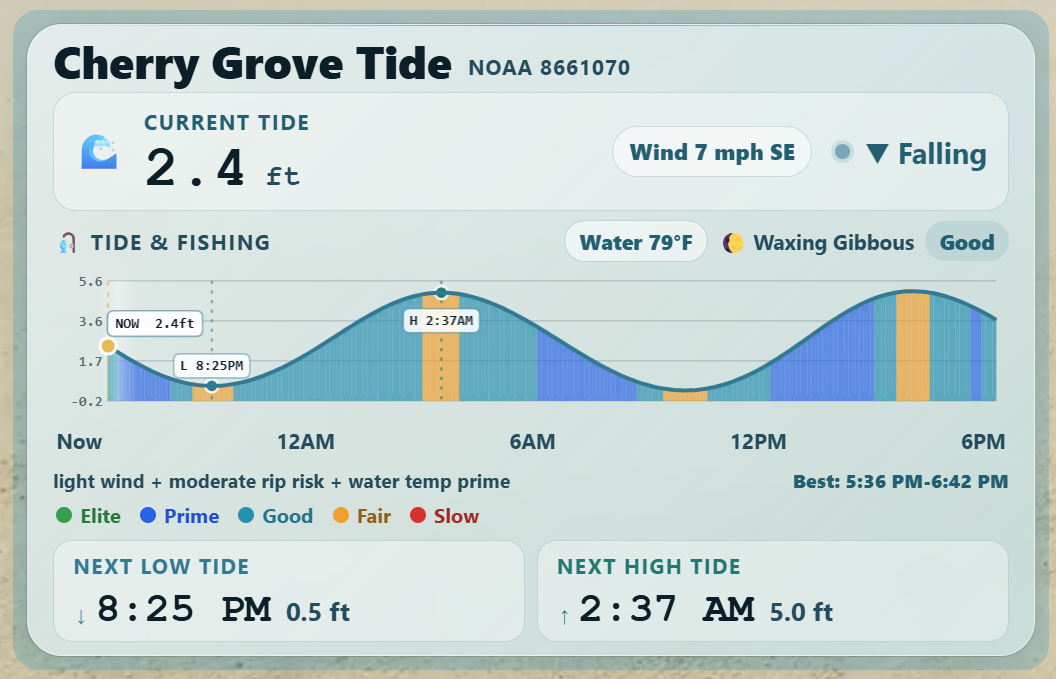
TideWise is a Home Assistant dashboard (Lovelace) custom card for tide predictions, current tide height, next high/low tides, and optional fishing bite-window scoring. The default provider is NOAA CO-OPS, with early Canada CHS/DFO support and experimental UKHO Admiralty support available for testing.
Screenshots
Main TideWise Card
Theme Modes
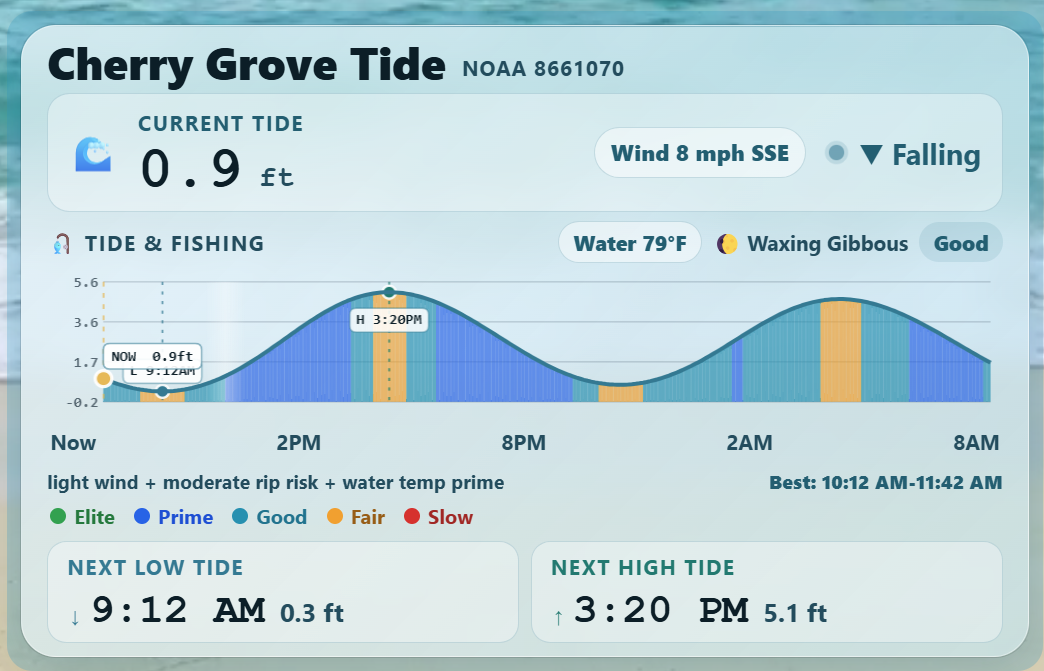
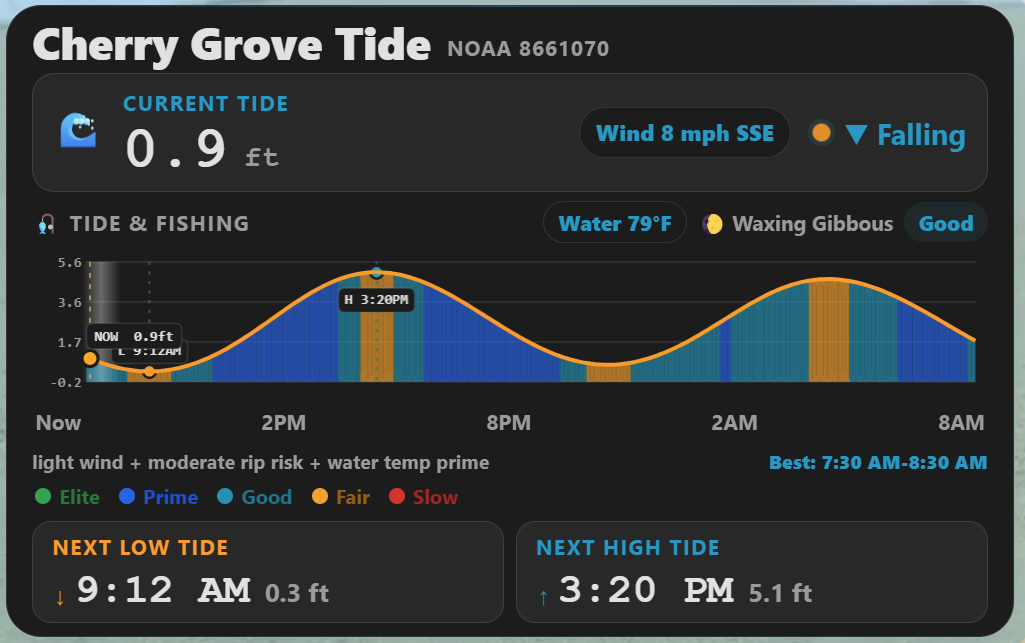
TideWise keeps its ocean-glass style by default. It can also follow Home Assistant theme colors more closely with theme_mode: auto.
NOAA Station Picker
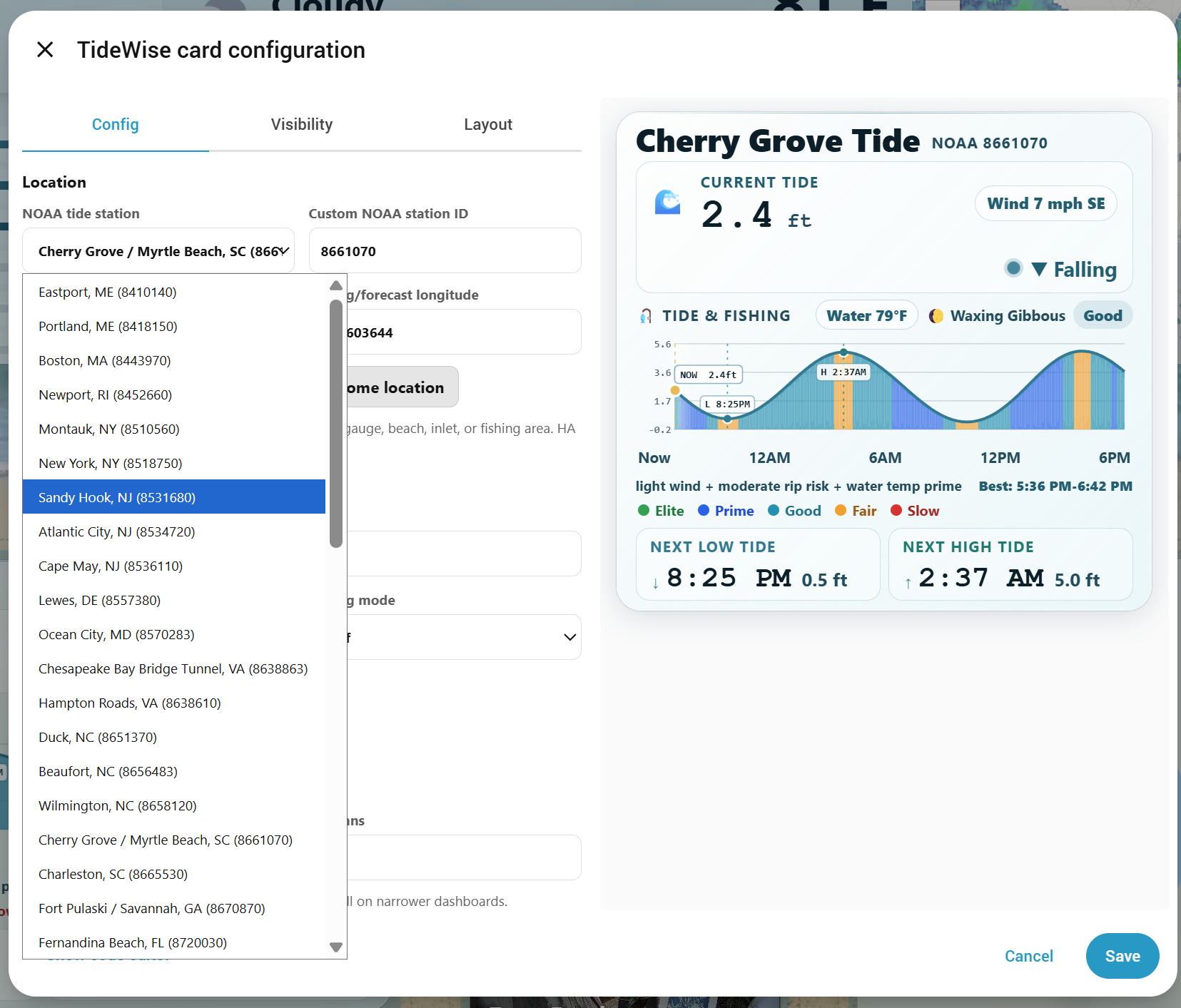
Visual Editor
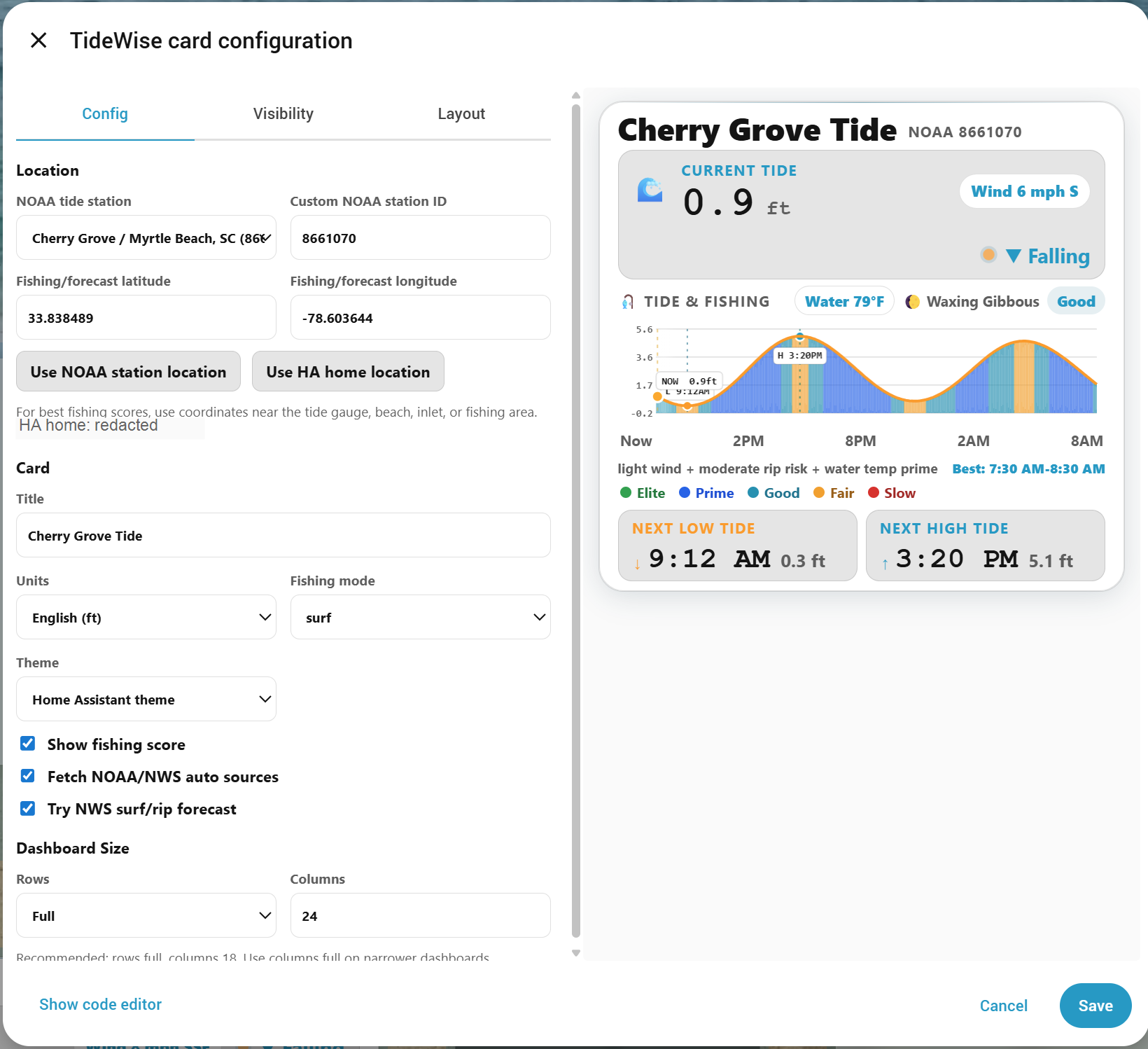
It combines tide data with local Home Assistant entities such as weather, wind, water temperature, surf height, pressure, rain, and rip current risk. Missing optional entities are allowed; TideWise falls back to neutral scoring where possible.
Beta notice: TideWise is still early beta software. Please expect occasional layout issues, missing-data fallbacks, and station-specific quirks while testing.
Beta Feedback
TideWise is in beta. If it works for your setup, please consider starring the repo so I can gauge interest and so you can follow development:
If you run into issues or want to confirm your station works, please open one of these quick reports:
Helpful details include Home Assistant version, HACS version, TideWise version, browser/device, NOAA station ID, and a screenshot or console error if something broke.
Features
- NOAA tide predictions using a configurable station ID
- Early Canada CHS/DFO water-level prediction and forecast support
- Experimental UKHO Admiralty tide support with a user-provided UKHO API key
- Current interpolated tide height
- Water temperature display when available
- Wind display when available
- Next high and low tide
- 24-hour tide chart
- High/low fallback for NOAA stations without full interval predictions
- Visual editor support
- Opt-in Home Assistant theme color support with
theme_mode: auto - 50-station NOAA preset picker plus custom NOAA station ID
- Canada region picker with CHS station discovery
- UKHO station picker and API key field
- Optional fishing bite-window score
- Fishing modes for general, surf, inlet, flounder, trout/redfish, and sheepshead use
- Optional NOAA/NWS public data fetching
- Optional Home Assistant entity overrides for weather, wind, water temperature, surf height, pressure, rain, and rip current risk
- Safety-aware fishing display that can cap the current score without globally flattening future bite windows
- Hidden YAML-only debug panel for troubleshooting fishing inputs, score components, caps, and data sources
- Legacy support for
custom:cherry-grove-tides-card
Installation
Recommended: HACS Custom Repository

TideWise is not yet listed in the default/searchable HACS store. Until it is accepted into the default HACS list, install it as a custom HACS repository.
- Open HACS in Home Assistant.
- Open the three-dot menu in the top right.
- Choose Custom repositories.
- Add this repository URL:
https://github.com/TheWillMiller/tide-wise
For category, choose Dashboard.
If your HACS version uses older wording, choose the dashboard/card/frontend/plugin-style option.
Install TideWise.
Refresh Home Assistant.
A hard browser refresh is recommended after installing or updating:
- Windows/Linux:
Ctrl + F5 - Mac:
Cmd + Shift + R
Then add the card from your dashboard editor:
- Edit your dashboard.
- Add a new card.
- Search for TideWise.
- Open the visual editor.
- Select a NOAA station or enter a custom station ID.
- Save.
Manual Install
- Download or copy
tidewise-card.js. - Place it in your Home Assistant
wwwdirectory. - Add it as a dashboard resource:
url: /local/tidewise-card.js
type: module
- Refresh Home Assistant and hard-refresh your browser.
- Add the card to a dashboard.
Test From GitHub CDN
For quick testing before installing locally, you can add this dashboard resource:
url: https://cdn.jsdelivr.net/gh/TheWillMiller/tide-wise@v0.7.2/tidewise-card.js
type: module
After changing resources, refresh Home Assistant and hard-refresh the browser tab.
CDN testing is not the preferred long-term install method. HACS is recommended for normal use.
Quick Start
type: custom:tidewise-card
title: Local Tides
station: "8661070"
units: english
mode: general
auto_sources: true
auto_surf_forecast: true
grid_options:
  rows: full
  columns: 18
Minimal Config
type: custom:tidewise-card
title: Local Tides
station: "8661070"
units: english
mode: general
Cherry Grove Example
type: custom:tidewise-card
title: Cherry Grove Tides
station: "8661070"
units: english
mode: inlet
auto_sources: true
auto_surf_forecast: true
weather_entity: weather.nws_33_8552645_78_6761264_kmyr
water_temp_entity: sensor.noaa_surf_water_temperature
wave_height_entity: sensor.noaa_surf_surf_height
rip_current_risk_entity: sensor.noaa_surf_rip_current_risk
wind_speed_entity: sensor.noaa_weather_wind_speed
wind_direction_entity: sensor.noaa_weather_wind_direction
pressure_entity: sensor.noaa_weather_barometric_pressure
rain_today_entity: sensor.rain_sensor_rain_last_24h
grid_options:
  rows: full
  columns: 18
Tide-Only Config
type: custom:tidewise-card
title: Local Tides
station: "8661070"
units: english
show_fishing_score: false
grid_options:
  rows: full
  columns: 18
Canada CHS Example
Canada support uses the Canadian Hydrographic Service / DFO IWLS API. The visual editor can load Canadian regions and station lists, so most users should choose a station from the editor instead of writing the object ID by hand.
type: custom:tidewise-card
title: Pointe-du-Chene Tides
provider: chs_iwls
ca_region: atlantic
ca_station: "64b6e5ec8027cb190816a0c0"
ca_station_code: "01804"
units: metric
mode: general
auto_sources: false
grid_options:
  rows: full
  columns: 18
Canadian tide predictions can render the tide chart and high/low times. NOAA/NWS auto sources are US-focused, so Canadian fishing inputs such as weather, wind, surf, water temperature, and pressure should come from Home Assistant entities when available.
UK UKHO Example
UK support uses the UKHO Admiralty API directly from the browser. Each user must provide their own UKHO API key. This is experimental because browser-side API calls depend on UKHO/Azure allowing CORS from Home Assistant dashboards.
type: custom:tidewise-card
title: Portsmouth Tides
provider: ukho
ukho_station: "0390"
ukho_api_key: "YOUR_UKHO_API_KEY"
units: metric
mode: general
auto_sources: false
auto_surf_forecast: false
grid_options:
  rows: full
  columns: 18
UKHO tide heights are provided in metres. TideWise displays them as metres with units: metric, or converts them to feet with units: english.
UKHO key note: This is a frontend dashboard card, so the API key is stored in your dashboard configuration and is visible to browsers/users who can inspect that dashboard. Use your own UKHO key and follow UKHO's API terms.
Dashboard Size
TideWise is a dense chart card. In Home Assistant section/grid dashboards, give it enough horizontal space:
grid_options:
  rows: full
  columns: 18
On narrower dashboards, use:
grid_options:
  rows: full
  columns: full
Theme Support
TideWise defaults to its built-in ocean-glass styling:
theme_mode: tidewise
To make the card follow Home Assistant theme colors more closely, use:
theme_mode: auto
The visual editor includes a Theme dropdown for this setting. Theme mode only changes the card styling; it does not change tide fetching, NOAA/NWS data, or fishing score behavior.
Visual Editor
TideWise includes a Home Assistant visual editor. When adding the card from the dashboard editor, you can:
- Choose 50 common NOAA tide stations from a dropdown
- Enter a custom NOAA station ID
- Switch to Canada CHS / DFO and choose a region-fed station dropdown
- Switch to UK UKHO Admiralty, choose a UKHO station, and enter your own UKHO API key
- Set fishing/forecast latitude and longitude
- Fill coordinates from the selected NOAA station
- Use your Home Assistant home latitude/longitude when that matches your fishing area
- Select English or metric units
- Select fishing mode
- Choose TideWise styling or Home Assistant theme colors
- Enable or disable fishing score
- Enable or disable public NOAA/NWS auto sources
- Enable or disable NWS surf/rip forecast parsing
- Set the recommended dashboard size
The station dropdown is a 50-station starter list, not a complete NOAA station database. If your station is not listed, choose Custom station ID and paste the NOAA CO-OPS station ID.
Latitude and longitude are used for fishing-score context such as NWS forecast lookup, surf/rip forecast lookup, and moon/solunar timing. For best results, use coordinates near the tide gauge, beach, inlet, or fishing area.
Auto Sources
For NOAA/US cards, TideWise can fetch extra public NOAA/NWS data directly from the browser when auto_sources is enabled:
- NOAA CO-OPS water temperature, wind, and air pressure where the selected station supports those products
- NWS hourly forecast weather and wind from latitude/longitude
- NWS Surf Zone Forecast text for surf height, rip current risk, and water temperature where the local forecast office issues an SRF product
Manual Home Assistant entities take priority. If a manual entity is configured, TideWise uses it instead of the auto-fetched value.
Surf Zone Forecasts are text products and vary by NWS office. TideWise parses common formats such as:
high rip current risksurf height 2 to 4 feetwater temperature in the mid 80s
Some locations may still show unknown surf or rip data. Manual entities or dedicated integrations remain the most reliable override.
Recent rainfall totals are not yet reliably auto-filled. They work best through a local rain sensor or Home Assistant weather integration.
Fishing Score
The fishing score is advisory only. It is intended to give a quick glance at likely better and worse bite windows.
Depending on available data, TideWise may consider:
- Tide movement
- Tide direction
- Time to next high/low tide
- Current tide height
- Moon/solunar timing
- Time of day
- Weather condition
- Wind speed
- Wind direction
- Water temperature
- Surf/wave height
- Rip current risk
- Pressure
- Pressure trend
- Rainfall/runoff
When optional data is missing, TideWise falls back to the data it has available.
Current safety conditions such as high rip current risk can cap the Now score while still allowing the future curve to show improving bite potential. This is why a card may show Slow now with a better bite window later in the day.
Hidden Debug Panel
For troubleshooting, TideWise includes a YAML-only debug panel. It is hidden from normal users and is not exposed in the visual editor.
Enable it manually only when diagnosing a station, data source, or fishing score:
debug:
  enabled: true
  panel: true
The debug panel is collapsed by default and scrolls internally when expanded. It shows the current/Now score target, future curve mode, source availability, component weights, moon multiplier, safety caps, final current score, display score, and whether the future curve is globally capped.
Configuration
| Option | Required | Default | Description |
|---|---|---|---|
type |
Yes | Use custom:tidewise-card. The legacy custom:cherry-grove-tides-card alias also works. |
|
title |
No | TideWise |
Card title. |
provider |
No | noaa_coops |
Tide data provider. Use noaa_coops for US NOAA CO-OPS, chs_iwls for early Canada CHS/DFO support, or ukho for experimental UKHO Admiralty support. |
station |
Required for NOAA | NOAA tides and currents station ID. | |
ca_region |
No | atlantic |
Canada station picker region: atlantic, great_lakes, quebec, pacific, or arctic. |
ca_station |
Required for Canada | Canadian CHS/DFO IWLS station object ID. Prefer choosing it from the visual editor. | |
ca_station_code |
No | Optional Canadian CHS display code. | |
ukho_station |
Required for UKHO | 0390 |
UKHO Admiralty tide station ID. Prefer choosing it from the visual editor. |
ukho_api_key |
Required for UKHO | User-provided UKHO Admiralty API key. This is stored in dashboard config and visible to browsers that can load the card. | |
units |
No | english |
Display units. Usually english or metric. Canadian CHS and UKHO data are metric and are converted to feet when english is selected. |
mode |
No | general |
Fishing score mode: general, surf, inlet, flounder, trout_redfish, or sheepshead. |
theme_mode |
No | tidewise |
Visual style mode. Use tidewise for the default ocean-glass look or auto to follow Home Assistant theme colors more closely. |
show_fishing_score |
No | true |
Set to false for a tide-only card. |
auto_sources |
No | true |
Fetch public NOAA/NWS weather and marine observations directly where available. US-focused; non-US providers should use Home Assistant entities for fishing context. |
auto_surf_forecast |
No | true |
Try to parse NWS Surf Zone Forecast text for surf height, rip current risk, and water temperature. US-focused. |
srf_region |
No | Optional internal grouping for NWS-listed Surf Zone Forecast offices. Usually set by the visual editor. | |
nws_office |
No | Auto from NWS point metadata | Optional NWS office code such as ILM, CHS, or SGX for Surf Zone Forecast products. |
beach_state |
No | Optional beach forecast state used by the visual editor. | |
beach_area |
No | Optional NWS beach/surf area preset used for rip risk and surf context. | |
surf_zone |
No | Auto from NWS point metadata | Optional NWS surf/beach forecast zone such as SCZ054; overrides coordinate-derived zone for SRF parsing. |
latitude |
No | Home Assistant home latitude, then Cherry Grove fallback | Fishing/forecast latitude for NWS lookup and moon/solunar scoring. |
longitude |
No | Home Assistant home longitude, then Cherry Grove fallback | Fishing/forecast longitude for NWS lookup and moon/solunar scoring. |
weather_entity |
No | First available weather entity | Weather condition source. |
water_temp_entity |
No | Water temperature sensor. Fahrenheit and Celsius are supported. | |
wave_height_entity |
No | Wave/surf height sensor. Feet and meters are supported. | |
rip_current_risk_entity |
No | Rip current risk sensor. | |
unsafe_to_swim_entity |
No | Boolean or text entity for unsafe surf/swim conditions. | |
wind_speed_entity |
No | Weather attribute fallback | Wind speed sensor. mph, km/h, m/s, and knots are supported. |
wind_direction_entity |
No | Weather attribute fallback | Wind bearing in degrees. |
pressure_entity |
No | Weather attribute fallback | Barometric pressure. hPa and inHg are supported. |
pressure_trend_entity |
No | Pressure trend entity. | |
rain_today_entity |
No | Rainfall in the last 24 hours. Inches and mm are supported. | |
debug |
No | disabled | Hidden troubleshooting object. Use debug: { enabled: true, panel: true } only when diagnosing score/data issues. Not available in the visual editor. |
Finding a NOAA Station
Use a NOAA tides and currents station ID near your location. TideWise uses the NOAA CO-OPS data API, so station IDs must support tide predictions.
If your station does not work, try a nearby NOAA station that supports tide predictions.
Finding a Canadian Station
Set Tide provider to Canada CHS / DFO in the visual editor, choose a Canadian region, then choose a CHS water-level station from the station dropdown. Canadian Great Lakes stations are under Great Lakes / Ontario.
Canada support uses CHS/DFO IWLS water-level predictions where available. Some Great Lakes stations publish water-level forecasts instead, so TideWise falls back from wlp predictions to wlf forecasts when needed. The Great Lakes picker includes a small official CHS seed list because those stations may not appear in the CHS bulk station API. Selected stations may still need testing because CHS availability can vary by station and forecast window.
NOAA/NWS auto sources are US-focused. For Canadian fishing context, configure Home Assistant entities for weather, wind, pressure, water temperature, surf, rain, or safety/rip-risk data when available.
Finding a UKHO Station
Set Tide provider to UK UKHO Admiralty in the visual editor, choose a UKHO station, then enter your own UKHO API key. The key is required because TideWise calls the UKHO API directly from the browser.
UKHO support is experimental. It can render UK tide heights and high/low events where the selected station, API key, subscription tier, and browser access allow it. Weather, wind, water temperature, surf, rain, pressure, and fishing safety context should come from Home Assistant entities for UK cards.
Because this is a frontend card, the UKHO key is not secret storage. Anyone with access to inspect the dashboard/browser traffic can see it. If UKHO blocks browser-side CORS for your subscription, TideWise will need a future Home Assistant/backend helper for UKHO rather than a pure Lovelace-only fetch.
Beach / Surf Forecast Area
For US surf and rip-current context, TideWise can use a beach forecast area instead of relying only on latitude/longitude. The tide station still controls the tide curve, but the beach area controls NWS Surf Zone Forecast scoping for rip risk and surf height.
TideWise includes a guided list of NWS-listed SRF offices for areas where the National Weather Service publishes Surf Zone Forecast products. This is not the same as every U.S. coastal county; some coastal offices may handle beach hazards through other products such as Hazardous Weather Outlooks.
The visual editor keeps this simple: choose a State, then choose the closest Area. Where TideWise has an exact beach/surf-zone preset, that area is used. Otherwise, the area maps to the closest NWS-listed SRF office and TideWise still uses your coordinates for local forecast context.
The first built-in precise beach-area set covers the NWS Wilmington, NC office beaches for the Grand Strand and nearby NC/SC beaches. Broader NWS-listed SRF offices are available for other supported states/regions, and more precise beach-zone presets can be added as confirmed.
Example:
srf_region: Atlantic/Gulf/Caribbean
beach_state: SC
beach_area: sc-horry
nws_office: ILM
surf_zone: SCZ054
Troubleshooting
If TideWise works for you after troubleshooting, please consider starring the repo or opening a Works For Me / Confirmed Station report. If it breaks, a Beta Install Report with your versions and station ID helps a lot.
TideWise does not show in the card picker
- Confirm TideWise is installed in HACS.
- Hard-refresh the browser.
- Restart Home Assistant if needed.
- Check that the card resource exists.
- Open the browser console and look for TideWise errors.
HACS shows an old README or old version
HACS may cache repository metadata.
Try:
- Open HACS.
- Open TideWise.
- Open the three-dot menu.
- Select Redownload.
- Choose the latest version.
- Hard-refresh your browser.
If HACS still shows an old README, the installed card file may still be current while the HACS display cache is stale.
If HACS shows a short value like 214b6c2 instead of v0.7.2, that is a GitHub commit hash. HACS shows commit hashes when a repository has tags but no full GitHub Release yet. Publishing a full GitHub Release makes HACS show the release version instead.
Card does not show up
- Confirm TideWise is installed.
- Confirm the dashboard resource exists.
- Hard-refresh the browser.
- Redownload the latest release in HACS.
- Restart Home Assistant if needed.
- Check the browser console for
tidewise-card.jsloading errors.
Visual editor does not show
- Confirm the latest TideWise JS is loaded.
- Hard-refresh the browser.
- Redownload the latest HACS release.
- Check the browser console for custom element errors.
Tide data unavailable
- Verify the NOAA station ID.
- Try a known preset station.
- Confirm your browser/Home Assistant can reach NOAA.
- Open the browser console and check for network or station errors.
Fishing score looks limited
This usually means optional weather, wind, water temperature, surf, pressure, rain, or rip current data is unavailable.
The card should still work, but the score may be based on fewer inputs.
For deeper troubleshooting, temporarily enable the hidden debug panel in YAML:
debug:
  enabled: true
  panel: true
Remove it again after testing.
Privacy
TideWise does not include telemetry, tracking pixels, external analytics, or phone-home behavior.
When auto_sources or auto_surf_forecast are enabled, the card fetches the public NOAA/NWS data needed to render the configured dashboard card. Adoption tracking is based only on GitHub-native signals such as stars, issues, release activity, and tester reports.
Maintainer notes for GitHub-native adoption signals are in PROJECT_INSIGHTS.md.
Beta Tester Checklist
The full checklist is also available in BETA_TESTER_CHECKLIST.md.
If you are testing TideWise, please report:
- Home Assistant version
- HACS version
- TideWise version
- Browser/device
- NOAA station ID used
- Whether you installed from HACS custom repository, manual resource, or CDN
- Screenshot of any layout issue
- Browser console errors, if any
- Whether the issue happens after a hard refresh
Basic test steps:
- Install TideWise from HACS custom repository.
- Add the card from the dashboard card picker.
- Open the visual editor.
- Select a preset station.
- Save.
- Refresh the dashboard.
- Confirm the card still loads.
- Change fishing mode.
- Save and refresh again.
- Test on desktop and phone.
- Test with missing optional entities.
- Screenshot or copy any errors.
Safety
TideWise is informational. It is not a marine safety, navigation, emergency, or surf safety tool.
Always check official local forecasts, marine advisories, beach warnings, and on-site conditions before entering the water or boating.
Do not use TideWise for navigation, hazardous surf decisions, boating safety, swimming safety, or life-safety decisions.
Development
The distributable card is:
tidewise-card.js
For HACS default repository submission, TideWise is a dashboard/custom card. HACS validation/submission uses the plugin category internally for dashboard plugins.
Run the local syntax check before opening a pull request:
npm run check
Roadmap
Planned areas for future releases:
- Map-based fishing/forecast coordinate picker
- More station presets and station discovery improvements
- International tide-provider research for non-NOAA regions
- Further fishing outlook calibration based on tester feedback
- Additional mobile layout polish
International Provider Notes
TideWise uses explicit provider adapters instead of stretching NOAA-specific code paths. NOAA CO-OPS remains the default provider, Canada CHS/DFO is available for early testing, and UKHO Admiralty support is experimental with a user-provided API key.
The Environment Agency flood-monitoring API can be useful for rivers, flood gauges, and some observed level stations, but it should not be treated as the main UK tide-prediction source for TideWise.
The National Tidal and Sea Level Facility is a stronger UK research candidate because it documents the UK National Tide Gauge Network and publishes tidal predictions for selected UK and Ireland ports. It still needs licensing, CORS, and data-shape validation before TideWise can depend on it.
Likely future shape:
provider: noaa_coops
station: "8661070"
Other providers should get their own station picker and validation rules. For example, Canadian or UK support may need separate station IDs, units, datum notes, and availability checks.
Comments