Latest release: v0.5.1
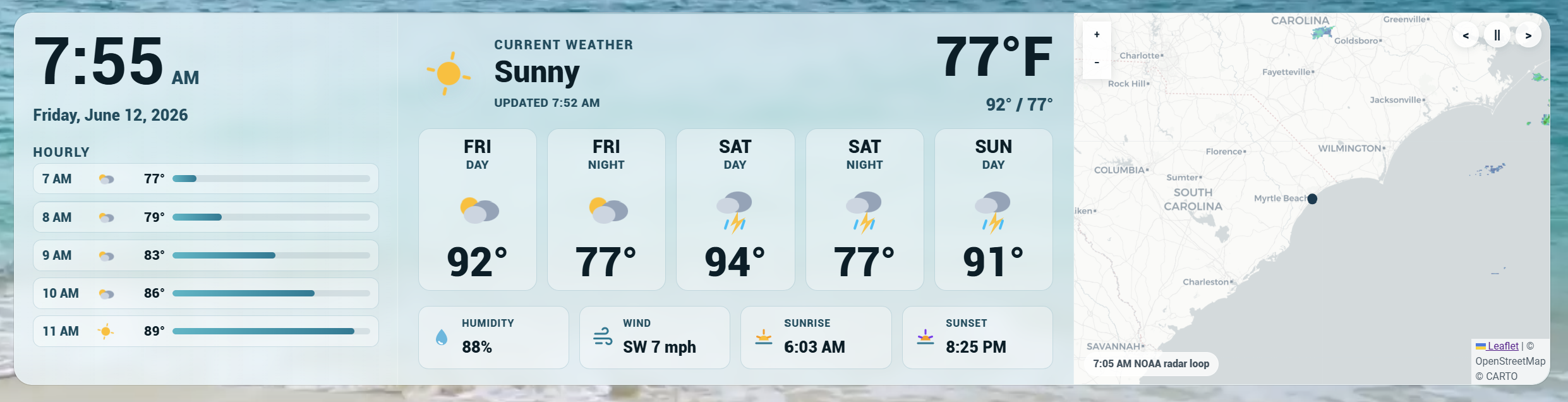
RadarWise is a Home Assistant dashboard (Lovelace) custom card for current weather, hourly and daily forecasts, precipitation details, sunrise and sunset, wind, humidity, dew point, and optional radar. It follows the TideWise/RiverWise visual language while staying a dashboard card, not a backend integration.
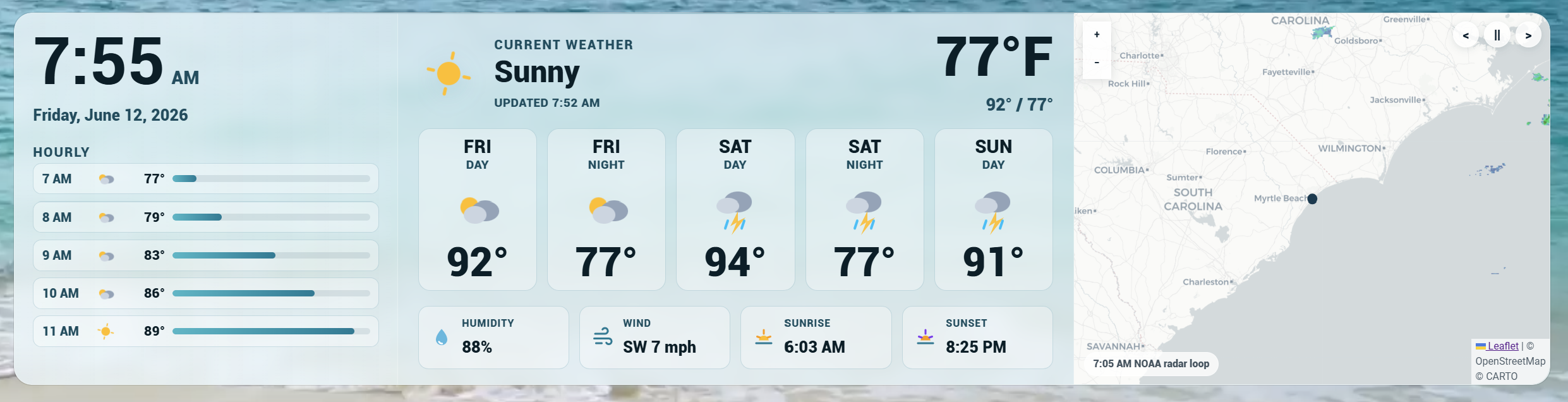
Public release note: RadarWise is ready for regular use, but weather providers vary by region. Please report provider-specific layout, radar, or forecast quirks so support can keep improving.
Region Support
RadarWise gets weather data from an existing Home Assistant weather entity, so it can work anywhere Home Assistant has a weather provider.
| Region | Weather data | Radar |
|---|---|---|
| United States | Any Home Assistant weather entity |
NOAA radar by default, RainViewer optional |
| Canada | Any Home Assistant weather entity |
Environment Canada radar by default, RainViewer optional |
| United Kingdom | Any Home Assistant weather entity |
RainViewer global radar by default |
| Global / other | Any Home Assistant weather entity |
RainViewer global radar by default |
RadarWise does not ask for, store, or call private weather API keys from dashboard YAML.
Environment Canada radar uses the public MSC GeoMet RADAR_1KM_RRAI WMS layer. RainViewer is still available as a no-key global radar option. Its public API is for personal, educational, and small community use and may have service or coverage limits.
Testing Outside the US, Canada, and UK
RadarWise should still render current conditions and forecasts anywhere Home Assistant has a working weather entity. Outside the initial US, Canada, and UK presets, radar falls back to RainViewer and local alert/warning overlays may be limited or unavailable.
If you are testing from Australia, New Zealand, Europe, or any other region, please open a report or feature request with:
- Country/region and nearest city or general area
- Home Assistant weather integration/provider
- Whether hourly and daily forecasts appear
- Whether RainViewer radar loads for your area
- Any local radar, warning, or forecast provider RadarWise should know about
Features
- Custom Lovelace card:
custom:radarwise-card - Legacy alias:
custom:radar-wise-card - Home Assistant visual editor
- Existing
weatherentity support - Optional local temperature sensor override
- Optional humidity sensor fallback
- Optional dew point sensor fallback
- Optional localized forecast summary ticker
- Hourly forecast strip
- Daily or twice-daily forecast cards
- Auto-scroll option for long forecast lists
- Precipitation probability and amount when exposed by the weather provider
- Fahrenheit and Celsius support
- Card language support for Auto, English, French, Spanish, German, and Portuguese
- RadarWise built-in theme mode
- Home Assistant theme-aware mode with
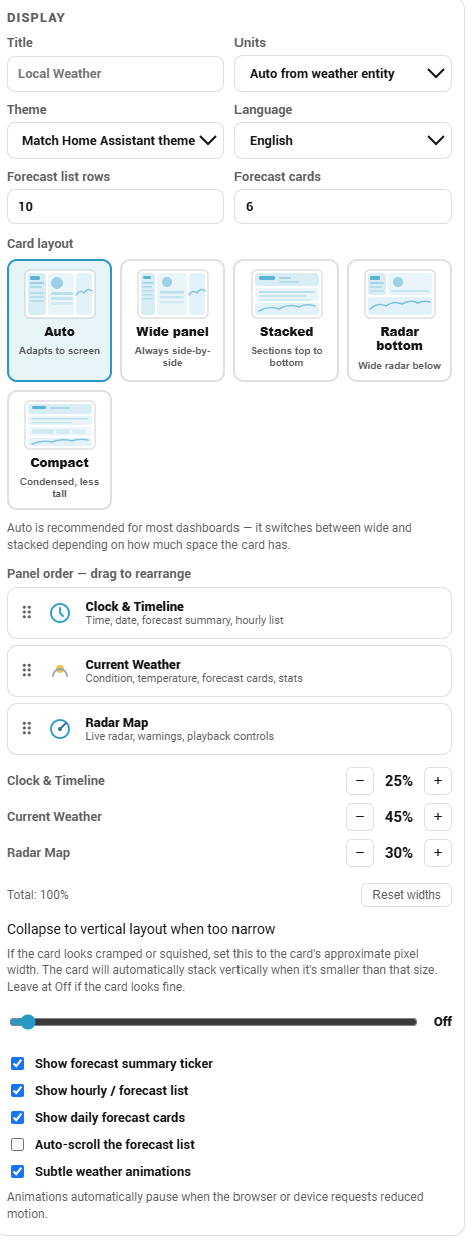
theme_mode: auto - Layout presets: auto, wide panel, stacked, radar bottom, and compact
- Drag-and-drop panel ordering for clock/timeline, current weather, and radar
- Adjustable panel widths with a configurable vertical-collapse threshold
- Optional radar panel
- US NOAA radar support
- Environment Canada radar support
- RainViewer global radar support for the UK, global regions, and optional Canada fallback
- Radar playback controls: pause, previous frame, and next frame
- Radar timeline, style, basemap, and loop speed options
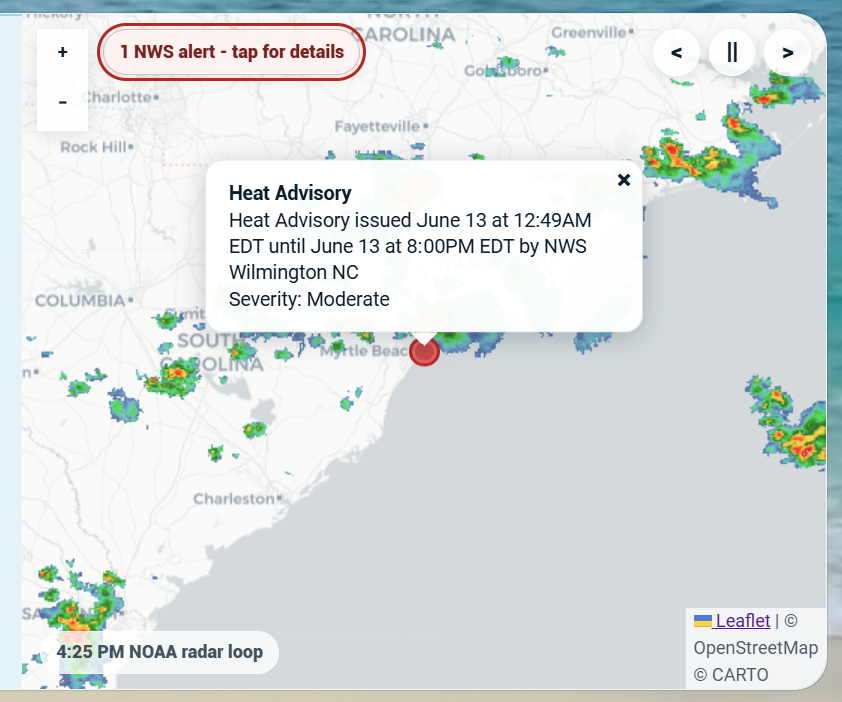
- US NWS active warning overlay
- Hidden YAML-only debug panel
Installation
Recommended: HACS Custom Repository

RadarWise is not yet listed in the default/searchable HACS store. Until it is accepted into the default HACS list, install it as a custom HACS repository.
- Open HACS in Home Assistant.
- Open the three-dot menu in the top right.
- Choose Custom repositories.
- Add this repository URL:
https://github.com/TheWillMiller/radar-wise
- For category, choose Dashboard.
- Install RadarWise.
- Refresh Home Assistant.
A hard browser refresh is recommended after installing or updating:
- Windows/Linux:
Ctrl + F5 - Mac:
Cmd + Shift + R
Then add the card from your dashboard editor:
- Edit your dashboard.
- Add a new card.
- Search for RadarWise.
- Open the visual editor.
- Choose a weather entity.
- Choose the region/radar setup.
- Save.
Manual Install
- Download or copy
radarwise-card.js. - Place it in your Home Assistant
wwwdirectory. - Add it as a dashboard resource:
url: /local/radarwise-card.js
type: module
- Refresh Home Assistant and hard-refresh your browser.
- Add the card to a dashboard.
Rename Compatibility
RadarWise was renamed from its original project name in v0.5.0. If Home Assistant still has an older resource URL that points to weatherwise-card.js, v0.5.1 includes a compatibility loader at that filename so the card can still register. New installs should use radarwise-card.js.
Test From GitHub CDN
For quick testing before installing locally, you can add this dashboard resource:
url: https://cdn.jsdelivr.net/gh/TheWillMiller/radar-wise@v0.5.1/radarwise-card.js
type: module
CDN testing is not the preferred long-term install method. HACS is recommended for normal use.
Quick Start
type: custom:radarwise-card
entity: weather.home
title: Local Weather
country: us
radar_provider: auto
theme_mode: radarwise
units: auto
layout: auto
forecast_count: 5
hourly_count: 5
latitude: 33.688
longitude: -78.886
grid_options:
  rows: full
  columns: 18
Canada Example
type: custom:radarwise-card
entity: weather.home
title: Local Weather
country: ca
radar_provider: auto
theme_mode: radarwise
units: metric
latitude: 43.6532
longitude: -79.3832
grid_options:
  rows: full
  columns: 18
UK Example
type: custom:radarwise-card
entity: weather.home
title: Local Weather
country: uk
radar_provider: auto
theme_mode: auto
units: metric
latitude: 51.5072
longitude: -0.1276
grid_options:
  rows: full
  columns: 18
Theme Support
RadarWise defaults to its built-in glass styling:
theme_mode: radarwise
To make the card follow Home Assistant theme colors more closely, use:
theme_mode: auto
The visual editor includes a Theme dropdown for this setting.
Visual Editor
RadarWise includes a Home Assistant visual editor. When adding the card from the dashboard editor, you can:
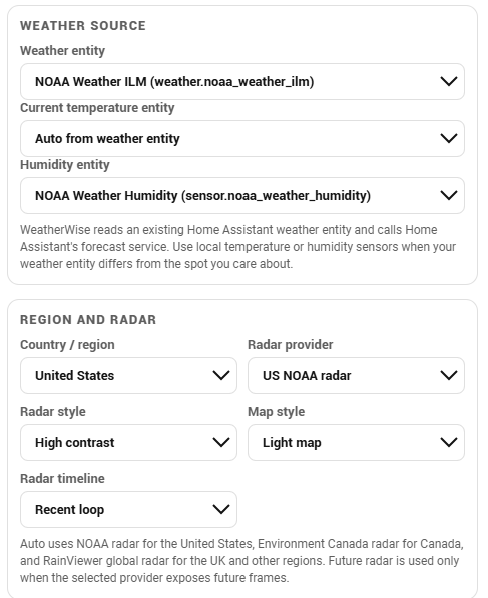
- Choose a Home Assistant weather entity
- Choose an optional local temperature sensor when the weather entity is not local enough
- Choose an optional humidity sensor when the weather entity does not expose humidity
- Choose an optional dew point sensor when the weather entity does not expose dew point
- Choose United States, Canada, United Kingdom, or global/other setup
- Choose automatic radar, NOAA radar, RainViewer radar, or no radar
- Choose radar timeline, style, map style, and radar loop speed
- Set title, units, forecast counts, language, and theme mode
- Choose card language: Auto, English, French, Spanish, German, or Portuguese
- Choose a layout preset with visual layout tiles
- Drag panels to reorder clock/timeline, current weather, and radar
- Adjust panel widths and choose when the card collapses to vertical layout
- Show or hide the forecast summary
- Show or hide the hourly/forecast list and daily forecast cards
- Enable optional auto-scroll for long forecast lists
- Enable or disable subtle weather animations
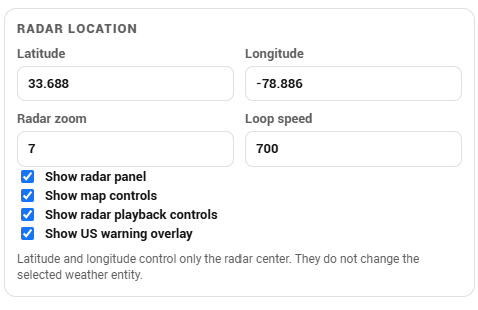
- Set radar latitude/longitude and zoom
- Show or hide the radar panel
- Show or hide map controls
- Show or hide radar playback controls
- Show or hide the US NWS warning overlay
Visual Editor Screenshots
Weather source and radar setup:
Display, layout, panel order, widths, and forecast controls:
Radar location and map controls:
Configuration
| Option | Required | Default | Description |
|---|---|---|---|
type |
Yes | Use custom:radarwise-card. The legacy custom:radar-wise-card alias also works. |
|
entity |
Yes | Home Assistant weather entity. |
|
temperature_entity |
No | Optional temperature sensor/helper entity for the current displayed temperature. Useful when an indoor, patio, or hyperlocal sensor differs from the weather provider. | |
humidity_entity |
No | Optional humidity sensor/helper entity. Useful when the weather entity has no humidity attribute. | |
dew_point_entity |
No | Optional dew point sensor/helper entity. RadarWise also auto-reads common dew point attributes from the weather entity when available. | |
title |
No | Local Weather |
Card title. |
country |
No | us |
Region hint: us, ca, uk, or global. |
radar_provider |
No | auto |
auto, noaa, envcanada, rainviewer, or none. |
theme_mode |
No | radarwise |
radarwise or auto. |
units |
No | auto |
auto, imperial, or metric. |
language |
No | auto |
Card display language: auto, en, fr, es, de, or pt. Auto follows Home Assistant/browser language when possible. |
layout |
No | auto |
auto, wide_panel, stacked, radar_bottom, or compact. Use radar_bottom for a full-width radar below weather content, or stacked/compact for narrow dashboards. |
hourly_count |
No | 5 |
Number of hourly/forecast-list rows, 1-24. If hourly forecasts are unavailable, RadarWise falls back to twice-daily or daily data. |
forecast_count |
No | 5 |
Number of daily/twice-daily forecast cards, 1-7. |
show_forecast_summary |
No | true |
Show or hide the one-line forecast summary under the date. The text is generated from existing forecast data, localized by language, and respects reduced-motion settings. |
show_timeline |
No | true |
Show or hide the left hourly/forecast list. |
show_forecast |
No | true |
Show or hide the daily/twice-daily forecast card strip. |
timeline_autoscroll |
No | false |
Slowly auto-scroll long forecast lists. Manual scrolling pauses it briefly. |
panel_order |
No | ["clock", "weather", "radar"] |
Order of the three major panels. Values must include clock, weather, and radar. |
column_widths |
No | [25, 50, 25] |
Percentage widths for the ordered panels. Total should equal 100. |
stack_below |
No | 0 |
Pixel width threshold for forcing vertical layout. Use 0 or leave unset to disable. |
show_animations |
No | true |
Show subtle weather icon, forecast, and hourly row animations. Respects reduced-motion settings. |
show_radar |
No | true |
Show or hide the radar panel. |
show_map_controls |
No | true |
Show or hide map zoom controls. |
radar_controls |
No | true |
Show or hide radar playback controls. |
radar_timeline |
No | loop |
loop, latest, or future. Future frames are used only when the selected radar provider exposes them. |
radar_style |
No | standard |
Radar overlay style: standard, vivid, or soft. |
radar_basemap |
No | light |
Map style: light, dark, or osm. |
radar_speed |
No | 700 |
Radar loop speed in milliseconds, 300-3000. |
radar_zoom |
No | 7 |
Initial radar zoom. |
show_warning_overlay |
No | true |
Show active US NWS alerts on the radar map when available. |
latitude |
No | Home Assistant latitude | Radar center latitude. |
longitude |
No | Home Assistant longitude | Radar center longitude. |
debug |
No | disabled | Hidden troubleshooting object. Use debug: { enabled: true, panel: true } only when diagnosing data issues. |
Hidden Debug Panel
For troubleshooting, RadarWise includes a YAML-only debug panel. It is hidden from normal users and is not exposed in the visual editor.
debug:
  enabled: true
  panel: true
Remove it after testing.
Troubleshooting
RadarWise does not show in the card picker
- Confirm RadarWise is installed in HACS.
- Confirm the loaded resource points to
/hacsfiles/.../radarwise-card.jsor the compatibility/hacsfiles/.../weatherwise-card.js. - Hard-refresh the browser.
- Restart Home Assistant if needed.
- Check that the dashboard resource exists.
- Open the browser console and look for RadarWise errors.
Forecast data unavailable
- Verify the selected weather entity exists.
- Confirm the entity supports Home Assistant forecast data.
- Try another
weatherentity. - Check the browser console for forecast service errors.
Radar unavailable
- Check the selected radar provider.
- Use
radar_provider: noaaonly for US radar. - Use
radar_provider: envcanadafor Canada, orradar_provider: rainviewerfor UK and global setups. - Confirm the dashboard browser can reach external map/radar tile services.
What is the red dot on the radar?
The red radar dot appears when the US NWS warning overlay finds an active alert near the radar location. Click or tap the red dot for the alert headline. The small dark dot is the configured radar center.
Humidity shows --%
- Check whether the selected weather entity exposes a humidity attribute.
- If it does not, choose a humidity sensor in the visual editor.
- Or set
humidity_entity: sensor.your_humidity_sensorin YAML.
Dew point shows --
- Check whether the selected weather entity exposes a dew point attribute.
- If it does not, choose a dew point sensor in the visual editor.
- Or set
dew_point_entity: sensor.your_dew_point_sensorin YAML.
What do the blue bars show?
The blue bars in the forecast list show relative temperature across the visible rows. Longer bars are warmer compared with the other rows currently shown. If your weather provider exposes precipitation probability or amount, RadarWise also shows that beside the bar.
Address-Based Setup
RadarWise intentionally uses Home Assistant weather entities instead of direct address lookup. Address entry would require geocoding plus direct weather-provider calls from the browser, which adds privacy, API key, rate-limit, and regional-provider questions. A future RadarWise integration could offer address-based setup more cleanly by creating the right entities in Home Assistant.
Privacy
RadarWise does not include telemetry, tracking pixels, external analytics, or phone-home behavior.
When radar is enabled, the browser viewing the dashboard loads map/radar tiles from the selected provider. The card does not send weather entity data to a RadarWise server.
Safety
RadarWise is informational. It is not a life-safety, severe-weather warning, aviation, boating, or emergency tool.
Always check official local forecasts, warnings, alerts, and emergency information for safety-critical decisions.
Development
The distributable card is:
radarwise-card.js
Run the local syntax check before opening a pull request:
npm run check
For HACS default repository submission, RadarWise is a dashboard/custom card. HACS validation/submission uses the plugin category internally for dashboard plugins.
Comments