Khan Automation — Home Assistant Custom Energy Flow Card · Sky Edition
khan-skycard.js · Sky Edition **v1.0.5 *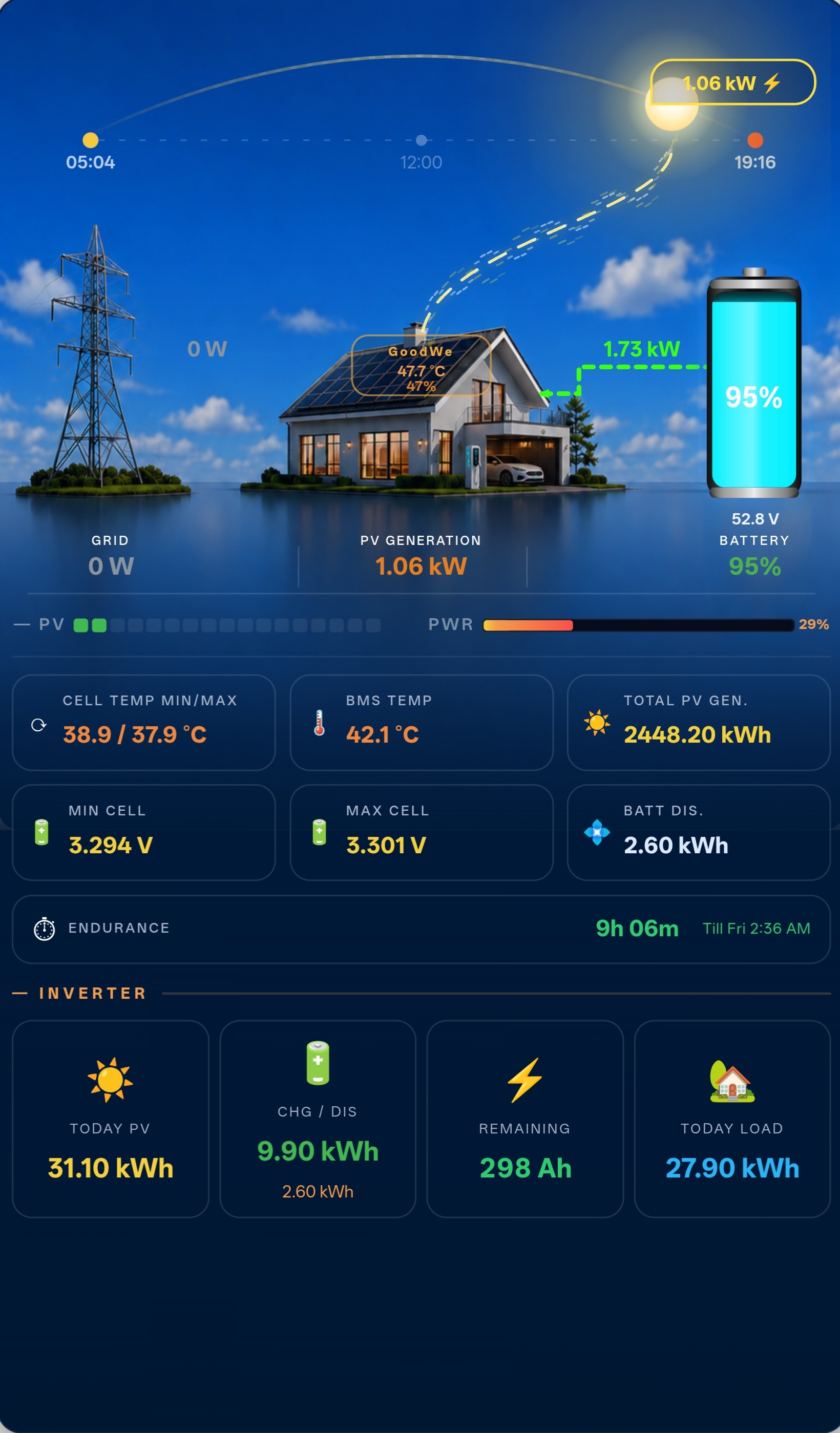
Origin:
khan-skycardis a full visual overhaul ofk-flow-cardand lives in its own separate repository. It shares the same entity schema and visual editor but replaces the entire SVG canvas with a photographic background system and redesigned celestial / inverter visuals.
Overview
khan-skycard is a custom Home Assistant Lovelace card that renders a live, animated energy-flow diagram against a full-card photographic sky background. Thirteen background images cover every ma
jor weather condition and time-of-day combination — the card selects the correct image automatically from a connected weather entity and the current sun elevation.
The card is self-contained in a single JavaScript file — no NPM, no build step, no additional dependencies.
What Changed from k-flow-card
| Area | k-flow-card | khan-skycard (Sky Edition) |
|---|---|---|
| Background | Dark SVG canvas | Full-card photographic PNG (13 variants) |
| Grid pylon | SVG icon, right side | Photo composition, left side |
| House | SVG icon overlay | Part of photo — overlay removed |
| Inverter node | Large labelled box | Tiny amber-bordered pill badge (64 × 22 px) at photo centre |
| INV info banner | Inline in box | Floating glassmorphism panel above badge (name · TEMP · LOAD %) |
| Battery position | Left side | Right side (mirrored) |
| Battery visual | Cylinder from photo | SVG fill-bar with SOC %, voltage (cylinder removed from photo) |
| Sun | Arc-tracked SVG circle | Free-floating photorealistic orb — atmospheric halo, corona rays, colour-shift horizon→zenith |
| Moon | Simple crescent | SVG mask crescent — earthshine glow, surface gradient, 6 craters, limb brightening |
| Arc / horizon line | Present | Removed — celestial bodies move freely |
| PV blocks | Proportional segments | Flat uniform-height coloured segments (green → cyan → yellow) |
| PWR bar | Rounded | Square-cornered with live % label, colour blue → orange |
| Flow paths | Routed to large INV box | Rerouted to tiny badge; grid + battery converge at y=320; load drops vertically from y=430 |
📦 Installation Option A — HACS (Recommended)
Requires HACS to be installed in Home Assistant.
Open HACS in Home Assistant → Frontend. Click the ⋮ menu (top-right) → Custom repositories. Paste your repository URL:
https://github.com/thekhan1122/khan-skycard
Set category to Lovelace and click Add. Search for k-flow-card and click Download. HACS automatically downloads the card and all icon files into /config/www/community/khan-skycardcard/. No manual file copying needed. Hard-refresh your browser (Ctrl + Shift + R / Cmd + Shift + R).
HACS registers the Lovelace resource automatically. Skip the manual resource step below.
Option B — Manual Installation
Go to the repository and download these files from the dist/ folder:
khan-skycard.js
Create the folder /config/www/community/khan-skycard/ and place all 13 files inside it.
Sky Images
The card needs 13 PNG files placed at:
| Filename (no extension) | Condition |
|---|---|
| `sky-clear-day` | Clear sky, daytime |
| `sky-clear-dawn` | Clear sky, dawn / dusk transition |
| `sky-clear-dusk` | Clear sky, dusk |
| `sky-night-clear` | Clear sky, night |
| `sky-partlycloudy-day` | Partly cloudy, daytime |
| `sky-partlycloudy-night` | Partly cloudy, night |
| `sky-cloudy-day` | Overcast, daytime |
| `sky-cloudy-night` | Overcast, night |
| `sky-rainy-day` | Rain, daytime |
| `sky-rainy-night` | Rain, night |
| `sky-thunderstorm` | Thunderstorm (any time) |
| `sky-snowy-day` | Snow, daytime |
| `sky-fog-day` | Fog / mist (any time) |

All images must be **PNG** format.

---

## Configuration Reference

All keys are configured through the visual editor. YAML equivalents are listed below for reference.

### General / Sky

| Key | Default | Description |
|---|---|---|
| `inverter_name` | `''` | Label shown in the inverter pill badge |
| `weather_entity` | `''` | Weather entity — drives sky image selection |
| `pv_max_power` | `7500` | Max PV power for bar scaling (W) |
| `inverter_max_power` | `6000` | Inverter max power for PWR bar scaling (W) |

### Solar

| Key | Default | Description |
|---|---|---|
| `pv1_power` | `sensor.goodwe_pv1_power` | PV string 1 power (W) |
| `pv2_power` | `sensor.goodwe_pv2_power` | PV string 2 power (W) |
| `pv3_power` | `''` | PV string 3 — optional, enable via Extra PV toggle |
| `pv4_power` | `''` | PV string 4 — optional, enable via Extra PV toggle |
| `pv_total_power` | `sensor.goodwe_pv_power` | Total PV power (W) |
| `today_pv` | `sensor.goodwe_today_s_pv_generation` | Today's PV generation (kWh) |
| `total_pv_gen_entity` | `sensor.goodwe_total_pv_generation` | Lifetime PV generation (kWh) |
| `inv_temp` | `sensor.goodwe_inverter_temperature_module` | Inverter temperature |
| `today_batt_chg` | `sensor.goodwe_today_battery_charge` | Today battery charge (kWh) |
| `today_load` | `sensor.goodwe_today_load` | Today load (kWh) |
| `consump` | `sensor.goodwe_house_consumption` | House consumption (W) |
| `sun` | `sun.sun` | Sun entity — drives celestial orb position |

### Grid

| Key | Default | Description |
|---|---|---|
| `grid_active_power` | `sensor.goodwe_active_power` | Grid active power (W) |
| `grid_import_energy` | `sensor.goodwe_today_energy_import` | Today grid import (kWh) |
| `grid_export_energy` | `''` | Today grid export (kWh) — optional |
| `grid_power_alt` | `sensor.grid_phase_a_power` | Alternate grid power sensor |
| `invert_grid_power` | `false` | Invert sign — enable if positive = exporting |

### Primary Battery

| Key | Default | Description |
|---|---|---|
| `_show_battery` | `true` | Show primary battery section |
| `battery_soc` | `sensor.jk_soc` | Battery state of charge (%) |
| `battery_power` | `sensor.jk_power` | Battery power (W) |
| `battery_current` | `sensor.jk_current` | Battery current (A) |
| `battery_voltage` | `sensor.jk_voltage` | Battery voltage (V) |
| `battery_temp1` | `sensor.jk_temp1` | Cell temp probe 1 |
| `battery_temp2` | `sensor.jk_temp2` | Cell temp probe 2 |
| `battery_mos` | `sensor.jk_mos` | BMS MOS temperature |
| `battery_min_cell` | `sensor.jk_cellmin` | Min cell voltage |
| `battery_max_cell` | `sensor.jk_cellmax` | Max cell voltage |
| `batt_dis` | `sensor.goodwe_today_battery_discharge` | Today discharge (kWh) |
| `battery_full_ah` | `314` | Battery capacity (Ah) |
| `battery_full_wh` | `16076` | Battery capacity (Wh) |
| `battery_cap_unit` | `ah` | Capacity unit shown in editor: `ah` or `kwh` |
| `goodwe_battery_soc` | `sensor.goodwe_battery_state_of_charge` | Fallback SOC |
| `goodwe_battery_curr` | `sensor.goodwe_battery_current` | Fallback current |
| `invert_battery_power` | `false` | Invert sign — enable if positive = discharging |

### Secondary Battery

| Key | Default | Description |
|---|---|---|
| `_show_battery2` | `false` | Enable secondary battery (chip toggle) |
| `battery2_soc` | `''` | Secondary SOC (%) |
| `battery2_power` | `''` | Secondary power (W) |
| `battery2_current` | `''` | Secondary current (A) |
| `battery2_voltage` | `''` | Secondary voltage (V) |
| `battery2_mos` | `''` | Secondary BMS temperature |

### EV / Car Charger

| Key | Default | Description |
|---|---|---|
| `_show_ev` | `false` | Enable EV section (chip toggle) |
| `charger_state` | `''` | Charger state entity (string: `charging`, `completed`, etc.) |
| `charger_power` | `''` | Charger power (W) |
| `charger_current` | `''` | Charger current (A) |
| `charger_soc` | `''` | Car battery SOC (%) |
| `charger_eta` | `''` | Charge ETA in minutes — optional |
| `charger_battery_capacity_wh` | `''` | EV battery capacity (Wh) |

### Labels

| Key | Default | Description |
|---|---|---|
| `_labels_custom_entities` | `false` | Enable Labels section (chip toggle) |
| `label_cell_temp_minmax` | `CELL TEMP MIN/MAX` | Tile label — cell temp |
| `label_bms_temp` | `BMS TEMP` | Tile label — BMS temp |
| `label_min_cell` | `Min Cell` | Tile label — min cell voltage |
| `label_max_cell` | `Max Cell` | Tile label — max cell voltage |
| `label_batt_dis` | `Batt Dis.` | Tile label — battery discharge |
| `label_total_pv_gen` | `TOTAL PV GEN.` | Tile label — total PV generation |
| `label_entity_cell_temp` | `''` | Override entity for cell temp tile |
| `label_entity_bms_temp` | `''` | Override entity for BMS temp tile |
| `label_entity_min_cell` | `''` | Override entity for min cell tile |
| `label_entity_max_cell` | `''` | Override entity for max cell tile |
| `label_entity_batt_dis` | `''` | Override entity for batt dis tile |

> **Entity override rule:** A Labels entity picker activates only after its label text is changed from the default. The matching picker in the Battery section locks with an "Overridden by Labels" veil to prevent duplication. Battery voltage pickers are never locked.

---

## Visual Editor Sections

| Section | Toggle | Description |
|---|---|---|
| General | — | Inverter name, weather entity, power limits |
| Labels | `+ Enable` chip | Rename stat tiles; per-row entity overrides |
| Solar | — | PV1, PV2 entities |
| Extra PV Strings | `+ Enable` chip | PV3, PV4 |
| Solar Extras | — | Totals, temperatures, today stats |
| Grid | — | Grid power, import/export, consumption |
| Primary Battery | `+ Enable` chip | Full BMS telemetry |
| Secondary Battery | `+ Enable` chip | Second pack |
| System Limits | `+ Enable` chip | Capacity and power limits |
| EV / Car Charger | `+ Enable` chip | Charger state, SOC, ETA |

---

## Colour Logic

| Metric | Thresholds |
|---|---|
| **SOC** | ≤25% red · ≤50% orange · ≤75% blue · >75% green |
| **Cell Temp** | ≤15°C blue · ≤35°C green · ≤45°C orange · >45°C red |
| **Cell Voltage** | <3.0V red · <3.1V orange · <3.4V yellow · ≤3.65V green · >3.65V red |
| **Inverter / Env Temp** | ≤25°C green · ≤45°C orange · >45°C red |
| **PWR bar** | 0% blue → 100% orange (continuous gradient) |

---

## File Structure
/config/www/community/khan-skycard/ │ ├── khan-skycard.js ← single JS file, register as Lovelace resource │ └── sky/ ← 13 PNG background images ├── sky-clear-day.png ├── sky-clear-dawn.png ├── sky-clear-dusk.png ├── sky-night-clear.png ├── sky-partlycloudy-day.png ├── sky-partlycloudy-night.png ├── sky-cloudy-day.png ├── sky-cloudy-night.png ├── sky-rainy-day.png ├── sky-rainy-night.png ├── sky-thunderstorm.png ├── sky-snowy-day.png └── sky-fog-day.png
### Internal class structure
khan-skycard.js │ ├── class KhanSkyCardEditor (visual editor — HTMLElement) │ ├── _render() builds editor sections │ ├── makeSection() collapsible section with optional chip toggle │ ├── picker() ha-selector entity picker │ ├── textField() native input, commits on blur/Enter │ ├── numberField() numeric input, commits on blur/Enter │ ├── switchRow() pill toggle (invert flags) │ ├── labelRow() text field + conditionally-enabled entity picker │ └── pickerMaybeDisabled() picker with override veil overlay │ └── class KhanSkyCard (main card — HTMLElement) ├── setConfig() merges config, triggers static build ├── _buildStaticSVG() renders SVG canvas + HTML stat panel (once per config) ├── _updateDynamic() updates all live values, colours, animations (every hass update) ├── _skyImage() selects background PNG from weather entity + sun elevation ├── _sunOrbHTML() photorealistic sun — halo, corona rays, colour shift ├── _moonSVG() SVG crescent moon ��� mask, craters, earthshine glow ├── _buildPvBlocksHTML() flat coloured PV bar segments ├── _val() safe numeric entity reader ├── _strVal() safe string entity reader ├── _socColor() SOC → hex colour ├── _cellTempColor() temperature → hex colour ├── _cellVoltColor() cell voltage → hex colour ├── _tempColor() general temperature → hex colour ├── _remCapColor() remaining capacity → hex colour └── _fmtTill() hours → "Till HH:MM" or "in Xh Ym" string
---

## Notes

- Tested on Home Assistant OS with GoodWe ET/ES inverter integration and JK BMS Bluetooth integration.
- The card uses shadow DOM — theme CSS does not penetrate. All colours are hardcoded or driven by entity values.
- Config keys prefixed with `_` (e.g. `_show_battery`) are editor-only boolean toggles stored in the card YAML.
- Sky image selection requires a `weather_entity` to be set. Without it, the card falls back to `sky-clear-day.png`.
- When installed manually, register as `type: module` in Resources.

---

## Troubleshooting

### Card does not appear / "Custom element doesn't exist"

- Confirm the resource is registered: **Settings → Dashboards → Resources**. You should see `/local/community/khan-skycard/khan-skycard.js` with type `JavaScript Module`.
- Hard refresh: `Ctrl + Shift + R` (Windows/Linux) · `Cmd + Shift + R` (Mac).
- If on the mobile app, clear app cache or force-close and reopen.

---

### Sky background is not showing / wrong image

- Confirm all 13 PNGs are present at `/config/www/community/khan-skycard/sky/` with exact filenames (case-sensitive, no spaces).
- Check that `weather_entity` is set in the card editor and the entity state is not `unavailable`.
- Open browser DevTools → Network tab and filter for `sky-` to see which image is being requested and whether it returns 200 or 404.

---

### Visual editor is blank or fails to load

- Open browser DevTools (`F12`) → Console tab. Look for any red errors referencing `khan-skycard`.
- Ensure no stale `k-flow-card` or duplicate `khan-skycard` resource entry exists. Remove any duplicates under **Settings → Dashboards → Resources**.

---

### Entities show `--` or do not update

- Open **Developer Tools → States** and confirm the entity exists with a valid numeric state (not `unavailable` or `unknown`).
- Entity IDs are case-sensitive.
- The card skips `unavailable` and `unknown` states by design — tiles show `--` until a valid value is returned.

---

### Flow animations not showing

- Flow paths animate only when the corresponding power reading is above zero.
- Confirm your inverter entities are returning live values.
- `sun.sun` is required for celestial orb positioning; if missing the sun/moon will not render but the rest of the card functions normally.

---

### Battery section is missing

- Primary Battery requires `_show_battery: true`. In the visual editor, click **+ Enable** next to **Primary Battery**.
- Secondary Battery, EV, Extra PV Strings, System Limits, and Labels sections each have their own **+ Enable** chip.

---

### Endurance tile shows `--`

- Requires `battery_full_ah` (capacity in Ah) and `battery_current` to be set and returning valid values.
- If the battery is neither charging nor discharging (current ≈ 0), `--` is shown by design.

---

### Labels pickers are greyed out

- Enable the **Labels** section via its **+ Enable** chip first.
- Each entity picker unlocks only after you change that row's label text from its default — this prevents accidental overrides.

---

### Reporting a bug

Include when filing an issue:
- Home Assistant version
- khan-skycard version
- Browser console errors (screenshot or paste)
- Relevant YAML config snippet (remove sensitive entity names if needed)

---

*Khan Automation · khan-skycard · Sky Edition v1.0.5*
Comments