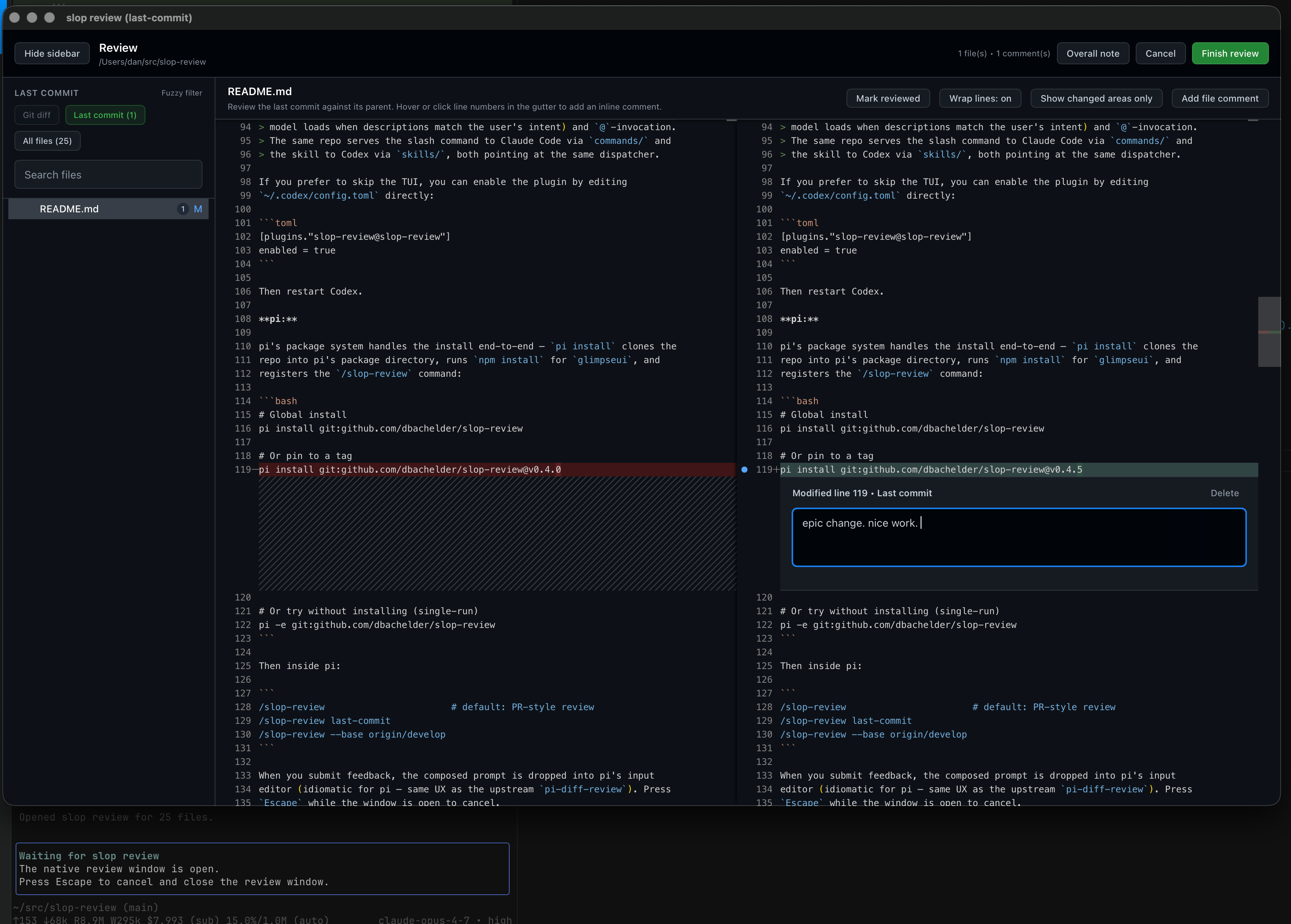
slop-review provides a dedicated review window for code changes generated by terminal-based AI coding agents. It targets users of Claude Code, Codex CLI, and pi, where AI agents often produce rough drafts—referred to as "slop"—that need inspection before integration. The tool opens a native interface powered by Glimpse and Monaco Editor, allowing inline comments on diffs. When feedback is submitted, it saves to a temporary file that the agent reads back into the chat session for iterative fixes.
This JavaScript project, hosted at github.com/dbachelder/slop-review with 39 stars, forked from badlogic/pi-diff-review. It extends the original to support additional agents while keeping the core workflow: inspect changes visually, annotate issues, and pipe structured feedback to the AI.
Core features
slop-review focuses on git-aware diff review tailored to AI-assisted coding:
- Displays a PR-style review by default, comparing the current branch against an auto-detected base (tries
origin/HEAD,origin/main,main,origin/master, ormaster). - Supports scopes like
last-commit(changes in the most recent commit) oruncommitted(staged and unstaged files); custom bases via--base origin/develop. - Includes a collapsible sidebar for fuzzy file search and git status markers (added, modified, deleted).
- Lazy-loads file contents as users switch between files or scopes, with side-by-side original and modified views.
- Enables drafting comments on the original line, modified line, or entire file; submits as a single feedback block to a temp file for agent consumption.
A screenshot in the docs shows it reviewing its own README changes, highlighting the inline annotation flow.
Getting it running
Installation varies by host, but all lead to the same review window. No global dependencies beyond the host tools themselves.
For pi
Use pi's package manager:
pi install npm:pi-slop-review
Alternatives include GitHub installs for development versions:
pi install git:github.com/dbachelder/slop-review
# Or a specific tag
pi install git:github.com/dbachelder/slop-review@v0.5.0
Invoke inside pi:
/slop-review                       # PR-style default
/slop-review last-commit
/slop-review --base origin/develop
Feedback drops into pi's input editor on submit. Press Escape to cancel. Updates run via pi update. Note: The npm package is named pi-slop-review to match pi.dev conventions, but the command remains /slop-review.
For Claude Code
Add from the plugin marketplace:
/plugin marketplace add dbachelder/slop-review
/plugin install slop-review@slop-review
This adds the /slop-review slash command. Updates use /plugin update.
For Codex CLI
Register the marketplace first:
codex plugin marketplace add dbachelder/slop-review
Then, inside Codex TUI:
/plugins
Switch to the "Slop Review" marketplace tab, select slop-review, and install. This enables it as a skill, auto-invoked on review requests or via @slop-review.
For a TUI-free setup, edit ~/.codex/config.toml:
[plugins."slop-review@slop-review"]
enabled = true
Restart Codex afterward. Updates: codex plugin marketplace upgrade slop-review.
| Host | Install source | Update command |
|---|---|---|
| pi | npm or GitHub | pi update |
| Claude Code | GitHub marketplace | /plugin update |
| Codex CLI | GitHub marketplace | codex plugin marketplace upgrade slop-review |
How it works in practice
Once invoked, the window loads git diffs on demand. Users navigate files via the sidebar's fuzzy search, which respects git status icons. Comments attach precisely: to unchanged lines (original side), new/changed lines (modified side), or file-level notes.
Submission composes all annotations into a prompt saved to a temp file. The agent—whether Claude Code, Codex, or pi—reads this as a tool call or skill input, often addressing each point sequentially in chat. In pi, it lands directly in the editor for editing before sending. This closes the loop without leaving the terminal environment.
Scopes expand flexibility. last-commit isolates the tip commit for quick checks. uncommitted covers workspace mess from iterative AI generations. Custom --base handles feature branches diverging from develop or similar.
Who this is for
Developers relying on terminal AI agents for code generation fit best. If you use pi for shell scripting with AI help, Claude Code for Anthropic-powered editing, or Codex CLI from OpenAI, slop-review catches low-quality outputs early. It's suited to workflows where AI proposes batches of changes—new features, refactors, bug fixes—and you need visual diff review before merging.
Solo coders or small teams in fast iteration cycles benefit, especially on git repos with standard branching (main/master). The Monaco editor appeals to those preferring VS Code-like syntax highlighting and inline edits over raw git diff.
Comparisons to similar tools
slop-review forks from pi-diff-review, retaining its pi integration while adding Claude Code and Codex support. The upstream focuses solely on pi, with feedback via the input editor; this version generalizes to slash commands and skills.
Basic git tools like git diff or tig offer terminal diffs but lack inline annotations or AI feedback loops. GUI options such as VS Code's GitLens or GitHub's web PRs require context switches from terminal agents. Browser-based Monaco diffs (e.g., in GitHub) don't integrate with chat UIs.
At 39 stars, it's niche but purpose-built—no bloat for non-AI use. Heavier than a simple delta diff pager, yet lighter than full IDEs for quick reviews.
Users avoiding AI agents or preferring non-terminal reviews might skip it. Standard git users get by with git difftool configured to meld or vscode. Those locked into one ecosystem may prefer host-native tools, like pi's upstream diff-review.
The GitHub repo at dbachelder/slop-review and npm page at pi-slop-review hold the latest details.
Comments