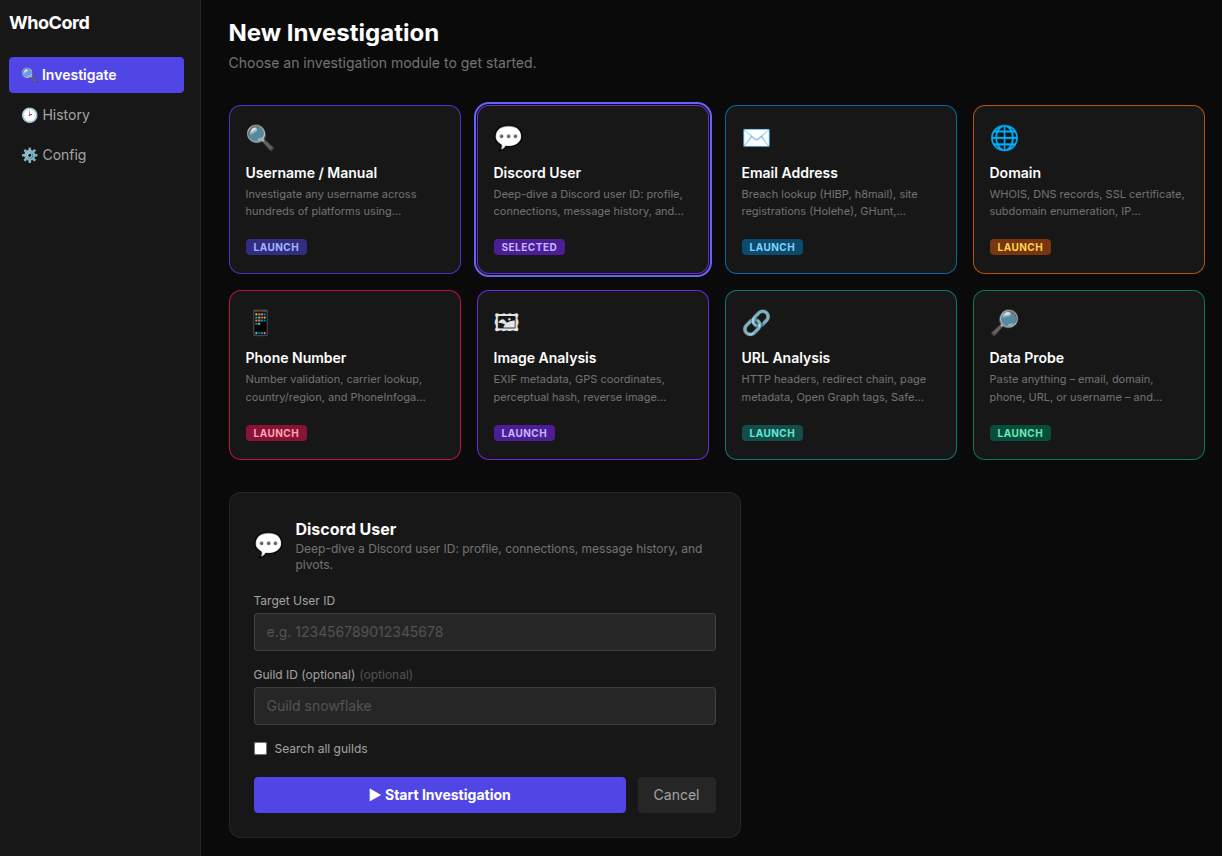
Turn any username, email, domain, phone number, image, URL, or probe string into a full identity profile.
WhoCord is a modular OSINT investigation platform that runs dozens of open‑source tools, builds a knowledge graph, detects correlations, and generates an AI‑enhanced dark‑themed HTML report – all streamed live to a modern React dashboard.
⚡ Features
- 8 investigation modules – Username / Manual, Discord, Email, Domain, Phone, Image, URL, Data Probe (auto‑detect).
- Discord‑native link resolution – extracts and resolves Instagram, TikTok, Facebook, and Twitter tracking links shared by a target user.
- Full identity pipeline – names, emails, locations, breach data, GitHub history, avatar metadata, and Google account info (GHunt).
- Email intelligence – Holehe (site registrations), h8mail, HIBP, EmailRep, GHunt, Blackbird email search, MOSINT (social account flags).
- Domain investigation – WHOIS, DNS records, SSL certificate, IP geolocation, subdomain enumeration, theHarvester.
- Phone investigation – number validation, carrier lookup, PhoneInfoga OSINT.
- Image analysis – EXIF metadata, perceptual hash, reverse image search, OCR text extraction.
- URL analysis – HTTP metadata, redirect trace, page metadata, Open Graph tags, Safe Browsing check, Wayback snapshot.
- Data Probe – paste anything (email, domain, phone, URL, username) and WhoCord auto‑detects the type.
- Knowledge graph & correlations – 5 detectors (avatar reuse, email‑platform cluster, username variants, name‑email link, location consistency).
- AI‑generated reports – LLaMA 3.3 (via Groq) produces structured narrative and persona summary.
- Dark‑themed HTML report – collapsible platform cards, avatar display, breach tags, pivot sub‑reports, technical data.
- Live SSE streaming – watch investigations in real time with stage list, finding cards, and console logs.
- Pivot system – recursive investigation of discovered emails/usernames with user confirmation modal.
- Secure token storage – API keys stored in your OS keyring, never in plain text.
- Web dashboard – run investigations from your browser, toggle tools, manage tokens, view history.
🚀 Quick Start (recommended)
- Download the portable zip from the Releases page (Linux 64‑bit, ~500 MB).
- Extract the archive anywhere:
unzip WhoCord.zip -d WhoCord - Run the web dashboard:
(opens your browser automatically)cd WhoCord ./run.sh
No Python, pip, or tool installation is required – everything is bundled inside.
📦 Installation (from source – for developers)
1. Clone the repository
git clone https://github.com/Siv-nick/WhoCord.git
cd WhoCord
2. Create a Python virtual environment
python3 -m venv venv
source venv/bin/activate   # Linux / macOS
3. Install WhoCord and its Python dependencies
pip install -e .
4. Install external command‑line tools (most via pip)
All required tools can be installed with a single pip install command:
# Username search tools
pip install sherlock-project maigret naminter linkook

# Email intelligence tools
pip install holehe h8mail theHarvester

# GitHub & Google tools
pip install gitfive ghunt

# Phone & image analysis
pip install phoneinfoga pillow imagehash pytesseract

# Domain investigation
pip install dnspython
5. Install Blackbird (email & username search on 600+ sites)
git clone https://github.com/p1ngul1n0/blackbird
cd blackbird
pip install -r requirements.txt
cd ..
The required data file (
wmn-data.json) is auto‑downloaded on first use. If that fails, download it manually from WhatsMyName and place it inblackbird/data/.
6. Install system WHOIS (required for domain investigations)
sudo apt install whois          # Debian/Ubuntu
# brew install whois            # macOS
7. (Optional) Authenticate GHunt for Google account intelligence
ghunt login
Follow the instructions to authenticate with your Google account.
8. Build the frontend (required for source installations)
The web dashboard requires a compiled React frontend. Make sure you have Node.js 18+ and npm installed, then run:
cd frontend
npm install
npm run build
cd ..
This creates the frontend/dist/ folder that Flask serves automatically.
9. Launch the web dashboard
python web_app.py
Then open http://127.0.0.1:5000.
Or use the one‑click launcher: ./run.sh.
🚀 Usage
Web Dashboard (primary interface)
The dashboard offers eight investigation modules:
| Module | Input | Tools run |
|---|---|---|
| Username / Manual | username (optional email) | Sherlock, Maigret, Blackbird, Naminter, Linkook, Sociopath, scraping, analysis, intelligence, email tools |
| Discord User | user ID + guild ID | Discord profile fetch, message crawling, tracking‑link resolution |
| Email Address | Holehe, h8mail, HIBP, EmailRep, GHunt, SMTP, Gravatar, Scylla, Blackbird email, MOSINT | |
| Domain | domain | WHOIS, DNS, SSL, IP geolocation, subdomain enumeration, theHarvester |
| Phone Number | phone | phonenumbers library, carrier lookup, PhoneInfoga |
| Image Analysis | image URL | EXIF, perceptual hash, reverse search, OCR |
| URL Analysis | URL | HTTP meta, redirects, page metadata, Open Graph, Safe Browsing, Wayback |
| Data Probe | any string | auto‑detects type and runs the appropriate module |
Live investigation page shows:
- Stage list with real‑time status
- Finding cards (emails, names, breaches, correlations)
- Console logs (raw tool output)
- Pivot confirmation modal (when enabled)
History page – list all past investigations with links to reports and JSON intel.
Config page – manage API tokens, toggle tools, set pivot options, upgrade tools.
Interactive menu (legacy CLI)
discord-osint
Then use the numbered menu to toggle tools, set tokens, and start investigations.
Command‑line mode (limited to manual/discord)
discord-osint --mode manual --target someusername --output html --debug
📁 Output files
All results are saved in investigation_cache/:
| File | Description |
|---|---|
intel_*.json |
Complete intelligence snapshot (structured JSON) |
report_*.md |
AI‑generated markdown report (if Groq enabled) |
report_*.html |
Interactive dark‑themed HTML report |
blackbird_output/ |
Raw Blackbird JSON results |
socialscan_output/ |
Socialscan results |
debug_*.log |
Detailed debug logs (when debug mode is on) |
HTML report sections
- Identity (Discord handle, name clues, location, language, confidence scores)
- Persona Summary (AI)
- Social Profiles (collapsible platform cards with avatars, bios, extra fields)
- Email Intelligence (breach tags, MOSINT flags)
- Intelligence Analysis (graph stats, narrative, correlations)
- Pivot Sub‑Investigations
- Technical Data (WHOIS, DNS, SSL, IP geolocation, subdomains, theHarvester, phone, URL analysis, GHunt)
🛠️ Tools & technologies
WhoCord integrates these open‑source OSINT projects:
| Category | Tools |
|---|---|
| Username search | Sherlock, Maigret, Blackbird, Naminter, Linkook, Sociopath, Social Analyzer, Toutatis |
| Email intelligence | Holehe, h8mail, HIBP, EmailRep, GHunt, MOSINT, Scylla, Gravatar, SMTP verification |
| Domain & DNS | WHOIS (system), dnspython, theHarvester, sublist3r (fallback wordlist) |
| Phone | phonenumbers, PhoneInfoga, AbstractAPI (free) |
| Image | Pillow, imagehash, exifread, SauceNAO (reverse image), Tesseract OCR |
| URL | requests, BeautifulSoup, Google Safe Browsing, Wayback Machine |
| Intelligence | networkx, socid‑extractor, Groq (LLaMA 3.3) |
| Web dashboard | Flask, React, TypeScript, Tailwind CSS, SSE |
🔄 Updates
Check CHANGELOG.md for version history.
🔒 Security & privacy
- Tokens are never stored in plain text – kept in your OS keyring.
config.jsononly contains non‑sensitive toggles.- All investigation data stays on your machine inside
investigation_cache/.
⚠️ Disclaimer
WhoCord is intended for educational purposes and authorised security testing only. Do not use it to stalk, harass, or violate anyone’s privacy. The author assumes no liability for misuse.
📄 License
MIT License
Comments