English | 简体中文
A production-grade browser data-collection platform built around one idea: a recording becomes a rule, and a rule becomes a scheduled task.
Design philosophy: PageResearch Agent exists to prototype rules fast; ScriptCat + the server deliver long-term stable, schedulable, observable collection.
 (UI captions are in Chinese; an English UI is on the roadmap.)
Why AegisCrawler?
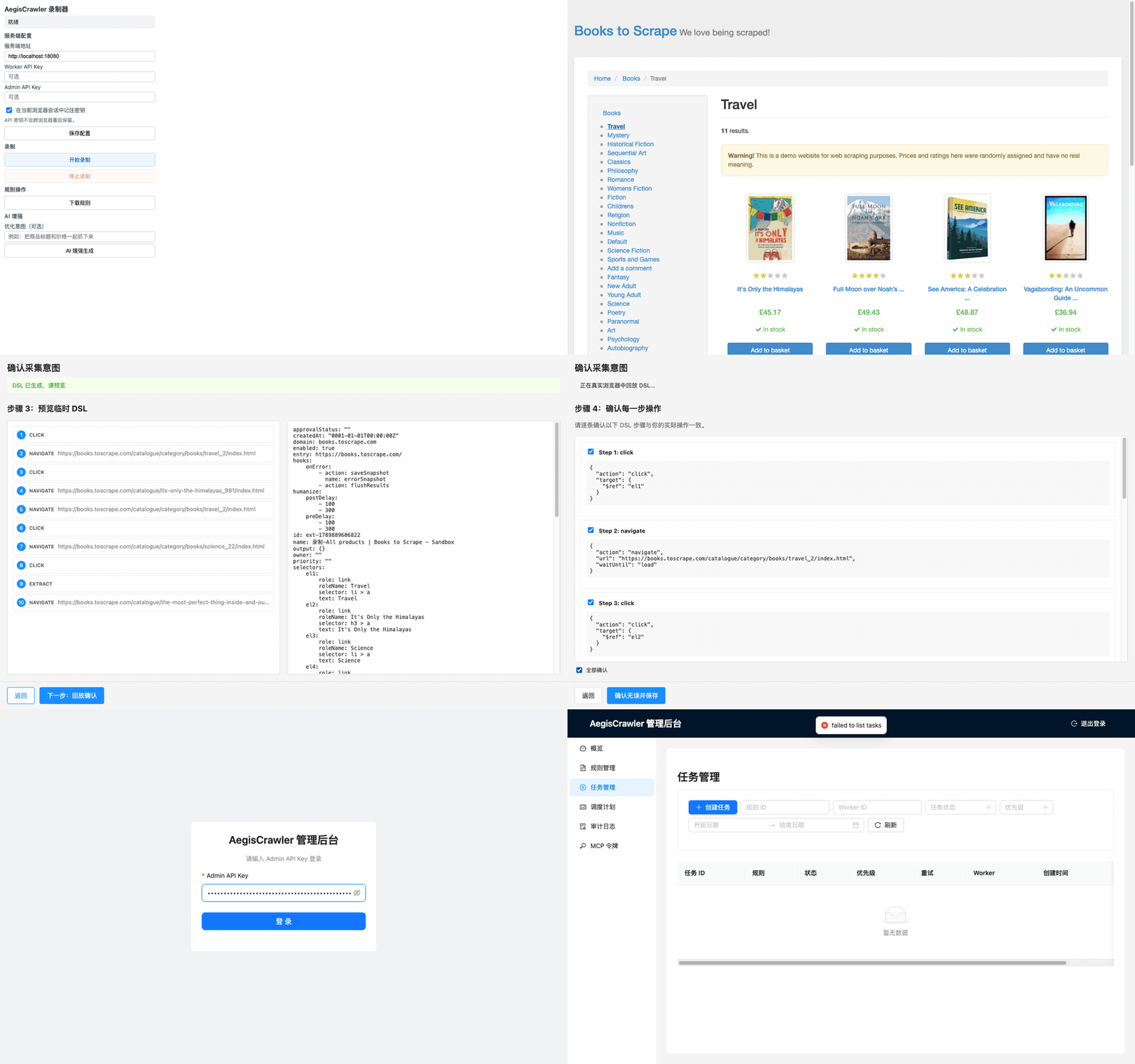
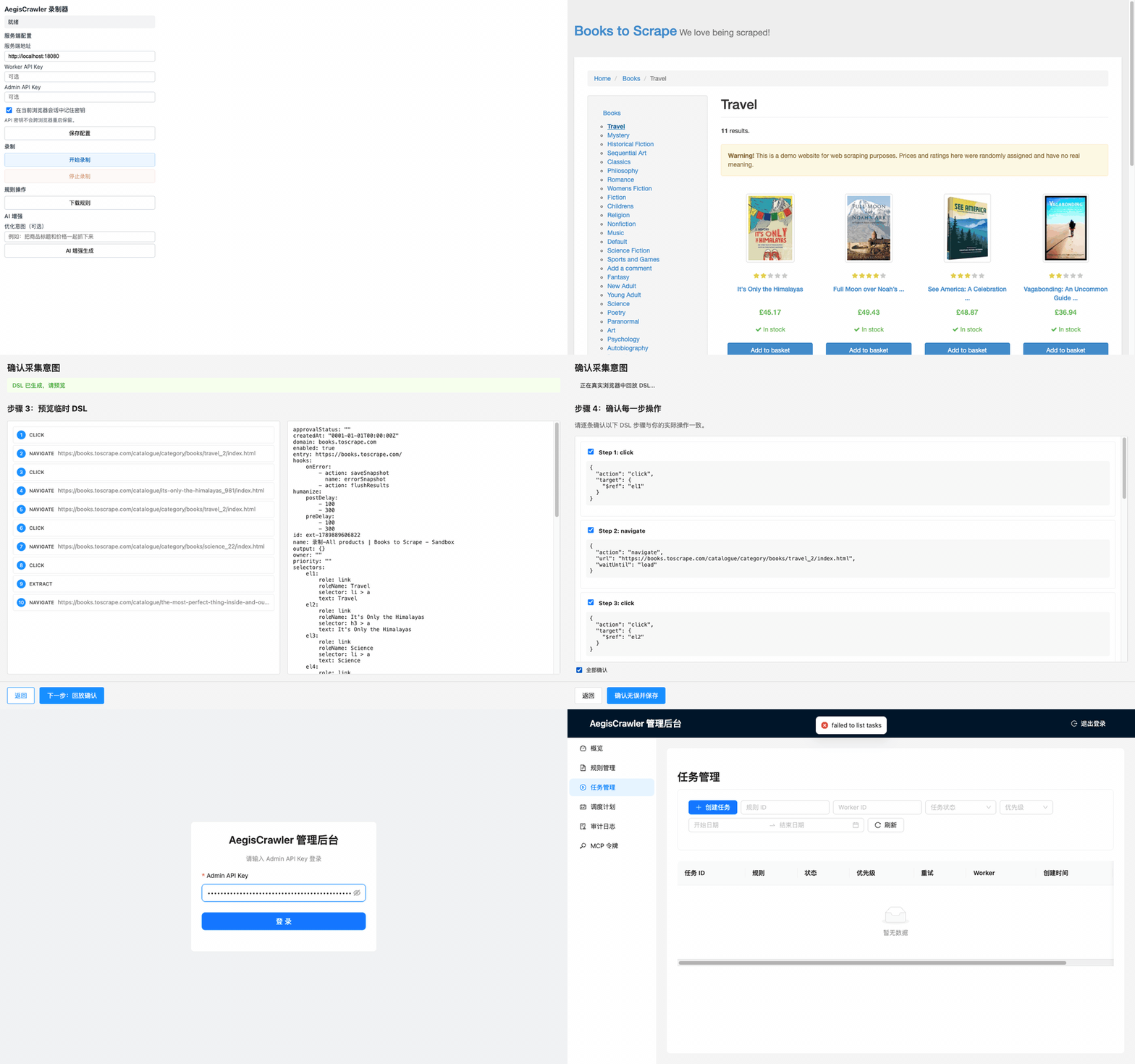
- Record → DSL → Task, no code. The PageResearch Agent extension records clicks, typing, scrolling, and drags on a real page and turns them into an executable YAML/JSON DSL rule.
- Humanized action DSL covering the full browser surface:
click,type,scroll,drag,slide,upload,hover,wait,evaluate,loop,if,extract, and more. - Production task lifecycle. Lease-based claiming, heartbeat renewal, sweeper recovery with retries, and a dead-letter queue.
- ScriptCat worker executes rules in a real browser tab and streams results, logs, and status back to the server.
- Optional LLM rule enhancement. The server can patch a recorded baseline rule via OpenAI/Anthropic-compatible APIs — every enhancement goes through a security scan and a diff review in the Admin UI before a human applies it.
- Admin UI (Chinese): rule CRUD, one-shot & cron tasks with schedule preview, task cancel/retry, audit logs, and an interactive DAG view that turns complex DSL into a readable flow.
- Production hardening. Request-body limits, global timeouts, circuit breaker, tiered rate limiting (global / worker / site), worker SDK backoff and buffering.
- Observable by default. Structured zap logs with
traceId, Prometheus metrics, health/readiness probes, DB-size metrics. - Single-binary Go server with SQLite (WAL, versioned migrations, pure Go,
no CGO) and the Admin UI embedded via
go:embed.
Architecture
┌───────────────────────────────────────────────────────────────────��─┐
│                          Browser                                    │
│  ┌───────────────────────┐        ┌──────────────────────────────┐  │
│  │ PageResearch Agent extension   │        │ ScriptCat extension / Worker │  │
│  │ · record interactions │        │ · poll /tasks/claim          │  │
│  │ · generate DSL rules  │        │ · open target page (tab)     │  │
│  │ · upload to server    │        │ · execute DSL userscript     │  │
│  └───────────┬───────────┘        └──────────────┬───────────────┘  │
│              │ POST /admin/rules                 │ POST /results    │
└──────────────┼────────────────────────────────────┼──────────────────┘
               ▼                                    ▼
┌────────────────────────────────────────────────────────────────────���┐
│                     AegisCrawler Server (Go)                        │
│  ┌───────────┐ ┌────────────┐ ┌────────────┐ ┌───────────────────┐  │
│  │ Admin API │ │ Worker API │ │ Scheduler  │ │ Store (SQLite WAL │  │
│  │ /admin/*  │ │ /tasks/*   │ │ lease/retry│ │ + migrations)     │  │
│  │ /health   │ │ /results   │ │ sweeper    │ │                   │  │
│  │ /metrics  │ │ /heartbeat │ │ retention  │ │                   │  │
│  └───────────┘ └────────────┘ └────────────┘ └───────────────────┘  │
└─────────────────────────────────────────────────────────────────────┘
Quick start
1. Start the server
git clone https://github.com/singhand-labs/AegisCrawler.git
cd AegisCrawler

cat > .env <<EOF
WORKER_API_KEY=change-me-worker-key-long-and-random
ADMIN_API_KEY=change-me-admin-key-long-and-random
VARIABLE_ENCRYPTION_KEY=change-me-encryption-key-at-least-32-characters-long
METRICS_API_KEY=change-me-metrics-key
SWAGGER_API_KEY=change-me-swagger-key
LLM_ENABLED=false
# Compose requires an explicit choice; production LLM usage must switch to
# enforced mode with a full policy (see Production notes below).
LLM_POLICY_MODE=legacy
EOF

docker compose up -d
curl -s http://localhost:8080/health        # {"status":"ok"}
No Docker? Build from source (Node 20+, Go 1.24+)
npm ci
cd server && go mod download && go build -o aegiscrawler ./cmd/server
export WORKER_API_KEY=... ADMIN_API_KEY=... VARIABLE_ENCRYPTION_KEY=...
DATABASE_PATH=opencrawler.db LLM_ENABLED=false LLM_POLICY_MODE=legacy
./aegiscrawler serve
The binary also provides validate-config, migrate, and version
subcommands; see the Chinese README for details.
2. Load the PageResearch Agent extension
npm run build:extension
Then in Chrome: Extensions → Manage → Load unpacked → select dist/extension/.
3. Record a rule
- Open the target site, click 开始录制 (Start recording) in the extension popup.
- While recording, optionally click the floating 标注采集意图 button or press
Alt+Mto circle page elements and add plain-language notes such as “商品标题字段” or “排除广告区域”. These marks help the requirement and DSL LLM understand what you intend to collect without storing screenshots. - Perform the actions you want to collect; click 停止录制 (Stop).
- The intent wizard opens: review or edit the recorded marks, confirm your goal, preview the generated DSL (steps + YAML), watch a full replay validate it, then save the rule.
- Configure the server base URL and your Admin API key in the popup before uploading.
4. Run it as a task
Open the Admin UI at http://localhost:8080/admin/ (log in with the Admin API
key), create a one-shot or cron task from your rule, then load the userscript
(dist/aegiscrawler-0.2.0.user.js) into a browser running
ScriptCat — the worker claims the
task, executes the rule, and reports results back.
LLM rule enhancement (optional)
With LLM_POLICY_MODE=enforced and a configured provider route (OpenAI /
Anthropic compatible), the recording popup offers an AI enhancement step:
the server patches the recorded baseline rule, runs a safety scan, stores the
result as a pending rule, and the Admin UI shows a diff for explicit
approve/reject. The deterministic baseline always works, with or without the
LLM. Production LLM usage requires LLM_POLICY_MODE=enforced with a full
provider route, price table, hard budget, and attempt caps — see
Production notes.
Production notes
Detailed internal design documents, the operations runbook, and the qualification history are maintained locally and not published at this time. The essentials:
- TLS: terminate at a reverse proxy (Caddy / nginx / Traefik); never expose the raw HTTP port directly.
- Image:
docker pull ghcr.io/singhand-labs/aegiscrawler:latest. - Backups: back up the SQLite file (
/data/opencrawler.dbinside the container) on a schedule. - Keys: keep
WORKER_API_KEY/ADMIN_API_KEY/VARIABLE_ENCRYPTION_KEYstrong and random, and store them separately from database backups. - Health & metrics:
GET /health(liveness),GET /health?ready=1(readiness incl. DB check),GET /metrics(Prometheus). - Dead-letter queue: tasks exceeding
MAX_RETRIESland indead_letterand need manual triage before re-creation.
REST API reference is served at http://localhost:8080/swagger/index.html
(OpenAPI/Swagger).
Local development & tests
npm ci
npm run lint && npm test            # TypeScript + Admin UI suites
cd server && go test ./... && go vet ./... && go build ./...
npm run build:extension             # build the extension into dist/extension
Security notes
REQUIRE_SECURITY_KEYS=trueby default: the server refuses to start without strong Worker/Admin API keys and a variable-encryption key.- Sensitive task variables are encrypted at rest (
VARIABLE_ENCRYPTION_KEY). - The
evaluateDSL action is restricted by default;allowEvaluateDOMexposes the DOM and is meant for trusted rules only. - Distribute the extension/userscript through controlled channels; do not ship secrets inside them.
Legal disclaimer
AegisCrawler is a general-purpose browser automation and data-collection
tool. Users must comply with local laws (including copyright,
anti-unfair-competition, data-security, PIPL, and GDPR regulations), the
target site's terms of service, and robots.txt. Do not use it for
unauthorized access, bypassing authentication or anti-bot measures, scraping
personal data, infringing intellectual property, or disrupting target
systems. The authors accept no liability for use or misuse of this tool.
Prefer official APIs or explicit permission from site owners.
Comments