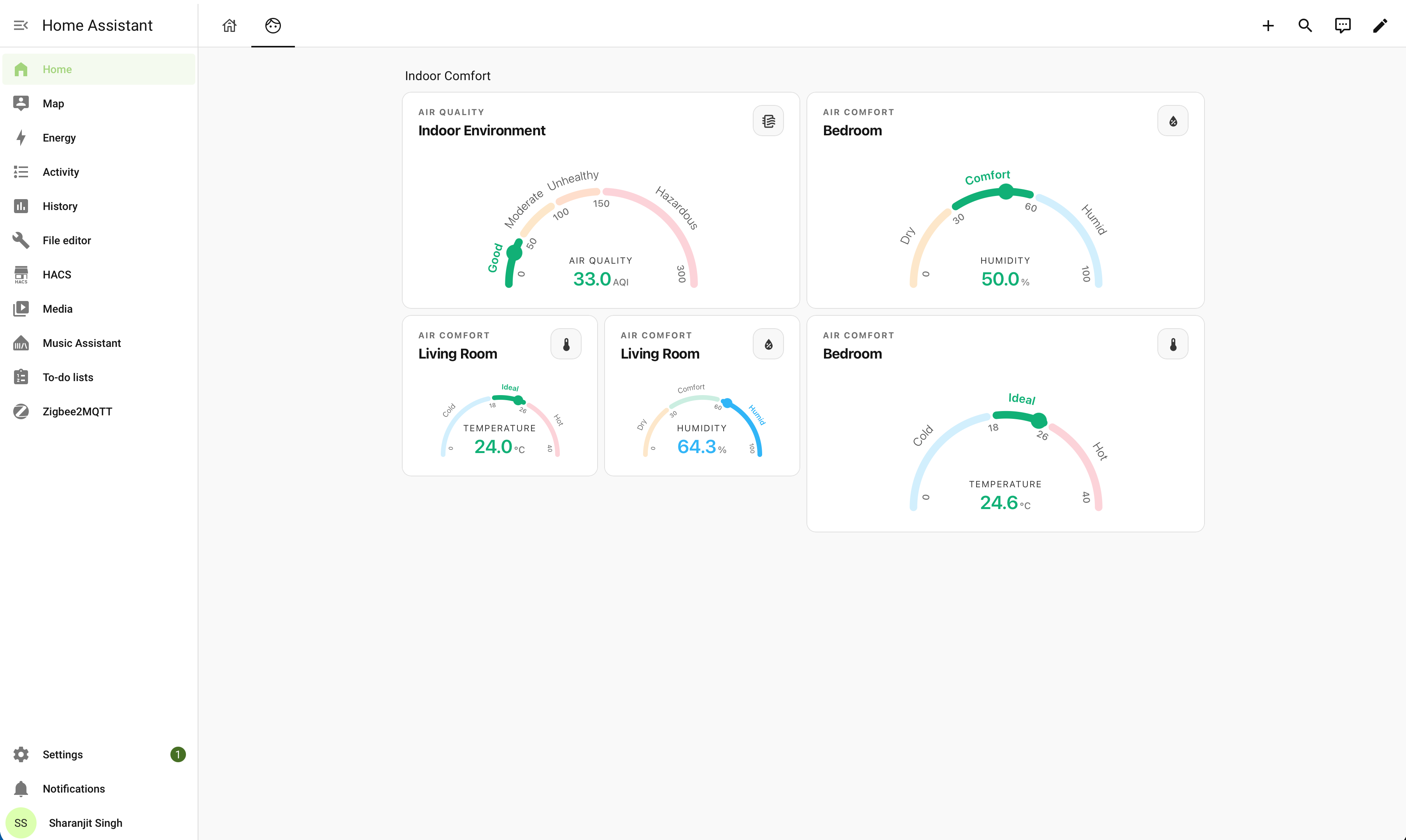
A modern, universal semi-circular curved gauge card for Home Assistant.
Works out of the box with ANY numeric Home Assistant entity (Temperature, Humidity, Air Quality, Battery, BMI, Solar Power, Wind, etc.) and includes a Visual GUI Card Editor!
✨ Features
- 🎯 Segmented Semicircular Arc Gauge: Configurable color-coded zones with clean gaps and smooth marker animation.
- 🏷️ Authentic Curved
<textPath>Typography: Category labels and boundary numbers naturally follow the arc's curvature. - ⚡ Built-In Instant Presets: 1-click presets for
temperature,humidity,bmi,battery, andair_quality. - 🛠️ Visual GUI Card Editor: Configure title, subtitle, icon, presets directly in the Home Assistant UI without writing YAML!
📦 Installation
Method 1: Via HACS (Recommended)
- Ensure HACS is installed in Home Assistant.
- In HACS, click the 3 dots in the top-right corner $\rightarrow$ Custom repositories.
- Add repository URL:
https://github.com/sharn25/Curved-curved-gauge-card - Category: Dashboard (or Plugin).
- Click Add $\rightarrow$ Click Download.
Method 2: Manual Installation
- Download
curved-curved-gauge-card.js. - Copy
curved-curved-gauge-card.jsinto your Home Assistant configuration directory underhomeassistant/www/:homeassistant/ └── www/ └── curved-gauge-card.js - In Home Assistant, navigate to Settings $\rightarrow$ Dashboards $\rightarrow$ 3 dots (top right) $\rightarrow$ Resources $\rightarrow$ Add Resource:
- URL:
/local/curved-curved-gauge-card.js - Resource type:
JavaScript Module
- URL:
- Refresh your browser.
📋 YAML Configuration Examples
1. Temperature Gauge (Built-In Preset) 🌡️
type: custom:curved-gauge-card
entity: sensor.living_room_temperature
title: Bedroom
subtitle: AIR COMFORT
preset: temperature
2. Humidity Gauge (Built-In Preset) 💧
type: custom:curved-gauge-card
entity: sensor.bedroom_humidity
title: Bedroom
subtitle: AIR COMFORT
preset: humidity
3. Air Quality Gauge (4-Zone AQI Preset) 🍃
type: custom:curved-gauge-card
entity: sensor.indoor_air_quality
title: Indoor Environment
subtitle: AIR QUALITY
preset: air_quality
4. Battery Level Gauge 🔋
type: custom:curved-gauge-card
entity: sensor.phone_battery_level
title: Phone Battery
subtitle: DEVICE STATUS
preset: battery
5. Custom Solar / Power Gauge (Custom Zones) ⚡
type: custom:curved-gauge-card
entity: sensor.solar_inverter_power
title: Solar Inverter
subtitle: ENERGY GENERATION
icon: mdi:solar-power
min: 0
max: 5000
unit: "W"
segments:
  - from: 0
    to: 1000
    label: Low
    color: "#94A3B8"
  - from: 1000
    to: 3500
    label: Optimal
    color: "#10B981"
  - from: 3500
    to: 5000
    label: Peak
    color: "#F59E0B"
⚙️ Configuration Reference
| Option | Type | Default | Description |
|---|---|---|---|
type |
string |
Required | custom:curved-gauge-card |
entity |
string |
Required | Any Home Assistant numeric sensor entity ID |
title |
string |
Entity name | Main card title |
subtitle |
string |
"" |
Small uppercase category tag above the title |
icon |
string |
Entity icon | Custom top-right badge icon (e.g. mdi:thermometer) |
preset |
string |
"" |
Preset: temperature, humidity, bmi, battery, air_quality, custom |
min |
number |
0 |
Scale minimum value |
max |
number |
100 |
Scale maximum value |
unit |
string |
Entity unit | Displayed unit symbol (e.g. °C, %, AQI, W) |
decimals |
number |
1 |
Number of decimal places to display |
stroke_width |
number |
8 |
Thickness of the arc bar in pixels |
gap |
number |
6.0 |
Angular gap between arc segments in degrees |
show_header |
boolean |
true |
Show or hide the top title and icon badge |
show_labels |
boolean |
true |
Show or hide curved category text labels |
show_ticks |
boolean |
true |
Show or hide curved numeric boundary ticks |
segments |
list |
[] |
Custom color segment boundaries and labels |
🎨 Built-In Presets Overview
| Preset | Min | Max | Unit | Segments & Colors |
|---|---|---|---|---|
temperature |
0 |
40 |
°C |
Cold (#38BDF8), Ideal (#10B981), Hot (#F43F5E) |
humidity |
0 |
100 |
% |
Dry (#F59E0B), Comfort (#10B981), Humid (#38BDF8) |
air_quality |
0 |
300 |
AQI |
Good (#10B981), Moderate (#F59E0B), Unhealthy (#F97316), Hazardous (#F43F5E) |
battery |
0 |
100 |
% |
Low (#F43F5E), Good (#38BDF8), Full (#10B981) |
bmi |
13 |
37 |
— | Underweight (#38BDF8), Normal (#10B981), Overweight (#F43F5E) |
📄 License
MIT License — see LICENSE for details.
Comments