Self-hosted session replay built on S2. Each session is stored as one S2 stream, and that stream is the whole backend — there's no separate database, message bus, object store, or search index. Because an S2 stream can be tailed as it's written, RePlaya can replay a session live, while the visitor is still on the page, as well as play back finished ones. Add the recorder snippet to your site and sessions are stored as streams you can replay, live-tail, filter, and export.
Demo
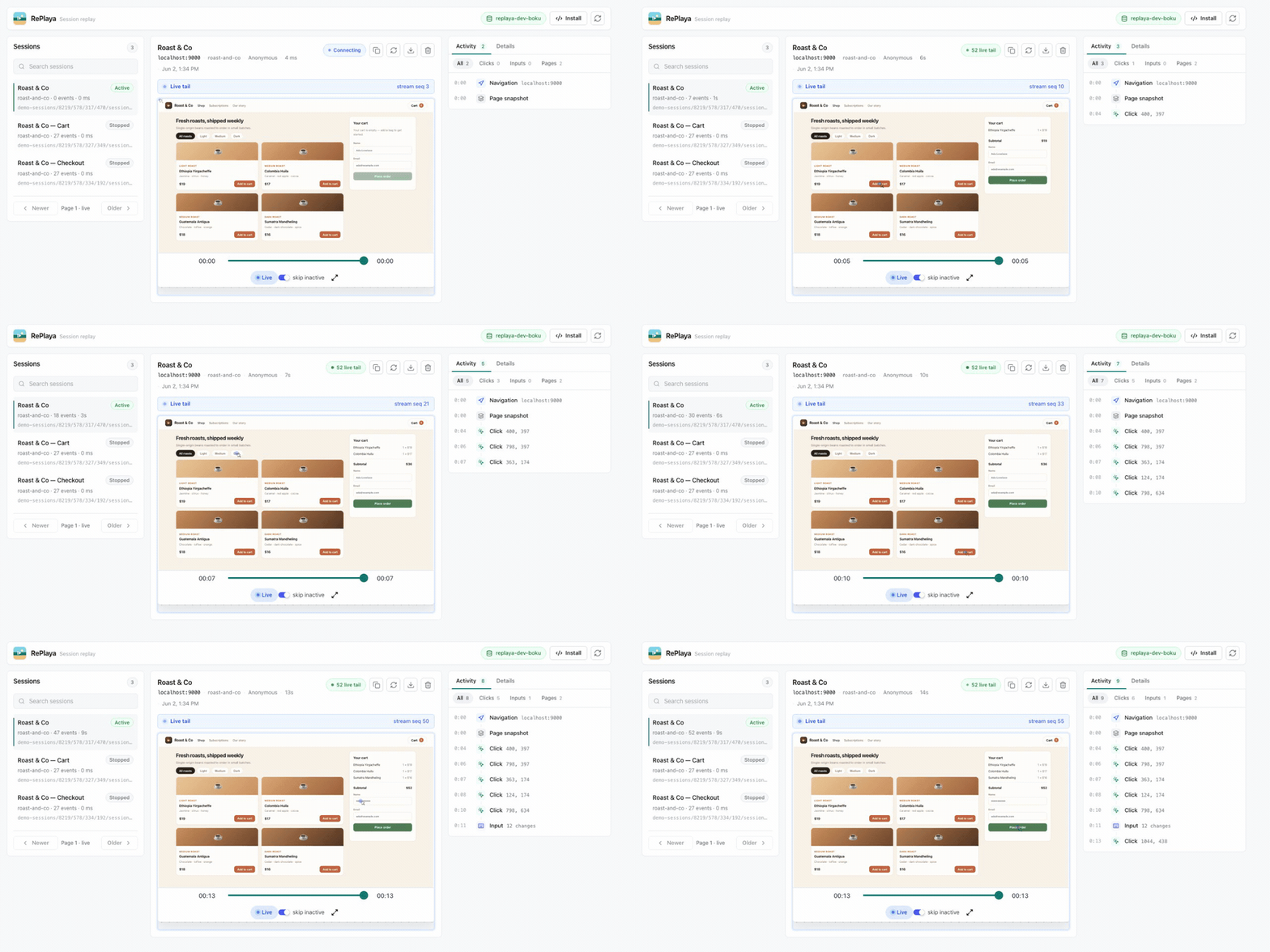
A new session appears in the list and is live-tailed from its S2 stream — the replay and activity feed update as the visitor uses the app. (MP4)
Quickstart
You'll need an S2 access token and a basin. Put them in .env.local:
S2_ACCESS_TOKEN=replace-with-an-s2-access-token
S2_BASIN=replaya-your-name
PORT=8787
The basin is created on first use with RePlaya's stream defaults. The dashboard's health pill reports the basin and the effective S2 endpoints so you can confirm what you're pointed at. To use s2-lite or another compatible deployment instead of S2 Cloud, set the endpoints explicitly:
S2_ACCOUNT_ENDPOINT=http://localhost:7070
S2_BASIN_ENDPOINT=http://localhost:7070
Then install dependencies and start the dev server:
pnpm install
pnpm dev
The API runs on http://localhost:8787 and Vite serves the dashboard on http://localhost:5173. To create a test recording without instrumenting another app, open http://localhost:8787/recorder-test; it records through the same hosted recorder script.
For a production-style local run, build and serve everything from Express on one port:
pnpm build
pnpm start
# open http://localhost:8787
Drop-in recorder
Add this to any page to start capturing, pointing it at your RePlaya host:
<script>
  !function(w,d,s,u){w.replaya=w.replaya||function(){(w.replaya.q=w.replaya.q||[]).push(arguments)};var e=d.createElement(s);e.async=1;e.src=u;d.head.appendChild(e)}(window,document,"script","https://replaya.example.com/recorder.js");
  replaya("init", {
    apiHost: "https://replaya.example.com",
    source: "web-app"
  });
</script>
In local development that host is http://localhost:8787, and /recorder-test serves a page that records through the same script.
source is optional metadata for grouping captures by app, site, environment, or tenant. distinctId and userId can be passed to tag sessions with application identity.
By default, the recorder masks all input, select, and textarea values (rrweb maskAllInputs), so end-user keystrokes — passwords, emails, anything typed — are never sent to the server. To capture raw form control state on a page where that's acceptable (e.g. an internal admin UI), pass maskAllInputs: false to replaya("init", ...), or add data-mask-all-inputs="false" to the recorder script tag.
Masking covers input values only; text the page renders into the DOM is still recorded. Wrap sensitive regions in the replaya-block class to omit them from the recording, or replaya-ignore to skip a subtree's changes.
In production, keep the dashboard and read APIs private and expose only the collector routes publicly; see Configuration & deployment.
How it works on S2
A session recording is a log: an append-only, ordered, timestamped sequence of events. RePlaya stores each session as one S2 stream and reads it back the same way, so a single primitive covers what's often split across several systems.
- Storage. rrweb events are appended to the tail of the session's stream over the S2 Producer API, which batches with backpressure and acks each batch once it's durable. The stream is the recording — there's no separate blob store, and nothing buffers on the server between ingest and storage. Large rrweb events are framed across multiple S2 records and reconstructed on read.
- Timeline. Session streams use
timestamping.mode: client-require, so the rrweb capture time is written into each event record's S2 timestamp and read back as the scrub timeline. (Create, stop, and heartbeat records use server wall-clock time.) - Listing. S2 lists streams in lexicographic order, so each stream is named
sessions/<inverted timestamp>;streams.list({ prefix: "sessions/" })then returns newest-first withstartAfterpaging — no database keeping an order in sync. A best-effort sidecar index stream is tailed to update the list as new sessions start. - Live tail.
GET /api/sessions/:id/liveopens an S2 read session from the snapshot tail and bridges new records to the browser over SSE, where they're appended to the mounted player. The same stream serves both the historical scrub and the live edge. - Concurrency. Stream creation and stop write
active/stoppedfencing tokens; event and heartbeat appends are fenced onactive, so a finished session can't be resurrected by a late writer.
Streams are created on first append (createStreamOnAppend), inheriting the basin's default config, so there's no stream provisioning to manage. That leaves one external dependency: point RePlaya at S2 Cloud, or at a self-hosted s2-lite to keep everything in your own infrastructure. Recordings live in your own basin — URI-addressable, with configurable retention and on-demand deletion. The browser never receives the S2 token; all S2 reads and writes go through the RePlaya server.
For comparison with a typical session-replay backend:
| Typical replay backend | RePlaya | |
|---|---|---|
| Services to run | Message bus, analytics store, relational DB, object store, search index | One Node server + S2 |
| Live sessions | Usually playback after an ingest/flush delay | Live tail of active sessions, off the same stream |
| Stored recording | Blobs in object storage; metadata across databases | One ordered S2 stream per session |
| Self-host footprint | A multi-service cluster, often on Kubernetes | A single process + S2 (or self-hosted s2-lite) |
Dashboard search is a client-side filter over the sessions already listed — S2 provides ordering and newest-first listing, not full-text search. See ARCHITECTURE.md for the full design.
Configuration & deployment
Server-only S2 configuration lives in .env.local (see Quickstart). The read side has no built-in authentication by design — the deployment boundary is the access control. In production, RePlaya treats the collector as public, write-only surface area and the dashboard/read APIs as private surface area.
- Don't expose the read APIs to the internet. Bind the app to a private interface and put the dashboard,
GET /api/sessions*, live tailing, and/api/healthbehind your SSO/access layer (VPN, Tailscale, Cloudflare Access, oauth2-proxy). - Expose only the collector publicly —
GET /recorder.js,GET /vendor/rrweb.min.js, and the write endpoints (POST /api/sessions,/events,/heartbeat,/stop) — and lock those down withREPLAYA_ALLOWED_CAPTURE_ORIGINS+REPLAYA_PROJECT_KEY. - Set
NODE_ENV=productionso ingest auth is enforced, originless ingest is rejected, and the recorder test fixture is disabled. - Set
REPLAYA_APPEND_TOKEN_SECRETto a stable random value (e.g.openssl rand -hex 32). With ingest auth enabled (the production default), the server refuses to start without it. SetREPLAYA_TRUST_PROXY=trueif you run behind a reverse proxy so per-client rate limits use the real client IP.
NODE_ENV=production
REPLAYA_PROJECT_KEY=pk_live_replace_with_public_write_key
REPLAYA_APPEND_TOKEN_SECRET=replace-with-a-long-random-secret
REPLAYA_ALLOWED_CAPTURE_ORIGINS=https://app.example.com,https://www.example.com
REPLAYA_TRUST_PROXY=true
Then pass the public project key in the recorder init:
replaya("init", {
  apiHost: "https://collect.example.com",
  projectKey: "pk_live_replace_with_public_write_key",
  source: "web-app"
});
Session create returns a short-lived append token that the recorder sends with event, heartbeat, and stop writes. Useful limits and knobs:
REPLAYA_SESSION_CREATE_RATE_LIMITdefault60per minute per client/project.REPLAYA_SESSION_APPEND_RATE_LIMITdefault600per minute per client/session.REPLAYA_MAX_EVENTS_PER_BATCHdefault100.REPLAYA_JSON_BODY_LIMITdefault8mb.REPLAYA_APPEND_TOKEN_TTL_MSdefault86400000.REPLAYA_LOG_REQUESTS— access log for every request. Defaults on in development, off in production; failed requests (4xx/5xx) are always logged.REPLAYA_SHUTDOWN_GRACE_MSdefault10000. OnSIGTERM/SIGINTthe server drains in-flight requests, drops lingering live-tail streams after ~3s, and hard-exits at the grace deadline.
See ARCHITECTURE.md for how the boundary, ingest auth, and append tokens fit together.
Docker
docker build -t replaya .
docker run --rm -p 8787:8787 \
  -e NODE_ENV=production \
  -e S2_ACCESS_TOKEN=... -e S2_BASIN=... \
  -e REPLAYA_PROJECT_KEY=pk_live_... \
  -e REPLAYA_APPEND_TOKEN_SECRET="$(openssl rand -hex 32)" \
  -e REPLAYA_ALLOWED_CAPTURE_ORIGINS=https://app.example.com \
  replaya
The image runs the single compiled server (node dist-server/server/index.js) as a non-root user and includes a HEALTHCHECK against /api/health. Only the collector and recorder routes should be publicly reachable.
Pass secrets with
-e VAR=value(or a secrets manager), not by reusing a local.env.docker --env-filedoes not strip surrounding quotes the waydotenvdoes, so a quoted value likeS2_ACCESS_TOKEN="..."would reach the container with the quotes included.
Scripts
pnpm devstarts the API and Vite.pnpm buildtype-checks the client/server and builds the frontend.pnpm lintruns ESLint.pnpm testruns the unit/smoke suite (recorder invariants + HTTP smoke). No S2 required.pnpm test:integrationruns the S2 round-trip tests against a real S2 API.pnpm startserves the built frontend and API from Express.
Testing
pnpm test covers recorder invariants and an HTTP smoke of the server (recorder delivery, security headers, ingest-auth rejection) without needing S2.
The integration tests exercise the real create → append → replay → delete path against s2 lite, the in-memory S2 emulator. They're skipped unless S2_TEST_ENDPOINT is set:
docker run -d -p 8080:80 ghcr.io/s2-streamstore/s2 lite
S2_TEST_ENDPOINT=http://localhost:8080 pnpm test:integration
CI runs both: a build/lint/unit-test job (Node 20 + 24) and an integration job that boots s2 lite and runs the round-trip suite.
Comments