
🎯 Overview
BrowserMind is a browser automation agent built on top of browser-use. giving you a single interface to run any browser task using the LLM of your choice. Point it at a task, pick a model, and let it run.
Form automation · Data scraping · Complex workflows · Automation
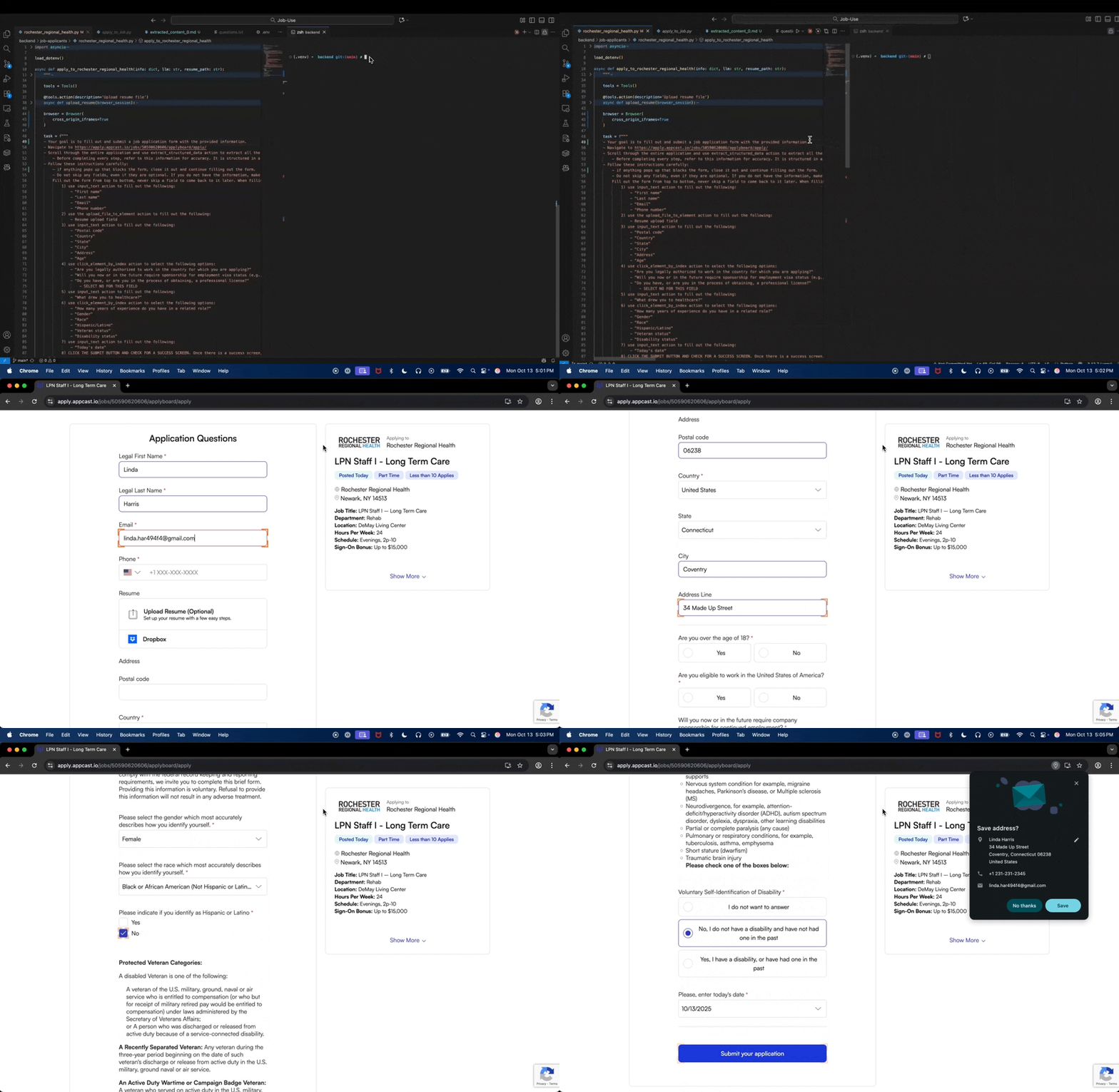
Task = "Fill in this job application with my resume and information."
✨ Features
| Feature | Description |
|---|---|
| Multi-LLM Support | Works with Anthropic (Claude), OpenAI (GPT-4), Groq, Google (Gemini), and Ollama |
| Speed Optimized | Built-in speed optimization for fast task completion with minimal steps |
| Easy Setup | Minimal configuration—just set your API keys and go |
| Headless Browsing | Efficient headless browser automation out of the box |
| Error Handling | Graceful fallbacks and error management |
| Extensible Tools | Built on Browser-Use's comprehensive tool ecosystem |
🚀 Quick Start
1. Clone & Install
git clone https://github.com/rojansapkota/BrowserMind.git
cd BrowserMind
pip install -r requirements.txt
2. Set Your API Key
Create a .env file in the project root:
GROQ_API_KEY=your_groq_api_key
ANTHROPIC_API_KEY=your_anthropic_api_key
OPENAI_API_KEY=your_openai_api_key
GOOGLE_API_KEY=your_google_api_key
3. Run Your First Task
python main.py
When prompted, enter a task:
Enter your task for the agent: Find the latest AI news on Hacker News
The agent will automatically browse and complete the task for you.
💾 Installation
Prerequisites
Step-by-Step Setup
# 1. Clone the repository
git clone https://github.com/rojansapkota/BrowserMind.git
cd BrowserMind

# 2. Install dependencies
pip install -r requirements.txt

# 3. Install Chromium (if not already installed)
# Browser-Use handles this automatically, but you can manually install:
# python -m playwright install chromium

# 4. Set up your environment variables
cp .env.example .env  # Create from template (optional)
# Edit .env with your API keys
Demos
🍎 Grocery-Shopping
Task = "Put this list of items into my instacart."
https://github.com/user-attachments/assets/a6813fa7-4a7c-40a6-b4aa-382bf88b1850
💻 Personal-Assistant.
Task = "Help me find parts for a custom PC."
https://github.com/user-attachments/assets/ac34f75c-057a-43ef-ad06-5b2c9d42bf06
⚙️ Configuration
Supported LLM Providers
| Provider | Setup | Model |
|---|---|---|
| Groq | Set GROQ_API_KEY |
meta-llama/llama-4-scout-17b-16e-instruct |
| Anthropic | Set ANTHROPIC_API_KEY |
claude-3-5-sonnet-20240620 |
| OpenAI | Set OPENAI_API_KEY |
gpt-4.1 |
Set GOOGLE_API_KEY |
gemini-2.0-flash-lite |
|
| Ollama | Run locally via Ollama | llama3.2:latest (customizable) |
Environment Variables
# API Keys
GROQ_API_KEY=your_key_here
ANTHROPIC_API_KEY=your_key_here
OPENAI_API_KEY=your_key_here
GOOGLE_API_KEY=your_key_here

# Ollama (for local models)
OLLAMA_BASE_URL=http://localhost:11434
Customization Options
Edit main.py to customize:
# Browser window size
window_size={'width': 1280, 'height': 720}

# Page load wait time
minimum_wait_page_load_time=0.1

# Wait between actions
wait_between_actions=0.1

# Temperature (0 = deterministic, higher = more creative)
temperature=0.0
📖 Usage Examples
Basic Task Execution
from main import run_agent
import asyncio

# Simple task
asyncio.run(run_agent("Find the current Bitcoin price", provider='groq'))

# Use different providers
asyncio.run(run_agent("Fill out this form", provider='anthropic'))
asyncio.run(run_agent("Scrape product listings", provider='openai'))
Programmatic Usage
import asyncio
from main import initialize_agent

async def automated_workflow():
    query = "Navigate to google.com and search for 'Browser Mind'"
    agent, browser_session = initialize_agent(query, provider='groq')

    try:
        result = await agent.run()
        print(f"Task completed: {result}")
    finally:
        await browser_session.close()

asyncio.run(automated_workflow())
Common Use Cases
- Form Filling: Automatically complete and submit web forms
- Data Scraping: Extract structured data from websites
- Research: Gather information from multiple sources
- Monitoring: Watch for changes and alerts
- Automation: Repetitive browser tasks
🔧 Advanced Configuration
Custom System Message
CUSTOM_PROMPT = """
Your custom instructions here.
Focus on speed and accuracy.
"""

agent = Agent(
    task=query,
    llm=llm,
    browser_session=browser_session,
    extend_system_message=CUSTOM_PROMPT
)
Using Different Ollama Models
# Pull a model first
ollama pull mistral

# Then use it in main.py
return ChatOllama(model='mistral')
📊 Troubleshooting
| Issue | Solution |
|---|---|
| API Key Error | Ensure your .env file is in the project root and API key is valid |
| Browser Won't Open | Check if Chromium is installed; run playwright install chromium |
| Timeout Errors | Increase minimum_wait_page_load_time in the configuration |
| Module Not Found | Run pip install -r requirements.txt again |
🎓 Learn More
- Browser-Use Documentation: docs.browser-use.com
- Browser-Use GitHub: github.com/browser-use/browser-use
- Playwright Documentation: playwright.dev
🤝 Contributing
Contributions are welcome! Please feel free to:
- Report bugs via Issues
- Submit pull requests with improvements
- Share your use cases and examples
📄 License
This project is licensed under the MIT License - see the LICENSE file for details.
Made with ❤️ for the OpenSource community
Comments